| Author |
Message |
Neologist
Joined: 14 Jun 2010
Posts: 6
|
| Posted: Mon Jun 14, 2010 8:42 pm Post subject: Greyscale Calibration - Please help |
|
|
Hi folks,
the greyscale calibration guide for dummies recently caught my eye.
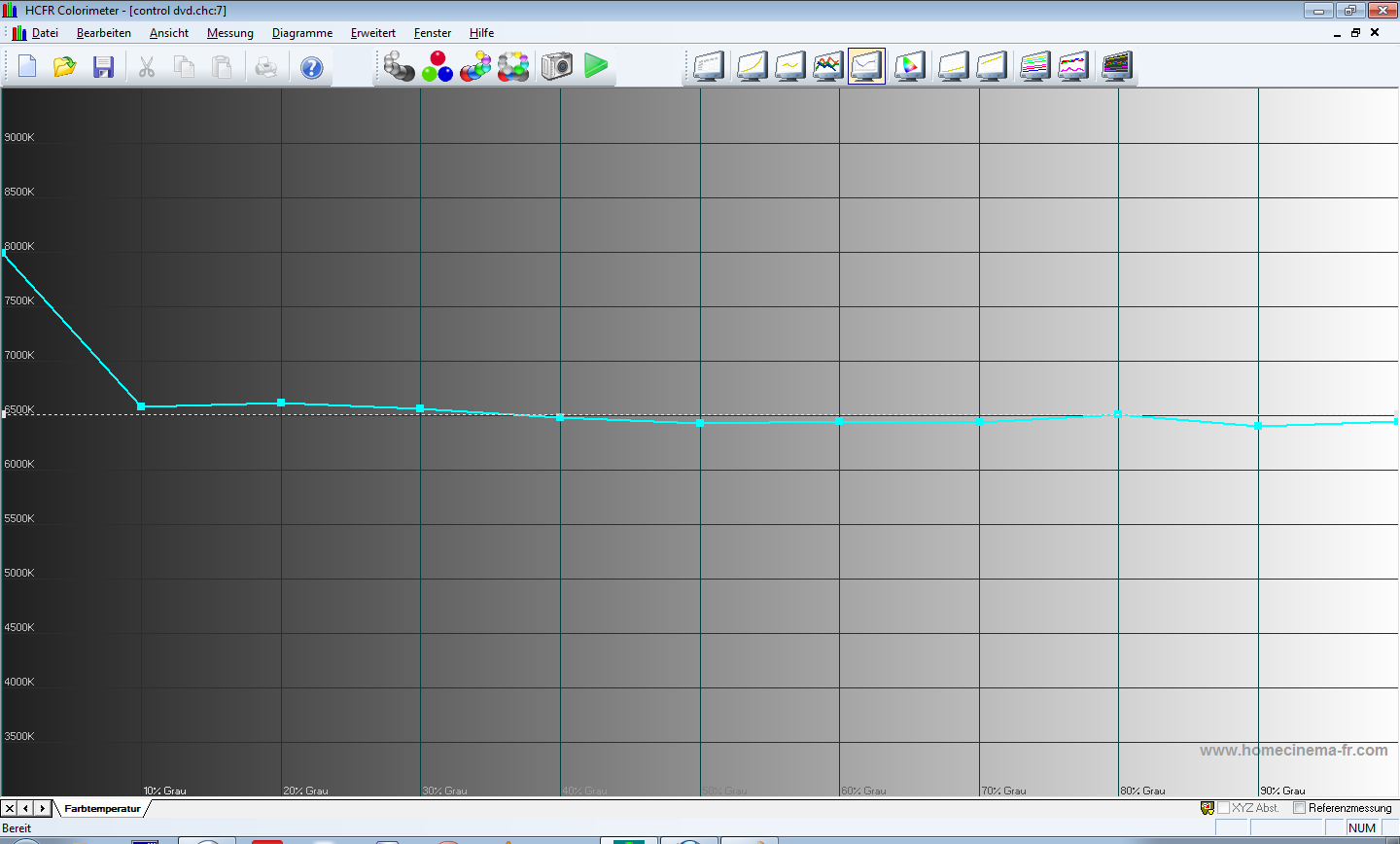
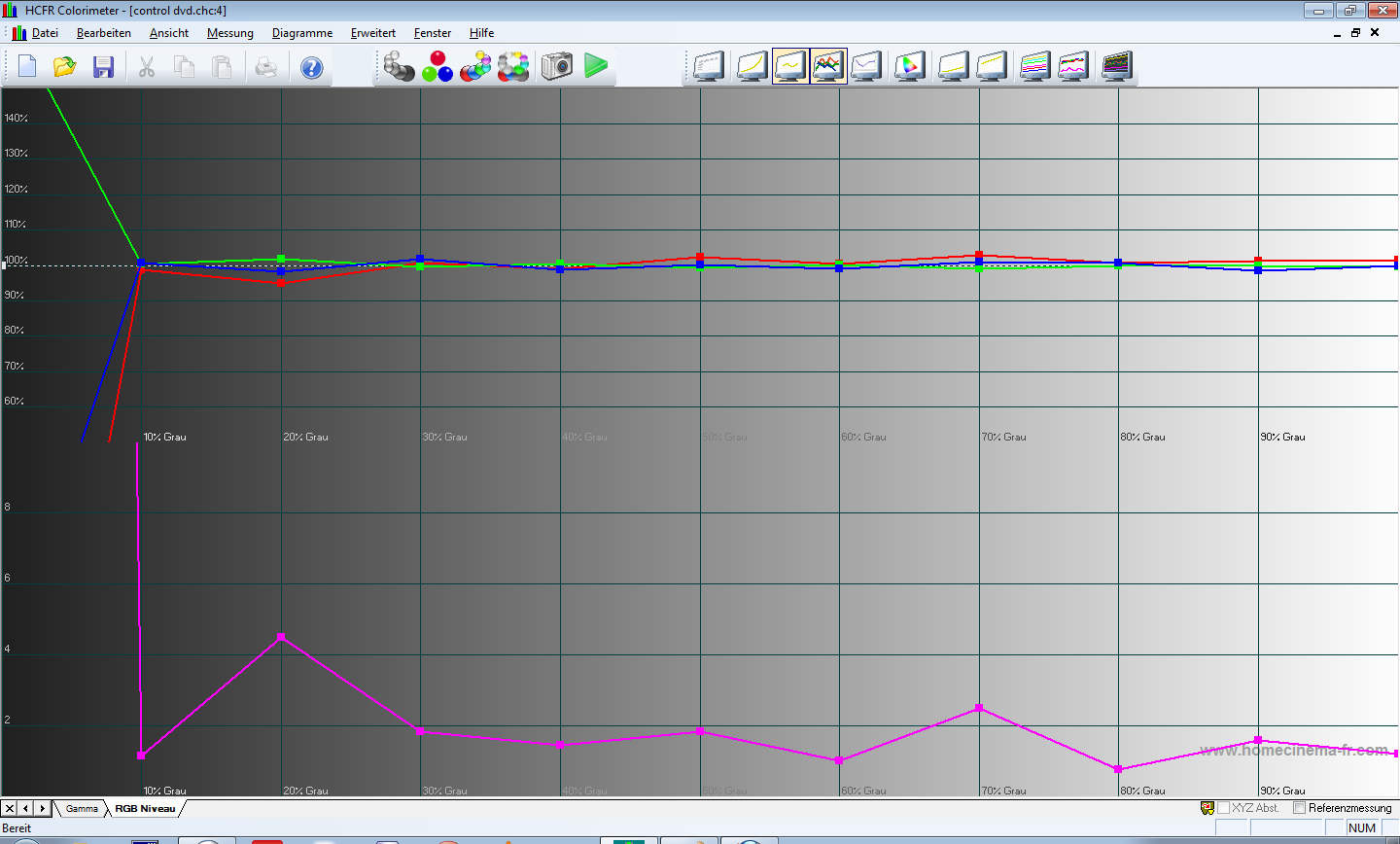
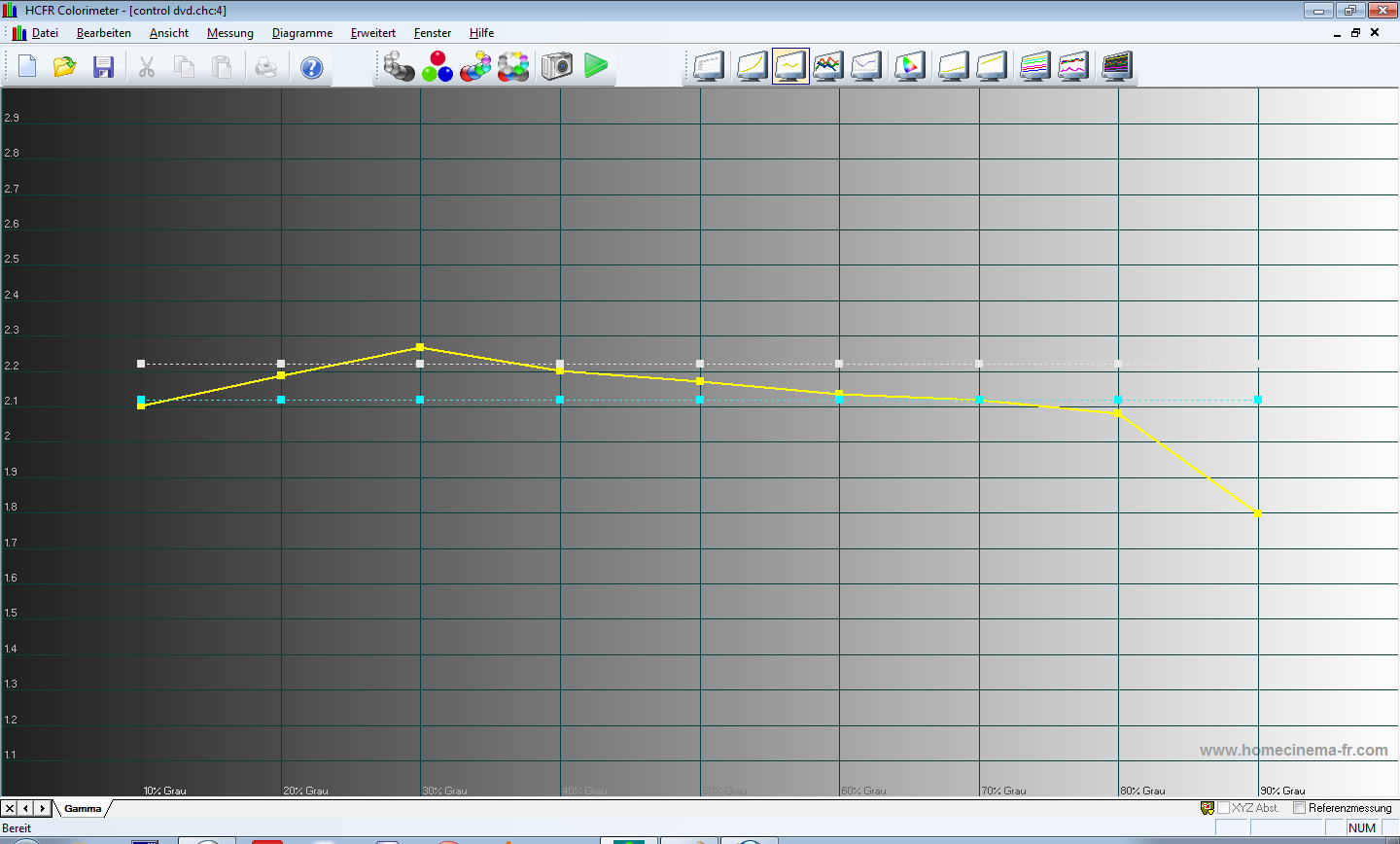
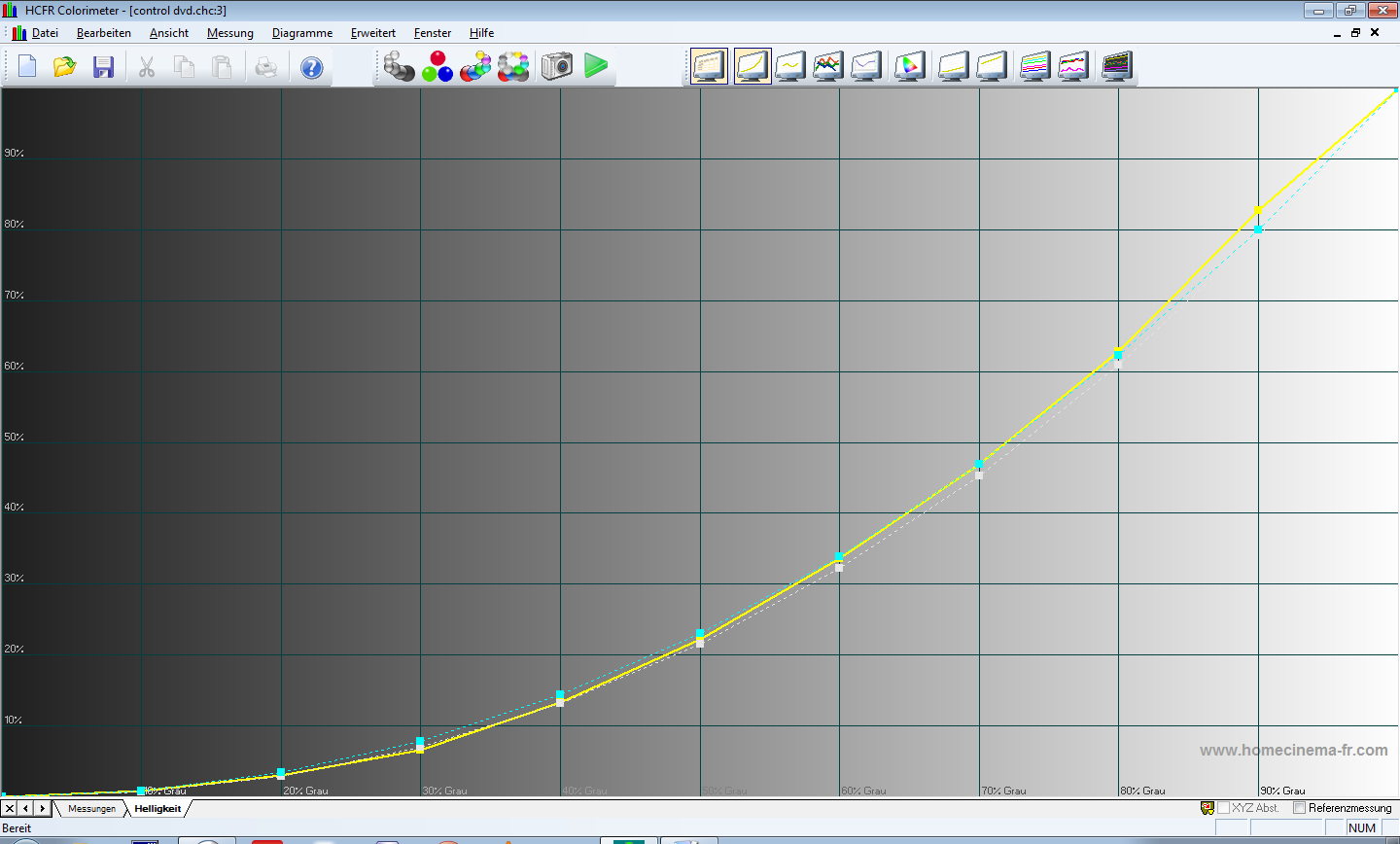
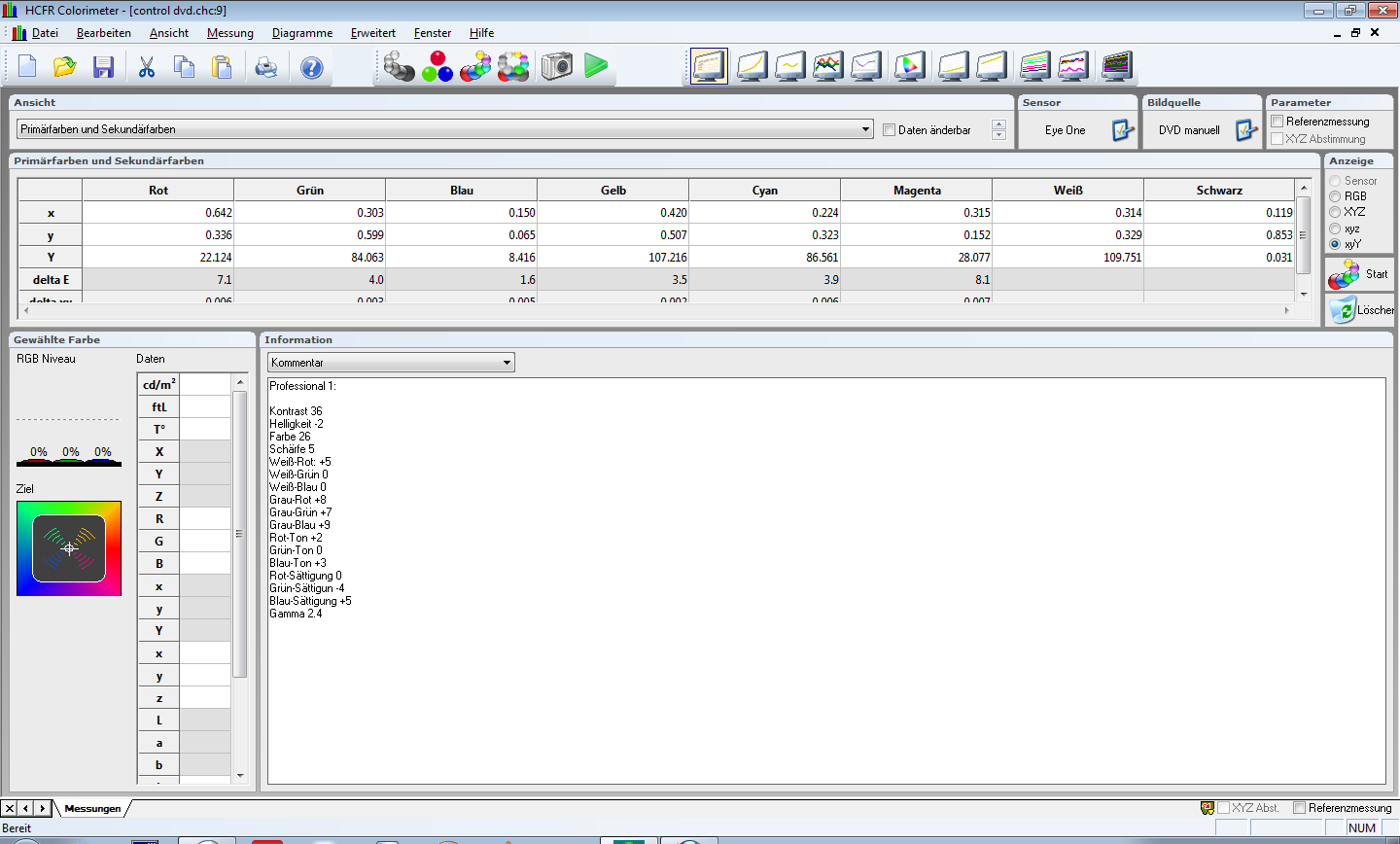
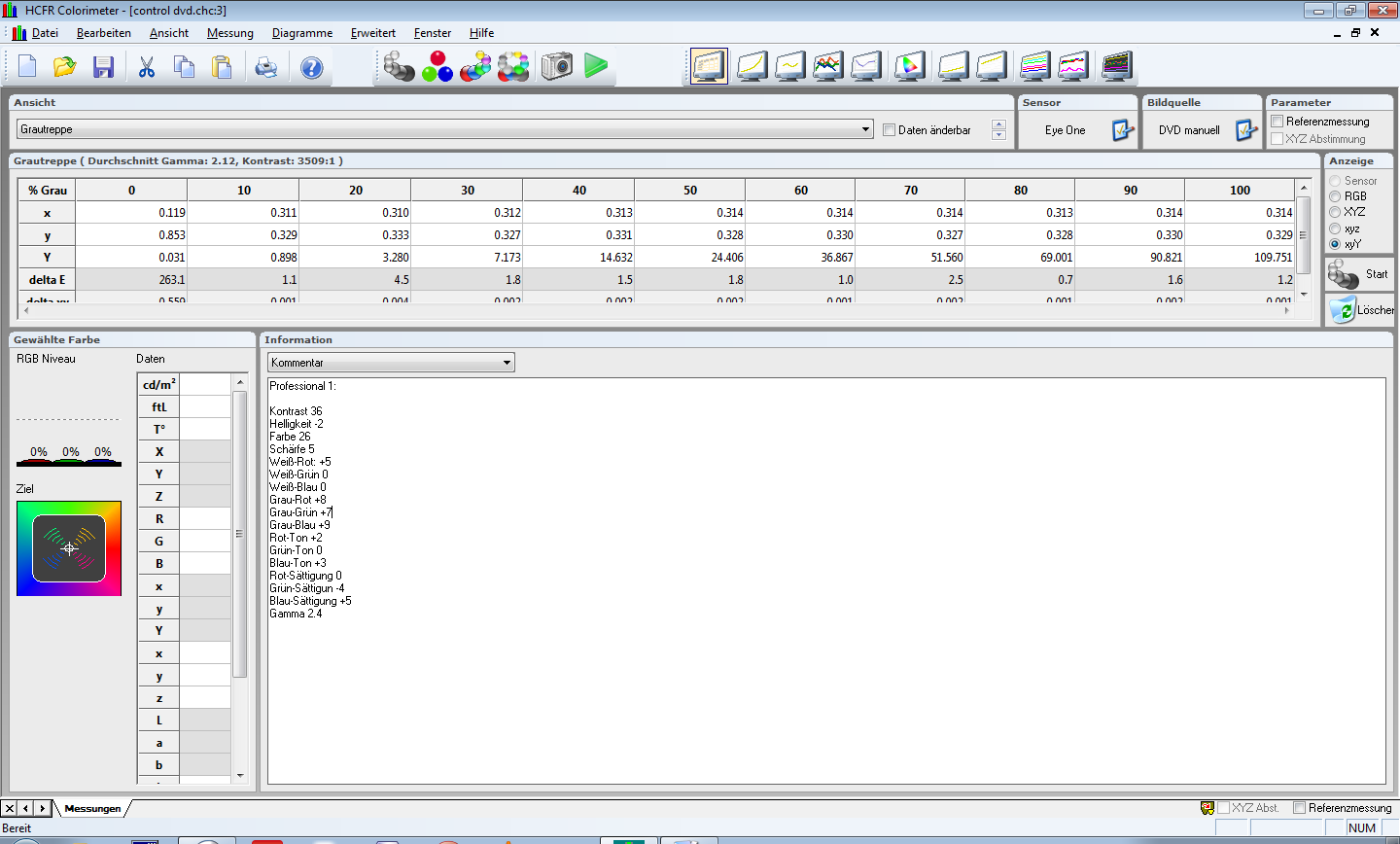
I just tried to calibrate my Plasma-TV (Panasonic G20) and got the following results:
See files below.
Even though I believe I got quite close to D65 (except for the gamma and the colours´luminances) I have a problem.
When I switch through the test patterns from 0 to 100 IRE everything´s fine, but when looking at a greyscale ladder (with little squares of grey lined in a row from dark to bright and vice versa) some grey shades tend to have a reddish tint.
How can I have tinted greys with a calibrated grey scale?
I used HFCR and an Eye1Display 2.
I followed the guide´s steps and used the AVCHD 709 (with the colour gamut in HFCR set to REC 709).
What did I do wrong?
Besides: would the wrong luminances and the gamma effect the picture very negatively?
I´d be greatful for any help.
Thanks in advance and sorry for my English, but I´m not a native speaker.
Best regards,
Neologist
| Description: |
|
| Filesize: |
85.87 KB |
| Viewed: |
49 Time(s) |
|
| Description: |
|
| Filesize: |
112.33 KB |
| Viewed: |
53 Time(s) |
|
| Description: |
|
| Filesize: |
106.41 KB |
| Viewed: |
49 Time(s) |
|
| Description: |
|
| Filesize: |
106.11 KB |
| Viewed: |
43 Time(s) |
|
| Description: |
|
| Filesize: |
102.35 KB |
| Viewed: |
49 Time(s) |
|
| Description: |
|
| Filesize: |
102.5 KB |
| Viewed: |
39 Time(s) |
|
|
|
| Back to top |
|
 |
akajester

Joined: 09 Jul 2008
Posts: 934
Location: Wisconsin
|
| Posted: Mon Jun 14, 2010 8:50 pm Post subject: |
|
|
|
I'm not an expert but it all looks good to me. The luminance isn't so far off that it would cause an issue in my opinion. I'm not sure what you mean by the reddish tint though.
|
|
| Back to top |
|
|
Nashou66

Joined: 12 Jan 2007
Posts: 16171
Location: West Seneca NY
|
|
| Back to top |
|
|
Neologist
Joined: 14 Jun 2010
Posts: 6
|
| Posted: Tue Jun 15, 2010 10:30 am Post subject: |
|
|
Hey guys,
thanks for the quick answer.
@Nashou66:
The probe is from yesterday.
@Akajester:
I didn´t mean the overall luminance but the primary and secondary colours´luminance.
They´re supposed to match the following:
(compare the 100 IRE Y values of white to those of the colours)
Red 21 %
green 72 %
blue 7 %
yellow 93 %
cyan 79 %
magenta 28 %
In my case that´s:
Red: 20%
Green: 77%
Blue: 8%
Yellow: 97%
Cyan: 79%
Magenta: 25%
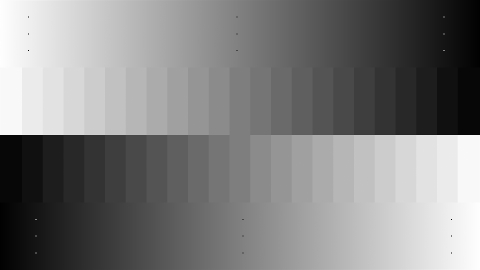
I attached another picture of a greyscale ladder below.
What I mean by the reddish tint is that some shades of grey in the picture seem to have a touch of red in them.
Not in this one though, since I just downloaded it somewhere to provide a sample of what I´m talking about.
I´m a little confused.
Thanks again.
Best regards
| Description: |
|
| Filesize: |
16.03 KB |
| Viewed: |
233 Time(s) |
|
|
|
| Back to top |
|
|
Nashou66
Joined: 12 Jan 2007
Posts: 16171
Location: West Seneca NY
|
|
| Back to top |
|
|
HogPilot
Joined: 21 Jan 2010
Posts: 2383
TV/Projector: Vizio P702ui-B3, Pioneer Elite Pro-151FD & 111FD
|
| Posted: Tue Jun 15, 2010 11:29 am Post subject: |
|
|
I think you may have misunderstood nashou66 - he was asking how old your i1Display2 is (also referred to as a probe). The filters that it uses to measure RGB can degrade over time and cause drift/inaccuracy in its measurements, which would explain why the the probe is reporting that the greyscale is good even though it is visually obvious that it's not.
_________________
| ecrabb wrote: | | Curt Palme wrote: | | Interesting, Mac isn't returning my emails. Go figure. |
He's mad at us for making Hog a moderator. He took his ball and went home.
SC |
|
|
| Back to top |
|
|
Nashou66
Joined: 12 Jan 2007
Posts: 16171
Location: West Seneca NY
|
| Posted: Tue Jun 15, 2010 11:33 am Post subject: |
|
|
| HogPilot wrote: | | I think you may have misunderstood nashou66 - he was asking how old your i1Display2 is (also referred to as a probe). The filters that it uses to measure RGB can degrade over time and cause drift/inaccuracy in its measurements, which would explain why the the probe is reporting that the greyscale is good even though it is visually obvious that it's not. |
Yes that is what i meant. I should have been more clear due to translation misinterpretations.
How old is the D2 probe, when did you purchase it and was it new from a well known seller like spectracal who testes each probe before they sell it.
Athanasios
_________________
Don't blame your underwear for your crooked ass~ unknown Greek philosopher
"Republicans believe every day is the Fourth of July, but the Democrats believe every day is April 15." --- President Reagan
One Smart Dog!!!
Marquee High Performance Bellows now shipping!!
Marquee Modifications and Performance Enhancement
Marquee C-element and Bellow removal
|
|
| Back to top |
|
|
Neologist
Joined: 14 Jun 2010
Posts: 6
|
| Posted: Tue Jun 15, 2010 3:38 pm Post subject: |
|
|
Hey,
aaah, thanks a lot. Now I understand. 
I did the 2 point calibration at 80% and 30% white.
I´m not sure, if I can tell which shades of grey correspond to 80 and 30 in the testpattern, so I can´t really say if the calibrated shades are free of any tint or not.
But the funny thing is, that when I switch through the patterns from 0 to 100 % (the ones that have a single square in the middle) the colour seems ok, I don´t see those shades.
Only on those ladder-patterns.
Besides: switching to THX-Mode or cinematic mode (i.e. pre-installed picture-modes) results the same, even though the tint is somewhere else and a different colour (for example greenish).
I don´t know how old that probe  is. I bought it on eBay and I guess it was a used one (at least I saved € 100 compared to a new one) because I didn´t receice a sales slip. is. I bought it on eBay and I guess it was a used one (at least I saved € 100 compared to a new one) because I didn´t receice a sales slip.
The device itself and its packing looked pretty good though. All the original stuff was included and didn´t appear to be used a lot.
Besides, I ran i1-Diagnostics prior to calibration and the device passed all the tests.
Guess I should´ve bought a new one.
|
|
| Back to top |
|
|
Nashou66
Joined: 12 Jan 2007
Posts: 16171
Location: West Seneca NY
|
| Posted: Tue Jun 15, 2010 3:58 pm Post subject: |
|
|
| Neologist wrote: | Hey,
aaah, thanks a lot. Now I understand.
I did the 2 point calibration at 80% and 30% white.
I´m not sure, if I can tell which shades of grey correspond to 80 and 30 in the testpattern, so I can´t really say if the calibrated shades are free of any tint or not.
If the 30 and 80 look good and the rest did not then id say its normal and your TV does not track grey well in between and you'd need a processor that has 11 point greyscale adjustment.
But the funny thing is, that when I switch through the patterns from 0 to 100 % (the ones that have a single square in the middle) the colour seems ok, I don´t see those shades.
It is harder to tell if a single square pattern is tinted unless you have a reference to compare to, in the ladder pattern your reference would be the two pints you calibrated to 30 and 80
Only on those ladder-patterns.
Besides: switching to THX-Mode or cinematic mode (i.e. pre-installed picture-modes) results the same, even though the tint is somewhere else and a different colour (for example greenish).
I don´t know how old that probe is. I bought it on eBay and I guess it was a used one (at least I saved € 100 compared to a new one) because I didn´t receice a sales slip.
The device itself and its packing looked pretty good though. All the original stuff was included and didn´t appear to be used a lot.
Besides, I ran i1-Diagnostics prior to calibration and the device passed all the tests.
Guess I should´ve bought a new one. |
This is where you need to try to find someone near you with a better probe to compare readings. If you had someone with a Spectrometer instead of a tri-stimulus (that tend to drift even if only a few months old) to compare yours to or to profile it to you'd be able to know for sure if its the calibration or the display not tracking correctly.
I know from experience, i thought i had a bad probe but in the end it was just the way my CRT's tracked, very green in the mid IRE's but i could get 30 and 80 perfect.
One way to test how your color decoder or how your low end and high end work with each color is put up a 30-40- IRE field and ramp brightness up to max and see what happens tint wise. if it goes red then your red comes out of black faster than green and blue or it has red push. you would use 70-80 for the contrast as well. this will let you know how your sets colors work in relation. some times you can fix it by sacrificing accurate colors on the low end to improve the mid ranges which are more predominate in viewing material. so you might use 40 ire as one pint of calibration and 70 as the other. you might have to try different combinations to find the one that looks best to you if you do not have access to a VP that has 11 points of greyscale adjustment. If your adjust contrast or brightness from max to min and no change in the shade of grey for the whole stair step then you know you got it perfect, but i mist admit this is hard to do .
Also try the tint controls as well, here you need the blue filter's to look through and use the DVE test pattern for those.
Athanasios
_________________
Don't blame your underwear for your crooked ass~ unknown Greek philosopher
"Republicans believe every day is the Fourth of July, but the Democrats believe every day is April 15." --- President Reagan
One Smart Dog!!!
Marquee High Performance Bellows now shipping!!
Marquee Modifications and Performance Enhancement
Marquee C-element and Bellow removal
|
|
| Back to top |
|
|
Nashou66
Joined: 12 Jan 2007
Posts: 16171
Location: West Seneca NY
|
|
| Back to top |
|
|
akajester
Joined: 09 Jul 2008
Posts: 934
Location: Wisconsin
|
| Posted: Tue Jun 15, 2010 4:15 pm Post subject: |
|
|
In the end its your eyes that watch the movie. If it looks a little red back down the red and maybe that's all it takes to fix it. Nashou had some great tips, use a different IRE level to make the adjustments and see if it comes out a little better with your probe. Once you're happy with it write down all the settings so you can go back to them later if you make a mistake.
I have a used i1 and it seems to work good but maybe I got lucky. Or maybe I just don't know enough to know that it should look better!
Another thought, if you were to use that probe to calibrate another tv, would it look too red too? just a thought.
Have fun!
Dale
|
|
| Back to top |
|
|
HogPilot
Joined: 21 Jan 2010
Posts: 2383
TV/Projector: Vizio P702ui-B3, Pioneer Elite Pro-151FD & 111FD
|
| Posted: Tue Jun 15, 2010 8:35 pm Post subject: |
|
|
I was thinking about this some more, and if this truly were solely a probe issue where it were delivering inaccurate measurements, then the greyscale should be off across the entire range of 0-100IRE. However, since it measures good at all IREs, looks good at some IREs, and looks reddish at others, this leads me to believe that it's a combination of probe error and display control limitations. In other words, not only is the probe returning erroneous readings, but the greyscale controls built into the TV don't have the resolution to adjust the greyscale finely enough to even it out. However this is just a guess on my part.
I would also recommend getting my hands on another newer or known accurate probe to check your results. A the very least that would tell you whether you're getting proper readings in the first place. I'm not familiar enough with the greyscale controls on your TV to help you if it turns out to be at least partly a problem with your display as well. Good luck!
_________________
| ecrabb wrote: | | Curt Palme wrote: | | Interesting, Mac isn't returning my emails. Go figure. |
He's mad at us for making Hog a moderator. He took his ball and went home.
SC |
|
|
| Back to top |
|
|
Newby217
Joined: 30 Apr 2008
Posts: 26
Location: Santa Clarita, CA
|
| Posted: Wed Jun 16, 2010 3:54 am Post subject: Re: Greyscale Calibration - Please help |
|
|
| Neologist wrote: |
I just tried to calibrate my Plasma-TV (Panasonic G20) and got the following results
Neologist |
I have a Panny S1 plasma which is similar to your G20 but without the THX mode. You should be getting good results for your plasma. I am pretty sure that your probe could have drifted already. I used the 30% and 80% windows as well for my calibration and the grescale looks great.
Also, did you re-calibrate the probe every 10 mins for temperature drift? Plasmas create a lot of heat that needs to be measured and corrected for at intervals. I used a D2 probe but now I have the HCFR probe that Athanasios (aka Nashou66) built for me and hopefully I will get to use it sometime this week but for my CRT RPTV. Later on I wil try it on the Plasma.
Im going to try tonight Athanasios. 
If you do end up buying a new probe I would suggest getting a DTP-94 at a minimum. I read they are pretty decent for plasmas and they can still be found.
|
|
| Back to top |
|
|
Neologist
Joined: 14 Jun 2010
Posts: 6
|
| Posted: Wed Jun 16, 2010 1:00 pm Post subject: |
|
|
Hi,
well, I kept thinking about this.
I forgot to mention that I used the option "average many reads on dark measurements" in the "measures/sensors" option.
Because, if I uncheck this option my values for red on an 30 IRE pattern vary from 97 to 105 % every one or two seconds.
So when reading the greyscale, I can never tell which value the probe took.
In addition to this, the probe varies in its readings after each calibration (I take the inside of a dvd case and drop a blanket on top to make sure, there´s no additional light). So I guess it´s the probe. Even though I tested it with i1-Diagnostics and it passed all the tests the program had run on it.
Anyway, I kept staring at those greyscale ramps and figure that all the greys appear to have a tint. The darker ones tend to red, the lighter ones to blue.
But actually I´m not that sure, because when I look at a particular one for as long as 1-2 seconds it appears as grey to me.
By the way, it´s the same if I take my calibrated profile or the pre-calibrated out of the box profiles. The only difference is that those tints change their position (they appear in a different shade of grey).
I don´t trust my eyes any more.
I mean, it doesn´t matter that much.
In THX mode the picture is quite awesome.
When I pause a movie and switch to my calibrated profile I sense a change in the picture but I couldn´t tell what exactly changed.
I couldn´t even tell what I would like better, but I would go for whatever the measurements refer to as better.
So I doubt I would even notice those tints while watching a movie.
|
|
| Back to top |
|
|
Rolls-Royce
Joined: 30 Sep 2007
Posts: 288
Location: Victorville, CA
|
| Posted: Sat Jun 19, 2010 8:27 pm Post subject: |
|
|
| Neologist wrote: | Hi,
well, I kept thinking about this.
I forgot to mention that I used the option "average many reads on dark measurements" in the "measures/sensors" option.
Because, if I uncheck this option my values for red on an 30 IRE pattern vary from 97 to 105 % every one or two seconds.
So when reading the greyscale, I can never tell which value the probe took.
In addition to this, the probe varies in its readings after each calibration (I take the inside of a dvd case and drop a blanket on top to make sure, there´s no additional light). So I guess it´s the probe. Even though I tested it with i1-Diagnostics and it passed all the tests the program had run on it.
Anyway, I kept staring at those greyscale ramps and figure that all the greys appear to have a tint. The darker ones tend to red, the lighter ones to blue.
But actually I´m not that sure, because when I look at a particular one for as long as 1-2 seconds it appears as grey to me.
By the way, it´s the same if I take my calibrated profile or the pre-calibrated out of the box profiles. The only difference is that those tints change their position (they appear in a different shade of grey).
I don´t trust my eyes any more.
I mean, it doesn´t matter that much.
In THX mode the picture is quite awesome.
When I pause a movie and switch to my calibrated profile I sense a change in the picture but I couldn´t tell what exactly changed.
I couldn´t even tell what I would like better, but I would go for whatever the measurements refer to as better.
So I doubt I would even notice those tints while watching a movie. |
One of the problems with trying to 'eyeball' grayscale-as you've discovered-is that your eyes adapt. 
Using only 2 points (30/80, 20/80, 20/90, etc.) to do grayscale measurements isn't enough, IMHO. If displays had linear light output for each primary, this method would work fine. Most displays don't, however. With my older CRT, I needed to settle for a not-quite-perfect D65 at each end in order to get all the IREs under 3 dE.
As well as possibly having an older and drifted probe, there's another thing that could be happening with your setup. Later Kuros and current Panasonic plasmas use a coating that improves blacks but has been seen to cause red to be underreported by some colorimeters such as the C5 and possibly the D2/LT. The issue is unrelated to temperature AFAIK, and Spectracal is looking into it to see if correction factors can be developed.
_________________
....Royce....
|
|
| Back to top |
|
|
paintnothing
Joined: 02 Nov 2010
Posts: 1
|
| Posted: Tue Nov 02, 2010 5:53 pm Post subject: |
|
|
|
Any news on this screen coating causing issues with the calibration? I am soon to be hiring an isf engineer to calibrate my G20. Have tried myself but get bad results in gamma, hdtv test got excellent results using pro1 mode so it should be achievable.
|
|
| Back to top |
|
|
Elix
Joined: 23 Jan 2011
Posts: 5
|
| Posted: Sun Jan 23, 2011 1:55 pm Post subject: |
|
|
I am at a loss, like Neologist. I have a similar model, TX-PR42GT20 (P42GT25 for Russian market). I calibrated it with ColorHCFR and i1 Display 2 with a help from Greyscale Calibration Guide. I got good results on paper, but the reddish tint is obvious. Which leads me to think that my plasma is impossible to calibrate with i1. >:(
For now I just reduced R-gain and R-offset to reduce the red tint, but I know it ruined everything else.
This topic is currently my only hope. I don't know what calibrator I should get/rent to calibrate it accurately.
|
|
| Back to top |
|
|
kal
Forum Administrator

Joined: 06 Mar 2006
Posts: 18114
Location: Ottawa, Canada
TV/Projector: JVC DLA-NZ7
|
| Posted: Sun Jan 23, 2011 2:42 pm Post subject: |
|
|
| Elix wrote: | I am at a loss, like Neologist. I have a similar model, TX-PR42GT20 (P42GT25 for Russian market). I calibrated it with ColorHCFR and i1 Display 2 with a help from Greyscale Calibration Guide. I got good results on paper, but the reddish tint is obvious. Which leads me to think that my plasma is impossible to calibrate with i1. >
For now I just reduced R-gain and R-offset to reduce the red tint, but I know it ruined everything else.
This topic is currently my only hope. I don't know what calibrator I should get/rent to calibrate it accurately. |
How old is your i1 Display 2? It may be simply be old and off.
Kal
_________________

Support our site by using our affiliate links. We thank you!
My basement/HT/bar/brewery build 2.0
|
|
| Back to top |
|
|
Elix
Joined: 23 Jan 2011
Posts: 5
|
| Posted: Sun Jan 23, 2011 3:27 pm Post subject: |
|
|
It's not old, it's been bought only 6 months ago.
And thanks for your concern.
|
|
| Back to top |
|
|
kal
Forum Administrator
Joined: 06 Mar 2006
Posts: 18114
Location: Ottawa, Canada
TV/Projector: JVC DLA-NZ7
|
|
| Back to top |
|
|
|
|





