| Author |
Message |
Spanky Ham

Joined: 22 Mar 2006
Posts: 5643
Location: Comedy Central
|
| Posted: Fri Jun 18, 2010 7:40 pm Post subject: |
|
|
|
I only have one IDE connector on my new mobo. I use a SATA to IDE connector like Phil's link and it works fine. I also bought a USB to combo HD adapter and it works great for hot swapping HDs. I use the other connector when I want to boot from said HD or for my DVD drive.
|
|
| Back to top |
|
 |
Phil Smith
Joined: 08 Mar 2006
Posts: 7717
|
| Posted: Sat Jun 19, 2010 7:01 pm Post subject: |
|
|
I only have one IDE connector on my new mobo. I use a SATA to IDE connector like Phil's link and it works fine.

|
|
| Back to top |
|
|
Joust
Joined: 05 May 2006
Posts: 2429
Location: Almonte, Ontario, Canada
TV/Projector: Marquee 8501LC
|
| Posted: Sun Jun 20, 2010 2:45 pm Post subject: |
|
|
I just read this post.
the problem with your old machine is most likely bad caps as already pointed out. they were rampant a few years ago.
but if it wasn't caps. and you managed to flash a bois upgrade. then I'd say your problem has to be corrupted NVRAM. this is the non-volatile ram that stores your bios settings. Most motherboards have a jumper to clear it. or you can remove the battery. this will force it to clear. it can clear garbage in there that even bios "Restore default" settings cannot clear.
I too never give up on an old motherboard.  I usually fix them, then have nothing to do with it so it sits around until its useless and then it gets thrown out. I usually fix them, then have nothing to do with it so it sits around until its useless and then it gets thrown out. 
|
|
| Back to top |
|
|
Phil Smith
Joined: 08 Mar 2006
Posts: 7717
|
| Posted: Tue Jun 22, 2010 8:27 pm Post subject: |
|
|
Joust, Removing the battery and moving the jumper were one of the first things I did. It didn't help.
I received my adapter today. It has a female SATA connection. My SATA cable all have female ends. F&%K! 
|
|
| Back to top |
|
|
Joust
Joined: 05 May 2006
Posts: 2429
Location: Almonte, Ontario, Canada
TV/Projector: Marquee 8501LC
|
| Posted: Tue Jun 22, 2010 9:37 pm Post subject: |
|
|
did you get that Vantec device that was listed above?
I have that and you can plainly see that it is a male connector. the cable plugs right onto it.
but if your device has a female like a cable then the drive should plug right into it.
|
|
| Back to top |
|
|
Phil Smith
Joined: 08 Mar 2006
Posts: 7717
|
| Posted: Wed Jun 23, 2010 7:44 pm Post subject: |
|
|
| Phil Smith wrote: | I finally got time to work on this today. My old drive is parallel. My new computer's motherboard only has SATA inputs.
I found this: http://cgi.ebay.com/ws/eBayISAPI.dll?ViewItem&item=200482969600 I also found similar adapters on the net. They all say they're for plugging SATA drives into older motherboards. Not one of them mentions using it like I need.
I'm guessing it wouldn't make any difference and it would work for me. What do you think? |
I purchased the adapter in the link.
The description states it's female. I didn't foresee having any problems, so I didn't read the fine print. 
|
|
| Back to top |
|
|
Joust
Joined: 05 May 2006
Posts: 2429
Location: Almonte, Ontario, Canada
TV/Projector: Marquee 8501LC
|
| Posted: Wed Jun 23, 2010 8:20 pm Post subject: |
|
|
|
the cable plugs into that adapter. I have one. it works. i've used it to plug into a SATA drive.
|
|
| Back to top |
|
|
Phil Smith
Joined: 08 Mar 2006
Posts: 7717
|
| Posted: Wed Jun 23, 2010 10:11 pm Post subject: |
|
|
It's hard to tell from this photo, but it's definitely a female connector.

|
|
| Back to top |
|
|
Joust
Joined: 05 May 2006
Posts: 2429
Location: Almonte, Ontario, Canada
TV/Projector: Marquee 8501LC
|
| Posted: Thu Jun 24, 2010 1:11 am Post subject: |
|
|
ah, this is NOT the same thing as the Vantac posted in the beginning of the thread which I thought you were talking about. This is an adapter to put a SATA drive into a machine that has IDE (ATA) connectors and controller.
this plugs directly onto a SATA drive and in turns plugs into the IDE cable and power supply of the PC with a IDE controller.
|
|
| Back to top |
|
|
greg_mitch
Joined: 03 May 2006
Posts: 5320
|
| Posted: Thu Jun 24, 2010 4:31 am Post subject: |
|
|
| greg_mitch wrote: | Doesn't have to be a hassle...just get an external enclosure that goes to USB or...

Vantec IDE to USB Cable
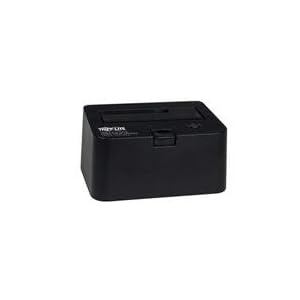
or if it is a SATA drive get a cradle...I have two (got one free with purchase of 2TB drive - heck...buy a 2TB drive and try to find a combo deal for it!)
|
|
|
| Back to top |
|
|
Spanky Ham
Joined: 22 Mar 2006
Posts: 5643
Location: Comedy Central
|
|
| Back to top |
|
|
Joust
Joined: 05 May 2006
Posts: 2429
Location: Almonte, Ontario, Canada
TV/Projector: Marquee 8501LC
|
|
| Back to top |
|
|
greg_mitch
Joined: 03 May 2006
Posts: 5320
|
| Posted: Thu Jun 24, 2010 1:39 pm Post subject: |
|
|
| greg_mitch wrote: | | greg_mitch wrote: | Doesn't have to be a hassle...just get an external enclosure that goes to USB or...
Vantec IDE to USB Cable
or if it is a SATA drive get a cradle...I have two (got one free with purchase of 2TB drive - heck...buy a 2TB drive and try to find a combo deal for it!)
|
|
|
|
| Back to top |
|
|
Phil Smith
Joined: 08 Mar 2006
Posts: 7717
|
|
| Back to top |
|
|
greg_mitch
Joined: 03 May 2006
Posts: 5320
|
| Posted: Thu Jun 24, 2010 6:35 pm Post subject: |
|
|
What in the world are you trying to accomplish?
You are coming up with the most jerry rigged way to transfer data here.
Just get a USB to SATA cable and use it everytime this happens to you.
|
|
| Back to top |
|
|
Joust
Joined: 05 May 2006
Posts: 2429
Location: Almonte, Ontario, Canada
TV/Projector: Marquee 8501LC
|
| Posted: Thu Jun 24, 2010 6:45 pm Post subject: |
|
|
| Phil Smith wrote: |
I finally got time to work on this today. My old drive is parallel. My new computer's motherboard only has SATA inputs.
|
| Phil Smith wrote: |
I think I'll leave the drive in the new computer (I don't have any other use for it), so I went ahead and ordered the adapter I linked to. Hopefully it will work.
|
from these quotes i believe Phil wants to put an old IDE (ATA) drive, permanently into a newer PC that has only SATA interfaces.
all suggested solutions should work except, unfortunately the one that he bought
|
|
| Back to top |
|
|
Phil Smith
Joined: 08 Mar 2006
Posts: 7717
|
| Posted: Thu Jun 24, 2010 9:06 pm Post subject: |
|
|
Yes, as Joust points out, I want to install it permanently. And since I have a IDE drive and no USB connectors on my MB, the cable you mention wouldn't work.
The only thing preventing this from working is a male/female SATA cable, which I ordered yesterday.
|
|
| Back to top |
|
|
greg_mitch
Joined: 03 May 2006
Posts: 5320
|
| Posted: Thu Jun 24, 2010 11:49 pm Post subject: |
|
|
Ok...sorry I didn't see you were going to permanently install it now...that isn't how this started out.
I guess I wouldn't waste my time with an IDE drive being permanently installed.
I have about 10 external drives of various vintages and various connectors and various size. I just have a few HDD docks and a few cables so that they can be moved, connected, etc. without unscrewing covers and shutting down other systems.
YMMV.
|
|
| Back to top |
|
|
Joust
Joined: 05 May 2006
Posts: 2429
Location: Almonte, Ontario, Canada
TV/Projector: Marquee 8501LC
|
| Posted: Fri Jun 25, 2010 12:54 am Post subject: |
|
|
| Phil Smith wrote: | Yes, as Joust points out, I want to install it permanently. And since I have a IDE drive and no USB connectors on my MB, the cable you mention wouldn't work.
The only thing preventing this from working is a male/female SATA cable, which I ordered yesterday. |
how do you think that this cable will help you?
you need a device to convert IDE to SATA.
the thing you bought converts SATA to IDE. thats why it won't work for you. it is deigned to plug directly onto a SATA drive and then onto the IDE cable as if it was an IDE drive.
|
|
| Back to top |
|
|
|
|




