| Author |
Message |
Phil Smith
Joined: 08 Mar 2006
Posts: 7717
|
| Posted: Thu Jun 03, 2010 9:54 pm Post subject: Transferring The Main Hardrive From One Computer To Another |
|
|
My computer that I've used for ebay the last 6-7 years won't boot up. I get a "bios rom checksum error" even though I've successfully flashed it.
It's pretty old, so no great loss other than the ebay data on the hard drive (my Turbo Lister database has several hundred pre-written auctions) and some family photos. I have a new computer that, if possible, I would like to add the old hard drive to long enough to get my data. My old computer is running 32 bit XP, while the new computer is running Windows 7.
I've never had a need to do anything like this. Is it doable?
|
|
| Back to top |
|
 |
greg_mitch
Joined: 03 May 2006
Posts: 5320
|
| Posted: Thu Jun 03, 2010 10:04 pm Post subject: |
|
|
1. open up new case
2. attach HDD to IDE or SATA port and power
3. boot up computer
4. copy and paste information
Or...even easier
1. buy external SATA to USB converter
2. Hook up drive to cable and cable to computer
3. copy and paste information
|
|
| Back to top |
|
|
-Pjackso
Joined: 31 Mar 2006
Posts: 791
Location: Oklahoma
|
| Posted: Thu Jun 03, 2010 10:06 pm Post subject: |
|
|
Doesn't he need to set the 2nd drive to slave? (not master)
_________________
-Nothing relevant to add.
|
|
| Back to top |
|
|
greg_mitch
Joined: 03 May 2006
Posts: 5320
|
| Posted: Thu Jun 03, 2010 10:08 pm Post subject: |
|
|
| -Pjackso wrote: | | Doesn't he need to set the 2nd drive to slave? (not master) |
You might have to if you have an older setup (which I suppose he had).
Sometimes you can pull the jumper completely or put it on CS and it will automatically make it slave.
A few reboots and jumper positioning should do the trick.
I wouldn't touch it to start with though.
Last edited by greg_mitch on Thu Jun 03, 2010 10:09 pm; edited 1 time in total
|
|
| Back to top |
|
|
greg_mitch
Joined: 03 May 2006
Posts: 5320
|
| Posted: Thu Jun 03, 2010 10:09 pm Post subject: |
|
|
BTW...will the computer not turn on at all (fans spin?) or just not get past the POST screen?
Do you have other compatible spare parts to swap things?
Might be bad RAM stick, PSU, vid card, mobo clock battery, etc.
|
|
| Back to top |
|
|
Spanky Ham

Joined: 22 Mar 2006
Posts: 5643
Location: Comedy Central
|
| Posted: Thu Jun 03, 2010 10:31 pm Post subject: |
|
|
|
Greg covered it, but an alternative is Puppy Linux. You can download it in about 15 minutes and rip it to a CD in another 2. On boot, you set the BIOS to boot from CD. Puppy runs in RAM. If the HD is good, then you can read everything off of it.
|
|
| Back to top |
|
|
Phil Smith
Joined: 08 Mar 2006
Posts: 7717
|
| Posted: Thu Jun 03, 2010 10:57 pm Post subject: |
|
|
I can't use any drives at all other than the floppy to flash bios. It won't even read a dos boot disk, so Puppy Linux isn't an option.
My troubles started with no power at all. I unplugged and replugged everything which got it to fire up and post. I now get the "bios rom checksum error" message which is followed by a prompt to insert a bios flash disk in drive a. Flashing goes thru it's routine and reports it's successful, but the same problems remain. It won't allow me in bios. Flashing bios is all I can do, with no improvement or change.
I was going to ask if the Windows install would still work if I replaced the motherboard with an identical new one, but for some reason they're expensive (surprising) and hard to find (not surprising). I paid quite a bit for when it was new, but hell, that was a long time ago. I assumed they'd be almost free by now. It's an Abit IC7-G.
I'm just glad I can recover my data. I was under the impression that a hard drive with Windows installed on it wouldn't read when hooked up to another computer.
|
|
| Back to top |
|
|
Spanky Ham
Joined: 22 Mar 2006
Posts: 5643
Location: Comedy Central
|
| Posted: Thu Jun 03, 2010 11:32 pm Post subject: |
|
|
|
Well, I guess you are stuck with hooking it up to another computer. I do it all the time, except it is just a hassle getting it hooked up.
|
|
| Back to top |
|
|
greg_mitch
Joined: 03 May 2006
Posts: 5320
|
| Posted: Fri Jun 04, 2010 1:03 am Post subject: |
|
|
Doesn't have to be a hassle...just get an external enclosure that goes to USB or...

Vantec IDE to USB Cable
or if it is a SATA drive get a cradle...I have two (got one free with purchase of 2TB drive - heck...buy a 2TB drive and try to find a combo deal for it!)
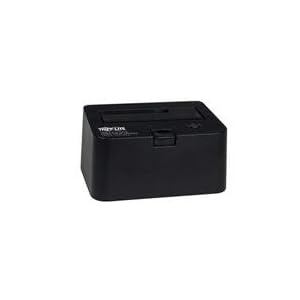
If you replaced your mobo with the exact same mobo the Windows installation would be asking you for a new CD key since a mobo replacement takes with it the unique identifying information that was recorded when you activated the Windows license.
Don't worry though, because if you call the 1800 number to get a new key you simply tell them you replaced a faulty mobo and the copy of Windows is only installed on one machine and they give you a new key over the phone...or at least that is how it was a few years ago.
Now there are a few instances where you can't just simply pull a drive and throw it in your computer to rob the files...some NAS's use a different file system, linux, etc. that Windows can't read...or couldn't at one time anyway.
In order to trouble shoot a few things on the old system here is my technique...ALL FOLLOWED BY REBOOT TO SEE IF IT FIXED THE PROBLEM:
First visually inspect the CPU fan and PSU fan to make sure they spin when the power is pushed initially. Some will slow down after the immediate spin up but almost all fans I have seen will at least ramp up and then back down upon power up. If you recently moved the tower, reseat all power connections (don't forget video card if it has one).
1. Remove all PCI cards.
2. Remove RAM sticks and install only 1 in the first slot (usually closest to CPU)
3. Repeat with a different stick of RAM until you go through all sticks.
4. Remove graphics card if you have onboard graphics
5. Swap PSU
6. Replace mobo battery
|
|
| Back to top |
|
|
macgyver655
Joined: 22 Aug 2007
Posts: 8508
|
| Posted: Fri Jun 04, 2010 1:11 am Post subject: |
|
|
|
The original MB probably has a bunch of blown caps. Snap a pic and post it. I'm curious.
|
|
| Back to top |
|
|
Mark_A_W
Joined: 15 Mar 2006
Posts: 3068
Location: Sunny Melbourne Australia
|
| Posted: Fri Jun 04, 2010 10:35 am Post subject: |
|
|
It's not worth fixing Mac.
Stick to the $40,000 projectors, not the $50 mobos.
|
|
| Back to top |
|
|
macgyver655
Joined: 22 Aug 2007
Posts: 8508
|
| Posted: Fri Jun 04, 2010 11:27 am Post subject: |
|
|
| Mark_A_W wrote: | It's not worth fixing Mac.
Stick to the $40,000 projectors, not the $50 mobos. |
LOL, yeah I know. I just figured he wanted to know what had happened. He seemed to be curious. I have never bothered repairing a mb with blown caps. To much trouble. I just replace the board..... 
|
|
| Back to top |
|
|
Spanky Ham
Joined: 22 Mar 2006
Posts: 5643
Location: Comedy Central
|
| Posted: Fri Jun 04, 2010 4:43 pm Post subject: |
|
|
Greg,
That Vantec adapter is exactly what I need. I have a couple of IDE 2.5 and 3.5 hds that I would love to be able to plug in with this.
|
|
| Back to top |
|
|
ralpharch
Joined: 02 Nov 2007
Posts: 211
Location: Derwood
|
| Posted: Fri Jun 04, 2010 5:18 pm Post subject: |
|
|
|
Sort of a related question. I have several very old computers, including this laptop I am posting with and several "ancient" homebuilds. If I were to purchase more up to date components and build like I used to is there an easy way to salvage the licenses on the old computers? Don't know if I can locate the specific key that goes with each computer (I have the keysbut unsure how they maatch to computers), and some of the software like Office was 3-computer versions. It's all legal on existing; just wondering if there is an easy way to transfer licenses (which for the non-laptops were all upgrade licenses) over and then kill the old machines?
|
|
| Back to top |
|
|
Phil Smith
Joined: 08 Mar 2006
Posts: 7717
|
| Posted: Fri Jun 04, 2010 9:52 pm Post subject: |
|
|
The first thing I did was unplug-replug everything and removed some unnecessary PCI cards. That got me from no power at all to the state I described.
The computer is all I really need for the task I perform on it, and I was hoping I could get it running. But it's old enough that it doesn't warrant spending much time or money on it. IF I get time tomorrow I'll connect the hard drive to the new computer (that was originally going to be for home use  ) and retrieve my data. ) and retrieve my data.
Thanks for the help! 
|
|
| Back to top |
|
|
greg_mitch
Joined: 03 May 2006
Posts: 5320
|
| Posted: Sat Jun 05, 2010 2:15 am Post subject: |
|
|
|
Ahhhh...I never give up on an old machine unless it is practically useless or I have $500 burning a hole in my pocket.
|
|
| Back to top |
|
|
trent222
Joined: 03 Jun 2010
Posts: 4
|
| Posted: Sat Jun 05, 2010 6:17 am Post subject: |
|
|
|
You may want to try unseating ram and putting in back in. Sometimes post gets stuck there and throws weird errors.. Just a thought...
|
|
| Back to top |
|
|
Phil Smith
Joined: 08 Mar 2006
Posts: 7717
|
| Posted: Fri Jun 18, 2010 2:39 pm Post subject: |
|
|
I finally got time to work on this today. My old drive is parallel. My new computer's motherboard only has SATA inputs.
I found this: http://cgi.ebay.com/ws/eBayISAPI.dll?ViewItem&item=200482969600 I also found similar adapters on the net. They all say they're for plugging SATA drives into older motherboards. Not one of them mentions using it like I need.
I'm guessing it wouldn't make any difference and it would work for me. What do you think?
|
|
| Back to top |
|
|
greg_mitch
Joined: 03 May 2006
Posts: 5320
|
| Posted: Fri Jun 18, 2010 5:58 pm Post subject: |
|
|
| Phil Smith wrote: | I finally got time to work on this today. My old drive is parallel. My new computer's motherboard only has SATA inputs.
I found this: http://cgi.ebay.com/ws/eBayISAPI.dll?ViewItem&item=200482969600 I also found similar adapters on the net. They all say they're for plugging SATA drives into older motherboards. Not one of them mentions using it like I need.
I'm guessing it wouldn't make any difference and it would work for me. What do you think? |
If you aren't trying to install the old drive permanently, just get the Vantec cable I linked to above...it is cheap and works with SATA and the older IDE drives.
I can't believe they make mobos without the IDE connection now! What mobo is it?
|
|
| Back to top |
|
|
Phil Smith
Joined: 08 Mar 2006
Posts: 7717
|
| Posted: Fri Jun 18, 2010 7:12 pm Post subject: |
|
|
I think I'll leave the drive in the new computer (I don't have any other use for it), so I went ahead and ordered the adapter I linked to. Hopefully it will work.
The new computer is a basic Compac, so it doesn't have much of a MB. I've always built my own computers in the past, but there never was a good reason to. My computer needs are basic. Now HTPCs are a different story. I've wasted a lot of money on my HTPC.
Thanks again for the help!
|
|
| Back to top |
|
|
|
|




