| Author |
Message |
Nashou66

Joined: 12 Jan 2007
Posts: 16171
Location: West Seneca NY
|
| Posted: Fri May 14, 2010 1:38 am Post subject: Longbows have blue DIP not Hump, what can I do?? Lumagen !!! |
|
|
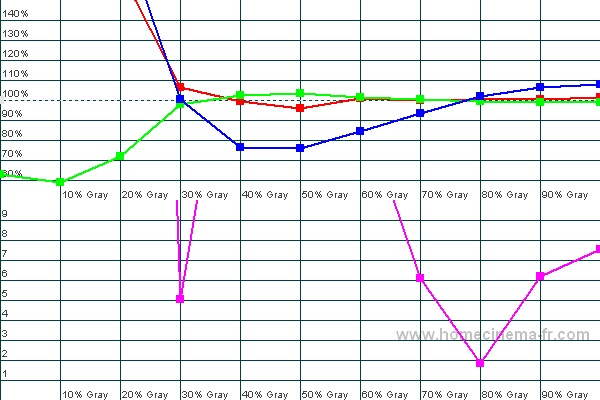
Ok I have been struggling with doing a proper grey scale calibration on my Two marquee 8500 Ultra LongBow's for my Blend. I have alway thought it was my probe. An i1 pro. But these never go bad or show any issues from what i have read and the great guys at Spectracal have told me. LA I owe you big time for putting up with me! 
Most CRT's give a blue Hump in between the two points you use for calibration and then it falls of below those two points causing the lower than 30 IRE and higher than 80 IRE to not look right and have a brownish low end and yellowish high end.
Defocusing the blue is what helps fix this problem. You give more light output in the upper IREs where typical blue runs out of steam. This in turn straightens out the hump as you can now lower the G2 and Drive as the defocusing helps get more light to the screen.
So here is my problem. I can't defocus because i already get too much blue int he high ends and low ends. I have a blue DIP!!! i always thought it was the probe not reading right. but when i calibrate by eye to get the mid ires and greyscale "looking ok" i always saw too much blue in the upper end and lower end , while 40-60 looked perfect to me.
So i sent my i1 to LA Habelein at spectracal and he and the crew did a work over on the probe and it was fine.
So tonight i ran a D2 i am Borrowing from BoilerMaker and did a few tests and found i get the same blue dip, focused is not as bad as if I defocus. So Do these Longbows have different tubes? i have no idea but what can I do to add more blue to the mid or reduce the blue to the highs? Using the controls in the PJ will not help. I already have drive for blue down to about 7 green drive is 0 . I always found controls for the blue on these longbows have more affect with each other than my other marquee's. A few clicks of say the drive up also raises the low end of the IRE quite a bit for blue.
One thing that helped me fine tune the adjustments is using the marquee PC based control program. it gives much more fine adjustment range than with the remote. i never realize how course the adjustment via the remote are compared to the program. I will never use the remote for greyscale again!!! Now i need to try it for geometry adjustments as well
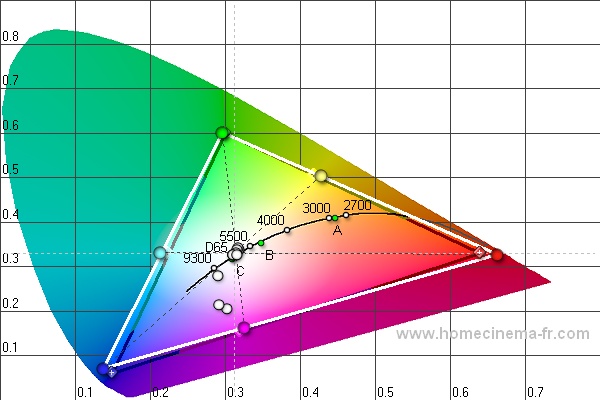
Well here is my quick run of greyscale . HFCR graph.


I could use my Lumagen HDQ, but you can not add color with CMS right? it is only for lowering over saturated primaries I always thought.
TSE any thing special about these longbows Software wise or Tube wise?
Athanasios
| Description: |
|
| Filesize: |
73.05 KB |
| Viewed: |
237 Time(s) |
|
| Description: |
|
| Filesize: |
91.87 KB |
| Viewed: |
242 Time(s) |
|
_________________
Don't blame your underwear for your crooked ass~ unknown Greek philosopher
"Republicans believe every day is the Fourth of July, but the Democrats believe every day is April 15." --- President Reagan
One Smart Dog!!!
Marquee High Performance Bellows now shipping!!
Marquee Modifications and Performance Enhancement
Marquee C-element and Bellow removal
Last edited by Nashou66 on Sun May 16, 2010 6:05 am; edited 1 time in total
|
|
| Back to top |
|
 |
draganm

Joined: 08 Mar 2006
Posts: 8990
Location: Colorado
|
| Posted: Sat May 15, 2010 2:08 pm Post subject: |
|
|
|
very wierd, I can only image it's related to the peaking circuit on the VIM, nothing else could possibly do this AFAIK.
|
|
| Back to top |
|
|
garyfritz

Joined: 08 Apr 2006
Posts: 12088
Location: Fort Collins, CO
|
| Posted: Sat May 15, 2010 2:23 pm Post subject: |
|
|
That IS weird. I assumed your probe's low end was bad, making the hump "shift" over to 80% or so. But if they've checked the probe, and another probe shows the same thing...
I can't believe it's something about the tubes. As I understand it, the blue hump is a fundamental property of the phosphors used in blue tubes. They just don't put out much light so you have to compensate with defocusing.
I'll be interested to hear what you find about using the PC to do geometry. I've always thought the Marquee's geometry controls were a bit coarse.
|
|
| Back to top |
|
|
kal
Forum Administrator

Joined: 06 Mar 2006
Posts: 18114
Location: Ottawa, Canada
TV/Projector: JVC DLA-NZ7
|
|
| Back to top |
|
|
Nashou66
Joined: 12 Jan 2007
Posts: 16171
Location: West Seneca NY
|
| Posted: Sat May 15, 2010 5:09 pm Post subject: |
|
|
Hi Guys, I have been waiting for a response from anyone as this is very frustrating!!
I have been blaming my probe/s for almost the past year.
I sent my i1 for the led calibration so they can also look at it. got it back same thing. Then LA asked me to send it back
one more time, they had it for about 5 days and actually sat down with the Spectracal crew at a meeting and discussed
my problem . They gave me some things to look at what I could be doing wrong but I got the same results using HCFR
and Calman, with two different probes. Even Docholywd sent me his i1 and i got similar results.
Drags, I got the same results with an 03p vim and a 02p vim with no peaking circuit.
One thing i found out last night was that on me second PJ , the Right one, i did the calibration with Brightness and
Contrast at the 50 starting points.On my left PK I raised contrast to the point of blooming and then lowered Brightness
to get proper black level I ended up at B of 22 and C at 65. So, with the 50 starting points I found the blue dip
to be deeper and then went higher on the graph from 80 to 100 than from 90 to 100 like in the graph above. Also red
was more linear and did not go up as in the graph above. I'll add the Right PJ's graph later when i get home as its on my laptop.
This gave the Mid IRE's an even more greenish brown tint to them. I have never seen a blue Dip, its sooo weird.
I know Kal. And I cant even use the Lumagen or the Tv-Ones to compensate as you can not add color with CMS only remove
over saturations.
That is why I wonder if these have either Different Phosphor in the blue, or different software control of one or all of the
colors than the normal control for G2 and Drive. Scott did mention to me these had a slightly different software than a stock Ultra.
Also I did not one mod to these. They are bone Stock except for the color corrected lenses, and i got the same results with all
clear lenses too IIRC.
I am thinking of using 20 and 60 IRE for calibration and then using the CMS to lower the Blue i'll most likely end up with above that.
Having a Blue Drive of 7 and a Green drive of 0 on my left PJ is not normal for a marquee. Far from it!!!
Athanasios
_________________
Don't blame your underwear for your crooked ass~ unknown Greek philosopher
"Republicans believe every day is the Fourth of July, but the Democrats believe every day is April 15." --- President Reagan
One Smart Dog!!!
Marquee High Performance Bellows now shipping!!
Marquee Modifications and Performance Enhancement
Marquee C-element and Bellow removal
|
|
| Back to top |
|
|
Nashou66
Joined: 12 Jan 2007
Posts: 16171
Location: West Seneca NY
|
|
| Back to top |
|
|
ecrabb
Forum Moderator

Joined: 13 Mar 2006
Posts: 15909
Location: Utah
TV/Projector: JVC RS40, Epson 5010
|
| Posted: Sat May 15, 2010 10:54 pm Post subject: |
|
|
Athanasios,
Do you have anything in the signal path that could be applying a different gamma to the blue channel than to red or green? I can't see how anything else would affect the blue output like that.
Weird.
SC
|
|
| Back to top |
|
|
Nashou66
Joined: 12 Jan 2007
Posts: 16171
Location: West Seneca NY
|
| Posted: Sun May 16, 2010 12:02 am Post subject: |
|
|
| ecrabb wrote: | Athanasios,
Do you have anything in the signal path that could be applying a different gamma to the blue channel than to red or green? I can't see how anything else would affect the blue output like that.
Weird.
SC |
hi SC
I have the Oppo, The MUX-HD as a splitter and it has no Gamma boost anywhere, the Lumagens I plan to use for 11 point gamma, the Tv-ones and then the Vim-Hd HDMI cards. IIRC i did try to do greyscale with only a BD player to the moome and got exactly the same results. I have the right PJ warming up now and plan to calibrate it like i did the left one with a higher contrast and lower Brightness as the blue dip is lower that way.
I love using the Marquee controller program now as I can have both PJ's controlled from one Serial cable. I can mute the one and then control the other adjustments and turn the other back on and compare all from my laptop while running the Calibration software.
I then can save each calibration to a file for each Marquee and bring it back up anytime i want to try to change something.
Very very strange. I was Hoping TSE would chime in here with any unknown info about the LongBows that might be different than a normal Marquee. Since they actually gave the LB designation in the part numbers i was thinking they actually might be very different. Most simulator VDC PJ's, have an ST for stereoscopic or DM for Dome applications in the part number. But the Apache LongBow simulators have forgone the ST and have their own designation.
Hmmmmm ?
I will have to try another Vim again at some point . Not using the Mux will be hard since these Tv-ones have an HDCP issue i can not avoid with out them in the chain. They are suppose to be HDCP compliant but the Oppo nor my LG's will not work with out the moome MUX in the path.
Athanasios
_________________
Don't blame your underwear for your crooked ass~ unknown Greek philosopher
"Republicans believe every day is the Fourth of July, but the Democrats believe every day is April 15." --- President Reagan
One Smart Dog!!!
Marquee High Performance Bellows now shipping!!
Marquee Modifications and Performance Enhancement
Marquee C-element and Bellow removal
|
|
| Back to top |
|
|
draganm
Joined: 08 Mar 2006
Posts: 8990
Location: Colorado
|
| Posted: Sun May 16, 2010 1:44 am Post subject: |
|
|
| Nashou66 wrote: | Drags, I got the same results with an 03p vim and a 02p vim with no peaking circuit.
Athanasios |
ok then neck-board. Those are the only 2 things in the video chain that would affect color tracking. First, try removing the CCM and see if anything changes.
I can't imagine it's the tube, never heard of anything different other than P43 greens.
It is very interesting though, first you had all those jail-bars from the braided Yoke leads now this. I'm surprised a 2004 vintage 8500 would be so glitchy and hard to tame.
|
|
| Back to top |
|
|
Nashou66
Joined: 12 Jan 2007
Posts: 16171
Location: West Seneca NY
|
| Posted: Sun May 16, 2010 6:00 am Post subject: |
|
|
Ok I talked with Bob Stephan and he told me to stop messing around with just the PJ controls and use the Damn Lumagen CMS!!!!!
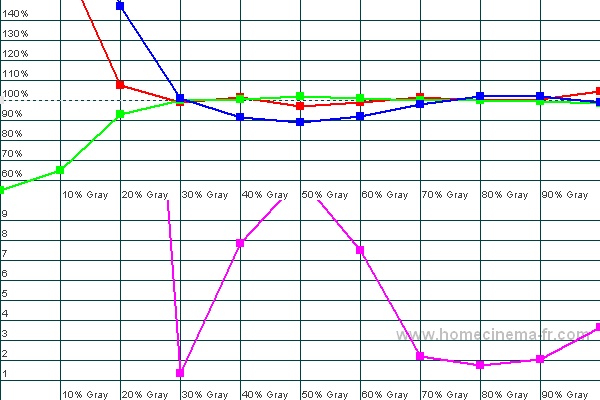
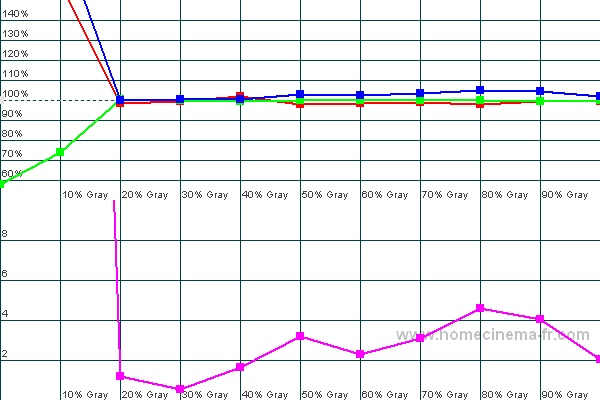
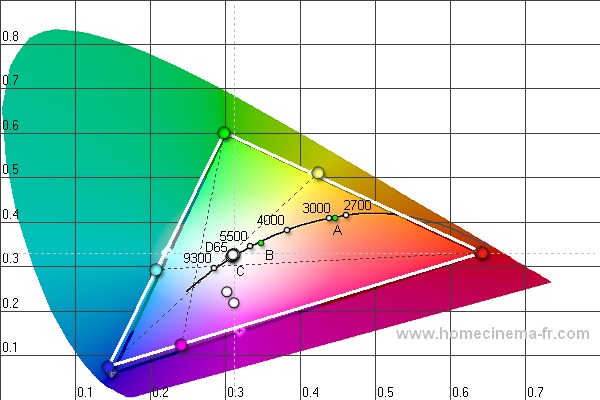
Ok Ok Ok, I just never seen a blue dip and am curious I told him. So i did my best with 30 and 80 ire in the Marquee and went onto the lumagen Greyscale and then CMS adjustments. So i went through each grey scale IRE and adjusted either blue or red. Then I ran a grey scale. holy sh*t!! What a difference!!! But I did notice my Black level was wayyyyyyyy low now. i had to bring brightness from 50 to 80 I then went through another greyscale adjustment for each IRE in the lumagen. Once i got that i looked at the gamut, they were all off now but secondaries looked really good. So i began adjusting red and green to get them back to reference. blue could not be adjusted to move it closer. So i left it alone. After i got really good green and red, blue is what it is and now the primaried were way off. No CMS in the HDQ for those so i lived with it. i ran another grey scale had to make more 11 point adjustments and then i looked at luminance or gamma.
made some adjustments to try to flatten it out and now it looked the best it ever did. In one of the DVE clips where the red and purple flowers come out of the foliage i always thought the red flowers were all red. they are not there is one that is orange and a couple that have red and orange in the petals. Now I see how over saturated the red was.
well here are the new graphs:
| Description: |
|
| Filesize: |
76.63 KB |
| Viewed: |
165 Time(s) |
|
| Description: |
|
| Filesize: |
72.79 KB |
| Viewed: |
165 Time(s) |
|
| Description: |
|

Download |
| Filename: |
Right PJ Facing Screen Lumagen.chc.zip |
| Filesize: |
7.31 KB |
| Downloaded: |
7 Time(s) |
_________________
Don't blame your underwear for your crooked ass~ unknown Greek philosopher
"Republicans believe every day is the Fourth of July, but the Democrats believe every day is April 15." --- President Reagan
One Smart Dog!!!
Marquee High Performance Bellows now shipping!!
Marquee Modifications and Performance Enhancement
Marquee C-element and Bellow removal
|
|
| Back to top |
|
|
Boilermaker
Joined: 21 May 2006
Posts: 527
|
| Posted: Sun May 16, 2010 2:59 pm Post subject: |
|
|
| Quote: | | No CMS in the HDQ for those so i lived with it. |
Athanasios - You have the same situation as I do. Don't ask how it happened, but only one of my two VideoEq's is the pro version with CMS. Luckily, crt's have pretty decent gamut's to start with.
What you need to do is use the projector without CMS as the baseline target for the projector with the CMS. Don't use the ideal points as it is more important to get the projectors to match than it is to have one of them perfect. Just save the gamut points on your baseline projector and those six points become your new targets for the one with the CMS.
When you are satisfied with the first one (the one without the CMS), save the peak white level at 100IRE and use it to set your contrast level for the second one. It will look awesome when you are done!
It looks as though you got your sensor to stabilize at 20IRE. What did you do differently?
Bob
|
|
| Back to top |
|
|
Nashou66
Joined: 12 Jan 2007
Posts: 16171
Location: West Seneca NY
|
| Posted: Sun May 16, 2010 6:16 pm Post subject: |
|
|
I think you misunderstood Bob, I said No CMS for those , meaning "those" as in the secondaries. Both HDQ's have CMS but the HDQ did not get CMS for the secondaries only for the primaries.
So I will be able to dial in the other PJ to match I hope.
I do have hue controls for red and green i think could these be used to move the cyan and Magenta more tot he correct position with out altering the primaries to much?
I am at work now and can not wait to go home and spend some time on the left PJ now.
Between my new found love of the Marquee controller for doing the 2 point greyscale , finally realizing to "trust my i1 pro" as Derek at Spectracal told me and the Lumagen HDQ's CMS and Greyscale/Gamma controls I think I will get this blend looking the best it ever has.
And If i get it to where I'm happy I was thinking of a Meet on the 3rd or 4th of July!! But this is just me talking out loud for now. But I do want to finally have one here. It be a fun weekend and I usually close on the 4th so i wont have to run back and forth between the meet and my restaurant
Athanasios
_________________
Don't blame your underwear for your crooked ass~ unknown Greek philosopher
"Republicans believe every day is the Fourth of July, but the Democrats believe every day is April 15." --- President Reagan
One Smart Dog!!!
Marquee High Performance Bellows now shipping!!
Marquee Modifications and Performance Enhancement
Marquee C-element and Bellow removal
|
|
| Back to top |
|
|
Boilermaker
Joined: 21 May 2006
Posts: 527
|
| Posted: Sun May 16, 2010 7:42 pm Post subject: |
|
|
| Quote: | | I think you misunderstood Bob, I said No CMS for those , meaning "those" as in the secondaries. Both HDQ's have CMS but the HDQ did not get CMS for the secondaries only for the primaries. |
Gotcha! That should be enough to get it damn near perfect. You'll be shittin' in tall cotton!!!
Bob
|
|
| Back to top |
|
|
Nashou66
Joined: 12 Jan 2007
Posts: 16171
Location: West Seneca NY
|
|
| Back to top |
|
|
Nashou66
Joined: 12 Jan 2007
Posts: 16171
Location: West Seneca NY
|
| Posted: Mon May 17, 2010 1:02 pm Post subject: |
|
|
Ok I posted this on AVS and want to post it here as well as I hope to get some ideas on what workflow i should follow while doing Pj calibration, Lumagen CMS and Zone contrast etc. here are my thoughts I would appreciate any suggestions from calibrators, pro or experienced hobbyists familiar with CMS cotrols.
From the AVS screen shot thread
My Eyes are killing me this morning, over 20 hours between three days of tweaking 6 hours last night. After i got done is when i realized i had the Zone Contrast modulation on the entire time i was doing the 2 point grey scale in the PJ's and then the 11 point with the lumagens. What i plan to do is:
*null the zone contrast
*Null the lumagen 11 point back to default
*null the CMS in the Lumagens
( I will save the current settings for everything with the PC controllers for all this of course in the Lumies and PJ's)
* work on the 2 point in the Marquee's
*this time I will do primaries in the lumagens first, I was never sure what the pros do workflow wise. Some suggestions here are welcome.
*Then go back and do the 11 point greyscale in the lumies
* adjust the gamma via the 11 point luminance in the Lumies
* See how the contrast and bl;ack levels turn out and adjust those accordingly
* go back and recheck 11 point grey scale and Gamma
* then work on the Zone contrast.
Witht he Zone contrast is where i am undecided on how t tackle it. I and Bob think its best to measure the luminance of each color in the center of the sreen and then zoome the image to the normal blend configuration and adjust zone contrast in the blend zone( Edge blending turned off for this) for each color to match the center. one thing this does though is alter the center a tad bit. so id have to go back and measure that again and then back to the zone and adjust some more. I really do not see any other way around this. All I know is it will take lots of time.
Thanks Bob for your help and pushing me to keep working on this.
Athanasios
_________________
Don't blame your underwear for your crooked ass~ unknown Greek philosopher
"Republicans believe every day is the Fourth of July, but the Democrats believe every day is April 15." --- President Reagan
One Smart Dog!!!
Marquee High Performance Bellows now shipping!!
Marquee Modifications and Performance Enhancement
Marquee C-element and Bellow removal
|
|
| Back to top |
|
|
Boilermaker
Joined: 21 May 2006
Posts: 527
|
| Posted: Mon May 17, 2010 7:21 pm Post subject: |
|
|
Athanasios - I am far from being an expert on calibration, but I have spent a lot of time playing with a crt blend, so I'll give it a shot. This is the order in which I would do it if I was starting from scratch which is what I'll do when I get a better probe:
1 - Turn off both blend zones.
2 - Set the projector that uses the Lumagen that has only the primary color controls in its CMS as the #1 projector. This is because while you might not have perfect locations for your secondary colors, you will be able to match them with your #2 projector.
3 - Set all CMS and grayscale adjustments on your #1 Lumagen to default.
4 - Set your #1 projector's zone contrasts to default.
5 - Set your #1 projector's contrast to a value for peak white that you want to end up with.
6 - Set your #1 projector's brightness as you would normally do.
7 - Using only IRE20 or 30 and IRE80 patterns do your 2-point grayscale using only your #1 projector's controls.
8 - Using your Lumagen CMS, set the primary colors to target.
9 - Using your Lumagen grayscale controls, do your 11-point grayscale.
10-Now measure and save your full grayscale and gamma curve.
11 - You will now have to go back to the Lumagen's 11-pointy grayscale controls to readjust to end up with a constant gamma from 10 to 100IRE of whatever gamma you are shooting for.
12 - Measure and save your full grayscale and gamma curve.
13 - You will have to repeat #9 thru #11 a few times until you are satisfied it is as perfect as it can get.
14 - Now move your probe to the blend zone area and adjust your zone contrast projector controls to match what you saved for IRE80 at the screen center. I'm not familiar with the Marquee's zone capabilities so I assumed it was just contrast.
15 - Your #1 projector should be perfect now, so run and save the full grayscale, gamma and 6-color address'. This will be your target for your #2 projector.
16 - Do the same thing for #2 projector using the values you saved for #1 as your new targets, including your secondary colors that you saved.
17 - Turn on your blend zone.
Now, put in a Blu-Ray, and send us some screenshots!!!
Bob
|
|
| Back to top |
|
|
Nashou66
Joined: 12 Jan 2007
Posts: 16171
Location: West Seneca NY
|
| Posted: Tue Nov 13, 2012 7:46 pm Post subject: |
|
|
Instead of starting a new thread I figured I re open this two year old thread.
I have always had this Blue dip with the Marquee's if I tried to do just a two point calibration setting the Brightness and contrast at 50
and going from there. But no matter what I did, getting 20% and 80% close to spec id have the Blue Dip so the marquees internal grey scale looked more greenish. I never could over come this and even using the lumagens there was always a slight yellow tint with some
of the mid and upper % whites, from 40-70. So I wondered if altering the starting points of the brightness and contrast would
make a difference. I began by raising the contrast higher to a level i like for the theater to get a some what decent light output from the 8" tubes. 70 is just before slight blooming happens. So from there I noticed now that it over exaggerated blues a bit and now Black level was off as well. I have been pulling my hair out trying to get rid of that green tint. So now I decided to redo the E Tech calibration method but with a brightness of 24-26 and contrast at 70. What I found was very strange numbers for Blue Drive and I got a grey scale from 20-100 that was almost flat with no blue dip but a blue hump!! An ever slight blue hump.
I ended up with a blue G2 of about 58 and the Blue drive at 8 !!!! Now that is low!!! But the full white Marquee test screen looks more uniform across the screen than I have ever seen since I got them. I never thought i would need to lower blue drive then low. but for some reason these LongBows work best for white balance at these numbers. G2's for the green and red were in the low 50's and red drive was about 24 for both PJ's and green drive were different for both by 40 clicks but green drive only makes a small change compared to red and blue drive. I was even able to adjust the 20% white mark quite a bit with a few clicks of Blue DRIVE!! that is not normal for a Marquee or any CRT I know of, it usually takes much more drive adjustment to make a large change from what I have seen.
So now using the Radiance to get the greyscale, gamma, CMS, and 125 point CMS is much more even since it has less adjustments and more head room to work.
I did one PJ last night and the second i going through its automated paces right now while I am at work. it takes about 1.5 hours for a full auto calibration for the marquee's.
But the first PJ looked really good looking at the Lumagens Greyscale pattern. Only thing I had to do was lower the luma for 0% white to get it to black. using the marquee Brightness lowered everything overall and crushed 5 and 10 %. So I think When I gat home tonight if the Auto Calibrate didn't have a hick up i should have two fairly close calibrated PJ's.
So you marquee experts, ever see a need to have a blue drive all the way down to 8?
Nashou
_________________
Don't blame your underwear for your crooked ass~ unknown Greek philosopher
"Republicans believe every day is the Fourth of July, but the Democrats believe every day is April 15." --- President Reagan
One Smart Dog!!!
Marquee High Performance Bellows now shipping!!
Marquee Modifications and Performance Enhancement
Marquee C-element and Bellow removal
|
|
| Back to top |
|
|
stridsvognen
Guest
|
| Posted: Tue Nov 13, 2012 10:43 pm Post subject: |
|
|
I think i have been almost down there.. I just found the data on my HCFR file from the best grayscale calibration i did before i got my lumagen.
You can see my blue have a small dip from 20-40% and a bump from 60-80%
But i think it should be possible to target 10% when you calibrate, and get that spot on.. It maybe takes a few days.. but in my opinion its worth it..
I see its from before i got my moome card.. So i have a gamma boost on the DVDO.
DVDO TEST PATTERN
DVDO Gamma 1.1 PC level 0-255 HD Furry 3
WHITE LEVEL = USER SETTING
RD 17
R G2 67
GD 60
G G2 66
BD 21
B G2 67
Brightness 50
Contrast 66
My projector is not installed at the moment, so i cant play along sorry.. 
I would love to see your calibration data after you finish your advanced auto calibrate.. 
|
|
| Back to top |
|
|
|
|