| Author |
Message |
scooter.125
Joined: 01 May 2010
Posts: 2
|
| Posted: Sat May 01, 2010 10:30 am Post subject: Gamma X boost not allowing picture with HDFury3 |
|
|
Hi Folks
New to this forum so a big hello to everyone from Northern Ireland.
PS it's raining LOL.
Anyway I ordered a HDFury3 with a Gamma-X boost and all the extra cabling that comes with the advanced kit last Friday arrived on Wednesday; excellent postal distribution  faster than sending something of the same size to the south of England faster than sending something of the same size to the south of England  . .
Today I set up the fury3 and got a green picture, my Panasonic TH-42PWD6 allows component and RGB inputs so I set the display to component and got a proper coloured picture. changed the settings in my SKY+ HD box from scart input set to 720P output and sweet so far.
I then plugged in the Gamma-X to the fury3 and lost the picture the blue light was on but I thought I may need to give it some more juice and plugged in the power supply - no picture - moved switch from PAS to INV - no picture.
Unplugged the Gamma-X picture restored.
Went onto PC and read the fury3 manual and some info on Gamma-X, Gamma-X won't work on component input ah ha I thought .
Changed dip switch 1 from default component to RGB reset plasma to RGB picture is fine and good so I thought happy days and re-plugged the Gamma-X into fury3 - no picture, added the power supply - no picture moved switch from PAS to INV - no picture, removed Gamma-X picture restored.
Anybody any ideas what's happening?
Fury3 dip switch sequence as follows
1 On - 2 On - 3 On - 4 On - 5 Off - 6 On - 7 On - 8 On
I think I have added the Adobe doc on my plasma fingers crossed.
Cheers and many thanks for your help and time
Stewarty
| Description: |
|

Download |
| Filename: |
TH37PWD6UY.pdf |
| Filesize: |
930.58 KB |
| Downloaded: |
1514 Time(s) |
_________________
Answers on a postcard to.....
|
|
| Back to top |
|
 |
damien55
Joined: 20 Oct 2008
Posts: 101
Location: UK
|
| Posted: Sat May 01, 2010 11:15 am Post subject: |
|
|
First of all welcome to the forum.
Just a thought,
Did you plug the gamma X the right way round? I know it sounds stupid but with HDfury 3 it is a easy mistake to do.
On HDfury 1 and 2 the output was a male VGA and that was a bit rubbish to plus into a standard VGA cable but great to connect directly to the back of an old plasma or to the GammaX because they use a VGA female connection.
So before you could just plug a GammaX directly on top of an HDFURY 1 or 2.
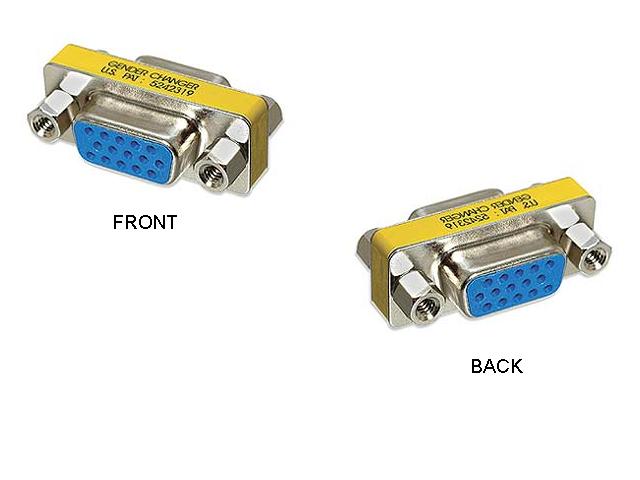
With HDfury 3 they decided to use a female VGA connector instead, so to connect the GammaX you need to change the gender using a cable or gender changer.
So basically make sure that you connect your HDfury3 to the input of the gammaX which is where the Blue LED is (the stupidly bright LED  ) and the output is where the X-vue sticker is. ) and the output is where the X-vue sticker is.
If you have done that properly did you try using two power supplies? One for the HDfury and one for the GammaX
Regards
Damien
|
|
| Back to top |
|
|
damien55
Joined: 20 Oct 2008
Posts: 101
Location: UK
|
| Posted: Sat May 01, 2010 11:26 am Post subject: |
|
|
Oh and I forgot, It's sunny in England (Midlands)... But I'm at work 
|
|
| Back to top |
|
|
AnalogRocks
Forum Moderator

Joined: 08 Mar 2006
Posts: 26706
Location: Toronto, Ontario, Canada
TV/Projector: Sony 1252Q, AMPRO 4000G
|
| Posted: Sat May 01, 2010 1:16 pm Post subject: |
|
|
Hi Scooter,
use the white VGA to VGA cable to connect the HDFury3 to the GammaX. The input end of the GammaX is the fat end.
_________________
Tech support for nothing
CRT.
HD done right!
|
|
| Back to top |
|
|
scooter.125
Joined: 01 May 2010
Posts: 2
|
| Posted: Sat May 01, 2010 7:57 pm Post subject: |
|
|
Hi Folks
Thanks for the advice Damien55 and Analogrocks.
Yes it looks like I had it the wrong way round and the fact after you replied Damien55 I checked the body of the Gamma-X and sure enough it says  INPUT INPUT  on the correct side to connect DOH!!! on the correct side to connect DOH!!! 
However I may not be as daft as Homer because it has thrown up another small issue to which Analogrocks points toward being that the Fury3 has a female VGA end and the Gamma-X has both male and female hence my mistake to try and connect in series; now Analogrocks is correct in that I should use the double ended male connector cable supplied to connect Fury3 to Gamma-X INPUT side however there is no female-female connect to allow the male end of the Gamma-X to connect to my male VGA cable from the plasma should I have been supplied with that cable do you guys know?
I really don't want to connect the Gamma-X to the plasma direct and then use my VGA into that as it will sit out like a sore truncheon from beneath the outer of the screen especially after spending time and money hiding my cables to the plasma 
I would rather have the Gamma-X in series behind the TV unit or is that a no-no 
Cheers and thanks for any more help
_________________
Answers on a postcard to.....
|
|
| Back to top |
|
|
AnalogRocks
Forum Moderator
Joined: 08 Mar 2006
Posts: 26706
Location: Toronto, Ontario, Canada
TV/Projector: Sony 1252Q, AMPRO 4000G
|
|
| Back to top |
|
|
|
|