| Author |
Message |
huggy

Joined: 02 Aug 2008
Posts: 927
Location: Melbourne,Australia
|
| Posted: Tue Mar 23, 2010 6:36 am Post subject: Cover art for MKV's? |
|
|
Can anyone recommend me a free program that does the above easily? I have some 300 odd MKV blu ray rip's that simply is boring to scroll through as text only.
Thanks
Dave
|
|
| Back to top |
|
 |
huggy
Joined: 02 Aug 2008
Posts: 927
Location: Melbourne,Australia
|
| Posted: Tue Mar 23, 2010 9:21 pm Post subject: |
|
|
What..........no one? 
Dave
|
|
| Back to top |
|
|
Zebu Fellenz
Joined: 21 Dec 2006
Posts: 2567
|
| Posted: Tue Mar 23, 2010 9:40 pm Post subject: |
|
|
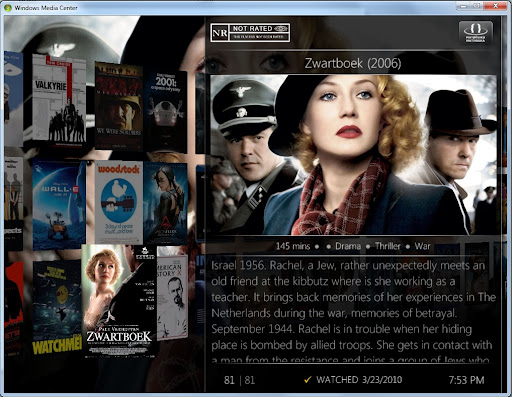
I use Media Center Master to fetch the meta data based on the file name, and then use Media Browser in 7MC as the interface, it works very nice and grabs much more than just the art.
Erik
|
|
| Back to top |
|
|
greg_mitch
Joined: 03 May 2006
Posts: 5320
|
| Posted: Wed Mar 24, 2010 1:42 am Post subject: |
|
|
|
My Movies plugin...although I still haven't figured out how to play MKV's within Media Center without patching the registry.
|
|
| Back to top |
|
|
Mark_A_W
Joined: 15 Mar 2006
Posts: 3068
Location: Sunny Melbourne Australia
|
| Posted: Wed Mar 24, 2010 2:12 am Post subject: |
|
|
|
I use XBMC. It downloads the covers, and you can set it to use IMBD.
|
|
| Back to top |
|
|
huggy
Joined: 02 Aug 2008
Posts: 927
Location: Melbourne,Australia
|
| Posted: Wed Mar 24, 2010 2:18 am Post subject: |
|
|
Thanks guys
I'm a novice at p.c's but let me explain exactly what I have and what I want done.
All my movies are in 4 1.5 tb drives with each drive named appropriately HD movies1,HD movies2 etc..etc.
Just what is the easiest method to just add cover art to these mkv files,that's what I want to achieve,I don't use Windows Media centre for anything so I assume Media Centre is the driving force behind everything?
Dave
|
|
| Back to top |
|
|
Mark_A_W
Joined: 15 Mar 2006
Posts: 3068
Location: Sunny Melbourne Australia
|
| Posted: Wed Mar 24, 2010 2:43 am Post subject: |
|
|
If the mkv files are in sub folders, 1 movie per folder, then you can add a jpg image to the folder as well.
In W7 and Vista (I think) the folder will get the image of the jpeg if you set display to thumbnails.
|
|
| Back to top |
|
|
huggy
Joined: 02 Aug 2008
Posts: 927
Location: Melbourne,Australia
|
| Posted: Wed Mar 24, 2010 2:56 am Post subject: |
|
|
| Mark_A_W wrote: | If the mkv files are in sub folders, 1 movie per folder, then you can add a jpg image to the folder as well.
In W7 and Vista (I think) the folder will get the image of the jpeg if you set display to thumbnails. |
Mark
Movies are not in folders of their own,just a whole bunch of mkv's in alphabetical order. I think it would be cool to flick through a catalogue of cover art and just click and play.
I really want this for the misses as an easy way to navigate.
Dave
|
|
| Back to top |
|
|
MikeEby

Joined: 24 Jun 2007
Posts: 5237
Location: Osceola, Indiana
|
| Posted: Wed Mar 24, 2010 2:57 am Post subject: |
|
|
| Mark_A_W wrote: | | I use XBMC. It downloads the covers, and you can set it to use IMBD. |
Does XBMC support 24bit FLAC now? I could never get XBMC to do squat.. Where is there a guide some where that's under 500 pages of posts?
Mike
_________________
Doing HD since the last century!
|
|
| Back to top |
|
|
Mark_A_W
Joined: 15 Mar 2006
Posts: 3068
Location: Sunny Melbourne Australia
|
| Posted: Wed Mar 24, 2010 3:06 am Post subject: |
|
|
| huggy wrote: | | Mark_A_W wrote: | If the mkv files are in sub folders, 1 movie per folder, then you can add a jpg image to the folder as well.
In W7 and Vista (I think) the folder will get the image of the jpeg if you set display to thumbnails. |
Mark
Movies are not in folders of their own,just a whole bunch of mkv's in alphabetical order. I think it would be cool to flick through a catalogue of cover art and just click and play.
I really want this for the misses as an easy way to navigate.
Dave |
Well...put them in folders!
Take you an hour.
|
|
| Back to top |
|
|
Mark_A_W
Joined: 15 Mar 2006
Posts: 3068
Location: Sunny Melbourne Australia
|
| Posted: Wed Mar 24, 2010 3:07 am Post subject: |
|
|
| MikeEby wrote: | | Mark_A_W wrote: | | I use XBMC. It downloads the covers, and you can set it to use IMBD. |
Does XBMC support 24bit FLAC now? I could never get XBMC to do squat.. Where is there a guide some where that's under 500 pages of posts?
Mike |
Yes.
But it doesn't handle 7.1, at all. (Unless it has been upgraded).
However you can set it to run an external player if you like, and just use it as a front end. There are other front ends around as well.
|
|
| Back to top |
|
|
MikeEby
Joined: 24 Jun 2007
Posts: 5237
Location: Osceola, Indiana
|
| Posted: Wed Mar 24, 2010 3:14 am Post subject: |
|
|
| Mark_A_W wrote: | | MikeEby wrote: | | Mark_A_W wrote: | | I use XBMC. It downloads the covers, and you can set it to use IMBD. |
Does XBMC support 24bit FLAC now? I could never get XBMC to do squat.. Where is there a guide some where that's under 500 pages of posts?
Mike |
Yes.
But it doesn't handle 7.1, at all. (Unless it has been upgraded).
However you can set it to run an external player if you like, and just use it as a front end. There are other front ends around as well. |
Yeah...I use WMC 7 with MediaBrowser plug-in, I launch MPC-HC with it. Works well, really can't find much wrong with it, has lots of eye candy, maybe a tad bloated but I really can't complain, just always looking a options. Out of about 250 movies I have ripped I think there are 2 it couldn't find the meta data for automatically you some times have to play around with the file name and include the year released in the file name for the search to work right.

Mike
_________________
Doing HD since the last century!
|
|
| Back to top |
|
|
Zebu Fellenz
Joined: 21 Dec 2006
Posts: 2567
|
| Posted: Wed Mar 24, 2010 11:49 pm Post subject: |
|
|
| greg_mitch wrote: | | My Movies plugin...although I still haven't figured out how to play MKV's within Media Center without patching the registry. |
Not saying this will work for you guaranteed but on my Windows 7 Professional x64 machine I installed the Shark007 codec pack and it works perfectly in both Media Center, and Media Player without any additional software. This is to play MKV files with FLAC audio created with Mike's GUI.
|
|
| Back to top |
|
|
Zebu Fellenz
Joined: 21 Dec 2006
Posts: 2567
|
| Posted: Thu Mar 25, 2010 12:05 am Post subject: |
|
|
Here's a picture of my interface, this is Media Browser with the Maelstrom theme, only change I made was to shrink the art so it's quicker to browse my library.
|
|
| Back to top |
|
|
huggy
Joined: 02 Aug 2008
Posts: 927
Location: Melbourne,Australia
|
| Posted: Sat Mar 27, 2010 10:33 am Post subject: |
|
|
Thanks guy's
Will give Zebu's and Mike's methods a go and see which one works best.
Dave
|
|
| Back to top |
|
|
greg_mitch
Joined: 03 May 2006
Posts: 5320
|
| Posted: Sat Mar 27, 2010 3:21 pm Post subject: |
|
|
| Zebu Fellenz wrote: | | greg_mitch wrote: | | My Movies plugin...although I still haven't figured out how to play MKV's within Media Center without patching the registry. |
Not saying this will work for you guaranteed but on my Windows 7 Professional x64 machine I installed the Shark007 codec pack and it works perfectly in both Media Center, and Media Player without any additional software. This is to play MKV files with FLAC audio created with Mike's GUI. |
Dammit...RTFM.
I needed the x64 components add-in and now it works flawlessly...no extra plugins...just go the OEM movies tab and now all my recorded movies, Bluray rips, DVD rips...all happily living together!
|
|
| Back to top |
|
|
|
|




