| Author |
Message |
backslap
Joined: 26 Jan 2009
Posts: 36
Location: the netherlands
|
| Posted: Sun Jan 17, 2010 4:26 pm Post subject: Horizontal lines on a Marquee 8500 |
|
|
Hi,
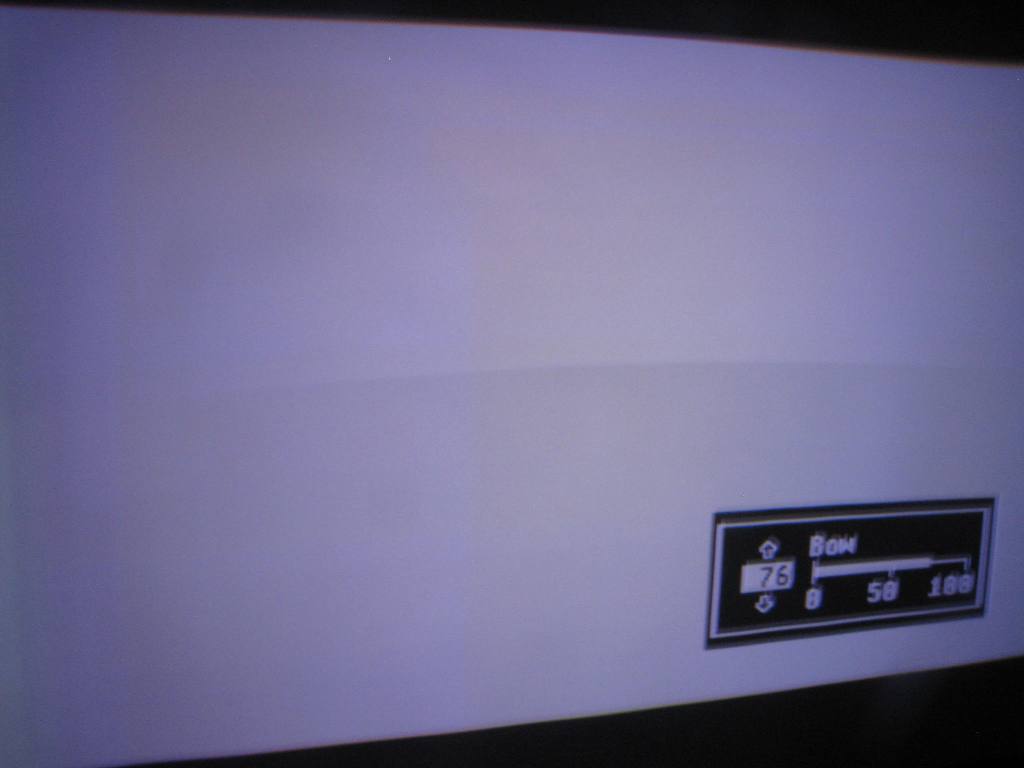
I want to show you guys a picture of a full white screen of my Marquee 8500:

Am I correct in assuming this isn't the notorious banding issue caused by the use of Bow?
I am seeing this (looks more dramatic on camera than it does in real life) on all resolutions.
What could it be?
Grtx, Elwin
PS. the brown blob is a feature of my camera.
|
|
| Back to top |
|
 |
AnalogRocks
Forum Moderator

Joined: 08 Mar 2006
Posts: 26706
Location: Toronto, Ontario, Canada
TV/Projector: Sony 1252Q, AMPRO 4000G
|
| Posted: Sun Jan 17, 2010 4:51 pm Post subject: |
|
|
Was this projector ceiling mounted before and now you have it on the floor or vice versa? That looks like a windows task bar burnt into the tubes.
BTW open that camera up and clean it will ya? 
_________________
Tech support for nothing
CRT.
HD done right!
|
|
| Back to top |
|
|
Nashou66

Joined: 12 Jan 2007
Posts: 16171
Location: West Seneca NY
|
|
| Back to top |
|
|
backslap
Joined: 26 Jan 2009
Posts: 36
Location: the netherlands
|
| Posted: Sun Jan 17, 2010 7:01 pm Post subject: |
|
|
Alright! I already thought it was banding but playing with Bow didn't solve anything...
Must have been the convergence tweaks I made to the green raster.
It's fine now after resetting the convergence, thanks!
|
|
| Back to top |
|
|
draganm

Joined: 08 Mar 2006
Posts: 8990
Location: Colorado
|
| Posted: Sun Jan 17, 2010 9:19 pm Post subject: |
|
|
| AnalogRocks wrote: | | That looks like a windows task bar burnt into the tubes. |
that brown stripe is the CRT re-fresh scan. You have to set the camera for shutter priority 8 to get rid of it. Took me a while yesterday to figure this out which is Ironic because I was trying to actually take a picture of banding. When you use too mcuh Bow you usually get only 1 big band in the middle. BTW, the brown stripe on the left is actual wear in his pic 
| Description: |
|
| Filesize: |
35.96 KB |
| Viewed: |
1942 Time(s) |
|
|
|
| Back to top |
|
|
|
|





