| Author |
Message |
RVonse

Joined: 09 Mar 2006
Posts: 3152
|
| Posted: Thu Oct 08, 2009 10:43 pm Post subject: BG1208 (9) is driving me nuts |
|
|
I have a high hour BG1208 that has 9" tubes installed and it has been running that way about 4 years now with pretty much no problems. I don't think the 9" upgrade has any to do with my problems but anything is possible I guess.
About 4 months ago I started getting intermittant pops and red flashes right after I replaced a red crt that had sat in storage a long time. The red tube problem just went away by itself after about a month but then I started to get bright blue flashes, only on startup. After the blue flashes (total bright raster) then the projector would run fine thereafter. I figured maybe my blue tube was going out although there is plenty of good blue once the flashing gets over with.
About 1 week ago I saw the usual startup blue flashes but then the set was totally dark. When I go to look directly into the lenses, I can still see a very faint picture but there is absolutely no contrast. Contrast adjustment does not do anything but brightness and G1 controls do.
Since there is full raster across the tubes (even though it is dim), and since I can see a faint picture on all crt's I was thinking this problem is RGB video. But I have now swapped both the input RGB and RGB driver cards with no change in symptoms. Just to be sure I covered everthing possible, I swapped the SMPS. Still no change in symptoms.
Could this be a motherboard issue? Anyone have any ideas how I should proceed now?
I've really enjoyed this projector but at this point I am wondering if I should give up and put something else on the ceiling.
|
|
| Back to top |
|
 |
macgyver655
Joined: 22 Aug 2007
Posts: 8508
|
| Posted: Thu Oct 08, 2009 10:58 pm Post subject: |
|
|
|
A quick answer but I'll go double check. Check your 17 volt supply fuses.
|
|
| Back to top |
|
|
jkruger

Joined: 24 Oct 2007
Posts: 2435
Location: Carlsbad, CA
|
| Posted: Fri Oct 09, 2009 3:13 am Post subject: |
|
|
Does changing G2 do anything? Glad you got the card okay, sorry it didn't help.
Last edited by jkruger on Fri Oct 09, 2009 3:23 am; edited 1 time in total
|
|
| Back to top |
|
|
macgyver655
Joined: 22 Aug 2007
Posts: 8508
|
| Posted: Fri Oct 09, 2009 3:21 am Post subject: |
|
|
I think he means G2 where he says G1, seeing there is no G1 adjustment. 
|
|
| Back to top |
|
|
RVonse
Joined: 09 Mar 2006
Posts: 3152
|
| Posted: Fri Oct 09, 2009 4:20 am Post subject: |
|
|
| macgyver655 wrote: | | I think he means G2 where he says G1, seeing there is no G1 adjustment. |
Yes, you are right I meant G2.
|
|
| Back to top |
|
|
RVonse
Joined: 09 Mar 2006
Posts: 3152
|
| Posted: Fri Oct 09, 2009 4:25 am Post subject: |
|
|
| jkruger wrote: | | Does changing G2 do anything? Glad you got the card okay, sorry it didn't help. |
G2 changes brightness only, but still does not correct video.
No need to be sorry. Yes the card came today and it still lets me know for sure where the problem isn't. I view that as value added.
|
|
| Back to top |
|
|
Curt Palme
CRT Tech
Joined: 08 Mar 2006
Posts: 24396
Location: Langley, BC
TV/Projector: All of them!
|
| Posted: Fri Oct 09, 2009 4:35 am Post subject: |
|
|
What about the menus or test pattern?
If they are dim too, disconnect two of the three CRT sockets and only run one tube at a time. See if you can narrow it down to one tube or socket or ?
|
|
| Back to top |
|
|
RVonse
Joined: 09 Mar 2006
Posts: 3152
|
| Posted: Fri Oct 09, 2009 3:50 pm Post subject: |
|
|
| Curt Palme wrote: | | What about the menus or test pattern? |
Menues are barely visable too on the green crt
| Curt Palme wrote: |
If they are dim too, disconnect two of the three CRT sockets and only run one tube at a time. See if you can narrow it down to one tube or socket or ? |
That was a great idea but it did not work. One tube at a time still gives the same result. I also tried unhooking crts from the splitter with no changes. And while I had that 2nd metal cover off the projector, I attempted to see if anything could be measured with my volt meter on the feedback wire off the splitter. When I touched the leads it instantly shut down the high voltage. That leads me to believe that circuit is probably working ok.
Since I know the RGB cards and crts are basically ok, my thinking at this point is something in a protection circuit could be responsible for shutting down video improperly. Could the H card? The H card, V card, focus card, and controller are about the only ones I have not tried.
|
|
| Back to top |
|
|
Curt Palme
CRT Tech
Joined: 08 Mar 2006
Posts: 24396
Location: Langley, BC
TV/Projector: All of them!
|
| Posted: Fri Oct 09, 2009 3:53 pm Post subject: |
|
|
Check the filament voltage. Maybe they are too low? Should be 6.3 volts or so. Anything under 5.5 will greatly affect the image.
I don't think I've ever had this issue before, not unless you could ultra high hour Marquee tubes that have lost emission. That can't be the case here.
It's not:
- H deflection
-V deflection
-HV
So that leaves the video circuits that you've replaced.
Could be:
-G2 board
-SMPS
-H shift board
|
|
| Back to top |
|
|
Curt Palme
CRT Tech
Joined: 08 Mar 2006
Posts: 24396
Location: Langley, BC
TV/Projector: All of them!
|
| Posted: Fri Oct 09, 2009 3:54 pm Post subject: |
|
|
Thinking about it though, maybe the blanking circuit is blanking out everything, leaving a really dim image? So don't discount the V board yet.
Check the 17.5 volt test point on the SMPS as well.
|
|
| Back to top |
|
|
RVonse
Joined: 09 Mar 2006
Posts: 3152
|
| Posted: Fri Oct 09, 2009 3:54 pm Post subject: |
|
|
| macgyver655 wrote: | | A quick answer but I'll go double check. Check your 17 volt supply fuses. |
The only fuses I know about are on the SMPS. And that whole card got swapped with no luck.
|
|
| Back to top |
|
|
RVonse
Joined: 09 Mar 2006
Posts: 3152
|
| Posted: Fri Oct 09, 2009 4:24 pm Post subject: |
|
|
| Curt Palme wrote: | Thinking about it though, maybe the blanking circuit is blanking out everything, leaving a really dim image? So don't discount the V board yet.
Check the 17.5 volt test point on the SMPS as well. |
Could only find the test point for the 14 volts and it was 14.82.
I have to leave for a bit but when I get back I will try to find the 17.5 test point.
|
|
| Back to top |
|
|
Ile

Joined: 09 Mar 2006
Posts: 1491
Location: Jyväskylä, Finland
|
|
| Back to top |
|
|
jkruger
Joined: 24 Oct 2007
Posts: 2435
Location: Carlsbad, CA
|
| Posted: Fri Oct 09, 2009 5:43 pm Post subject: |
|
|
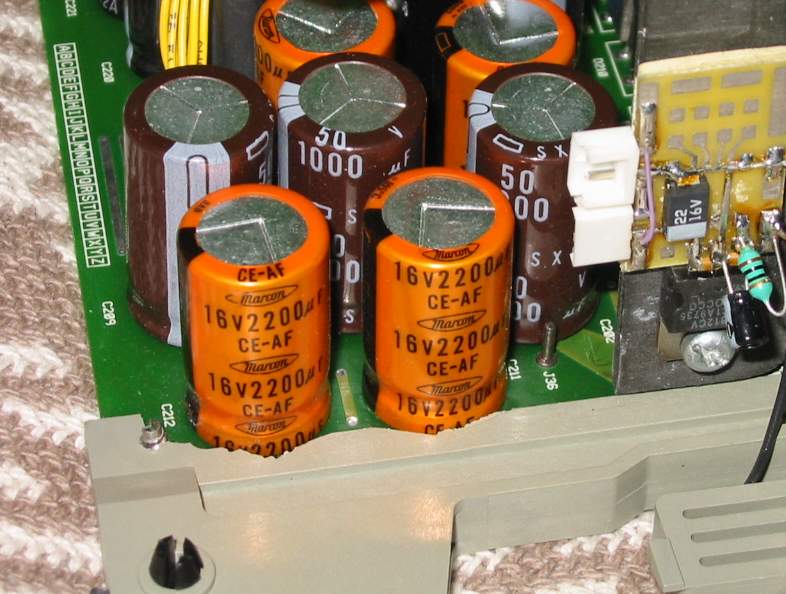
I had trouble finding the pin at first on my 1209s. It's a little different. The pin (J36) is to the right of the orange caps in this picture.
| Description: |
|
| Filesize: |
67.84 KB |
| Viewed: |
7686 Time(s) |
|
|
|
| Back to top |
|
|
macgyver655
Joined: 22 Aug 2007
Posts: 8508
|
| Posted: Fri Oct 09, 2009 5:44 pm Post subject: |
|
|
I would try the G2 board next if your throwing boards at it.
What do the led's look like on the G2 board?
|
|
| Back to top |
|
|
RVonse
Joined: 09 Mar 2006
Posts: 3152
|
| Posted: Fri Oct 09, 2009 6:48 pm Post subject: |
|
|
Ok, back now.
J36 is 18.26 volts.
All the leds on the G2 board are green and no red ones.
Everything works the same. Hardly any light output except for the blue tube flashes on startup.
|
|
| Back to top |
|
|
RVonse
Joined: 09 Mar 2006
Posts: 3152
|
| Posted: Fri Oct 09, 2009 6:52 pm Post subject: |
|
|
| Curt Palme wrote: | Check the filament voltage. Maybe they are too low? Should be 6.3 volts or so. Anything under 5.5 will greatly affect the image.
I don't think I've ever had this issue before, not unless you could ultra high hour Marquee tubes that have lost emission. That can't be the case here.
It's not:
- H deflection
-V deflection
-HV
So that leaves the video circuits that you've replaced.
Could be:
-G2 board
-SMPS
-H shift board |
I've tried the G2 and SMPS (with no luck) but not the H shift yet.
|
|
| Back to top |
|
|
macgyver655
Joined: 22 Aug 2007
Posts: 8508
|
| Posted: Fri Oct 09, 2009 6:59 pm Post subject: |
|
|
|
Have you tried the EHT?
|
|
| Back to top |
|
|
RVonse
Joined: 09 Mar 2006
Posts: 3152
|
| Posted: Fri Oct 09, 2009 7:14 pm Post subject: |
|
|
|
Yes. The EHT did not help. Have not tried the splitter or quad yet though. Don't think if I have either anyway.
|
|
| Back to top |
|
|
macgyver655
Joined: 22 Aug 2007
Posts: 8508
|
| Posted: Fri Oct 09, 2009 7:26 pm Post subject: |
|
|
So I take it you had a controller module to try.
A possibility is there may be a short on one of the output boards on the neckboard assy., and it may be drawing down a voltage. Try disconnecting the harnesses from the outputs, 1 board at a time and test.
|
|
| Back to top |
|
|
|
|





