| Author |
Message |
_in_peace_

Joined: 21 Jul 2009
Posts: 152
Location: Sweden
|
| Posted: Sat Sep 05, 2009 11:37 am Post subject: Tilt or not tilt? |
|
|
Hi!
I'm a new-bee in the business 
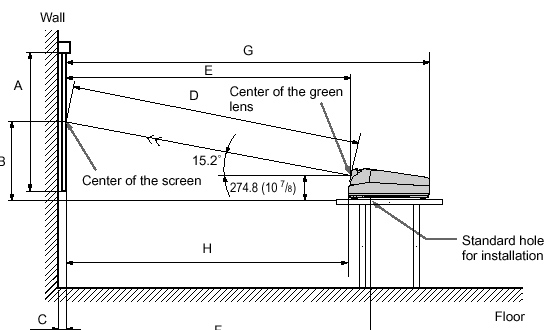
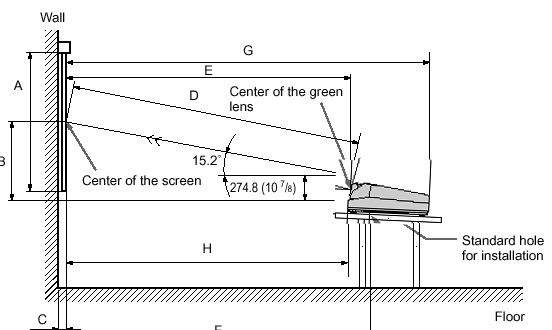
Can i tilt the projector and have it 4 inches under the end of the screen.
Or should I avoid keystone just like on a digital?
Thank's

| Description: |
|
| Filesize: |
42.49 KB |
| Viewed: |
8747 Time(s) |
|
| Description: |
|
| Filesize: |
42.97 KB |
| Viewed: |
8747 Time(s) |
|
|
|
| Back to top |
|
 |
Nashou66

Joined: 12 Jan 2007
Posts: 16171
Location: West Seneca NY
|
| Posted: Sat Sep 05, 2009 11:42 am Post subject: |
|
|
you can tilt its just that if you want even burn in of the tubes cause you might change your set up in the future then you might not have a clean tube face to work with. otherwise its fine as long as its not too much of an angle. its been discussed here before what the most of an angle you should go but as long as the keystone can cover it then thats your limit, albeit might not be the best solution.
Athanasios
_________________
Don't blame your underwear for your crooked ass~ unknown Greek philosopher
"Republicans believe every day is the Fourth of July, but the Democrats believe every day is April 15." --- President Reagan
One Smart Dog!!!
Marquee High Performance Bellows now shipping!!
Marquee Modifications and Performance Enhancement
Marquee C-element and Bellow removal
|
|
| Back to top |
|
|
ecrabb
Forum Moderator

Joined: 13 Mar 2006
Posts: 15909
Location: Utah
TV/Projector: JVC RS40, Epson 5010
|
| Posted: Sat Sep 05, 2009 2:23 pm Post subject: |
|
|
What projector? G70? 4" off the edge of the screen sounds like less than "typical" offset. What's your screen size and throw?
SC
|
|
| Back to top |
|
|
_in_peace_
Joined: 21 Jul 2009
Posts: 152
Location: Sweden
|
| Posted: Sat Sep 05, 2009 3:00 pm Post subject: |
|
|
The size of the screen... hm, i think around 94"
The distance is 2.6 m. Yes a G70 
|
|
| Back to top |
|
|
ecrabb
Forum Moderator
Joined: 13 Mar 2006
Posts: 15909
Location: Utah
TV/Projector: JVC RS40, Epson 5010
|
| Posted: Sat Sep 05, 2009 4:10 pm Post subject: |
|
|
OK, so a 94" wide screen and a 2.6m throw - that's almost identical to my setup. For reference, my offset (screen edge to green lens center) is probably pretty close to yours - maybe even a tad more. That's not far from typical.
FYI, the only way to eliminate keystone altogether is to mount (or hang) the projector such that the lenses are centered on the screen with the rear of the projector tilted. Rear-projection setups are the only installation that typically accommodates that setup well.
In short, you're fine.
SC
|
|
| Back to top |
|
|
draganm

Joined: 08 Mar 2006
Posts: 8990
Location: Colorado
|
| Posted: Sat Sep 05, 2009 4:24 pm Post subject: |
|
|
wow, a new guy who actually did his homework and asks intelligent questions. This doesn't happen here very often 
Enjoy the G70, it can throw a really good pic comparable to a $5K digital.
|
|
| Back to top |
|
|
ecrabb
Forum Moderator
Joined: 13 Mar 2006
Posts: 15909
Location: Utah
TV/Projector: JVC RS40, Epson 5010
|
| Posted: Sat Sep 05, 2009 5:16 pm Post subject: |
|
|
Yeah, that impressed me, too.
Hey, wait a second... Did you just compliment a guy on his G70? Uh oh. I need to PM Kal and tell him somebody hacked Dragan's account. 
SC
|
|
| Back to top |
|
|
dturco

Joined: 06 Feb 2009
Posts: 3778
Location: Eastern Shore Maryland
TV/Projector: Runco DLP VX-3000i Marquee 9500 parts doner
|
| Posted: Sat Sep 05, 2009 5:38 pm Post subject: |
|
|
| ecrabb wrote: | Yeah, that impressed me, too.
Hey, wait a second... Did you just compliment a guy on his G70? Uh oh. I need to PM Kal and tell him somebody hacked Dragan's account.
SC |
Yeah, that can't be Dragan, forget the G-70 part, it's the compliment that is the dead give away that someone else is using his account. 
_________________
Firefly rules. Can't stop the signal.
http://www.hulu.com/firefly
|
|
| Back to top |
|
|
draganm
Joined: 08 Mar 2006
Posts: 8990
Location: Colorado
|
| Posted: Sat Sep 05, 2009 10:39 pm Post subject: |
|
|
|
hey the guy already bought, it's presumably working, so why pee on his parade. If it breaks down, which it probably will, then I'll be there to recomend a Marquee.
|
|
| Back to top |
|
|
ecrabb
Forum Moderator
Joined: 13 Mar 2006
Posts: 15909
Location: Utah
TV/Projector: JVC RS40, Epson 5010
|
| Posted: Sat Sep 05, 2009 10:46 pm Post subject: |
|
|
| draganm wrote: | | If it breaks down, which it probably will, then I'll be there to recomend a Marquee. |
Stand down. It's him.
SC
|
|
| Back to top |
|
|
_in_peace_
Joined: 21 Jul 2009
Posts: 152
Location: Sweden
|
| Posted: Sun Sep 06, 2009 1:22 pm Post subject: Re: Tilt or not tilt? |
|
|
hehe, who is dragan?
thanx fot the answers
|
|
| Back to top |
|
|
RobertMfromLI

Joined: 29 Jun 2009
Posts: 114
Location: West Islip, NY
|
| Posted: Sun Sep 06, 2009 4:27 pm Post subject: |
|
|
in peace:
From what I understand, yes, you can tilt the projector. Yes it will make adjusting it more difficult, and yes, it causes uneven wear (or more accurately non-rectangular wear) on the tube surfaces.
And from what else I have gleaned, it is also more difficult on the projector itself as the guns are bending the image to fit the image rectangularly on the screen. This also seems to cause other issues with the image as pixels are getting "squished" or expanded to make this happen. I could be wrong on this, it's been a while since I have read up on it, but that is my rememberance of what I read.
On a related note, I have a PJ that had a couple failing boards (they worked fine, but solder points were definitely on their way out). When I did something similar, the PJ would complain and report board failures until I restored the settings to midpoints. Shortly afterwards, the boards entirely failed (well, their solder points anyway - easy enough to fix). I am guessing that the greater current draw on the failing connections made them entirely fail. I'd guess that such a continued strain can cause such solder points (good, bad or otherwise) to heat up to the point that such failure will occur at a later date. I am also guessing that such a failure depends on how much of a tilt you are adjusting for (ie: a little or moderate tilt may never cause the problem - while a very large tilt may). Also, my PJ models (BG500/BG800) may have been more susceptible to such failures.
And (everyone) as always, I am hoping for any corrections to my understanding of this - I've got no problems being wrong, as long as someone points it out so next time I am not wrong.
_________________
Kirk's 5 Year Mission continues at Star Trek New Voyages: Phase 2
Last edited by RobertMfromLI on Sun Sep 06, 2009 4:29 pm; edited 1 time in total
|
|
| Back to top |
|
|
AnalogRocks
Forum Moderator

Joined: 08 Mar 2006
Posts: 26706
Location: Toronto, Ontario, Canada
TV/Projector: Sony 1252Q, AMPRO 4000G
|
| Posted: Sun Sep 06, 2009 4:29 pm Post subject: |
|
|
Why not tilt the screen to make it easier for the projector?
_________________
Tech support for nothing
CRT.
HD done right!
|
|
| Back to top |
|
|
matteomo
Joined: 23 Dec 2007
Posts: 11
|
| Posted: Mon Sep 07, 2009 12:17 pm Post subject: |
|
|
| _in_peace_ wrote: | The size of the screen... hm, i think around 94"
The distance is 2.6 m. Yes a G70 |
94" is screen width or diagonal?
|
|
| Back to top |
|
|
_in_peace_
Joined: 21 Jul 2009
Posts: 152
Location: Sweden
|
| Posted: Mon Sep 07, 2009 12:46 pm Post subject: |
|
|
| Quote: | | 94" is screen width or diagonal? |
The issue is how high I should put the projector?
The white on the screen starts at ~ 41cm / 16" from the floor. I will go for no tilt..
I got some spare parts for future black outs.. 2800h on the machine and ~15h on the green and 600h on the other two. I cross my finger on this one cause my BenQ w9000 broke down 3 times in one year but on that unit i have warranty
|
|
| Back to top |
|
|
matteomo
Joined: 23 Dec 2007
Posts: 11
|
| Posted: Mon Sep 07, 2009 12:59 pm Post subject: |
|
|
| _in_peace_ wrote: | | Quote: | | 94" is screen width or diagonal? |
The issue is how high I should put the projector?
|
OK but....94" is screen width or diagonal?
|
|
| Back to top |
|
|
_in_peace_
Joined: 21 Jul 2009
Posts: 152
Location: Sweden
|
| Posted: Mon Sep 07, 2009 1:09 pm Post subject: |
|
|
| matteomo wrote: | | _in_peace_ wrote: | | Quote: | | 94" is screen width or diagonal? |
The issue is how high I should put the projector?
|
OK but....94" is screen width or diagonal? |
haha sorry bout that. Its diagonal..
|
|
| Back to top |
|
|
ecrabb
Forum Moderator
Joined: 13 Mar 2006
Posts: 15909
Location: Utah
TV/Projector: JVC RS40, Epson 5010
|
| Posted: Mon Sep 07, 2009 3:33 pm Post subject: |
|
|
| _in_peace_ wrote: | | haha sorry bout that. Its (94") diagonal.. |
Oh, wow - I missed that... I "assumed" when I shouldn't have.
Your throw is way too long for your screen size. That will have the net effect of making your projector dimmer, less sharp, and will wear your phosphor sooner because you'll have to drive brightness harder to compensate.
As a point of reference, my throw is similar to yours, but my screen is 110" diagonal - 17% larger.
SC
|
|
| Back to top |
|
|
ecrabb
Forum Moderator
Joined: 13 Mar 2006
Posts: 15909
Location: Utah
TV/Projector: JVC RS40, Epson 5010
|
| Posted: Mon Sep 07, 2009 3:47 pm Post subject: |
|
|
| RobertMfromLI wrote: | From what I understand, yes, you can tilt the projector. Yes it will make adjusting it more difficult, and yes, it causes uneven wear (or more accurately non-rectangular wear) on the tube surfaces.
And from what else I have gleaned, it is also more difficult on the projector itself as the guns are bending the image to fit the image rectangularly on the screen. This also seems to cause other issues with the image as pixels are getting "squished" or expanded to make this happen. I could be wrong on this, it's been a while since I have read up on it, but that is my rememberance of what I read. |
That's all true, but it's also the nature of the beast. As I explained earlier, unless you're mounting the projector centered on the screen (both horizontally AND vertically), there will be vertical keystone dialed in. Problem is, almost no front projection installation can be done that way because it puts the projector smack dab in the middle of the room - horizontally AND vertically. A very few people can get by with it if they put the projector on a stand about 4-feet tall, directly behind and just over the head of the viewer in the sweet spot. I'll also point out thought even in the zero-offset configuration, you'll have horizontal keystone dialed into both the red and blue CRTs.
The other 95% of us floor- or ceiling-mount our projectors and have an offset with keystone compensation.
Check your manuals for your particular projector's nominal throw offset.
SC
|
|
| Back to top |
|
|
ecrabb
Forum Moderator
Joined: 13 Mar 2006
Posts: 15909
Location: Utah
TV/Projector: JVC RS40, Epson 5010
|
| Posted: Mon Sep 07, 2009 3:54 pm Post subject: |
|
|
A couple more things...
1) My G70 is about 120" from my 96" wide screen, so the throw is about 1.25x screen width. That's slightly inside the PJcalc-recommended distance, because I wanted to be a little more conservative with the raster-maximizing, because I wanted excellent corner focus.
2) My machine is dropped from the ceiling at the front, and raised at the rear to aim tube-center at screen center.
3) I don't remember what my offset is, but I think my green lens-center is probably 6 inches or so outside the screen border. Don't recall what throw angle that represents.
Hope that helps.
SC
|
|
| Back to top |
|
|
|
|




