| Author |
Message |
jcoles
Joined: 17 Jul 2008
Posts: 40
|
| Posted: Mon Jul 20, 2009 12:30 pm Post subject: Marquee 9500LC resolution |
|
|
Hi,
I am running an HTPC out via a DVI connection to RGB input into a Marquee 9500. How can I tell what resolution I'm getting from the projector? I have a second input from a Dish HD receiver that is either 720P or 1080i, depending on how I configure the receiver.
Thanks
|
|
| Back to top |
|
 |
Nashou66

Joined: 12 Jan 2007
Posts: 16171
Location: West Seneca NY
|
|
| Back to top |
|
|
jcoles
Joined: 17 Jul 2008
Posts: 40
|
| Posted: Mon Jul 20, 2009 1:27 pm Post subject: |
|
|
|
So what you are saying is that the projector should be able to handle a signal from a bluray player, for instance, without any special configuration being done ahead of time? I ask this because I tried an HDFury2 connected from a bluray player directly to the RGB cable going to the projector and got a picture "on acid".... Rainbow moire patterns.
|
|
| Back to top |
|
|
dturco

Joined: 06 Feb 2009
Posts: 3778
Location: Eastern Shore Maryland
TV/Projector: Runco DLP VX-3000i Marquee 9500 parts doner
|
| Posted: Mon Jul 20, 2009 2:03 pm Post subject: |
|
|
| jcoles wrote: | | So what you are saying is that the projector should be able to handle a signal from a bluray player, for instance, without any special configuration being done ahead of time? I ask this because I tried an HDFury2 connected from a bluray player directly to the RGB cable going to the projector and got a picture "on acid".... Rainbow moire patterns. |
Most likely the Blu-Ray player is set to 24 hz. Marquees will not sync on that refresh rate. To turn off the 24hz go to the players menu select video output turn 24hz off.
The P/J could have auto lock turned off also but that is far less likely.
_________________
Firefly rules. Can't stop the signal.
http://www.hulu.com/firefly
|
|
| Back to top |
|
|
jcoles
Joined: 17 Jul 2008
Posts: 40
|
| Posted: Mon Jul 20, 2009 2:18 pm Post subject: |
|
|
|
No, the bluray player was set to 60Hz
|
|
| Back to top |
|
|
Nashou66
Joined: 12 Jan 2007
Posts: 16171
Location: West Seneca NY
|
|
| Back to top |
|
|
ecrabb
Forum Moderator

Joined: 13 Mar 2006
Posts: 15909
Location: Utah
TV/Projector: JVC RS40, Epson 5010
|
| Posted: Mon Jul 20, 2009 2:38 pm Post subject: |
|
|
Guys, the "picture on acid rainbow moire patterns" doesn't sound like a refresh rate issue - that sounds like a source/display (in this case, the HD Fury) handshake or rendering error. I get that once every month or two between my DirecTV box and my Olevia LCD in the living room. It usually happens when switch inputs, then come back to HDMI. Power-cycling the TV usually corrects it. There have been a couple of threads in the HD Fury forum with photos.
SC
|
|
| Back to top |
|
|
jcoles
Joined: 17 Jul 2008
Posts: 40
|
| Posted: Mon Jul 20, 2009 3:21 pm Post subject: |
|
|
|
I should be getting a new HDFury today. Hopefully the prior unit was bad, because I switched out both the bluray player and HDMI cable, but still had a problem. There are no other links in the chain. My only other thought was that it had something to do with the projector. Will let you know.
|
|
| Back to top |
|
|
Sparky015

Joined: 12 May 2009
Posts: 1185
Location: Cleveland / Akron, OH
|
| Posted: Mon Jul 20, 2009 6:57 pm Post subject: |
|
|
Could it be that since a new resolution is sent to the Marquee, that the convergence is off? Is this the first time sending 1080i to the projector? I imagine the pj will react differently between a BR through a HD Fury and a HTPC.
_________________
~Paul
|
|
| Back to top |
|
|
jcoles
Joined: 17 Jul 2008
Posts: 40
|
| Posted: Mon Jul 20, 2009 7:21 pm Post subject: |
|
|
|
No, this is wavy, rainbow video, not a convergence problem. Get 1080i just fine from my HD satellite receiver.
|
|
| Back to top |
|
|
jcoles
Joined: 17 Jul 2008
Posts: 40
|
| Posted: Tue Jul 21, 2009 1:04 am Post subject: |
|
|
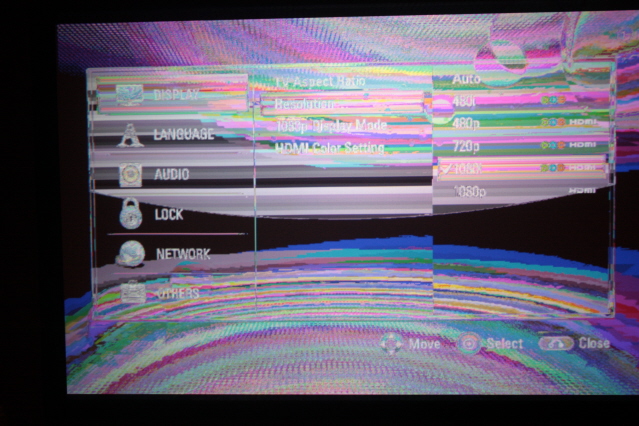
Well, the moment of truth came. I got my new HDFury unit and low and behold...the same problem exists. I will try to add a picture of my screen.
The first picture is with the BD player outputting at 720P or 1080I
The second picture is at 1080P. The message from the projector is "vertical synch out of range"
| Description: |
| BD player @ 1080P. Says vertical synch out of range |
|
| Filesize: |
111.58 KB |
| Viewed: |
12344 Time(s) |

|
| Description: |
| BD player at 720P or 1080i setting |
|
| Filesize: |
192.63 KB |
| Viewed: |
12344 Time(s) |
|
|
|
| Back to top |
|
|
jcoles
Joined: 17 Jul 2008
Posts: 40
|
| Posted: Tue Jul 21, 2009 1:20 am Post subject: |
|
|
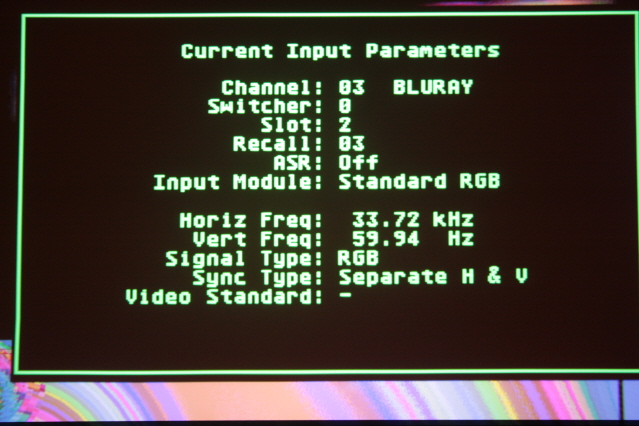
Does this help? When I press ** on the Marquee, this is the screen info
| Description: |
|
| Filesize: |
150.17 KB |
| Viewed: |
12340 Time(s) |
|
|
|
| Back to top |
|
|
Nashou66
Joined: 12 Jan 2007
Posts: 16171
Location: West Seneca NY
|
|
| Back to top |
|
|
Mark_A_W
Joined: 15 Mar 2006
Posts: 3068
Location: Sunny Melbourne Australia
|
| Posted: Tue Jul 21, 2009 2:13 am Post subject: |
|
|
| jcoles wrote: | | So what you are saying is that the projector should be able to handle a signal from a bluray player, for instance, without any special configuration being done ahead of time? I ask this because I tried an HDFury2 connected from a bluray player directly to the RGB cable going to the projector and got a picture "on acid".... Rainbow moire patterns. |
Did you have the H and V cables round the wrong way when you tried that?
Coz that's what you get when they are swapped...it's really cool and trippy.
|
|
| Back to top |
|
|
Mr. Green

Joined: 23 Feb 2007
Posts: 1394
Location: Calgary
TV/Projector: Marquee 9501LC / NEC 9PG+
|
| Posted: Tue Jul 21, 2009 2:16 am Post subject: |
|
|
| Mark_A_W wrote: | | jcoles wrote: | | So what you are saying is that the projector should be able to handle a signal from a bluray player, for instance, without any special configuration being done ahead of time? I ask this because I tried an HDFury2 connected from a bluray player directly to the RGB cable going to the projector and got a picture "on acid".... Rainbow moire patterns. |
Did you have the H and V cables round the wrong way when you tried that?
Coz that's what you get when they are swapped...it's really cool and trippy. |
Wouldn't that mess up the menu's too?
_________________
You can be young only once but, you can be immature forever.
Current Projector Marquee9501LC with PS3 (BLu-Ray) at 1080P LOVE IT! Screen is an Elunevision 120" 4:3 (2.4 gain - no hotspots). (also own a NEC 9PG+)
|
|
| Back to top |
|
|
Mark_A_W
Joined: 15 Mar 2006
Posts: 3068
Location: Sunny Melbourne Australia
|
| Posted: Tue Jul 21, 2009 2:20 am Post subject: |
|
|
|
Dunno on a Marquee.
|
|
| Back to top |
|
|
jcoles
Joined: 17 Jul 2008
Posts: 40
|
| Posted: Tue Jul 21, 2009 3:14 am Post subject: |
|
|
|
I just tried my HDFury unit on another persons Marquee unit and it worked fine. So, my problem is with the Marquee.
|
|
| Back to top |
|
|
Nashou66
Joined: 12 Jan 2007
Posts: 16171
Location: West Seneca NY
|
|
| Back to top |
|
|
mp20748
Joined: 12 Sep 2006
Posts: 5689
Location: Maryland
TV/Projector: 9500LC Ultra / Super 02 and 03 VIM
|
| Posted: Tue Jul 21, 2009 9:07 am Post subject: |
|
|
I'll have in my hands today that same FurryII that did not work on one Marquee, but worked fine on another.
I was suspecting that there may be a problem with the projector. Now that's confirmed, when I get around to it I'll look into what's causing it and post back with my findings.
I'll try and be mindful to start a thread on my mod forum on this problem. And since it's a Marquee and not a Fury problem, we'll discuss it there.
Thanks Jeff!
|
|
| Back to top |
|
|
David_Web
Joined: 02 May 2007
Posts: 418
Location: Sweden
|
| Posted: Tue Jul 21, 2009 12:29 pm Post subject: |
|
|
That does not look like a Marquee problem. At least not the pictures posted.
"colors" clipping way out of gamut. You can clearly see that the nature if the artifact is digital.
Reminds me of how some old games looked when something went wrong.
And I wish the marquee had the ability to manage colors. But it does not. Not even when faulty.
I see no way for a Marquee to distort a normal image to that shown in the screenshot.
_________________
SNR of people are ridiculously low.
|
|
| Back to top |
|
|
|
|





