|
As this forum is rarely used anymore, we've locked it. Feel free to browse and read. Questions? Please reach out to us directly. Cheers! |

|
 |
|
|
| Author |
Message |
chadd

Joined: 09 Dec 2009
Posts: 46
|
| Posted: Fri Feb 19, 2010 7:29 am Post subject: |
|
|
downloaded and re-ran with same results.
english is the default language.
here's my EAC3to Info:
| Code: |
eac3to (v3.17) is up to date
Nero Audio Decoder (Nero 6 or older) doesn't seem to be installed
http://www.nero.com/eng/store-blu-ray.html
CAUTION: You need Nero 7. Nero 8 won't work with eac3to.
ArcSoft DTS Decoder (1.1.0.0) works fine
Sonic Audio Decoder (3.17.0.0) doesn't seem to be installed
Haali Matroska Muxer (2009-01-10) is installed
There's a new version (2009-12-19) available
http://haali.net/mkv
Nero AAC Encoder could not be located
http://www.nero.com/eng/nero-aac-codec.html
Copy NeroAacEnc.exe to the eac3to or to the Windows folder.
Surcode DTS Encoder doesn't seem to be installed
http://www.surcode.com
MkvToolnix (2.9.8.0, release version) is installed
There's a new release version (3.2.0.0) available
http://www.bunkus.org/videotools/mkvtoolnix
There's a new beta version (3.2.0.0, 2010-02-17) available
http://www.bunkus.org/videotools/mkvtoolnix/win32/pre |
_________________
landchark!
Last edited by chadd on Fri Feb 19, 2010 7:31 am; edited 1 time in total
|
|
| Back to top |
|
 |
chadd
Joined: 09 Dec 2009
Posts: 46
|
| Posted: Fri Feb 19, 2010 7:30 am Post subject: |
|
|
repost.
i blame beer.
_________________
landchark!
|
|
| Back to top |
|
|
jmike
Joined: 15 Feb 2010
Posts: 5
|
| Posted: Fri Feb 19, 2010 3:03 pm Post subject: |
|
|
have a problem with core audio and the chapters.txt file.
Have a 5 series video card that can bitstream HD audio, so made the mkv with hd audio with core track. The Hd audio was fine, but didnt seem to have the core track.
Tried the command line and hd audio with core, got these files
MyMKVFile - 3 DTS Master.dtshd
MyMKVFile 1080p h264.mkv
MyMKVFile - Chapters.txt
MyMKVFile - 5 AC3 English 2_0 channels 192kbps 48khz.ac3 (audio commentary)
and some MyMKVFile - 12 English Subtitle.sup files. used BDSup2Sub and got the idx, sub files.
When i muxed them together i got filetype error, code 2 with chapters.txt.
So left that one out, but core audio is still missing.
Audio #1
ID : 2
Format : DTS
Format/Info : Digital Theater Systems
Format profile : MA
Codec ID : A_DTS
Duration : 2h 46mn
Bit rate mode : Variable
Channel(s) : 6 channels
Channel positions : Front: L C R, Surround: L R, LFE
Sampling rate : 48.0 KHz
Resolution : 24 bits
Audio #2
ID : 3
Format : AC-3
Format/Info : Audio Coding 3
Codec ID : A_AC3
Duration : 2h 46mn
Bit rate mode : Constant
Bit rate : 192 Kbps
Channel(s) : 2 channels
Channel positions : L R
Sampling rate : 48.0 KHz
Stream size : 229 MiB (1%)
|
|
| Back to top |
|
|
MikeEby

Joined: 24 Jun 2007
Posts: 5237
Location: Osceola, Indiana
|
| Posted: Fri Feb 19, 2010 3:49 pm Post subject: |
|
|
| jmike wrote: | have a problem with core audio and the chapters.txt file.
Have a 5 series video card that can bitstream HD audio, so made the mkv with hd audio with core track. The Hd audio was fine, but didnt seem to have the core track.
Tried the command line and hd audio with core, got these files
MyMKVFile - 3 DTS Master.dtshd
MyMKVFile 1080p h264.mkv
MyMKVFile - Chapters.txt
MyMKVFile - 5 AC3 English 2_0 channels 192kbps 48khz.ac3 (audio commentary)
and some MyMKVFile - 12 English Subtitle.sup files. used BDSup2Sub and got the idx, sub files.
When i muxed them together i got filetype error, code 2 with chapters.txt.
So left that one out, but core audio is still missing.
Audio #1
ID : 2
Format : DTS
Format/Info : Digital Theater Systems
Format profile : MA
Codec ID : A_DTS
Duration : 2h 46mn
Bit rate mode : Variable
Channel(s) : 6 channels
Channel positions : Front: L C R, Surround: L R, LFE
Sampling rate : 48.0 KHz
Resolution : 24 bits
Audio #2
ID : 3
Format : AC-3
Format/Info : Audio Coding 3
Codec ID : A_AC3
Duration : 2h 46mn
Bit rate mode : Constant
Bit rate : 192 Kbps
Channel(s) : 2 channels
Channel positions : L R
Sampling rate : 48.0 KHz
Stream size : 229 MiB (1%) |
Can you do this?...With the latest version press the command line button with the playlist selected you want to rip. Wait for the command line box to appear. Then close the box. Next go to menu select "Tool">"View Last eac3to Run". Paste what's in the window into the forum. I can then run your eac3to output in my debugger to find out what's going on.
Mike
_________________
Doing HD since the last century!
Last edited by MikeEby on Fri Feb 19, 2010 3:53 pm; edited 2 times in total
|
|
| Back to top |
|
|
MikeEby
Joined: 24 Jun 2007
Posts: 5237
Location: Osceola, Indiana
|
| Posted: Fri Feb 19, 2010 3:50 pm Post subject: |
|
|
| chadd wrote: | downloaded and re-ran with same results.
english is the default language.
here's my EAC3to Info:
| Code: |
eac3to (v3.17) is up to date
Nero Audio Decoder (Nero 6 or older) doesn't seem to be installed
http://www.nero.com/eng/store-blu-ray.html
CAUTION: You need Nero 7. Nero 8 won't work with eac3to.
ArcSoft DTS Decoder (1.1.0.0) works fine
Sonic Audio Decoder (3.17.0.0) doesn't seem to be installed
Haali Matroska Muxer (2009-01-10) is installed
There's a new version (2009-12-19) available
http://haali.net/mkv
Nero AAC Encoder could not be located
http://www.nero.com/eng/nero-aac-codec.html
Copy NeroAacEnc.exe to the eac3to or to the Windows folder.
Surcode DTS Encoder doesn't seem to be installed
http://www.surcode.com
MkvToolnix (2.9.8.0, release version) is installed
There's a new release version (3.2.0.0) available
http://www.bunkus.org/videotools/mkvtoolnix
There's a new beta version (3.2.0.0, 2010-02-17) available
http://www.bunkus.org/videotools/mkvtoolnix/win32/pre |
|
I don't see anything wrong there... 
Can you do this?...With the latest version press the command line button with the playlist selected you want to rip. Wait for the command line box to appear. Then close the box. Next go to menu select "Tool">"View Last eac3to Run". Paste what's in the window into the forum. I can then run your eac3to output in my debugger to find out what's going on.
Mike
_________________
Doing HD since the last century!
|
|
| Back to top |
|
|
jmike
Joined: 15 Feb 2010
Posts: 5
|
| Posted: Fri Feb 19, 2010 4:02 pm Post subject: |
|
|
| MikeEby wrote: |
Can you do this?...With the latest version press the command line button with the playlist selected you want to rip. Wait for the command line box to appear. Then close the box. Next go to menu select "Tool">"View Last eac3to Run". Paste what's in the window into the forum. I can then run your eac3to output in my debugger to find out what's going on.
Mike |
here:
eac3to v3.17
command line: "I:\Video tools\Another EAC3to GUI Plus blu-ray m2ts\eac3to\eac3to.exe" 1) -log="C:\Program Files (x86)\ACD\Another EAC3to GUI\log.txt"
------------------------------------------------------------------------------
M2TS, 1 video track, 3 audio tracks, 14 subtitle tracks, 2:46:35, 24p /1.001
1: Chapters, 24 chapters
2: h264/AVC, 1080p24 /1.001 (16:9)
3: DTS Master Audio, English, 5.1 channels, 24 bits, 48khz
(core: DTS, 5.1 channels, 24 bits, 1509kbps, 48khz)
4: AC3 Surround, Spanish, 2.0 channels, 320kbps, 48khz
5: AC3, English, 2.0 channels, 192kbps, 48khz
6: Subtitle (PGS), English
7: Subtitle (PGS), Spanish
8: Subtitle (PGS), Swedish
9: Subtitle (PGS), Norwegian
10: Subtitle (PGS), Danish
11: Subtitle (PGS), Finnish
12: Subtitle (PGS), English
13: Subtitle (PGS), Spanish
14: Subtitle (PGS), Swedish
15: Subtitle (PGS), Norwegian
16: Subtitle (PGS), Danish
17: Subtitle (PGS), Finnish
18: Subtitle (PGS), English
19: Subtitle (PGS), Spanish
Tried to just process audio, hd with core and commentary. This time i got a MyMKVFile - 3 DTS Master.dtshd with only dts core.
http://pastebin.com/m553804f
so to get HD with core first run in command mode with hd audio, then in command mode with only hd with core. Then mux them together.
Still the error with chapters.txt file
Last edited by jmike on Fri Feb 19, 2010 4:14 pm; edited 1 time in total
|
|
| Back to top |
|
|
chadd
Joined: 09 Dec 2009
Posts: 46
|
| Posted: Fri Feb 19, 2010 4:13 pm Post subject: |
|
|
| MikeEby wrote: |
I don't see anything wrong there...
Can you do this?...With the latest version press the command line button with the playlist selected you want to rip. Wait for the command line box to appear. Then close the box. Next go to menu select "Tool">"View Last eac3to Run". Paste what's in the window into the forum. I can then run your eac3to output in my debugger to find out what's going on.
Mike |
will do, i'll try that tonight after work.
_________________
landchark!
|
|
| Back to top |
|
|
MikeEby
Joined: 24 Jun 2007
Posts: 5237
Location: Osceola, Indiana
|
| Posted: Fri Feb 19, 2010 4:44 pm Post subject: |
|
|
| jmike wrote: |
Tried to just process audio, hd with core and commentary. This time i got a MyMKVFile - 3 DTS Master.dtshd with only dts core.
http://pastebin.com/m553804f
so to get HD with core first run in command mode with hd audio, then in command mode with only hd with core. Then mux them together.
Still the error with chapters.txt file |
This seems a lot like what I was getting when I tried the lastest version of Haali.
Download and install the version linked below, this is a version with AAC audio conversion I've been testing. Then click on Tools>EAC3to Info and paste the results here. This should tell you what the version of Haali it's using.
http://www.acdnow.com/AnotherEAC3toGUI/AnotherEAC3toGUISetupAACTest3.zip
Mike
_________________
Doing HD since the last century!
|
|
| Back to top |
|
|
jmike
Joined: 15 Feb 2010
Posts: 5
|
|
| Back to top |
|
|
MikeEby
Joined: 24 Jun 2007
Posts: 5237
Location: Osceola, Indiana
|
| Posted: Fri Feb 19, 2010 5:15 pm Post subject: |
|
|
I don't see anything wrong there.....I just want to fully understand the problem... When you add the batch and run fully automatic demux and remux you are only getting the HD track without the core track? Are you using Media info to determine what tracks on in the final file?
http://mediainfo.sourceforge.net/en
You also have a problem with chapters?...Is that on the fully automatic demux/remux?
Mike
_________________
Doing HD since the last century!
|
|
| Back to top |
|
|
jmike
Joined: 15 Feb 2010
Posts: 5
|
| Posted: Fri Feb 19, 2010 5:34 pm Post subject: |
|
|
yes, those two problems.
The core track is not there either selecting hd with core or using command line.
To get core track, use command line then only select hd and core. That produces a DTS Master.dtshd file that only contains core dts track.
So to sum up, selecting video + hd and core produces mkv and audio with only hd.
selecting hd audio and core without video produces the core audio.
The issue with chapters.txt is that mkv merge produces an error with invalid filetype and error code 2.
Also checked with mediainfo
|
|
| Back to top |
|
|
MikeEby
Joined: 24 Jun 2007
Posts: 5237
Location: Osceola, Indiana
|
| Posted: Fri Feb 19, 2010 7:43 pm Post subject: |
|
|
| jmike wrote: | yes, those two problems.
The core track is not there either selecting hd with core or using command line.
To get core track, use command line then only select hd and core. That produces a DTS Master.dtshd file that only contains core dts track.
So to sum up, selecting video + hd and core produces mkv and audio with only hd.
selecting hd audio and core without video produces the core audio.
The issue with chapters.txt is that mkv merge produces an error with invalid filetype and error code 2.
Also checked with mediainfo |
Later this evening I will see if I can reproduce the problem with what you posted.
BTW are you running 64 Bit? I really need to get a 64bit test setup going, also what movie is it?
Mike
_________________
Doing HD since the last century!
|
|
| Back to top |
|
|
jmike
Joined: 15 Feb 2010
Posts: 5
|
| Posted: Fri Feb 19, 2010 8:07 pm Post subject: |
|
|
win 7 64 bit yes.
Gangs of New York (remastered)
i muxed in core track, so that seems ok. Dont know how important chapters are.
|
|
| Back to top |
|
|
chadd
Joined: 09 Dec 2009
Posts: 46
|
| Posted: Sat Feb 20, 2010 6:38 pm Post subject: |
|
|
| MikeEby wrote: |
I don't see anything wrong there...
Can you do this?...With the latest version press the command line button with the playlist selected you want to rip. Wait for the command line box to appear. Then close the box. Next go to menu select "Tool">"View Last eac3to Run". Paste what's in the window into the forum. I can then run your eac3to output in my debugger to find out what's going on.
Mike |
when i press the command line button, it analyzes, but the command line box never appears.
i get the "manually select audio track" popup first.
this is what's in the "last eac3to" log:
| Code: |
eac3to v3.17
command line: "C:\rip\eac3to\eac3to.exe" 1) -log="C:\Program Files (x86)\ACD\Another EAC3to GUI\log.txt" |
_________________
landchark!
|
|
| Back to top |
|
|
chadd
Joined: 09 Dec 2009
Posts: 46
|
| Posted: Sat Feb 20, 2010 7:41 pm Post subject: |
|
|
just ripped another bluray with no issues, so i'm thinking it has to be something specific to that 'run fatboy run' disc
_________________
landchark!
|
|
| Back to top |
|
|
blackcell
Joined: 24 Feb 2010
Posts: 1
|
| Posted: Wed Feb 24, 2010 6:59 am Post subject: |
|
|
| jmike wrote: | yes, those two problems.
The core track is not there either selecting hd with core or using command line.
To get core track, use command line then only select hd and core. That produces a DTS Master.dtshd file that only contains core dts track.
So to sum up, selecting video + hd and core produces mkv and audio with only hd.
selecting hd audio and core without video produces the core audio.
The issue with chapters.txt is that mkv merge produces an error with invalid filetype and error code 2.
Also checked with mediainfo |
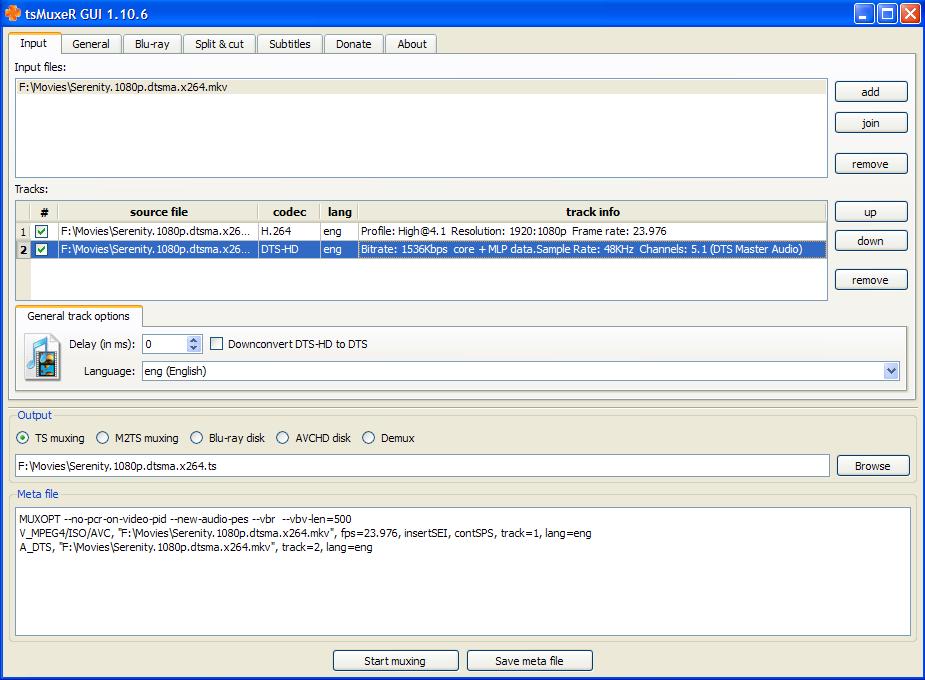
If I may I'd like to possibly shed some light on this issue with a question as I'm still trying to get my head wrapped around these HD audio formats. First, I don't think Mike's tool has an issue with DTS-HD (MA) + Core unless you want the Core as a separate track where you could select either one in a player. However, if you're only wanting to include the Core as a separate track for equipment compatibility purposes then I don't see any issue with the tool because the Core is included  . In my case I only run the "Add batch" and don't use the command line method. . In my case I only run the "Add batch" and don't use the command line method.
Here's why. Below is the audio portion using MediaInfo from my Serenity MKV created by Mike's tool.
Audio
ID : 2
Format : DTS
Format/Info : Digital Theater Systems
Format profile : MA
Codec ID : A_DTS
Duration : 1h 59mn
Bit rate mode : Variable
Channel(s) : 6 channels
Channel positions : Front: L C R, Surround: L R, LFE
Sampling rate : 48.0 KHz
Resolution : 24 bits
Title : DTSMA
Language : English
Notice the bitrate shows "variable". I would think MediaInfo should show it as variable/1510 Kbps similar to what MediaInfo shows for TrueHD + its Core of AC-3. Might be a MediaInfo bug or...who knows.
Anyways, here's the partial Eac3to GUI log:
eac3to v3.17
command line: "C:\Tools\RipBot\Tools\eac3to\eac3to.exe" "D:\BDMV\STREAM" 1) 1: "C:\tmp\Serenity - Chapters.txt" 2: "C:\tmp\Serenity 1080p VC-1.mkv" 5: "C:\tmp\Serenity - 5 DTS Master.dtshd" 17: "C:\tmp\Serenity - 17 English Subtitle.sup" 34: "C:\tmp\Serenity - 34 English Subtitle.sup" 39: "C:\tmp\Serenity - 39 English Subtitle.sup" 45: "C:\tmp\Serenity - 45 English Subtitle.sup" -log="C:\tmp\Serenity - Log.txt"
------------------------------------------------------------------------------
M2TS, 3 video tracks, 12 audio tracks, 32 subtitle tracks, 1:59:02, 24p /1.001
1: Chapters, 20 chapters
2: VC-1, 1080p24 /1.001 (16:9)
3: VC-1, 480p24 /1.001 (3:2)
4: VC-1, 480p24 /1.001 (3:2)
5: DTS Master Audio, English, 5.1 channels, 24 bits, 48khz
(core: DTS, 5.1 channels, 24 bits, 1509kbps, 48khz)
6: DTS, Spanish, 5.1 channels, 24 bits, 768kbps, 48khz
Next is the MKV file imported into TSmuxer (image attached). It has both DTS-MA + Core which allows the Core to automatically play on my analog setup. I'm not sure how Mike's tool is muxing both Audio tracks into one but, I think this is by design for DTS-HD (MA) unless you ONLY want the Core.?? So, for me this is a feature and not an issue. Please correct me if I'm completely confused or have confused the whole issue here.
| Description: |
|
| Filesize: |
95.12 KB |
| Viewed: |
19718 Time(s) |
|
|
|
| Back to top |
|
|
okashira
Joined: 10 Feb 2010
Posts: 9
|
| Posted: Thu Feb 25, 2010 1:43 am Post subject: |
|
|
Mike;
Just want to check in and while I haven't put much use into it yet, the AAC version hasn't failed me once yet. Thanks again... and are you planning on releasing it?
I picked up an Radeon 5770 and I decided to play with some HD audio tracks too. I need to mux a few movies with DTS-HD MA and AAC and figure out a way to ABX them while switching between bitstream of DTSHDMA to my Onkyo 606 and AAC over HDMI.
I would like to have a way to mux the hd audio track without the core as I've no use for it and it may save up to 1gb per movie.... You know how I am on my space efficiency 
Oh, and I use 64-bit Windows 7 exclusivly.
| MikeEby wrote: | | jmike wrote: | yes, those two problems.
The core track is not there either selecting hd with core or using command line.
To get core track, use command line then only select hd and core. That produces a DTS Master.dtshd file that only contains core dts track.
So to sum up, selecting video + hd and core produces mkv and audio with only hd.
selecting hd audio and core without video produces the core audio.
The issue with chapters.txt is that mkv merge produces an error with invalid filetype and error code 2.
Also checked with mediainfo |
Later this evening I will see if I can reproduce the problem with what you posted.
BTW are you running 64 Bit? I really need to get a 64bit test setup going, also what movie is it?
Mike |
|
|
| Back to top |
|
|
chadd
Joined: 09 Dec 2009
Posts: 46
|
| Posted: Fri Feb 26, 2010 7:16 am Post subject: |
|
|
| chadd wrote: | | just ripped another bluray with no issues, so i'm thinking it has to be something specific to that 'run fatboy run' disc |
ripped another couple of blurays with no problems.... it has to be a problem with that specific title
_________________
landchark!
|
|
| Back to top |
|
|
htman
Joined: 27 Feb 2010
Posts: 2
|
| Posted: Sat Feb 27, 2010 4:01 pm Post subject: |
|
|
|
Awesome tool... great info... and I really appreciate your time and efforts. So far it's worked out great for me, but I have one question. Any recommendations on reducing the output file size? I know disk is cheap these days, but some other rips I have are less than 10GB and I'm curious why I'm ending up with 19GB+ files. It's probably a stupid question... but any help is appreciated...
|
|
| Back to top |
|
|
MikeEby
Joined: 24 Jun 2007
Posts: 5237
Location: Osceola, Indiana
|
| Posted: Sat Feb 27, 2010 4:52 pm Post subject: |
|
|
| okashira wrote: | Mike;
Just want to check in and while I haven't put much use into it yet, the AAC version hasn't failed me once yet. Thanks again... and are you planning on releasing it?
I picked up an Radeon 5770 and I decided to play with some HD audio tracks too. I need to mux a few movies with DTS-HD MA and AAC and figure out a way to ABX them while switching between bitstream of DTSHDMA to my Onkyo 606 and AAC over HDMI.
I would like to have a way to mux the hd audio track without the core as I've no use for it and it may save up to 1gb per movie.... You know how I am on my space efficiency
Oh, and I use 64-bit Windows 7 exclusivly.
|
That's good to know its working well for you. Yes I will release the AAC version soon. I'm working currently on FLAC with a core track option along with a few bug fixes in the next release.
I haven't see a way with eact3to that extracts only the HD-Track without core, so I really can't promise anything there yet.
| htman wrote: | | Awesome tool... great info... and I really appreciate your time and efforts. So far it's worked out great for me, but I have one question. Any recommendations on reducing the output file size? I know disk is cheap these days, but some other rips I have are less than 10GB and I'm curious why I'm ending up with 19GB+ files. It's probably a stupid question... but any help is appreciated... |
Thanks! Yes, I'm looking into options for re-encoding the video to save space. It will add significant time to making a rip, we are talking several hours to create a movie only rip, but it will be an option. I want to get all the audio options nailed down and stable then move ahead on re-encoding video. The reason the for larger files is because it is an exact 1:1 copy of the blu-ray. Perhaps some of the files you have been working with have been re-encoded?
Mike
_________________
Doing HD since the last century!
|
|
| Back to top |
|
|
|
|
|
|
|
You cannot post new topics in this forum
You cannot reply to topics in this forum
You cannot edit your posts in this forum
You cannot delete your posts in this forum
You cannot vote in polls in this forum
You cannot attach files in this forum
You can download files in this forum
|
Forum powered by phpBB © phpBB Group
|
|



