|
As this forum is rarely used anymore, we've locked it. Feel free to browse and read. Questions? Please reach out to us directly. Cheers! |

|
 |
|
|
| Author |
Message |
MikeEby

Joined: 24 Jun 2007
Posts: 5237
Location: Osceola, Indiana
|
| Posted: Mon Jun 21, 2010 1:22 am Post subject: |
|
|
| jasonwc wrote: | | MikeEby wrote: | HD-DVD support is very marginal at best...I only own about 6 disks to test with and there are several naming conventions they used for audio tracks. The movie "300" I've never gotten to work, finally just gave up and bought the blu-ray, $13.99 well spend. 
Mike |
In this case, the problem can be easily remedied. Just change the extension for E-AC3 tracks to "eac3" rather than "ac3". BTW, is the "default" extension AC3? It seems that way as it outputs interlaced VC-1, DTS-HD Hi-Res and E-AC3 as AC3. |
Ahh..ic...I'll look at it...The code that generate the command line is some very touch stuff...I don't like to change much without doing tons of testing on several types of disks. On your new features I'll probably make a special build for you to test then check it myself for a couple weeks before a public release.
Mike
_________________
Doing HD since the last century!
|
|
| Back to top |
|
 |
chadd

Joined: 09 Dec 2009
Posts: 46
|
| Posted: Tue Jun 22, 2010 10:04 pm Post subject: |
|
|
| MikeEby wrote: |
Chadd...try to copy the disk to the hard drive with AnyDVD-HD then rip it from there. Sometimes on marginal disks I've sqeeked by that way. If it won't copy then it's a bad disk for sure.
Mike |
i ripped to iso using anydvd and then ripped to mkv from there and it seemed to work.
created an mkv file at least
when i play it, it doesn't really play, just loads and then sits "paused" but i can manually select any time in the movie from the timeline and see that frame. i'm going to guess that is a codec problem, not a ripping problem.
_________________
landchark!
|
|
| Back to top |
|
|
stlbearboy
Joined: 22 Jun 2010
Posts: 2
|
| Posted: Tue Jun 22, 2010 11:05 pm Post subject: |
|
|
|
Is there a bug with image downloads? AEAC crashes when I attempt to download images for Daybreakers. I have posters and backgrounds selected. Also where are the images saved to?
|
|
| Back to top |
|
|
MikeEby
Joined: 24 Jun 2007
Posts: 5237
Location: Osceola, Indiana
|
| Posted: Wed Jun 23, 2010 3:44 am Post subject: |
|
|
| stlbearboy wrote: | | Is there a bug with image downloads? AEAC crashes when I attempt to download images for Daybreakers. I have posters and backgrounds selected. Also where are the images saved to? |
Thanks I'll check that out....I think there is a problem if you try to download too many images. Check all three boxes in the image download dialog box this will cut down the number of images downloaded and only get the hi-res ones.
Click finish while the rip is running, then you will see a progess bar of the images downloading.
Once all images are downloaded there should be a "View Images" button that appears...Click on that button then another window will come up with a gallery of all the images downloaded. If you click on an image a full resolution version of the image will pop-up.
Check the boxes of the images you want to save then click on "Save Tagged".

A folder selection dialog will popup, select the folder you want to save the images to.
There is a bug in the file naming I'll fix in the next release, it doesn't work right at all really at all. I think is cause the app to crash when too many images are present. In the next release I will use naming that will be more compatible with MediaBrowser.
Mike
_________________
Doing HD since the last century!
|
|
| Back to top |
|
|
stlbearboy
Joined: 22 Jun 2010
Posts: 2
|
| Posted: Wed Jun 23, 2010 4:09 am Post subject: |
|
|
|
For Daybreakers it tries to download 11 images with all three boxes selected. Craps out when trying number 6
|
|
| Back to top |
|
|
Mark_A_W
Joined: 15 Mar 2006
Posts: 3068
Location: Sunny Melbourne Australia
|
| Posted: Wed Jun 23, 2010 4:52 am Post subject: Re: Bugs and Feature Requests |
|
|
| jasonwc wrote: |
Feature Requests-
2) Include an option to dither a lossless track to 16 bits. This halves the filesize, and numerous ABX tests reflect that there is no meaningful difference between 16 bit and 24 bit audio tracks for listening. 24 bit audio provides greater dynamic range which is useful in the mastering process. The 96 dB dynamic range provided by 16 bit audio is totally sufficient for nearly every other purpose, and it's basically impossible to differentiate 16 and 24 bit audio in any normal circumstance.
|
No!! That's against my religion!!
If you want crappy 16 bit audio, just rip the damn dvd instead. (Or use the DTS core option.) The whole point of going FLAC is to keep the original quality untouched.
Next we'll have requests for Mike to recompress the video to save space. Again, they already do that, it's called a "dvd".
Space is cheap. Get another drive.
|
|
| Back to top |
|
|
MikeEby
Joined: 24 Jun 2007
Posts: 5237
Location: Osceola, Indiana
|
| Posted: Wed Jun 23, 2010 2:14 pm Post subject: |
|
|
| stlbearboy wrote: | | For Daybreakers it tries to download 11 images with all three boxes selected. Craps out when trying number 6 |
Yep...I sure did...I will looked at what's causing the issue.
| Mark_A_W wrote: | | jasonwc wrote: |
Feature Requests-
2) Include an option to dither a lossless track to 16 bits. This halves the filesize, and numerous ABX tests reflect that there is no meaningful difference between 16 bit and 24 bit audio tracks for listening. 24 bit audio provides greater dynamic range which is useful in the mastering process. The 96 dB dynamic range provided by 16 bit audio is totally sufficient for nearly every other purpose, and it's basically impossible to differentiate 16 and 24 bit audio in any normal circumstance.
|
No!! That's against my religion!!
If you want crappy 16 bit audio, just rip the damn dvd instead. (Or use the DTS core option.) The whole point of going FLAC is to keep the original quality untouched.
Next we'll have requests for Mike to recompress the video to save space. Again, they already do that, it's called a "dvd".
Space is cheap. Get another drive. |
Don't worry Mark....It will default to Off.
Mike
_________________
Doing HD since the last century!
|
|
| Back to top |
|
|
Mark_A_W
Joined: 15 Mar 2006
Posts: 3068
Location: Sunny Melbourne Australia
|
| Posted: Thu Jun 24, 2010 12:21 am Post subject: |
|
|
I know, I just wanted to make my point 
|
|
| Back to top |
|
|
jasonwc
Joined: 20 Jun 2010
Posts: 25
|
| Posted: Thu Jun 24, 2010 12:26 am Post subject: |
|
|
| Mark_A_W wrote: | | I know, I just wanted to make my point |
If you can ABX 24 vs. 16 bit audio, I would be shocked. You would need exceedingly expensive equipment and a source created for that very purpose. 16 bit FLAC will always be superior to a lossy DTS or AC3 encode, and is usually smaller than a 1.5 Mbit DTS core track.
|
|
| Back to top |
|
|
Mark_A_W
Joined: 15 Mar 2006
Posts: 3068
Location: Sunny Melbourne Australia
|
| Posted: Thu Jun 24, 2010 12:35 am Post subject: |
|
|
I don't care.
I have a very good, fully active audio system (focal drivers). So I at least have a chance.
The FLAC audio track, even at 24 bit 7.1 channels, is only a few gigabytes, out of 20-40gb for the whole movie. The extra space taken is irrelevant.
I will not downgrade the quality of either audio or video, for the sake of a tiny bit of space. The whole point of buying the bluray was to get the best quality possible, both for now and in the future.
|
|
| Back to top |
|
|
jasonwc
Joined: 20 Jun 2010
Posts: 25
|
| Posted: Thu Jun 24, 2010 12:50 am Post subject: |
|
|
Mark,
Well, you're free to keep the untouched audio. I am much pickier about video than audio.
|
|
| Back to top |
|
|
Skirge01
Joined: 26 Jun 2010
Posts: 7
|
| Posted: Sat Jun 26, 2010 3:26 pm Post subject: |
|
|
I just found this program yesterday and it looks great... very simple layout, but containing most common features.
I'm having a similar issue to this post. Here's the error message I get:
| Code: |
Analyzing .....started at 10:50:31
Analyzing complete
Starting EAC3To.exe
EAC3to Command Line arguments : "C:\BDRips\New Moon\NEW_MOON" 1) 1: "C:\BDRips\files\Twilight Saga-New Moon - Chapters.txt" 2: "C:\BDRips\files\Twilight Saga-New Moon 1080p h264.mkv" 3: "C:\BDRips\files\Twilight Saga-New Moon - 3 DTS Master.dtshd" 7: "C:\BDRips\files\Twilight Saga-New Moon - 7 English Subtitle.sup" 9: "C:\BDRips\files\Twilight Saga-New Moon - 9 English Subtitle.sup" -log="C:\BDRips\files\Twilight Saga-New Moon - Log.txt"
EAC3to complete
Looking for forced subtitles...
No flagged forced subtitles found, looking for other types of forced subtitles...
Likely forced subtitle not found...
Total time 00:10:10 |
When it finishes, I have no MKV created and I see two CMD windows pop up, which I believe is an attempt to run BDSup2Sub.jar because it looks like a sequence of java code. I don't know if that's actually completing or not because the windows don't stay up long enough and the log file doesn't record the results. I've attempted to move the jar file to the java folder, the working folder, the stream folder (when ripped to HD), with no change in my results.
My paths are set as follows:
C:\Program Files (x86)\ClownBD\eac3to\eac3to.exe
C:\BDRips\files\BDSup2Sub.jar
C:\Program Files (x86)\MKVtoolnix\mkvmerge.exe
Default output folder: C:\BDRips\files
I am not using a different work file location.
Stream path (contains full rip via AnyDVD HD): C:\BDRips\New Moon\NEW_MOON
Output file: C:\BDRips\files\MyMKVFile.mkv
This is under Windows 7 Home Premium 64-bit.
Once I get this figured out, I do have another question: any plans of adding the ability to merge downloaded art into the MKV?
Thanks!
|
|
| Back to top |
|
|
MikeEby
Joined: 24 Jun 2007
Posts: 5237
Location: Osceola, Indiana
|
| Posted: Sat Jun 26, 2010 5:28 pm Post subject: |
|
|
| Skirge01 wrote: | I just found this program yesterday and it looks great... very simple layout, but containing most common features.
I'm having a similar issue to this post. Here's the error message I get:
| Code: |
Analyzing .....started at 10:50:31
Analyzing complete
Starting EAC3To.exe
EAC3to Command Line arguments : "C:\BDRips\New Moon\NEW_MOON" 1) 1: "C:\BDRips\files\Twilight Saga-New Moon - Chapters.txt" 2: "C:\BDRips\files\Twilight Saga-New Moon 1080p h264.mkv" 3: "C:\BDRips\files\Twilight Saga-New Moon - 3 DTS Master.dtshd" 7: "C:\BDRips\files\Twilight Saga-New Moon - 7 English Subtitle.sup" 9: "C:\BDRips\files\Twilight Saga-New Moon - 9 English Subtitle.sup" -log="C:\BDRips\files\Twilight Saga-New Moon - Log.txt"
EAC3to complete
Looking for forced subtitles...
No flagged forced subtitles found, looking for other types of forced subtitles...
Likely forced subtitle not found...
Total time 00:10:10 |
When it finishes, I have no MKV created and I see two CMD windows pop up, which I believe is an attempt to run BDSup2Sub.jar because it looks like a sequence of java code. I don't know if that's actually completing or not because the windows don't stay up long enough and the log file doesn't record the results. I've attempted to move the jar file to the java folder, the working folder, the stream folder (when ripped to HD), with no change in my results.
My paths are set as follows:
C:\Program Files (x86)\ClownBD\eac3to\eac3to.exe
C:\BDRips\files\BDSup2Sub.jar
C:\Program Files (x86)\MKVtoolnix\mkvmerge.exe
Default output folder: C:\BDRips\files
I am not using a different work file location.
Stream path (contains full rip via AnyDVD HD): C:\BDRips\New Moon\NEW_MOON
Output file: C:\BDRips\files\MyMKVFile.mkv
This is under Windows 7 Home Premium 64-bit.
Once I get this figured out, I do have another question: any plans of adding the ability to merge downloaded art into the MKV?
Thanks! |
Could you post something? On the main menu select Tool>Eac3to Info. Paste the results here. Also I have found on 64 bit Windows the app must be run with admin rights. Yes...Merging art might be neat.. I'm not sure if I've seen any apps that support extracting movie art.
Mike
_________________
Doing HD since the last century!
|
|
| Back to top |
|
|
Skirge01
Joined: 26 Jun 2010
Posts: 7
|
| Posted: Sat Jun 26, 2010 9:19 pm Post subject: |
|
|
Thanks for responding so quickly. Here are the results you asked for:
| Code: | eac3to (v3.21) is up to date
Nero Audio Decoder (Nero 6 or older) doesn't seem to be installed
http://www.nero.com/eng/store-blu-ray.html
CAUTION: You need Nero 7. Nero 8 won't work with eac3to.
ArcSoft DTS Decoder doesn't seem to be installed
http://www.arcsoft.com/products/totalmediatheatre
Sonic Audio Decoder (3.21.0.0) doesn't seem to be installed
Haali Matroska Muxer doesn't seem to be installed
http://haali.net/mkv
Nero AAC Encoder could not be located
http://www.nero.com/eng/nero-aac-codec.html
Copy NeroAacEnc.exe to the eac3to or to the Windows folder.
Surcode DTS Encoder doesn't seem to be installed
http://www.surcode.com
MkvToolnix (4.0.0.0, release version) is up to date
|
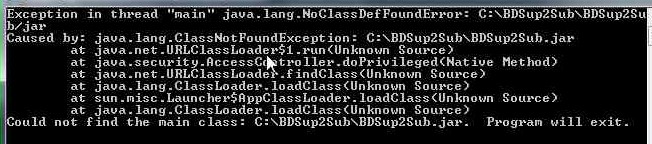
I do have a licensed version of TMT3 Platinum installed. Not sure which others I need from above. I just now also tried running it as the administrator and had the same problem. I was able to notice in the CMD windows that flashes up that the last line starts with "Could not find", so it would seem I definitely need something else installed or moved to a different location. I decided to try the Windows 7 Problem Steps Recorder and it took screenshots of the process for me, including the CMD window I couldn't read. I've attached the screenshot.
Any chance we could get an option to keep those CMD windows open, specifically for troubleshooting stuff like this?
As far as embedded images go, I hadn't even considered that software might not support that. I'm trying to build my MKVs with everything, so I'll hopefully never find a reason to go back and re-rip or re-package them.
| Description: |
|
| Filesize: |
47.49 KB |
| Viewed: |
12363 Time(s) |
|
|
|
| Back to top |
|
|
MikeEby
Joined: 24 Jun 2007
Posts: 5237
Location: Osceola, Indiana
|
| Posted: Sun Jun 27, 2010 3:51 am Post subject: |
|
|
| Skirge01 wrote: | Thanks for responding so quickly. Here are the results you asked for:
| Code: |
Haali Matroska Muxer doesn't seem to be installed
http://haali.net/mkv
|
|
I think the problem might be you don't have Haali installed.
http://haali.net/mkv
Mike
_________________
Doing HD since the last century!
|
|
| Back to top |
|
|
Skirge01
Joined: 26 Jun 2010
Posts: 7
|
| Posted: Sun Jun 27, 2010 2:11 pm Post subject: |
|
|
That fixed the hard stop, as it did create the MKV. Thanks for that... although, I feel really stupid that I didn't think I needed Haali installed. Still having issues with the subtitles, though.
I noticed that the java CMD box still quickly came up with that same error shown in my earlier screenshot. I also verified that the subtitles did not get merged, so there's definitely still an issue with BDSup2Sub.jar not launching. I don't believe there are any forced subtitles, but I do have it set to merge non-forced subs, as well.
The full log shows this:
| Code: |
Analyzing .....started at 06:12:21
Analyzing complete
Starting EAC3To.exe
EAC3to Command Line arguments : "C:\BDRips\New Moon\NEW_MOON" 1) 1: "C:\BDRips\files\Twilight Saga-New Moon - Chapters.txt" 2: "C:\BDRips\files\Twilight Saga-New Moon 1080p h264.mkv" 3: "C:\BDRips\files\Twilight Saga-New Moon - 3 DTS Master.dtshd" 7: "C:\BDRips\files\Twilight Saga-New Moon - 7 English Subtitle.sup" 9: "C:\BDRips\files\Twilight Saga-New Moon - 9 English Subtitle.sup" -log="C:\BDRips\files\Twilight Saga-New Moon - Log.txt"
EAC3to complete
Creating subtitles files...
C:\BDRips\files\Twilight Saga-New Moon - 9 English Subtitle.sup - Subtitles found...
BDSup2Sub Command Line arguments : "C:\BDRips\files\Twilight Saga-New Moon - 9 English Subtitle.sup" "C:\BDRIPS\FILES\TWILIGHT SAGA-NEW MOON - 9 ENGLISH SUBTITLE.idx" /res:1080
C:\BDRips\files\Twilight Saga-New Moon - 7 English Subtitle.sup - Subtitles found...
BDSup2Sub Command Line arguments : "C:\BDRips\files\Twilight Saga-New Moon - 7 English Subtitle.sup" "C:\BDRIPS\FILES\TWILIGHT SAGA-NEW MOON - 7 ENGLISH SUBTITLE.idx" /res:1080
Looking for forced subtitles...
No flagged forced subtitles found, looking for other types of forced subtitles...
Likely forced subtitle not found...
MKVMerge Started...
MKVMerge Command Line arguments: -o "C:\BDRips\files\Twilight Saga-New Moon.mkv" "--default-track" "1:no" "--forced-track" "1:no" "--display-dimensions" "1:1920x1080" "-d" "1" "-A" "-S" "-T" "--no-global-tags" "--no-chapters" "C:\BDRips\files\Twilight Saga-New Moon 1080p h264.mkv" "--forced-track" "0:no" "-a" "0" "-D" "-S" "-T" "--no-global-tags" "--no-chapters" "C:\BDRips\files\Twilight Saga-New Moon - 3 DTS Master.dtshd" "--track-order" "0:1,1:0" "--chapter-language" "eng" "--chapters" "C:\BDRips\files\Twilight Saga-New Moon - Chapters.txt"
MKVMerge Done!
EAC3ToLog: C:\Program Files (x86)\ACD\Another EAC3to GUI\Logs\EAC3to\Twilight Saga-New Moon~6-27-2010 6_35 - Log.txt
Total time 00:49:00 |
|
|
| Back to top |
|
|
MikeEby
Joined: 24 Jun 2007
Posts: 5237
Location: Osceola, Indiana
|
| Posted: Sun Jun 27, 2010 2:48 pm Post subject: |
|
|
Doubleclick on bdsup2sub.jar. It should launch a nice GUI where you can then drag a .sup files into and they should open. This will also test to be sure that java & bdsup2sub is working.
If it doesn't work launch, I would reinstall Java.
Mike
_________________
Doing HD since the last century!
|
|
| Back to top |
|
|
Skirge01
Joined: 26 Jun 2010
Posts: 7
|
| Posted: Sun Jun 27, 2010 4:02 pm Post subject: |
|
|
I just spent about 2 hours trying different things with no progress. If I open a command line, I can type "java.exe -jar c:\BDSup2Sub\BDSup2Sub.jar" from anywhere and it executes without issue. But, double-clicking the BDSup2Sub.jar file never works. I installed/reinstalled both the 32-bit and 64-bit JREs, then did the same outside of C:\Program Files*, just to see if some security setting might be causing the issue. I also right-clicked the .jar and "unblock"ed it, since Windows said it came from another computer. I've tried dragging and dropping it onto (and associating .jar files with) both java.exe and javaw.exe. I also edited the system paths for Windows do include the java directories and .jar extensions. Still nothing.
This clearly is NOT a problem with your program, so I really appreciate the help.
I've also tried searching for the "could not find the main class" message, but have found nothing that seems to apply.
|
|
| Back to top |
|
|
jasonwc
Joined: 20 Jun 2010
Posts: 25
|
| Posted: Sun Jun 27, 2010 4:18 pm Post subject: |
|
|
Mike,
I've done some more testing. Here's what I've found. It seems that Another EAC3to Gui doesn't do a good job handling the rarer video and audio formats. See below-
AVC 1080i60- Displays an extension of ac3; should be *.mkv
VC1 1080i50/60- Displays an extension of ac3; should be *.mkv
E-AC3- Displays an extension of ac3; should be *.eac3
DTS Express- Displays an extension of ac3; should be *.dts
DTS 2.0 (768 kbit)- Displays an extension of ac3; should be *.dts
Also, I recall 7.1 LPCM showing up incorrectly, but I can't say for sure. It should output as *.lpcm or *.flac depending on settings.
Feature Request:
If you use the command line option, it would be nice if BDSup2Jar ran after the demux to convert the subs from SUP to SUB/IDX. The subs can then be dropped in the processing directory. If you've got BDSup2Jar installed, and are demuxing the subs, there's a very good chance you want them converted. Also, it only takes a few seconds to do so through the CLI. It would also save a few steps (and mouseclicks - 3 to be precise).
|
|
| Back to top |
|
|
MikeEby
Joined: 24 Jun 2007
Posts: 5237
Location: Osceola, Indiana
|
| Posted: Sun Jun 27, 2010 5:35 pm Post subject: |
|
|
| Skirge01 wrote: | I just spent about 2 hours trying different things with no progress. If I open a command line, I can type "java.exe -jar c:\BDSup2Sub\BDSup2Sub.jar" from anywhere and it executes without issue. But, double-clicking the BDSup2Sub.jar file never works. I installed/reinstalled both the 32-bit and 64-bit JREs, then did the same outside of C:\Program Files*, just to see if some security setting might be causing the issue. I also right-clicked the .jar and "unblock"ed it, since Windows said it came from another computer. I've tried dragging and dropping it onto (and associating .jar files with) both java.exe and javaw.exe. I also edited the system paths for Windows do include the java directories and .jar extensions. Still nothing.
I've also tried searching for the "could not find the main class" message, but have found nothing that seems to apply. |
Someone else had an issue that sounds similar. It turned out the file assocation was incorrect in his system for .jar files. It sounds like you check that. You might ask the question or look at the bdsup2sub thread on doom9.
http://forum.doom9.org/showthread.php?t=145277
| jasonwc wrote: | Mike,
I've done some more testing. Here's what I've found. It seems that Another EAC3to Gui doesn't do a good job handling the rarer video and audio formats. See below-
AVC 1080i60- Displays an extension of ac3; should be *.mkv
VC1 1080i50/60- Displays an extension of ac3; should be *.mkv
E-AC3- Displays an extension of ac3; should be *.eac3
DTS Express- Displays an extension of ac3; should be *.dts
DTS 2.0 (768 kbit)- Displays an extension of ac3; should be *.dts
Also, I recall 7.1 LPCM showing up incorrectly, but I can't say for sure. It should output as *.lpcm or *.flac depending on settings.
Feature Request:
If you use the command line option, it would be nice if BDSup2Jar ran after the demux to convert the subs from SUP to SUB/IDX. The subs can then be dropped in the processing directory. If you've got BDSup2Jar installed, and are demuxing the subs, there's a very good chance you want them converted. Also, it only takes a few seconds to do so through the CLI. It would also save a few steps (and mouseclicks - 3 to be precise). |
Thank for the ideas. I've got a pay project that's been keeping me busy in my spare time the week and haven't had much time to devote to this project.
1080i tracks seem to be a big challenge as eac3to doesn't seem to support playlists for this type of disk. It will demux using discreet .m2ts files but will need to be handled very different and won't include a chapter file because it embedded int the playlist.
One problem is I don't have a lot of disks in this format to work with. Most seem to be nature documentary and concerts which really are not my cup of tea. The E-AC3 & DTS express should be easy fix, and I'll try to get it on the next drop.
I'm not sure I follow the part about bdsup2sub. It already does run after the demux and at present there is an option to covert all subtitles in the default language to .idx and mux them in to the final file. It does not name the tracks which I plan to fix soon. Maybe you could explain the part about dropping files into the process directory?
Mike
_________________
Doing HD since the last century!
|
|
| Back to top |
|
|
|
|
|
|
|
You cannot post new topics in this forum
You cannot reply to topics in this forum
You cannot edit your posts in this forum
You cannot delete your posts in this forum
You cannot vote in polls in this forum
You cannot attach files in this forum
You can download files in this forum
|
Forum powered by phpBB © phpBB Group
|
|



