|
As this forum is rarely used anymore, we've locked it. Feel free to browse and read. Questions? Please reach out to us directly. Cheers! |

|
 |
|
|
| Author |
Message |
htman
Joined: 27 Feb 2010
Posts: 2
|
| Posted: Sat Feb 27, 2010 7:10 pm Post subject: |
|
|
| MikeEby wrote: |
Thanks! Yes, I'm looking into options for re-encoding the video to save space. It will add significant time to making a rip, we are talking several hours to create a movie only rip, but it will be an option. I want to get all the audio options nailed down and stable then move ahead on re-encoding video. The reason the for larger files is because it is an exact 1:1 copy of the blu-ray. Perhaps some of the files you have been working with have been re-encoded?
Mike |
Not sure what was done with the files I've been using in the past as I didn't rip them.  Due to the size, I figured it was a 1:1 copy, so I was curious if there was anything I can do. I'm sure you're extremely busy, so no rush as I was curious if there was something I was doing wrong or if there was a quick way to covert the output and make it smaller. Due to the size, I figured it was a 1:1 copy, so I was curious if there was anything I can do. I'm sure you're extremely busy, so no rush as I was curious if there was something I was doing wrong or if there was a quick way to covert the output and make it smaller.
|
|
| Back to top |
|
 |
okashira
Joined: 10 Feb 2010
Posts: 9
|
| Posted: Tue Mar 02, 2010 8:19 am Post subject: |
|
|
| MikeEby wrote: | | okashira wrote: | Mike;
Just want to check in and while I haven't put much use into it yet, the AAC version hasn't failed me once yet. Thanks again... and are you planning on releasing it?
I picked up an Radeon 5770 and I decided to play with some HD audio tracks too. I need to mux a few movies with DTS-HD MA and AAC and figure out a way to ABX them while switching between bitstream of DTSHDMA to my Onkyo 606 and AAC over HDMI.
I would like to have a way to mux the hd audio track without the core as I've no use for it and it may save up to 1gb per movie.... You know how I am on my space efficiency 
Oh, and I use 64-bit Windows 7 exclusivly.
|
That's good to know its working well for you. Yes I will release the AAC version soon. I'm working currently on FLAC with a core track option along with a few bug fixes in the next release.
I haven't see a way with eact3to that extracts only the HD-Track without core, so I really can't promise anything there yet.
| htman wrote: | | Awesome tool... great info... and I really appreciate your time and efforts. So far it's worked out great for me, but I have one question. Any recommendations on reducing the output file size? I know disk is cheap these days, but some other rips I have are less than 10GB and I'm curious why I'm ending up with 19GB+ files. It's probably a stupid question... but any help is appreciated... |
Thanks! Yes, I'm looking into options for re-encoding the video to save space. It will add significant time to making a rip, we are talking several hours to create a movie only rip, but it will be an option. I want to get all the audio options nailed down and stable then move ahead on re-encoding video. The reason the for larger files is because it is an exact 1:1 copy of the blu-ray. Perhaps some of the files you have been working with have been re-encoded?
Mike |
yes, you're right - no way to remove that core. I should be happy with FLAC when I'm in the lossless mood. Just wanted to play with my new 5770 and bitstreaming...
scratch that request. 
that's great news about adding video encoding. I just started to do that myself. I had resolved to just rip all my video straight away (as your tool currently does) and use AAC or whatever audio. However, I recently realized how wasteful this is in some cases - it's worthwhile to re-encode comedies, poorly authored HD-DVDs, etc to 1280x720 and use x264.
I've been using x264 --preset veryslow -crf 18
usually results in about 4gb file size with 5.1 AAC audio. much better then 13-20gb for those already crappy HD-DVD authors, or comedies (Superman Returns HD-DVD and Anchorman all I've done so far) I'm quite impressed with the performance of x264. Of course I come from the days of encoding DivX using Nandub and encoding mped2 with 9 (that's nine) passes for SVCD.
|
|
| Back to top |
|
|
greg_mitch
Joined: 03 May 2006
Posts: 5320
|
| Posted: Sun Mar 07, 2010 10:44 pm Post subject: |
|
|
Fresh install on fresh W7 Premium x64 install. Installed all software from links. (except FFDShow since it isn't linked).
Works fine except for doesn't follow through with the merge. The eac3to part works fine.
Here is the error:
| Quote: | --------------------------------------------------------------------------------------------------
Date/Time: 3/7/2010 3:40:20 PM
Error Source: mscorlib
ErrorMessage: Index and length must refer to a location within the string.
Parameter name: length
Stack Trace: at System.String.InternalSubStringWithChecks(Int32 startIndex, Int32 length, Boolean fAlwaysCopy)
at AnotherEAC3toGUI.frmMain.buildMKVMergeCommandArgs(String outputFile, String filePrefix, String mainVideoStream, Boolean forcedSubsFound, Boolean includeAllSubs, List`1 subtitleList)
at AnotherEAC3toGUI.frmMain.gbtnRunBatches_Click(Object sender, EventArgs e)
-------------------------------------------------------------------------------------------------- |
|
|
| Back to top |
|
|
MikeEby

Joined: 24 Jun 2007
Posts: 5237
Location: Osceola, Indiana
|
| Posted: Mon Mar 08, 2010 1:21 am Post subject: |
|
|
Greg,
Make sure you set the default language to "English" in the options dialog. After you set it in the options dialog restart the program and verify the setting stuck. In future versions I will make the defaut on new installs.
Mike
_________________
Doing HD since the last century!
|
|
| Back to top |
|
|
greg_mitch
Joined: 03 May 2006
Posts: 5320
|
| Posted: Mon Mar 08, 2010 1:42 am Post subject: |
|
|
| MikeEby wrote: | Greg,
Make sure you set the default language to "English" in the options dialog. After you set it in the options dialog restart the program and verify the setting stuck. In future versions I will make the defaut on new installs.
Mike |
I assume you are referring to in MKVMerge? I went to File-Options and set "eng" as default language.
I will give it a go with another disc once I get one from netflix. Unless there is something else I should do.
Never did really figure out the chapters and subtitles...never seem to work for me.
|
|
| Back to top |
|
|
MikeEby
Joined: 24 Jun 2007
Posts: 5237
Location: Osceola, Indiana
|
| Posted: Mon Mar 08, 2010 1:51 am Post subject: |
|
|
No...In the gui from the main menu click on Tools>Options. Enter English in the default language field. If you run in batch mode mkvmerge is part of the whole process, it runs after eac3to. Forced subs and chapters will be all be merged into the final file.

Mike
_________________
Doing HD since the last century!
|
|
| Back to top |
|
|
greg_mitch
Joined: 03 May 2006
Posts: 5320
|
| Posted: Mon Mar 08, 2010 2:11 am Post subject: |
|
|
| MikeEby wrote: | No...In the gui from the main menu click on Tools>Options. Enter English in the default language field. If you run in batch mode mkvmerge is part of the whole process, it runs after eac3to. Forced subs and chapters will be all be merged into the final file.
Mike |
Got it...yes please change that in the future for idiots like me. 
Or maybe a drop down menu?
|
|
| Back to top |
|
|
twwen2
Joined: 10 Mar 2010
Posts: 14
|
| Posted: Wed Mar 10, 2010 1:19 pm Post subject: |
|
|
Hi all, firstly want to say thanks mike for an awesome tool!
I've been successfully using it for a few weeks now, and have just run into my first issue:
I like to keep the HD audio tracks (and core) whether it be DTSMA or TrueHD, so I have that option selected. This has worked fine so far, until I tried today with the Transporter 3 disk. It has two PCM 2.0 16bit english tracks and a TrueHD 5.1 english track. However, when I run the batch the program extracts the first PCM track and not the TrueHD one. Is this a bug?
I realize I can use the command-line to customize the batch, and that works fine (once I untick PCM and tick TrueHD). However, I can't get my head around the MakeMKV gui to remux the files. Anyone willing to give me a hand? The output from my custom command line consists of:
1) 1080p H264 video (but inside an mkv?)
2) TrueHD.thd
3) Chapters.txt
4) Log file
Can I use tsMuxeR to mux 2) and 3) and chapters file into 1)?
Or should I demux 1) and use makeMKV with 2), 3) and the demuxed h264 video as input?
Thanks heaps in advance,
Tom
|
|
| Back to top |
|
|
twwen2
Joined: 10 Mar 2010
Posts: 14
|
| Posted: Wed Mar 10, 2010 1:34 pm Post subject: |
|
|
I also have a seperate question, unrelated to my first post:
For the first few movies I used the tool on, I chose the option to decode HD audio to FLAC. This worked fine and I have since played them back in MPC-HC. However, to test any differences between the options I created two versions of Gladiator.mkv, one with FLAC and the other with DTSMA. I noticed that the volume level of the FLAC mkv was significantly lower than that of the DTSMA mkv. Can anyone explain what might be happening here?
Thanks again
|
|
| Back to top |
|
|
MikeEby
Joined: 24 Jun 2007
Posts: 5237
Location: Osceola, Indiana
|
| Posted: Wed Mar 10, 2010 3:59 pm Post subject: |
|
|
| twwen2 wrote: | Hi all, firstly want to say thanks mike for an awesome tool!
I've been successfully using it for a few weeks now, and have just run into my first issue:
I like to keep the HD audio tracks (and core) whether it be DTSMA or TrueHD, so I have that option selected. This has worked fine so far, until I tried today with the Transporter 3 disk. It has two PCM 2.0 16bit english tracks and a TrueHD 5.1 english track. However, when I run the batch the program extracts the first PCM track and not the TrueHD one. Is this a bug?
I realize I can use the command-line to customize the batch, and that works fine (once I untick PCM and tick TrueHD). However, I can't get my head around the MakeMKV gui to remux the files. Anyone willing to give me a hand? The output from my custom command line consists of:
1) 1080p H264 video (but inside an mkv?)
2) TrueHD.thd
3) Chapters.txt
4) Log file
Can I use tsMuxeR to mux 2) and 3) and chapters file into 1)?
Or should I demux 1) and use makeMKV with 2), 3) and the demuxed h264 video as input?
Thanks heaps in advance,
Tom |
I have that disk, I don't recall any issues with it...I did rip it some time ago...I will try it again and see what the results are.
What I would use to manually remux woutd be MKVMerge.
Mike
_________________
Doing HD since the last century!
|
|
| Back to top |
|
|
MikeEby
Joined: 24 Jun 2007
Posts: 5237
Location: Osceola, Indiana
|
| Posted: Wed Mar 10, 2010 4:03 pm Post subject: |
|
|
| twwen2 wrote: | I also have a seperate question, unrelated to my first post:
For the first few movies I used the tool on, I chose the option to decode HD audio to FLAC. This worked fine and I have since played them back in MPC-HC. However, to test any differences between the options I created two versions of Gladiator.mkv, one with FLAC and the other with DTSMA. I noticed that the volume level of the FLAC mkv was significantly lower than that of the DTSMA mkv. Can anyone explain what might be happening here?
Thanks again |
That has been reported with FLAC...I use ReClock for my audio render and it seems to help. ReClock will only work with 32 bit systems I think. For your FLACs playback how are you connected to your speakers? HDMI...Analog?
Mike
_________________
Doing HD since the last century!
|
|
| Back to top |
|
|
okashira
Joined: 10 Feb 2010
Posts: 9
|
| Posted: Wed Mar 10, 2010 8:17 pm Post subject: |
|
|
| twwen2 wrote: | I also have a seperate question, unrelated to my first post:
For the first few movies I used the tool on, I chose the option to decode HD audio to FLAC. This worked fine and I have since played them back in MPC-HC. However, to test any differences between the options I created two versions of Gladiator.mkv, one with FLAC and the other with DTSMA. I noticed that the volume level of the FLAC mkv was significantly lower than that of the DTSMA mkv. Can anyone explain what might be happening here?
Thanks again |
How do you know your DTS-MA decoder is not applying Dynamic Range Compression? Eac3to intentionally removed DRM from decoded files. DRM will make audio generally seem louder.
|
|
| Back to top |
|
|
twwen2
Joined: 10 Mar 2010
Posts: 14
|
| Posted: Wed Mar 10, 2010 10:38 pm Post subject: |
|
|
| MikeEby wrote: |
I have that disk, I don't recall any issues with it...I did rip it some time ago...I will try it again and see what the results are.
What I would use to manually remux woutd be MKVMerge.
Mike |
I tried MKVMerge, but it didn't recognize the TrueHD audio track as an input file.
|
|
| Back to top |
|
|
twwen2
Joined: 10 Mar 2010
Posts: 14
|
| Posted: Wed Mar 10, 2010 11:41 pm Post subject: |
|
|
| MikeEby wrote: |
That has been reported with FLAC...I use ReClock for my audio render and it seems to help. ReClock will only work with 32 bit systems I think. For your FLACs playback how are you connected to your speakers? HDMI...Analog?
Mike |
I'm playing the files using MPC-HC, using FFdshow to decode audio (and video) and sending the output via analogue (on-board realtek chipset) to my 2.0 bookshelf speakers. I'm also on Win7 x64.
| Okashira wrote: |
How do you know your DTS-MA decoder is not applying Dynamic Range Compression? Eac3to intentionally removed DRM from decoded files. DRM will make audio generally seem louder.
|
No idea if DRC is being applied or not. I'll have a look in the FFdshow configs.
|
|
| Back to top |
|
|
MikeEby
Joined: 24 Jun 2007
Posts: 5237
Location: Osceola, Indiana
|
| Posted: Thu Mar 11, 2010 1:02 am Post subject: |
|
|
| twwen2 wrote: | | MikeEby wrote: |
I have that disk, I don't recall any issues with it...I did rip it some time ago...I will try it again and see what the results are.
What I would use to manually remux woutd be MKVMerge.
Mike |
I tried MKVMerge, but it didn't recognize the TrueHD audio track as an input file. |
It will accept .dtshd files, you just have to select *.* from the file type dropdown.
Mike
_________________
Doing HD since the last century!
|
|
| Back to top |
|
|
twwen2
Joined: 10 Mar 2010
Posts: 14
|
| Posted: Thu Mar 11, 2010 10:49 am Post subject: |
|
|
| MikeEby wrote: |
It will accept .dtshd files, you just have to select *.* from the file type dropdown.
Mike |
Yes I realize that now.
So here's what I've tried since last night:
1) I ripped the blu-ray to disk as m2ts files.
2) I tried playing the main m2ts file (0000.m2ts) in MPC-HC and that worked fine.
3) I then used TsMuxer to demux the main movie file, keeping only the h264 video, truehd audio and subtitles.
4) I then used MakeMKV to mux the three files back into an mkv container. After a few errors (due to the filenames containing multiple "." characters) I managed to successfully mux to mkv.
However, the file will not play back correctly. The audio is just choppy static and the video stutters and lurches violently. I tried doing the remux four times, each time using slightly different settings (fps mainly). I tried 23.976 (this is the correct fps according to MediaInfo), 24 and 24/1001 but they all resulted in the same playback behaviour.
So I've hit a wall. Unless I'm doing something wrong in the demux/remux process then I'm at a loss as to where I go from here. I do have the first mkv with 2.0 PCM audio, and that's fine for now (I've only got two speakers anyway). But in the interests of long-term usage, I'd quite like to get the TrueHD track working.
Any ideas?
|
|
| Back to top |
|
|
MikeEby
Joined: 24 Jun 2007
Posts: 5237
Location: Osceola, Indiana
|
| Posted: Fri Mar 12, 2010 5:26 am Post subject: |
|
|
| MikeEby wrote: | | twwen2 wrote: | Hi all, firstly want to say thanks mike for an awesome tool!
I've been successfully using it for a few weeks now, and have just run into my first issue:
I like to keep the HD audio tracks (and core) whether it be DTSMA or TrueHD, so I have that option selected. This has worked fine so far, until I tried today with the Transporter 3 disk. It has two PCM 2.0 16bit english tracks and a TrueHD 5.1 english track. However, when I run the batch the program extracts the first PCM track and not the TrueHD one. Is this a bug?
I realize I can use the command-line to customize the batch, and that works fine (once I untick PCM and tick TrueHD). However, I can't get my head around the MakeMKV gui to remux the files. Anyone willing to give me a hand? The output from my custom command line consists of:
1) 1080p H264 video (but inside an mkv?)
2) TrueHD.thd
3) Chapters.txt
4) Log file
Can I use tsMuxeR to mux 2) and 3) and chapters file into 1)?
Or should I demux 1) and use makeMKV with 2), 3) and the demuxed h264 video as input?
Thanks heaps in advance,
Tom |
I have that disk, I don't recall any issues with it...I did rip it some time ago...I will try it again and see what the results are.
What I would use to manually remux woutd be MKVMerge.
Mike |
I just ripped Transporter 3 with the DTS-MA track. I did full automatic batch mode, everything seemed to come out fine. Below are the logs.
eac3to Log:
| Code: | eac3to v3.17
command line: "C:\eac3to\eac3to.exe" "d:\BDMV\STREAM" 1) 1: "C:\Work Folder\Tran 3 Test - Chapters.txt" 2: "C:\Work Folder\Tran 3 Test 1080p h264.mkv" 3: "C:\Work Folder\Tran 3 Test - 3 DTS Master.dtshd" 6: "C:\Work Folder\Tran 3 Test - 6 English Subtitle.sup" 7: "C:\Work Folder\Tran 3 Test - 7 English Subtitle.sup" -log="C:\Work Folder\Tran 3 Test - Log.txt"
------------------------------------------------------------------------------
M2TS, 1 video track, 3 audio tracks, 3 subtitle tracks, 1:43:58, 24p /1.001
1: Chapters, 16 chapters
2: h264/AVC, 1080p24 /1.001 (16:9)
3: DTS Master Audio, English, 7.1 channels, 24 bits, 48khz
(core: DTS, 5.1 channels, 24 bits, 1509kbps, 48khz)
4: AC3, French, 5.1 channels, 640kbps, 48khz, dialnorm: -27dB
5: AC3 Surround, English, 2.0 channels, 224kbps, 48khz, dialnorm: -27dB
6: Subtitle (PGS), English
7: Subtitle (PGS), English
8: Subtitle (PGS), Spanish
Creating file "C:\Work Folder\Tran 3 Test - Chapters.txt"...
[v02] Extracting video track number 2...
[v02] Muxing video to Matroska...
[s07] Extracting subtitle track number 7...
[a03] Extracting audio track number 3...
[s06] Extracting subtitle track number 6...
[a03] Creating file "C:\Work Folder\Tran 3 Test - 3 DTS Master.dtshd"...
[s07] Creating file "C:\Work Folder\Tran 3 Test - 7 English Subtitle.sup"...
[s06] Creating file "C:\Work Folder\Tran 3 Test - 6 English Subtitle.sup"...
Added fps value (24 /1.001) to MKV header.
Video track 2 contains 149569 frames.
Subtitle track 6 contains 878 captions.
Subtitle track 7 contains 1032 captions.
eac3to processing took 20 minutes, 10 seconds.
Done.
|
GUI Log:
| Code: |
Analyzing .....started at 23:47:05
Analyzing complete
Starting EAC3To.exe
EAC3to Command Line arguments : "d:\BDMV\STREAM" 1) 1: "C:\Work Folder\Tran 3 Test - Chapters.txt" 2: "C:\Work Folder\Tran 3 Test 1080p h264.mkv" 3: "C:\Work Folder\Tran 3 Test - 3 DTS Master.dtshd" 6: "C:\Work Folder\Tran 3 Test - 6 English Subtitle.sup" 7: "C:\Work Folder\Tran 3 Test - 7 English Subtitle.sup" -log="C:\Work Folder\Tran 3 Test - Log.txt"
EAC3to complete
Looking for forced subtitles...
No flagged forced subtitles found, looking for other types of forced subtitles...
Likely forced subtitle not found...
MKVMerge Started...
MKVMerge Command Line arguments: -o "G:\Movies 4\Tran 3 Test.mkv" "--default-track" "1:no" "--forced-track" "1:no" "--display-dimensions" "1:1920x1080" "-d" "1" "-A" "-S" "-T" "--no-global-tags" "--no-chapters" "C:\Work Folder\Tran 3 Test 1080p h264.mkv" "--forced-track" "0:no" "-a" "0" "-D" "-S" "-T" "--no-global-tags" "--no-chapters" "C:\Work Folder\Tran 3 Test - 3 DTS Master.dtshd" "--track-order" "0:1,1:0" "--chapter-language" "eng" "--chapters" "C:\Work Folder\Tran 3 Test - Chapters.txt"
MKVMerge Done!
[URL=file://C:\Program Files\ACD\Another EAC3to GUI\Logs\EAC3to\Tran 3 Test~3-12-2010 0_7 - Log.txt/URL]Û
Total time 00:23:56
|
BTW that was the fastest rip I've ever done...It only took a tad under 24 minutes. 
Mike
_________________
Doing HD since the last century!
|
|
| Back to top |
|
|
twwen2
Joined: 10 Mar 2010
Posts: 14
|
| Posted: Fri Mar 12, 2010 6:20 am Post subject: |
|
|
Well that is truly bizarre. I thought you made a typo originally when you wrote DTSMA, but now I know you meant it. My Transporter 3 disk has DD TrueHD!
What. The. Hell.
|
|
| Back to top |
|
|
MikeEby
Joined: 24 Jun 2007
Posts: 5237
Location: Osceola, Indiana
|
| Posted: Fri Mar 12, 2010 6:20 pm Post subject: |
|
|
| twwen2 wrote: | Well that is truly bizarre. I thought you made a typo originally when you wrote DTSMA, but now I know you meant it. My Transporter 3 disk has DD TrueHD!
What. The. Hell. |
WOW...that is weird....What region? According to High Def Digest's Blu-Ray review Transporter 3 is DTS-HD, it is 7.1 channels which is a little rare.
http://bluray.highdefdigest.com/2036/transporter3.html#Section4
Mike
_________________
Doing HD since the last century!
|
|
| Back to top |
|
|
twwen2
Joined: 10 Mar 2010
Posts: 14
|
| Posted: Sat Mar 13, 2010 2:19 am Post subject: |
|
|
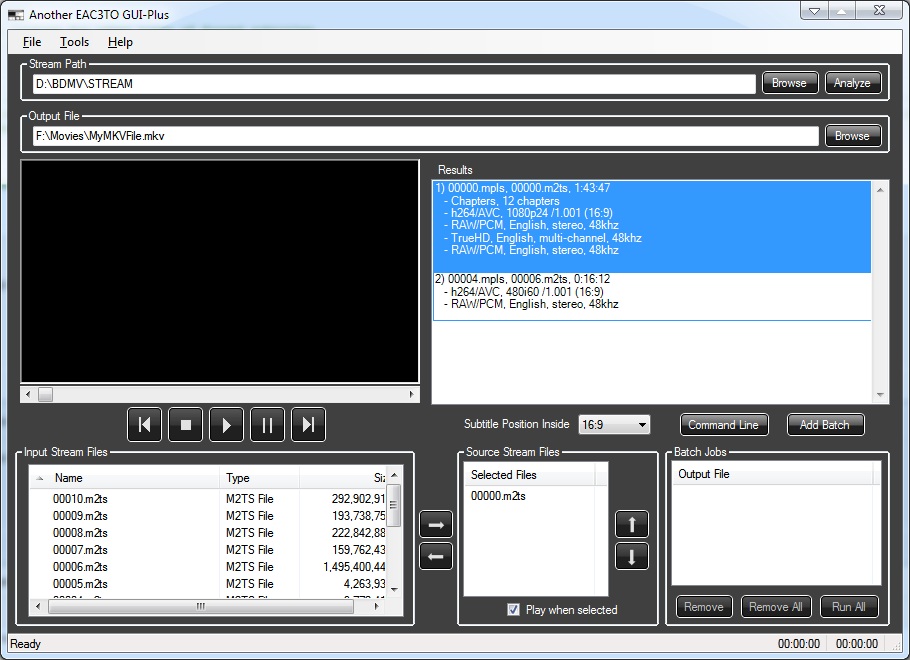
Region B, Australia. That link also says it should be in 7.1? None of the 10 or so blu-ray disks I've got have 7.1 audio, all are 5.1.
Here's a screenshot showing the disk in the program:
| Description: |
|
| Filesize: |
155.03 KB |
| Viewed: |
14262 Time(s) |
|
|
|
| Back to top |
|
|
|
|
|
|
|
You cannot post new topics in this forum
You cannot reply to topics in this forum
You cannot edit your posts in this forum
You cannot delete your posts in this forum
You cannot vote in polls in this forum
You cannot attach files in this forum
You can download files in this forum
|
Forum powered by phpBB © phpBB Group
|
|



