| Author |
Message |
WayneB
Joined: 24 Dec 2008
Posts: 113
Location: Victoria, BC
TV/Projector: Marquee 9500LC Ultra
|
| Posted: Wed Jul 01, 2009 4:15 am Post subject: |
|
|
| Nashou66 wrote: | | To demonstrate this i bet you could shine a very bright flashlight onto the screen while the PJ is off and then move it around and you will see another light source moving with it. |
Thanks Athanasios, I will give that a test.
Do you have this prism effect on your 9500LC ?
Update: No, the flashlight thing did not work for me. Maybe my LED flashlight is not powerfull enough.
However, I did shine the flashlight directly into the lenses and tapped the side of the projector. I could see the line of liquid move slightly. To visualize what I saw, look at a clock and draw a line from 11 to 1. That is about where the line is.
...Wayne
|
|
| Back to top |
|
 |
Mark_A_W
Joined: 15 Mar 2006
Posts: 3068
Location: Sunny Melbourne Australia
|
| Posted: Wed Jul 01, 2009 4:51 am Post subject: |
|
|
| ecrabb wrote: | Yeah, I probably wouldn't use tape on the lenses, as it would be a mess, but a plastic or perhaps flocking tape stuck to itself to seal the adhesive or something might work.
Some later XG LC's had factory-installed masking panels - I've seen them in pictures. I bet if you searched here or at AVS long enough, you might even find them in a photo. I've thought about making a set for my G70 to try, but it's LOW on the priority list.
SC |
All XG-LC's actually...


They are a simple paper sticker. It doesn't get hot there. Sometimes they are stuck on a bit crooked...
But we digress, the OP needs to top up his glycol.[/img]
|
|
| Back to top |
|
|
WayneB
Joined: 24 Dec 2008
Posts: 113
Location: Victoria, BC
TV/Projector: Marquee 9500LC Ultra
|
| Posted: Wed Jul 01, 2009 5:20 am Post subject: |
|
|
| Mark_A_W wrote: | | But we digress, the OP needs to top up his glycol. |
Based on the responses so far, I am thinking the process is a PITA but straight forward:
1. Lower the projector to the floor
2. Flip it over
3. Take off the lenses
4. Find the two glycol-filling screws and remove them
5. Use a syringe to insert more glycol.
6. Put it back together
7. Put it back on the ceiling
8. See if it worked
9. Re-do the setup/convergence
Questions:
How do you know how much to put in?
Can you put in too much?
Can you test it while on the floor?
If I leave it like it is for many months, will it harm the projector in any way?
Thanks....Wayne
|
|
| Back to top |
|
|
Tom.W

Joined: 09 Mar 2006
Posts: 6635
|
| Posted: Wed Jul 01, 2009 5:26 am Post subject: |
|
|
|
If you look through the lenses when the projector is running you should see the source of the ghost image. Yes you can wear sunglasses or just turn down contrast and brightness. Is the problem seen on all tubes ?
|
|
| Back to top |
|
|
Curt Palme
CRT Tech
Joined: 08 Mar 2006
Posts: 24396
Location: Langley, BC
TV/Projector: All of them!
|
| Posted: Wed Jul 01, 2009 5:29 am Post subject: |
|
|
I don't think there's a leak, the set came from me, and I'm paranoid about glycol leaks. I may not have filled the tube enough, as I flushed the glycol on the tube.
You may get away with taking the lens off, and putting a piece of electrical tape over the air bubble at the top of tube (look into the lens first to see where the bubble/reflection is located. that won't affect your image otherwise as the air bubble is far away from the actual image.
|
|
| Back to top |
|
|
dturco

Joined: 06 Feb 2009
Posts: 3778
Location: Eastern Shore Maryland
TV/Projector: Runco DLP VX-3000i Marquee 9500 parts doner
|
| Posted: Wed Jul 01, 2009 11:43 am Post subject: |
|
|
Thats good news. Knowing the Glycol was flushed makes a lot of sense why it might be a tad low.
_________________
Firefly rules. Can't stop the signal.
http://www.hulu.com/firefly
|
|
| Back to top |
|
|
WayneB
Joined: 24 Dec 2008
Posts: 113
Location: Victoria, BC
TV/Projector: Marquee 9500LC Ultra
|
| Posted: Wed Jul 01, 2009 1:48 pm Post subject: |
|
|
| Curt Palme wrote: | | You may get away with taking the lens off, and putting a piece of electrical tape over the air bubble at the top of tube (look into the lens first to see where the bubble/reflection is located. |
Thanks Curt, that is a relief! That sounds simple enough. I will give that a try later today. It is on all three tubes.
I assume the bubble will be easy enough to see with the lenses off.
Will I need to do a re-calibration or touch-up after adding the tape?
...Wayne
|
|
| Back to top |
|
|
Tom.W
Joined: 09 Mar 2006
Posts: 6635
|
| Posted: Wed Jul 01, 2009 4:26 pm Post subject: |
|
|
|
Are you saying the ghost image is on all three tubes when looking through the lenses ?
|
|
| Back to top |
|
|
WayneB
Joined: 24 Dec 2008
Posts: 113
Location: Victoria, BC
TV/Projector: Marquee 9500LC Ultra
|
| Posted: Wed Jul 01, 2009 5:41 pm Post subject: |
|
|
| Tom.W wrote: | | Are you saying the ghost image is on all three tubes when looking through the lenses ? |
Hi Tom, it is not exactly a ghost image. The projected image is more like a blurry streak of colors, similar to what a prism would make if you shine sunlight through the prism. It is definitely caused by the air bubble, because if you tap the side of the projector, the image rocks back and forth like fluid finding its own level.
Looking in the lens, I can see the bubble, but no ghost image or colored image. Just the bubble.

Glycol bubble in green tube
Yes, the bubbles are in all three lenses about the same level.
I have a 1 second 1.1MB .MOV (movie) file showing the bubble rocking, but that format is not supported for upload.
I am about to take the lenses off and try some black electrical tape on the tubes, as per Curt's recommendation.
...Wayne
|
|
| Back to top |
|
|
ecrabb
Forum Moderator

Joined: 13 Mar 2006
Posts: 15909
Location: Utah
TV/Projector: JVC RS40, Epson 5010
|
| Posted: Wed Jul 01, 2009 6:24 pm Post subject: |
|
|
Wayne... Email the me MOV if you want. I can convert and post it. Just for fun.
SC
|
|
| Back to top |
|
|
garyfritz

Joined: 08 Apr 2006
Posts: 12088
Location: Fort Collins, CO
|
| Posted: Wed Jul 01, 2009 6:38 pm Post subject: |
|
|
|
It's clearly in all 3 tubes. You can see red and blue in the picture, but at the overlap it's white, not magenta. And Wayne's pic shows a bubble in green.
|
|
| Back to top |
|
|
WayneB
Joined: 24 Dec 2008
Posts: 113
Location: Victoria, BC
TV/Projector: Marquee 9500LC Ultra
|
| Posted: Wed Jul 01, 2009 9:41 pm Post subject: |
|
|
The people in this forum are AWESOME. 
The response has been fantastic and it worked!
I no longer have the strange prism-like colors projecting beneath my screen. 
Thankyou VERY MUCH to EVERYONE who contributed to solving this problem.
I will buy some glycol and top it up the next time I take the projector down.
However, the workaround of masking off the non-image area, where the bubbles are, has eliminated the wayward lights.
I used very thin plastic black electrical tape. By keeping it on the glass and off the rim on the tube, I don't think it filled the small air gap between the tube and the lens. The only problem was the curvature of the tube. Putting on the tape was a trial and error effort and each time I removed the tape, I left a little adhesive behind that I had to wipe off with water and a cotton towel. The other problem was that I did not know how much to mask. It took three tries to get it right. That involved taking the lens off, cutting the tape and installing the tape. Putting the lens back on and running the test pattern again to see if it worked. I did NOT even have to do a re-convergence. 
It was easy to see the bubble with the lens off, by tapping the side of the projector to wiggle the fluid level.
It is the bowl-shaped object above the upper black line.

The bubble is clearly visible on the tube

The first attempt at masking the bubble

The second attempt made the tape a little bigger

This one seems big enough

For comparison, here are the three tape mask sizes
With the final size of tape masking the the upper portion of the tubes, I no longer see any colors below the screen.
I will summarize this and add it to my Marquee 9500LC Ultra Installation Experiences thread:
https://www.curtpalme.com/forum_archived/viewtopic.php@t=16721.html
Now I am inspired to try and do something about that irritating standby noise. 
Thanks again everyone.
.....Wayne
|
|
| Back to top |
|
|
Curt Palme
CRT Tech
Joined: 08 Mar 2006
Posts: 24396
Location: Langley, BC
TV/Projector: All of them!
|
| Posted: Wed Jul 01, 2009 9:46 pm Post subject: |
|
|
Nicely done! 
No worries running the set like that.
|
|
| Back to top |
|
|
Mark_A_W
Joined: 15 Mar 2006
Posts: 3068
Location: Sunny Melbourne Australia
|
| Posted: Wed Jul 01, 2009 9:50 pm Post subject: |
|
|
"Now I am inspired to try and do something about that irritating standby noise."
Unplug it, or turn off the switch.
They should change that design...it's nuts.
|
|
| Back to top |
|
|
dturco
Joined: 06 Feb 2009
Posts: 3778
Location: Eastern Shore Maryland
TV/Projector: Runco DLP VX-3000i Marquee 9500 parts doner
|
| Posted: Wed Jul 01, 2009 9:56 pm Post subject: |
|
|
Your not leaving that machine in standby for more than an hour at a time are you? 
The standby button does not turn off the machine, it leaves it active and ready to use, only without a picture displayed. Standby will wear down your tubes/ electronics. Always use the power button to turn off the 9500. The fan will run even when the machine is turned off with the power button that is normal.
To make it less noisy see here:
http://www.curtpalme.com/MARQUEE_FAN_MOD.shtm
Looking out for a fellow Marquee owner. 
_________________
Firefly rules. Can't stop the signal.
http://www.hulu.com/firefly
|
|
| Back to top |
|
|
WayneB
Joined: 24 Dec 2008
Posts: 113
Location: Victoria, BC
TV/Projector: Marquee 9500LC Ultra
|
| Posted: Wed Jul 01, 2009 10:32 pm Post subject: |
|
|
| Curte Palme wrote: | Nicely done!
No worries running the set like that. |
Thanks Curt. I have mentioned how much I LOVE this projector haven't I?
| Mark_A_W wrote: | | Unplug it, or turn off the switch. |
Hi Mark, Yes, I could do that, but I just spent a bunch of money upgrading to a Harmony 1000 remote so that I only have to press 1 button, instead of 2. 
| dturco wrote: | Your not leaving that machine in standby for more than an hour at a time are you?
The standby button does not turn off the machine, it leaves it active and ready to use, only without a picture displayed. |
Hi Dave,
Sorry I did not mean "Standby" (I have to get my terms right!). I meant powered off, but where the fan still runs.
Thanks for the link. I have seen that and have considered it. But with the Canadian conversion and shipping that is almost $450, so I have been looking at what I can do myself (for less money ).
I have read Athanasios's thread (multiple times):
https://www.curtpalme.com/forum_archived/viewtopic.php@t=9608.html
and this one on AVS:
http://www.avsforum.com/avs-vb/showthread.php?t=829082
It seems like some of the experts here on this forum have gone through this fan mod process a few years back.
I have not heard how the mods worked out, though. Are the replacement fans still holding up? Have any of the mods failed causing other problems?
I am currently thinking about the latest fan from Noctua NF-S12B FLX and some acoustic material Acustipack)
http://www.quietpcusa.com/Noctua-NF-S12B-FLX-Quiet-PC-Fan-120mm-P561C0.aspx
http://www.quietpcusa.com/Acoustic-Materials-C4.aspx
http://www.quietpcusa.com/AcoustiFan-Soft-Silicone-Anti-Vibration-Fan-Gasket-for-120mm-Case-Fans-Black-AFG120B-P100C0.aspx
On the other hand, maybe all I need is a 92mm gasket and some acoustic material and use the existing fans.
Has everyone who responded to this thread with a Marquee done some kind of LVPS fan mod?
How did it go?
....Wayne
Last edited by WayneB on Wed Jul 01, 2009 10:47 pm; edited 1 time in total
|
|
| Back to top |
|
|
dturco
Joined: 06 Feb 2009
Posts: 3778
Location: Eastern Shore Maryland
TV/Projector: Runco DLP VX-3000i Marquee 9500 parts doner
|
| Posted: Wed Jul 01, 2009 10:42 pm Post subject: |
|
|
GOZER has Tim's fan mods. It was done by Tim about 4-5 years ago, when the previous owner bought it from Tim. So I guess they hold up fine. Very quite too.
_________________
Firefly rules. Can't stop the signal.
http://www.hulu.com/firefly
|
|
| Back to top |
|
|
Nashou66

Joined: 12 Jan 2007
Posts: 16171
Location: West Seneca NY
|
|
| Back to top |
|
|
ecrabb
Forum Moderator
Joined: 13 Mar 2006
Posts: 15909
Location: Utah
TV/Projector: JVC RS40, Epson 5010
|
| Posted: Wed Jul 01, 2009 11:22 pm Post subject: |
|
|
Way to go, Wayne!
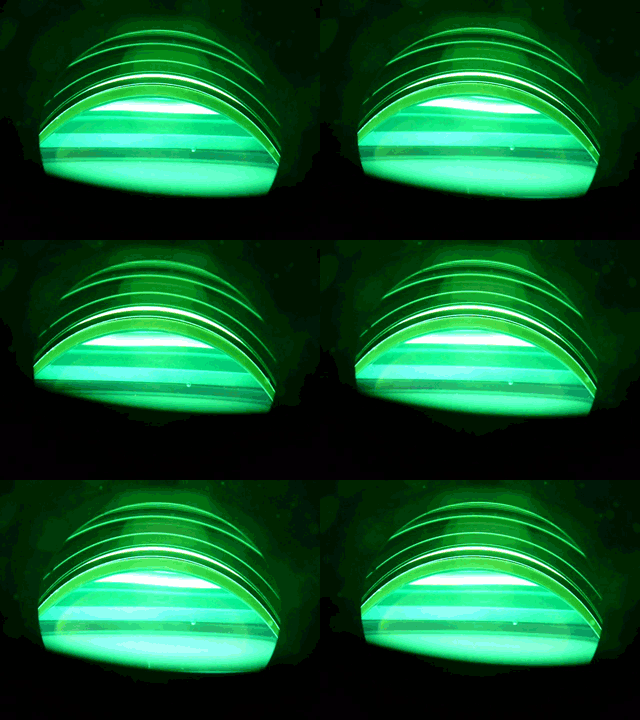
Also, I was really sick of what I'd been working on at work, so I took one of Wayne's MOV files and made a 1-second animated GIF of his glycol sloshing around...
FYI, the filesize limit on animated GIFs is 500k. So, I dropped down to 320x240 and 128 colors and came in at 496KB.
SC
| Description: |
|
| Filesize: |
493.83 KB |
| Viewed: |
9018 Time(s) |
|
|
|
| Back to top |
|
|
ecrabb
Forum Moderator
Joined: 13 Mar 2006
Posts: 15909
Location: Utah
TV/Projector: JVC RS40, Epson 5010
|
| Posted: Wed Jul 01, 2009 11:31 pm Post subject: |
|
|
Here's a Flash version of Wayne's video of the sloshing glycol. Something is wrong with the linkage because the controls don't show up for some reason - they come from an external file.
Yes, I'm EXTREMELY sick of what I've been working on at work. After working for weeks on the same heinous project, I like a little project that only takes 5 or 10 minutes.
SC
|
|
| Back to top |
|
|
|
|




