|
As this forum is rarely used anymore, we've locked it. Feel free to browse and read. Questions? Please reach out to us directly. Cheers! |

|
 |
|
|
| Author |
Message |
martinlandau
Joined: 21 Feb 2009
Posts: 10
|
| Posted: Tue Jun 23, 2009 11:59 am Post subject: Dome Projection Virtual Reality Infocomm 2009 |
|
|
I just got back from infocomm 2009 this weekend. They had several dome projection systems, one company "immersive display" I believe - had a really nice setup.
These systems seemed to run anywhere from 10-20K US dollars just for the dome.
http://www.playerzblog.com/a-cutting-edge-180-degrees-gaming-display-the-z-dome.html
I am looking for help from anyone that may have ideas or suggestions for a cheaper dome solution? A large dome is not necessary for good field of view - a small dome like above - just enough to cover your head and the peripheral vision should be enough right? This would be for personal viewing for 1 person.
Currently I have a sony 1272, I am assuming a 4:3 projector is the best solution for a small done and not 16:9, can anyone elaborate on considerations of various technologies and strategies when building a dome?
Also I am looking to do sterescopic 3D on this dome with the geforce 3d vision solution, are there special lenses or other things that are required to get coherent S3D on a small dome? Thanks.
They had many dome solutions at infocomm, and many s3d solutions, but I guess none of the companies thought to combine the 2 technologies.
|
|
| Back to top |
|
 |
ecrabb
Forum Moderator

Joined: 13 Mar 2006
Posts: 15909
Location: Utah
TV/Projector: JVC RS40, Epson 5010
|
| Posted: Tue Jun 23, 2009 6:18 pm Post subject: |
|
|
Thanks for the report from Infocomm... I gotta get there some time.
I think you're going to have two challenges. First, a CRT isn't going to be a good candidate for a small dome because the lenses have a very shallow depth-of-field (relatively speaking). They're really only suitable for a flat screen, or a very large-radius curved screen. A few guys are using torus screens, which is sort of a rectangular section of a sphere... But, you're only talking about 3-6" of change in depth over the width of an 8-10' wide screen, and even then not all lenses focus well across the screen under those conditions. The bottom line is I can't see how a single CRT is going to work in any way on a small dome (let's call it a "home dome"!  . That's why if you look at practically any CRT-based VR/SE/immersion setups, they're always projecting on flat or subtly surface. If they want a dome, it's a series of pentagonal or hexagonal screens. . That's why if you look at practically any CRT-based VR/SE/immersion setups, they're always projecting on flat or subtly surface. If they want a dome, it's a series of pentagonal or hexagonal screens.
Now, if you switched to a small digital, that might actually be workable. I think you'll still have focus issues, but it should be much less because I think the depth-of-field should be much better. So, the right digital might work. Might take some research on lenses, but you might be able to find one with the right characteristics... possibly.
But, then you have the problem of geometry. You'll need hardware and/or software that can do real-time warping to correct the massive geometric distortion that results from projecting on a spherical surface. I think there are probably some open-source solutions out there, but unless you're a developer, good luck trying to integrate that with DirectX or OpenGL to play a commercial game.
Here's the deal: It ain't easy to project good quality moving images onto a spherical surface and make it look good and work right... It's basically Computer Engineering Masters' thesis and PhD type stuff... Which is why there are companies at Infocomm selling $20k solutions.
I don't mean to crap on your idea, but a DIY home dome screen would be a massive challenge at best, and probably more of an exercise in frustration and a waste of money. Unless, of course, you're in it more for the journey and a learning experience rather than expecting a successful end result. If it sounds like fun to try regardless of outcome, then go for it! Document your results for others!
As for stereo on a small dome... If nobody at Infocomm was doing it, I'd bet there was a reason. Maybe stereo viewing just doesn't look right on a small tightly-curved screen.
SC
|
|
| Back to top |
|
|
mp20748
Joined: 12 Sep 2006
Posts: 5689
Location: Maryland
TV/Projector: 9500LC Ultra / Super 02 and 03 VIM
|
| Posted: Tue Jun 23, 2009 6:45 pm Post subject: |
|
|
SC covered this very well..
I get to see these domes a lot. I've never seen one using CRT. They all had digital projectors with very large (special) lens assemblies attached.
The domes that CRT have worked with are much larger (huge - room size or larger). Even the best curved CRT lenses would not work in that very small dome.
Stereo in a dome - why?
.
|
|
| Back to top |
|
|
perisoft

Joined: 29 Aug 2007
Posts: 2920
Location: Ithaca, NY
|
| Posted: Tue Jun 23, 2009 8:12 pm Post subject: |
|
|
| ecrabb wrote: | | Here's the deal: It ain't easy to project good quality moving images onto a spherical surface and make it look good and work right... It's basically Computer Engineering Masters' thesis and PhD type stuff... |
Ehh, I wouldn't go that far. People get scared too easily. I rolled my own motion system cuing code with a bit of research and some shower thinking, and everyone thinks that's difficult too. The math for something like this is pretty easy - simple geometry - and writing directX interceptors to reproject output onto arbitrary geometry is pretty well-trodden territory. The fact that people sell $20k solutions to do it says more about marketing costs, infrastructure, and customer support (and customer ignorance) than the technical difficulty of the problem.
_________________

|
|
| Back to top |
|
|
ecrabb
Forum Moderator
Joined: 13 Mar 2006
Posts: 15909
Location: Utah
TV/Projector: JVC RS40, Epson 5010
|
| Posted: Tue Jun 23, 2009 8:30 pm Post subject: |
|
|
| perisoft wrote: | | The fact that people sell $20k solutions to do it says more about marketing costs, infrastructure, and customer support (and customer ignorance) than the technical difficulty of the problem. |
Alright, fine... It was Masters' and PhD stuff 5-10 years ago. Good point, but you see mine, too, don't you? Unless you're a code-jockey... Unless you've written for DirectX before, or done at least a fair amount of programming, it would be a pretty tall order to get a project like this working in your "spare time". If it were truly "shade-tree engineering easy", lots of people would be doing it. It's not.
I also think you're oversimplifying. Yeah, mapping to arbitrary geometry is well-trodden territory, but exactly what geometry do you map to to reverse the distortion of the sphere? How do you control magnitude of the warping? Is the surface you're projecting on a section of a perfect sphere or not?
Obviously, I think it would require a lot more research, hard work and testing than you do. But, I'm not a developer, either. Hell, I spent a couple dozen hours last spring trying to learn the Cocoa API well enough to start writing iPhone apps... After a LOT of reading and work, I'm FAR from being able to write code from scratch. I can grab some stuff and hack something together, but I can't imagine just jumping into writing pieces for OpenGL or DirectX to do real-time transforms to project onto distorted surfaces...
Besides, software development aside, I'm still not sure you wouldn't need a special lens to project on a small dome surface.
SC
|
|
| Back to top |
|
|
martinlandau
Joined: 21 Feb 2009
Posts: 10
|
| Posted: Tue Jun 23, 2009 8:55 pm Post subject: |
|
|
Ecrabb and all thanks for the reply. I give more detailed info of my projector experience at infocomm here:
http://www.mtbs3d.com/phpbb/viewtopic.php?f=3&t=3666
http://www.mtbs3d.com/phpbb/viewtopic.php?f=3&t=3661
www.scalabledisplay.com had the software at all the booths with multiple projector spanning and the dome setups. the casio booth had www.immersivedisplayinc.com with a 12K dome system.
www.virtualsimulationsystems.com also had a dome.
I did not have a lot of time to spend at each booth and ask probing questions.
Several of these were smooth domes, the immersive effect was very enchanting. The key to real immersion it seems to me is a huge wrap around field of view, that is hard to get on a flat screen, even a large flat screen. If you can increase your field of view in the dome, and even lose focus on your periphery vision, it was still a very nice experience from what I saw at infocomm. Yes the geometry presents challenges, but from all the dome systems I saw, that HUGE field of view more than made up for lack of perfect focus at the periphery. One of the dome systems had 3 projectors running what looked like flight simulator X running with the scalabledisplay software. It was amazing. I do not know if they were using special geometry correcting lenses or not.
The casio booth was using only 2 projectors if I remember correctly. Also they were all front projection, not rear projection like the link I have at the beginning of this thread. I saw a laser 4kx4k resolution S3d projection system, to me, it paled in comparison to any of the dome systems with huge wrap around field of view. There were also HUGE as in 20 - 30 feet wide video walls, projectors, led, laser, huge flat panel displays, the dome experience ruled them all.
The prices for these domes, no hardware or software, were just too high running up to 20K for what is essentially just some tent poles and some fabric.
I am not much for DIY, but I am convinced anyone can build a nice personal home dome for much much less than 20K. As to why you would want a dome and s3d. well for all the games of course. Flight sims, racing sims, Halo, battlefield 1942, etc etc My local MOSI dome imax also seems to have people like to watch 2d and s3d on thier dome, but I would rather use the dome more for games for my own personal use right now. Several companies from ati to nvidia to iz3d to TI to samsung etc etc are developing hardware and software content for the home consumer to get a more and more immersive experience. Domes are the next logical step.
|
|
| Back to top |
|
|
drice1234

Joined: 07 Oct 2006
Posts: 1309
Location: Allen, Texas
|
|
| Back to top |
|
|
noos@xp37+
Joined: 17 Jun 2008
Posts: 464
Location: Berlin/Munich
|
| Posted: Wed Jun 24, 2009 6:03 pm Post subject: |
|
|
http://www.youtube.com/watch?v=7wkp9GhUp58&hl=de
....just a piece of viedo I once viewed on Google. It shows one of the programs to control extended geometry by the software. But as mentioned above, the opengl or Directx support is not known to me or critical. Would be great to get the software used for the small domes mentioned above with CRTs, but the focus issue stays... thanks for the details on the focussing issues of CRT lenses. But I can remember reading about the g70vru and its hd134 lenses. The was a dome setup mentioned in the sony catalogue!? Anyone familiar with those machines?
Best regards from Munich
noos
|
|
| Back to top |
|
|
noos@xp37+
Joined: 17 Jun 2008
Posts: 464
Location: Berlin/Munich
|
|
| Back to top |
|
|
ecrabb
Forum Moderator
Joined: 13 Mar 2006
Posts: 15909
Location: Utah
TV/Projector: JVC RS40, Epson 5010
|
| Posted: Wed Jun 24, 2009 6:34 pm Post subject: |
|
|
noos... Thanks for posting that. I forgot Sony sold the G70VR with extended geometry control specifically for curved-screen applications! The spec sheet says "Acceptable screen radius: Flat to 2500 mm". That's just over an 8' radius, which is pretty wickedly curved! I can't imagine that would focus worth a crap. Of course, the Sony marketing department's idea of "acceptable" and ours may be vastly different. I mean, they say these machines were good to a 300" diag picture, and we all know what total crap that would have looked like. Besides, the G70VR as well as those lenses are rare as hen's teeth.
The ImmersaView Sol7 software looks very cool... I remember seeing that video, too. Too bad it looks like it's serious bucks. The only price I found was $5000 retail/$4000 discounted. Kind of puts it out of the running for a fun/DIY project. Anybody know of any similar open source tools?
Man, thinking about this stuff makes me want to get a pair of cheap digitals to play around with like a 6' tall, 15' wide curved screen and edge-blending! I wish had money to burn on just-for-fun projects like this! Yeah, that's what I need! Some more projects!
SC
|
|
| Back to top |
|
|
martinlandau
Joined: 21 Feb 2009
Posts: 10
|
| Posted: Thu Jun 25, 2009 6:41 am Post subject: |
|
|
the sol7 stuff I saw was maybe a few hundred for a single pc home license I thought. But you don't need that. The key to immersion is filling your peripheral vision, a FOV of 120 or more. www.jdome.com talks more about this. You do not need FOCUS at the periphery, your eyes only focus on what is directly ahead. You can test this, hold up your projector manual directly in front of your eyes, you can read it, now move it way off to the side of your peripheral vision while still looking straight ahead, you can't read it.
You can use a fisheye lens or spherical mirror so that you don't have to use special warping software and save those CPU cycles for framerates and other uses.
Do a search for fisheye quake - it is a version of the game quake giving 180 FOV, it can even do 360 FOV, but that really distorts the image (useful for cheaters that want to see who is sneaking up behind them). It may be freeware, if so, that same software should be able to be used on all quake engine games and applications. I am in the middle of work right now so don't have time to hunt all the links for you, maybe in a day or 2.
|
|
| Back to top |
|
|
noos@xp37+
Joined: 17 Jun 2008
Posts: 464
Location: Berlin/Munich
|
| Posted: Thu Jun 25, 2009 11:01 am Post subject: |
|
|
Hello!
ecrabb... can you please explain what the "Acceptable screen radius: Flat to 2500 mm"....... means in daily usage? I have problems to follow it after translating. But in any case, I am sure the Sony marketing department is far to optimistic as we know. Those numbers are also provided by Barco if you check for the HRQ curved lenses.
I am also fully CRT addicted, but knowing what kind of digitals and their lenses can handle big curves, I would check for bargains on christmas. For another project. Anyone familiar with digital curve machines?
Someone offered me the HD134 lenses a few weeks ago. He wanted 450€ for the set! It was to insane for me, because I don´t own a G70. Does anyone know if the HD134 work with the normal G70 C-Element? I have some small LC retromachines waiting for new C-Elements....
Here is a post of me where I describe resolution hacks and FOV hacks in Games:
https://www.curtpalme.com/forum_archived/viewtopic.php@t=14102.html
Best regards from Munich
noos
|
|
| Back to top |
|
|
ecrabb
Forum Moderator
Joined: 13 Mar 2006
Posts: 15909
Location: Utah
TV/Projector: JVC RS40, Epson 5010
|
| Posted: Thu Jun 25, 2009 5:43 pm Post subject: |
|
|
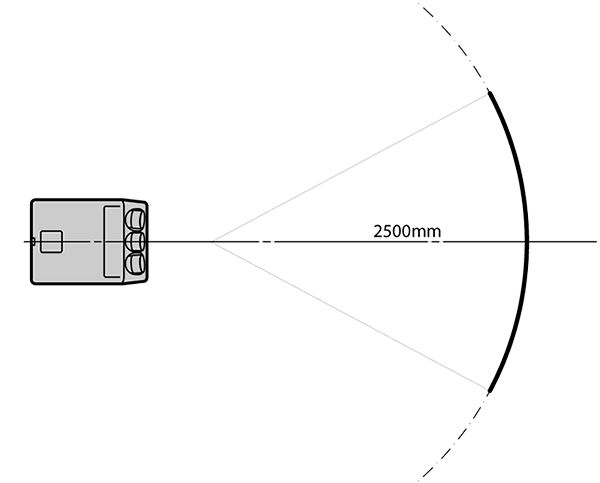
That specification means the screen can be anywhere between flat, up to curved across a 2500mm radius. In other words, take a string and secure it at one end. At the other end, 2.5m away, swing the string through space, and that's how much curve the screen can have. That's a TON of curve!
OK, I just went ahead and sketched it to rough scale so you could get an idea of the curve. That's a 2500mm radius curved screen, about 2.3 or 2.4m wide, and about a 3m throw. I'm pretty sure the lenses on the VR didn't have that much depth of field. They'd have to be huge or cut too much light to be sharp to have that much depth of field. "Acceptable" probably means "acceptably blurry at the edges" in this case.
SC
| Description: |
|
| Filesize: |
9.93 KB |
| Viewed: |
16038 Time(s) |
|
Last edited by ecrabb on Fri Jun 26, 2009 4:25 am; edited 2 times in total
|
|
| Back to top |
|
|
martinlandau
Joined: 21 Feb 2009
Posts: 10
|
| Posted: Thu Jun 25, 2009 10:40 pm Post subject: |
|
|
http://local.wasp.uwa.edu.au/~pbourke/papers/
His first paper about domes and immersive gaming was very illuminating, 180 degree field of view. He is supposed to be the world expert on dome projections - fascinating!
Also ecrabb - check this out from Japan - a gundam dome POD game - you can find some videos on youtube - using a very short throw projector with fisheye lens - AMAZING.
http://www.gundam-kizuna.jp/english/game/index.html
|
|
| Back to top |
|
|
ecrabb
Forum Moderator
Joined: 13 Mar 2006
Posts: 15909
Location: Utah
TV/Projector: JVC RS40, Epson 5010
|
| Posted: Thu Jun 25, 2009 11:07 pm Post subject: |
|
|
I've read some of that before. I used to do some work for a company you may have heard of - MechDyne (now Fakespace MechDyne). I graduated from Iowa State University, home of one of the first (as far as I'm aware) "caves". The original and the new version of the C6 was designed by MechDyne and the enclosure by a buddy of mine when we worked at an architecture firm together. So, that's why I'm into this stuff.
http://www.vrac.iastate.edu/c6.php
What do you do that you got to go to InfoComm? Or, do you live in FL?
Very cool stuff and fascinating, indeed... Now, I just need some wealthy relative to die and leave me a pile of money so I can buy myself a house with a big workshop or giant basement (AKA toybox).
SC
|
|
| Back to top |
|
|
AnalogRocks
Forum Moderator

Joined: 08 Mar 2006
Posts: 26706
Location: Toronto, Ontario, Canada
TV/Projector: Sony 1252Q, AMPRO 4000G
|
| Posted: Fri Jun 26, 2009 3:44 am Post subject: |
|
|
Hey SC, you labeld your drawing 2500cm instead of 2500mm
_________________
Tech support for nothing
CRT.
HD done right!
|
|
| Back to top |
|
|
ecrabb
Forum Moderator
Joined: 13 Mar 2006
Posts: 15909
Location: Utah
TV/Projector: JVC RS40, Epson 5010
|
| Posted: Fri Jun 26, 2009 4:25 am Post subject: |
|
|
Ooops. Good catch. Fixed.
SC
|
|
| Back to top |
|
|
noos@xp37+
Joined: 17 Jun 2008
Posts: 464
Location: Berlin/Munich
|
| Posted: Fri Jun 26, 2009 7:18 am Post subject: |
|
|
ecrabb....thanks for the drawing!!! But what does then 2500mm radius mean for for a 4 meter screen (ultra high gain silver screen for brightness). Does it mean it wraps around the 2,5m radius cycle. I only want to make sure I got it right, because I am planning to go for as much curve in my basement as possible. I heard by now that the HD8 and HD145 are quite the best AC lenses for curves. The should handle 5 to 10 percent of elevated sides of a screen. Meaning 10cm to 20cm (abs. max. I think) for a two meter screen or then 20cm to 40cm for a 4 m screen. Can you compare this with the optimistic Sony HD134 specs and that Barco ones:
Optional lenses
A range of lenses optimized for curved screen setups
HRQ 904
Screen width up to 4 m / 13 ft.
Screen radius 2.5-5m / 8-16 ft.
HRQ 910
Screen width up to 10 m / 32 ft.
Screen radius 5-15m / 16-49 ft.
I ask, because I want to know how good these AC lenses are, and if it is worse to spend so much money in the special LC curve lenses and its projectors.
Thans a lot!
noos
|
|
| Back to top |
|
|
Ile

Joined: 09 Mar 2006
Posts: 1491
Location: Jyväskylä, Finland
|
| Posted: Fri Jun 26, 2009 9:04 am Post subject: |
|
|
| noos@xp37+ wrote: | | Meaning 10cm to 20cm (abs. max. I think) for a two meter screen or then 20cm to 40cm for a 4 m screen. Can you compare this with the optimistic Sony HD134 specs and that Barco ones: |
2,5 m radius and 2 m wide picture gives about same 20 cm elevated corners.
2,5 m radius and 4 m wide gives about 1 m corner elevation. Brightness will be problem, since actual wide (curvy) is then near 5 m.
I used only pen and paper, so my numbers aren't so accurate. 
|
|
| Back to top |
|
|
|
|
|
|
|
You cannot post new topics in this forum
You cannot reply to topics in this forum
You cannot edit your posts in this forum
You cannot delete your posts in this forum
You cannot vote in polls in this forum
You cannot attach files in this forum
You can download files in this forum
|
Forum powered by phpBB © phpBB Group
|
|




