| Author |
Message |
WanMan

Joined: 19 Mar 2006
Posts: 10270
|
| Posted: Sun Jun 14, 2009 10:56 am Post subject: [Vizio] Service Menua Access |
|
|
Morning All,
I know better than to post this here, but why not? You guys seem to be pulling rabbits from hats and you may wind up doing this again. 
I have a Vizio plasma in the family room and on a couple of stations I am seeing unintended viewing-edge exposures. This is an edge that isn't intended to be seen. This is only occurring with the DirecTV DBS STBs. For instance, on Fox I am seeing the top edge of the frame exposed. On another channel (Universal HD) I am seeing the right edge exposed.
The Vizio plasma menu shows several features 'locked out' that I am sure requires nothing more than a service menu code to be entered, and of this is picture physical adjustment (L-R, U-D). Anyone know what the remote key code is?
_________________
Trust no one. Absolutely no one. Advice of the board.
|
|
| Back to top |
|
 |
macgyver655
Joined: 22 Aug 2007
Posts: 8508
|
| Posted: Sun Jun 14, 2009 11:16 am Post subject: |
|
|
Try either one of these and see what you get:
Turn The TV off.
Press and hold the {CH +} & {CH -} buttons on the TV.
Then press and release the {POWER} button on the TV.
Release the {CH +} & {CH -} buttons.
Now press the {MENU} button on the remote.
You should get your regular menu up, but with a "F" in the
bottom right corner of the menu (This if for factory).
Press and hold the {MENU} button for few seconds.
The Service Menu will be displayed.
Alternative method
Turn The TV off.
Press and hold the {CH +} & {CH -} buttons on the TV.
Then press and hold the {POWER} button on the TV.
Keep all three buttons pressed for few secs.
Now press the {MENU} button on the remote.
You should get your regular menu up, but with a "F" in the
bottom right corner of the menu (This if for factory).
Press and hold the {MENU} button for few seconds.
The Service Menu will be displayed.
|
|
| Back to top |
|
|
WanMan
Joined: 19 Mar 2006
Posts: 10270
|
| Posted: Mon Jun 15, 2009 10:23 pm Post subject: |
|
|
I tried both of these suggestions and nothing happened. Since the unit is turned off, the pressing and holding combination of the CH+, CH-, and POWER buttons didn't even turn the unit ON.  I'm guessing that since the suggestion was to turn the unit off first, the initial sequence would turn it on, right? I'm guessing that since the suggestion was to turn the unit off first, the initial sequence would turn it on, right?
_________________
Trust no one. Absolutely no one. Advice of the board.
|
|
| Back to top |
|
|
macgyver655
Joined: 22 Aug 2007
Posts: 8508
|
| Posted: Mon Jun 15, 2009 10:38 pm Post subject: |
|
|
Yes it should turn on. Whats the model number and I'll see what I can find out.
Maybe also try the procedure with the tv already on.......experiment a little. Thats the sequence I keep coming up with.
|
|
| Back to top |
|
|
WanMan
Joined: 19 Mar 2006
Posts: 10270
|
| Posted: Tue Jun 16, 2009 3:36 pm Post subject: |
|
|
GV42L (LCD) and VP505XVT1A (plasma)
_________________
Trust no one. Absolutely no one. Advice of the board.
|
|
| Back to top |
|
|
macgyver655
Joined: 22 Aug 2007
Posts: 8508
|
| Posted: Tue Jun 16, 2009 7:46 pm Post subject: |
|
|
Well I grabbed a copy of the service manual for your GV42L and there is no mention of a service menu. It does state that in the picture adjust menu there is an option for advanced picture adjustment. These newer tv service manuals are really crap........ 
It also states that when in RGB mode there is adjustment for Horz size and position. I'm still looking for the plasma manual.
|
|
| Back to top |
|
|
macgyver655
Joined: 22 Aug 2007
Posts: 8508
|
| Posted: Tue Jun 16, 2009 8:10 pm Post subject: |
|
|
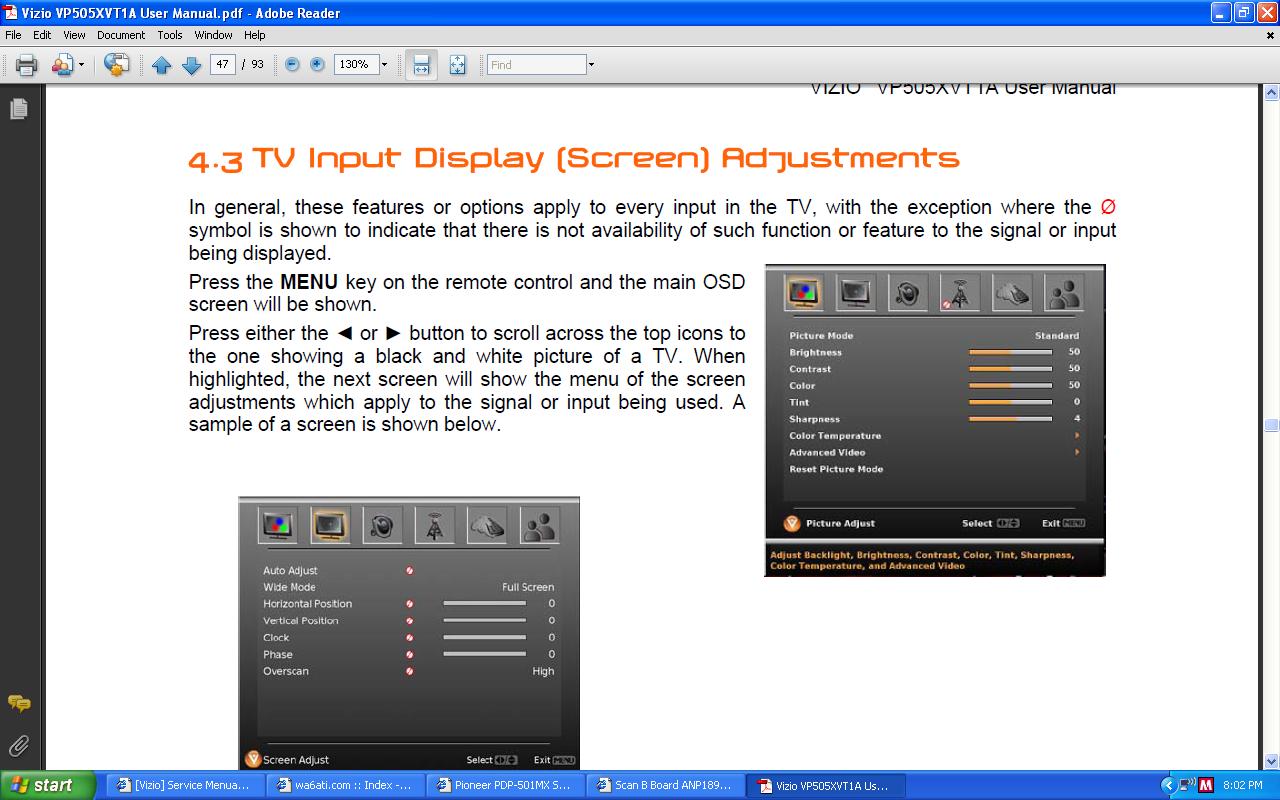
ok I just looked over the user manual for the VP505XVT1A and that has all the position adjustments in the regular on screen menu.
Did this answer your question?
|
|
| Back to top |
|
|
WanMan
Joined: 19 Mar 2006
Posts: 10270
|
| Posted: Tue Jun 16, 2009 11:53 pm Post subject: |
|
|
The user manual is not telling the truth. Unless the features I am seeing disabled are because of HDMI input being used.
| Description: |
|
| Filesize: |
4.09 KB |
| Viewed: |
63 Time(s) |

|
_________________
Trust no one. Absolutely no one. Advice of the board.
|
|
| Back to top |
|
|
macgyver655
Joined: 22 Aug 2007
Posts: 8508
|
| Posted: Wed Jun 17, 2009 12:06 am Post subject: |
|
|
LOL....I guess this is what your talking about. I'll see if I can locate a service manual for it but from what I have found, Vizio states there is no hidden service menu on their newer devices.......
| Description: |
|
| Filesize: |
137.59 KB |
| Viewed: |
40 Time(s) |
|
|
|
| Back to top |
|
|
WanMan
Joined: 19 Mar 2006
Posts: 10270
|
| Posted: Wed Jun 17, 2009 11:04 am Post subject: |
|
|
That is it.
_________________
Trust no one. Absolutely no one. Advice of the board.
|
|
| Back to top |
|
|
Jester62
Joined: 16 Aug 2013
Posts: 1
Location: Texas
|
| Posted: Fri Aug 16, 2013 7:15 am Post subject: |
|
|
Gosh this is such an old post but I always try to lend a hand when possible.
Try this method :
GV42L Service Menu Access :
With power on, push "Menu" on remote and then push"Vol-" and "Input" on keypad.
VP505 Service Menu Access :
With power on, push "Menu" on remote and then push "2" "4" "8" "9"
Hopefully this will work for you. Good Luck !
Jester62
|
|
| Back to top |
|
|
|
|





