|
As this forum is rarely used anymore, we've locked it. Feel free to browse and read. Questions? Please reach out to us directly. Cheers! |

|
 |
|
|
| Author |
Message |
CRT_Ben
Joined: 28 Aug 2006
Posts: 1684
Location: Northern Virginia
|
| Posted: Thu Jun 11, 2009 6:34 pm Post subject: |
|
|
| garyfritz wrote: | | Interestingly enough, even my cheapie 1680x1050 LCD monitor (Westinghouse L1916HW) can't display that image properly! The left 1/3 and right 1/4 of the screen look fine, but it loses it in the center. The vertical areas are much darker and they flicker like mad. This is with a VGA connector -- not sure if a DVI would do any better, but I suspect not. |
I bet DVI makes a much bigger difference than you think. Especially because the manufacturers will almost certainly skimp on the A/D conversion within the monitor for the analog input...I switched to DVI on my (somewhat cheap-y) Spectre 24" LCD, and it's worlds better in color and sharpness.
For fun I hooked up both cables and put on a 1 off/1 on pattern at 1920x1200. With the VGA cable it looks like a CRT; dark, fuzzy vertical lines. With DVI, crystal clear.
|
|
| Back to top |
|
 |
draganm

Joined: 08 Mar 2006
Posts: 8990
Location: Colorado
|
| Posted: Thu Jun 11, 2009 6:38 pm Post subject: |
|
|
| perisoft wrote: | | So here's another question: Has anybody checked to see if the lenses vary? It's not necessarily a foregone conclusion that they're all the same quality, is it? |
all HD8's are not equal. The older ones with the metal wing nut on top do not focus well at all. I don't know why, both say HD8 Rev. B but the older ones have aa silver sticker and newer ones Gold. Mind you these are all plastic. There were some glass HD8's but I've never had a set.
|
|
| Back to top |
|
|
perisoft

Joined: 29 Aug 2007
Posts: 2920
Location: Ithaca, NY
|
| Posted: Thu Jun 11, 2009 6:42 pm Post subject: |
|
|
| CRT_Ben wrote: | | garyfritz wrote: | | Interestingly enough, even my cheapie 1680x1050 LCD monitor (Westinghouse L1916HW) can't display that image properly! The left 1/3 and right 1/4 of the screen look fine, but it loses it in the center. The vertical areas are much darker and they flicker like mad. This is with a VGA connector -- not sure if a DVI would do any better, but I suspect not. |
I bet DVI makes a much bigger difference than you think. Especially because the manufacturers will almost certainly skimp on the A/D conversion within the monitor for the analog input...I switched to DVI on my (somewhat cheap-y) Spectre 24" LCD, and it's worlds better in color and sharpness.
For fun I hooked up both cables and put on a 1 off/1 on pattern at 1920x1200. With the VGA cable it looks like a CRT; dark, fuzzy vertical lines. With DVI, crystal clear. |
The problem is neither the cable nor the monitor, but the tracking settings on the monitor. There are ultra-fine 'clock' settings (think 'image width') that affect whether the pixels line up perfectly. There are almost always adjustments on the monitor for it; if you're running the native resolution of the panel and get that kind of thing, there's just a slight image width difference, which means you get what is effectively moire.
If an analog cable is bad enough, it can be very hard (or impossible, depending on the monitor) to get it right, but it's almost never right by DEFAULT. Try the 'auto' setting first; if that doesn't clear it up, mess with the fine sync or similar setting. When you get it correct, everything will pop in perfectly and it'll be like wiping the fog off the window!
_________________

|
|
| Back to top |
|
|
ecrabb
Forum Moderator

Joined: 13 Mar 2006
Posts: 15909
Location: Utah
TV/Projector: JVC RS40, Epson 5010
|
| Posted: Thu Jun 11, 2009 7:26 pm Post subject: |
|
|
Or, Gary could avoid all that dinking around and just hook it up with the DVI cable and have perfect 1:1 pixel mapping automagically. 
Gary, if you have an LCD monitor and a video card that have DVI, but you're using VGA, run, don't walk, run the computer and order a DVI cable from Monoprice.
SC
|
|
| Back to top |
|
|
perisoft
Joined: 29 Aug 2007
Posts: 2920
Location: Ithaca, NY
|
| Posted: Thu Jun 11, 2009 7:35 pm Post subject: |
|
|
| ecrabb wrote: | | Or, Gary could avoid all that dinking around... |
Well, I figure that anyone who wanted to avoid dinking around wouldn't be posting here in the first place... 
|
|
| Back to top |
|
|
ecrabb
Forum Moderator
Joined: 13 Mar 2006
Posts: 15909
Location: Utah
TV/Projector: JVC RS40, Epson 5010
|
| Posted: Thu Jun 11, 2009 7:43 pm Post subject: |
|
|
That's a poor assumption. Most everybody here likes dinking around; but depending the individual in question, there's quite an array of things we like or do not like dinking around with.
For instance, I love dinking with CRT projectors, but DETEST dinking with Windows hardware device drivers.
SC
|
|
| Back to top |
|
|
garyfritz

Joined: 08 Apr 2006
Posts: 12088
Location: Fort Collins, CO
|
| Posted: Thu Jun 11, 2009 8:34 pm Post subject: |
|
|
SC, my laptop doesn't have DVI out, or I'd have switched to DVI long ago.
| perisoft wrote: | | The problem is neither the cable nor the monitor, but the tracking settings on the monitor. There are ultra-fine 'clock' settings (think 'image width') that affect whether the pixels line up perfectly. There are almost always adjustments on the monitor for it; if you're running the native resolution of the panel and get that kind of thing, there's just a slight image width difference, which means you get what is effectively moire. |
I don't think what I'm seeing is moire. That would be a static pattern, yes? This is a flickering in the vert-line sections of that image. The vert squares are also darker in that area, similar to the checkerboard pattern you see on a CRT that can't handle the bandwidth. But the left and right sides of the screen are just fine, which says to me it's definitely not the cable.
| Quote: | | If an analog cable is bad enough, it can be very hard (or impossible, depending on the monitor) to get it right, but it's almost never right by DEFAULT. Try the 'auto' setting first; if that doesn't clear it up, mess with the fine sync or similar setting. When you get it correct, everything will pop in perfectly and it'll be like wiping the fog off the window! |
I don't see any tracking or clock settings in the OSD menus. The only "auto" setting I see (p. 8 of the manual) does an "auto-config" when it sees new timings -- and that's already on.
...aha! Found it! It wasn't ON any of the menus. On p. 9 it showed how to do the auto-adjust, and *poof* the entire pattern displays perfectly. Thanks, Peri!
It sounds like you know what you're talking about in this area, so maybe you can clear up something for me. I run the monitor at native resolution. So why do I see color fringing around black-on-white text? Some chars like ] and ! look like they're smeared across pixels, with red fringe to the left, instead of a sharp black line. Is that caused by the kind of tracking error you're talking about? If so, why didn't the auto-adjust fix it?
|
|
| Back to top |
|
|
ecrabb
Forum Moderator
Joined: 13 Mar 2006
Posts: 15909
Location: Utah
TV/Projector: JVC RS40, Epson 5010
|
| Posted: Thu Jun 11, 2009 8:45 pm Post subject: |
|
|
| garyfritz wrote: | | It sounds like you know what you're talking about in this area, so maybe you can clear up something for me. I run the monitor at native resolution. So why do I see color fringing around black-on-white text? Some chars like ] and ! look like they're smeared across pixels, with red fringe to the left, instead of a sharp black line. Is that caused by the kind of tracking error you're talking about? If so, why didn't the auto-adjust fix it? |
Gary, is it sort of a blue/orange fringe? That sounds like Windows ClearType to me. You can turn it off.

http://www.microsoft.com/typography/cleartype/tuner/step1.aspx
SC
|
|
| Back to top |
|
|
garyfritz
Joined: 08 Apr 2006
Posts: 12088
Location: Fort Collins, CO
|
| Posted: Fri Jun 12, 2009 12:33 am Post subject: |
|
|
Aha. Right you are, Steve. It looks significantly worse with ClearType turned off, especially italic fonts. But the Windows ClearType "tuner" you linked me to lets you improve it. Supposedly it doesn't work in Vista but it sure looks better to me.
Thanks for the pointer! Even if it's embarrassing that I have to get Windows advice from a Mac bigot.
|
|
| Back to top |
|
|
ecrabb
Forum Moderator
Joined: 13 Mar 2006
Posts: 15909
Location: Utah
TV/Projector: JVC RS40, Epson 5010
|
| Posted: Fri Jun 12, 2009 5:07 am Post subject: |
|
|
Hey, I'm no Mac bigot, man! I just have my preferences - just like everybody else! I just don't understand why the Windows sufferers keep coming back for more like it's going to get any better! Like Vista Service Pac... er, I mean Windows 7 is going to suck any less! I guess it's a form of Stockholm syndrome...  OK, maybe I'm a bigot... I digress... OK, maybe I'm a bigot... I digress...
Seriously, though... The only reason I knew about the ClearType issue is because I do screen caps all the time as part of courseware development, and way back when we switched from Windows 2000 to XP, I had to find the solution. I've had to help a dozen other people resolve the issue the last 5 or 6 years, too - so it stays fresh.
Mac OS X has a nearly identical feature called "font smoothing" that like Windows, you can tweak in 5 or 6 steps. I turn it off on both OS'es when I'm doing captures.
SC
|
|
| Back to top |
|
|
garyfritz
Joined: 08 Apr 2006
Posts: 12088
Location: Fort Collins, CO
|
| Posted: Fri Jun 12, 2009 2:17 pm Post subject: |
|
|
Honestly I am NO fan of Windoze or Microshaft. I'd MUCH rather run on a Unix base like OS X, and I'd MUCH rather support Apple than the Evil Empire. But my clients use Windows and require me to use Windows. I know I could run Windows on top of a Mac -- so I could buy more-expensive hardware and pay for two OS's and two sets of apps? No thanks.
I frequently do screen caps for courseware development too, and I should have figured this out on my own. I guess I never thought to connect the fringing I see on the screen and the fringing I sometimes see in the screen-cap program, assuming it was an artifact of the program's magnifier. Duh.
|
|
| Back to top |
|
|
skippyar
Joined: 22 May 2009
Posts: 108
Location: Bristol, UK
|
| Posted: Fri Jun 12, 2009 8:02 pm Post subject: |
|
|
| garyfritz wrote: | | skippyar wrote: | Thought I'd download the picture and see what it looked like on my Barco Data 500 via computer, out of curosity.
I'm using 800*600*32bits colour @60hz refresh VGA-BNC 15HD D-Sub w/ Radeon 7500series (x4 AGP 64MB) which the Barco handles quite nicely. 1024 is too much and stressing causes fuzziness. |
At first I was confused how you could be resolving 1920x1080 at all, but I see you cheated. You're only *displaying* 800x600 pixels of the picture. So that's like only displaying the upper-left 1/4 of a movie image.
Interestingly enough, even my cheapie 1680x1050 LCD monitor (Westinghouse L1916HW) can't display that image properly! The left 1/3 and right 1/4 of the screen look fine, but it loses it in the center. The vertical areas are much darker and they flicker like mad. This is with a VGA connector -- not sure if a DVI would do any better, but I suspect not. |
Yes, apologises for the confusion. The computer is only displaying the upper-left portion of the entire image as you so rightly pointed out.
This might help explain why your 19" suffers from flicker: http://www.planetanalog.com/showArticle.jhtml?articleID=165600661
Unlike refresh signal on CRTs, the flicker seen on LCD stems from an offset of the 'common voltage'. The common voltage generator (of the common electrode) generates a common voltage according to data signals received from the predetermined number of data lines. O_O
It was mentioned that the "HD" lenses are not ideally suitable for High Definition resolutions such as the 1080p. Not to sound too much of a noobie, but I'm using Delta HD 6C ML lenses and I struggle on anything past 800*600pixels (via PC). I simply thought this was to do with the limitations and capabilities of my projector and its technology, not the lenses?! (although I appreciate their role).
Without going off topic, I was always a bit confused by the Curt Palme http://www.curtpalme.com/Projector_Rankings.shtm for the Barco Data 500, which states: Max Resolution 1024x768, HDTV resolutions supported 720p, 1080i (HDFury2). If my entry-level Barco distorts at max res then how can it possibly handle a HDFury2 adaptor, or does the CRT itself require some technical enhancements. 
Thanks for any enlightenment.
Paul.
(Something cool I did figure out was copying the preferences for 4:3 and storing them as a new source number (Channel 91). From the copied preferences I reduced the 'Vertical Height' of the image suitable for 16:9 format (within 4:3 parameters/letterbox effect). So now when I watch TV on the Barco I can flip between source 1 (composite) in 4:3 ratio to source 91 (composite) in 16:9 ratio /letterbox) - Brilliant!
|
|
| Back to top |
|
|
garyfritz
Joined: 08 Apr 2006
Posts: 12088
Location: Fort Collins, CO
|
| Posted: Fri Jun 12, 2009 8:30 pm Post subject: |
|
|
I don't know about the capabilities of the HD6CML lenses, but I suspect those aren't your weak link. You've got an ES projector. ES tubes are inherently less sharp than EM tubes. And they lose sharpness with age. If you have a lot of hours on your tubes, they're not even capable of what they used to do -- which was never as good as what an EM projector can do.
I've run 720p on an ES projector (Dwin HD700) and it looks good, but it's clearly past the limits of the projector. ES tubes are just not as sharp as EM.
|
|
| Back to top |
|
|
skippyar
Joined: 22 May 2009
Posts: 108
Location: Bristol, UK
|
| Posted: Fri Jun 12, 2009 11:49 pm Post subject: |
|
|
| garyfritz wrote: | I don't know about the capabilities of the HD6CML lenses, but I suspect those aren't your weak link. You've got an ES projector. ES tubes are inherently less sharp than EM tubes. And they lose sharpness with age. If you have a lot of hours on your tubes, they're not even capable of what they used to do -- which was never as good as what an EM projector can do.
I've run 720p on an ES projector (Dwin HD700) and it looks good, but it's clearly past the limits of the projector. ES tubes are just not as sharp as EM. |
When I purchased this PJ it had 6000 hours, currently its at about 6125 hours. I've read a little about the different types of tubes. I never really expected an awful lot from this Barco (1992). However, when its warmed and settled down I'm always impressed with the results and how well its faired over the years.
Yes, its not a very sharp picture by a long way. I still think it champions quite well even with all its characteristics/limitations when compared to the calibre of todays technology.
The Blue lens I've always struggled to get as equally sharp as the Red and Green. God knows why, but its ever so slightly defocused. I've tried tweaking dipoles, astigmatics etc, lens fitting to tube... I've also noticed when the contrast exceeds 25+ because of the defocus it causes a halo effect from the blue(sort of like fringing effect). The other known problem is the dread green tint on dark images. Again I've tried my best with the gain control settings but found the only way to alleviate the problem is increase the brightness, but then I loose my 'black' (more like grey) levels.  
You can actually see the 'defocus' from blue in this image: http://www.flickr.com/photos/skipster/3571413451/sizes/o/in/set-72157618808224845/ (green & blue)
and from 1min 20 in this video shows the clarity and problems with overall outer defocus in the corners.
http://www.youtube.com/watch?v=HJ2ubP5FOJM and again Blue convergence issues.
There is an oddity with the Blue in the bottom left on the internal source where the grid 'flicks' up quite severely so I've had to 'zoom' the H/V image source out and expand the PJ H/V over the PJ screen then mask it off using the blanking. 
|
|
| Back to top |
|
|
garyfritz
Joined: 08 Apr 2006
Posts: 12088
Location: Fort Collins, CO
|
| Posted: Sat Jun 13, 2009 1:12 am Post subject: |
|
|
The "green tint on dark images" is just a calibration issue. See what I told dturco in this thread.
Blue SHOULD NOT be as sharp as R/G. Your eye can't focus well on blue so it doesn't matter if it's not sharp -- and CRTs need to defocus blue so the blue doesn't crap out in bright areas. See this post for an explanation.
I dunno what controls you have with the Barco, but the first thing that comes to mind with your "defocus in the corners" issue -- especially if you've already tried to resolve it with convergence &etc -- is optical. Most lenses have two focus knobs -- one for center, one for corners. Have you adjusted yours? There's also Scheimpflug adjustment, but if you're sharp in the center and out of focus in ALL corners, that's more likely the corner-focus adjustment.
First time I've seen the Spice Girls used as a test pattern BTW.
|
|
| Back to top |
|
|
skippyar
Joined: 22 May 2009
Posts: 108
Location: Bristol, UK
|
| Posted: Sat Jun 13, 2009 3:48 am Post subject: |
|
|
| garyfritz wrote: | The "green tint on dark images" is just a calibration issue. See what I told dturco in this thread.
Blue SHOULD NOT be as sharp as R/G. Your eye can't focus well on blue so it doesn't matter if it's not sharp -- and CRTs need to defocus blue so the blue doesn't crap out in bright areas. See this post for an explanation.
I dunno what controls you have with the Barco, but the first thing that comes to mind with your "defocus in the corners" issue -- especially if you've already tried to resolve it with convergence &etc -- is optical. Most lenses have two focus knobs -- one for center, one for corners. Have you adjusted yours? There's also Scheimpflug adjustment, but if you're sharp in the center and out of focus in ALL corners, that's more likely the corner-focus adjustment.
First time I've seen the Spice Girls used as a test pattern BTW. |
For the green discolouration I did something similiar as you kindly pointed out using:
http://www.stevelarkins.freeuk.com/tv_grey_scale.htm
I downloaded a greyscale pattern and basically did my best by eye as I don't have any colour temperature equipment. I then flicked through numerous TV channels looking at various broadcasts. The biggest mistake I made was to gauge the results against an LCD TV displaying the same input, not to mention confusing the life out of me.
That second link regarding the Blue I've definately bookmarked to re-read and fully absorb as this explains ALOT of confusion I was having when making adjustments to the CRT gain controls. Very interesting and enlightening thankyou!
I've adjusted both my inner and outer focus on the lenses as best possible. I don't believe I have any Scheimpflug adjustment control?! However, I'm wondering if the Scheimpflug principle might have something to do with the way I've mounted my PJ and its plane of focus. If you look at this photo: http://www.flickr.com/photos/skipster/3566591323/sizes/o/in/set-72157618825049144/
you'll notice how the PJ is mounted in the desktop way up and I've raised the back to give me the angle of trajectory down at the PJ screen. I had to mount it this way as I had no proper mounting equipment, so built a housing for it to sit in. (Though the lenses do point at a perfect angle the top of screen is closer and bottom further from PJ obviously).
Yeah, the Spice Girls came in quite handy as most of their videos are in 4:3 format so I was able to get an overall impression of how the end result would look with the video filling the entire parameters of the PJ screen, as most of the input sources are now 16:9 and only appear as letterbox on my setup.
|
|
| Back to top |
|
|
Kiev Savoie

Joined: 25 Oct 2007
Posts: 432
|
| Posted: Sat Jun 13, 2009 2:20 pm Post subject: |
|
|
http://www.flickr.com/photos/skipster/3566591323/sizes/o/in/set-72157618825049144/
I did something similar to this for a rear projection system. With the rear jacked up above the front end like that it allowed me to fold the light beam in the most compact way i could figure out. The great thing about this is that you can get a pretty much perfectly square raster on the tube face and utilize every last bit of phospher (Assuming the lenses are dead even with the center of the screen and level on the zero axis). The not so great thing about it is that I can't get the bottom of the image to focus very well, it's pretty soft and i have not figured out what to do about it (if anything can be done about it!).
Your situation would be much better served by a standard ceiling mount. If the unistrut is too expensive for you a couple of boards laying on top of your rafters with treaded rod coming down off them through your sheet rock works very well, just be advised to get your beam geometry right because this setup is not adjustable.
|
|
| Back to top |
|
|
garyfritz
Joined: 08 Apr 2006
Posts: 12088
Location: Fort Collins, CO
|
| Posted: Sat Jun 13, 2009 3:26 pm Post subject: |
|
|
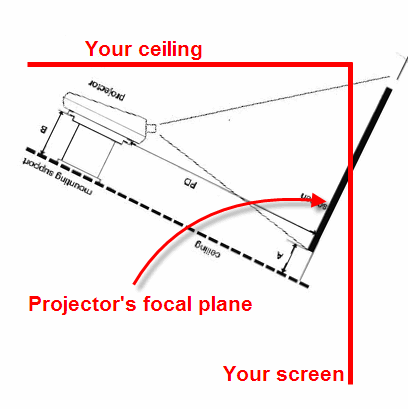
Well, it's a little tough to see from your picture, but yes, it might be Scheimpflug issues. Especially where you have the projector mounted at an angle like that -- most projectors are designed to run "flat" and they have a built-in offset to display the image above the projector (with the PJ base flat on a table mount) or below the projector (with the PJ base flat on the ceiling for an upside-down ceiling mount). See e.g. p. 16 of the BG800 manual. If your focus is sharp in a band across the middle of the screen, but fuzzy at top & bottom, you've got a Scheimpflug problem.
Your projector is right-side-up but on the ceiling. If it was mounted "flat" it would be projecting up above the ceiling. By tilting up the rear to center the image onto your screen with the PJ "right-side-up" on the ceiling, you're working against the built-in vertical offset, and that WILL cause major Scheimpflug problems. The projector is designed to project to a flat vertical surface above the right-side-up PJ. The optics are aligned so the vertical screen is in the proper focal plane. By tilting the projector you've tilted the entire focal plane, and now it's focusing on a plane that is behind the screen for the top half, and in front of the screen on the bottom half. See the attached pic -- I took the setup image from the BG800 manual and rotated it the way you've rotated your projector.
It's easy to verify this. Get your center focus as sharp as possible. Now take an index card or other rigid piece of white paper. Hold it at the center of the screen, then move it out toward the projector. The image on the card should get blurrier as you move away from the sharp-focus point at the screen.
Now move the card down onto the bottom half of the screen. The image should be blurrier there. Now move the card out toward the screen again -- toward the proper focal plane as shown in the picture -- and see if the image on the card gets sharper as you move it out. If it does, then you definitely have a Scheimpflug problem.
The solution is "easy." "All" you have to do is flip your projector so it's upside down with its base parallel to the ceiling. Then your setup will be more like the picture on p. 16 of the manual, and you should have good focus across your vertical screen.
Honestly, though, if you're going to go to the trouble of pulling the projector off the ceiling, you really ought to consider replacing it while you have it down. Good EM-focus projectors are getting stupidly cheap. You'll be astonished at how much sharper and clearer the picture will be with a BG808 or Marquee 8500 or similar. It's not subtle. It's a night-and-day difference.
| Description: |
|
| Filesize: |
14.47 KB |
| Viewed: |
10651 Time(s) |
|
|
|
| Back to top |
|
|
skippyar
Joined: 22 May 2009
Posts: 108
Location: Bristol, UK
|
| Posted: Sat Jun 13, 2009 6:03 pm Post subject: |
|
|
| Kiev Savoie wrote: | http://www.flickr.com/photos/skipster/3566591323/sizes/o/in/set-72157618825049144/
..... The not so great thing about it is that I can't get the bottom of the image to focus very well, it's pretty soft and i have not figured out what to do about it (if anything can be done about it!)..... |
Yup!
|
|
| Back to top |
|
|
skippyar
Joined: 22 May 2009
Posts: 108
Location: Bristol, UK
|
| Posted: Sat Jun 13, 2009 6:16 pm Post subject: |
|
|
| garyfritz wrote: | The solution is "easy." "All" you have to do is flip your projector so it's upside down with its base parallel to the ceiling. Then your setup will be more like the picture on p. 16 of the manual, and you should have good focus across your vertical screen.
Honestly, though, if you're going to go to the trouble of pulling the projector off the ceiling, you really ought to consider replacing it while you have it down. Good EM-focus projectors are getting stupidly cheap. You'll be astonished at how much sharper and clearer the picture will be with a BG808 or Marquee 8500 or similar. It's not subtle. It's a night-and-day difference. |
There's no way I'm getting up there and carting that thing back down in a hurry. I made a vow that once it was up there it stayed there, even if its broken.
Your diagram highlighted a major oversight I made with the angle of the PJ screen slanting back.
I could have gone for a 2nd hand DLP or something, but I thought the Barco was more adventurous and interesting.
|
|
| Back to top |
|
|
|
|
|
|
|
You cannot post new topics in this forum
You cannot reply to topics in this forum
You cannot edit your posts in this forum
You cannot delete your posts in this forum
You cannot vote in polls in this forum
You cannot attach files in this forum
You can download files in this forum
|
Forum powered by phpBB © phpBB Group
|
|




