|
As this forum is rarely used anymore, we've locked it. Feel free to browse and read. Questions? Please reach out to us directly. Cheers! |

|
 |
|
|
| Author |
Message |
Wolf-Strong
Joined: 25 May 2009
Posts: 77
|
| Posted: Tue Jun 23, 2009 11:03 pm Post subject: |
|
|
Ok so now I face yet another problem that I could use some wisdom on:
As everyone reading this now should know, I have no video source. Now, the most important thing is that I be able to watch DVDs on the projector, second I would like to hook up outside video sources like the PS2/PS3 (when we get one)/xbox/SNES/Ect..., and lastly is that it have even better picture quality. Now I am working on the quality of the picture by moving the projector more to the side and trying to center it to the screen as much as humanly possible. I will even be most likely moving the screen again just so I can get it as center as possible.
Now as far as the video source, I am just stuck. I have no computer I can honestly hook it up to, which leaves me thinking that I can either build a Media PC for ~$200 and use that. None of the gaming systems are HDMI or DVI so HD Fury doesn't seem like a viable option, and I figure I could always buy a PCI card for the Media PC to have an input for them. I do have a receiver (Yamaha Natural Sound RX-V480) for the speakers.
So please, I need some wisdom on this; is the Media PC the best option? Is there a more affordable one? Does a media PC even offer and benefits (Linux based) or should I just save up for a laptop (Asus G50)? Like I said, please I am just looking for some wisdom here, or better options if you know of any so I can weight my options.
EDIT: Oh yes, now I am off to see Transformers 2 at the midnight showing! Already have my ticket and everything! Can not wait!!!!!
|
|
| Back to top |
|
 |
Zebu Fellenz
Joined: 21 Dec 2006
Posts: 2567
|
| Posted: Wed Jun 24, 2009 12:12 am Post subject: |
|
|
| Wolf-Strong wrote: |
So please, I need some wisdom on this; is the Media PC the best option? |
If all you want is SD-DVD you can get a "media" PC for well under $100, if you want HD with Blu-ray and such figure on ~$400 unless you buy many used parts or find some great deals.
I'd never give up my media PC, it's a great source to have and the ability to set custom resolutions is important to have with CRT.
The PS3 is another option but I don't own one so I cannot comment.
Big advantage to a HTPC is you don't need a VP or scaler to tweak the image as that can all be done with the video cards and powerstrip.
|
|
| Back to top |
|
|
Wolf-Strong
Joined: 25 May 2009
Posts: 77
|
| Posted: Wed Jun 24, 2009 1:02 am Post subject: |
|
|
| Zebu Fellenz wrote: | | Wolf-Strong wrote: |
So please, I need some wisdom on this; is the Media PC the best option? |
If all you want is SD-DVD you can get a "media" PC for well under $100, if you want HD with Blu-ray and such figure on ~$400 unless you buy many used parts or find some great deals.
I'd never give up my media PC, it's a great source to have and the ability to set custom resolutions is important to have with CRT.
The PS3 is another option but I don't own one so I cannot comment.
Big advantage to a HTPC is you don't need a VP or scaler to tweak the image as that can all be done with the video cards and powerstrip. |
Well I know about getting a used computer and just reinstalling a new OS for it to run DVDs perfectly, but I was thinking about spending another $100 for the 'cool factor' of being a micro atx in one of these cases :  
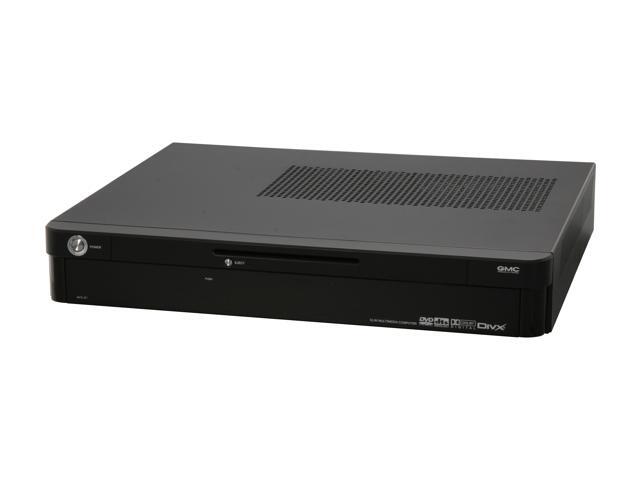
But being realistic...yeah a used $100 PC may be the way to go
|
|
| Back to top |
|
|
jask

Joined: 17 Mar 2006
Posts: 10187
Location: kamloops BC
|
| Posted: Wed Jun 24, 2009 7:46 am Post subject: |
|
|
you don't need cool factor...you are in a dark room.
spend your money on hardware with an eye to building a HD stable system.A good graphics card,fast processor, and memory are needed.A BR drive will allow you to really see what all the excitement is about. HD content and previews can be downloaded from the net and will allow you to do your setup at higher resolutions and see how much better your projector can be when you are able to build out the PC.
|
|
| Back to top |
|
|
Elaine Benes
Joined: 25 Apr 2006
Posts: 1416
|
| Posted: Wed Jun 24, 2009 10:21 am Post subject: |
|
|
If you want to get watching dvd's as quick and cheaply as possible, just buy a progressive scan dvd player with a VGA output. Here in Canada, I can buy them at Canadian Tire for about $40. On a PG, the 480p image will look great, very sharp and satisfying.
At some point in the future, when you've got more money, buy/build an HTPC capable of BD/DVD playback, but to get going right now watching movies from DVD, a cheapo progressive scan player with VGA output is your best bet...
Like this one: http://snipurl.com/krzov [cgi_ebay_com]
|
|
| Back to top |
|
|
jkruger

Joined: 24 Oct 2007
Posts: 2435
Location: Carlsbad, CA
|
|
| Back to top |
|
|
akajester

Joined: 09 Jul 2008
Posts: 934
Location: Wisconsin
|
| Posted: Wed Jun 24, 2009 2:47 pm Post subject: |
|
|
|
Another option for a source is sometimes you can find old laptops around that have dvd rom drives in them. We've junked 5 yr old laptops that would output vga to a pj just fine. Then you just need to figure out the audio. Or any old computer with a dvdrom and soundblaster card.
|
|
| Back to top |
|
|
Wolf-Strong
Joined: 25 May 2009
Posts: 77
|
| Posted: Wed Jun 24, 2009 9:18 pm Post subject: |
|
|
Ok so I just picked up a fairly nice used Compaq PC for $100. AMD Athlon 64 x2 3800, 1GB ram, 200GB HD, Nvidia 6150 (integraded), and a DVD lightscribe drive for $100. Nice and clean though I will be upgrading the sound and graphics card in due time; I will also most likely be reformating it with Linux Media Center OS (plenty of free options) considering it will help give the comp that extra edge on performance and customization.
I will be posting more pictures up tonight when I get everything cleaned up (little dusty inside) and hooked up! You guys are going to especially like my speakers! 
|
|
| Back to top |
|
|
Zebu Fellenz
Joined: 21 Dec 2006
Posts: 2567
|
| Posted: Wed Jun 24, 2009 9:26 pm Post subject: |
|
|
| Wolf-Strong wrote: | Ok so I just picked up a fairly nice used Compaq PC for $100. AMD Athlon 64 x2 3800, 1GB ram, 200GB HD, Nvidia 6150 (integraded), and a DVD lightscribe drive for $100. Nice and clean though I will be upgrading the sound and graphics card in due time; I will also most likely be reformating it with Linux Media Center OS (plenty of free options) considering it will help give the comp that extra edge on performance and customization.
I will be posting more pictures up tonight when I get everything cleaned up (little dusty inside) and hooked up! You guys are going to especially like my speakers! |
Not a bad PC at all, if it has PCI-E you may want to look for a newer ATi video card and a blu-ray drive.
|
|
| Back to top |
|
|
jask
Joined: 17 Mar 2006
Posts: 10187
Location: kamloops BC
|
| Posted: Wed Jun 24, 2009 11:22 pm Post subject: |
|
|
|
if you have not nuked the m$ yet- consider doing a dual boot install while you are getting used to htpc. If you are going to go the HD route eventually you will want to be able to run AnyDVD HD.
|
|
| Back to top |
|
|
scdg124

Joined: 01 Jan 2007
Posts: 69
Location: Louisville, KY
|
| Posted: Wed Jun 24, 2009 11:36 pm Post subject: |
|
|
Use an XBOX 360 with the VGA cable. You'll get upconverted DVDs and HD Games.
_________________
Who's more foolish?..The fool or the fool who follows?
|
|
| Back to top |
|
|
Wolf-Strong
Joined: 25 May 2009
Posts: 77
|
| Posted: Wed Jun 24, 2009 11:38 pm Post subject: |
|
|
| Zebu Fellenz wrote: | | Wolf-Strong wrote: | Ok so I just picked up a fairly nice used Compaq PC for $100. AMD Athlon 64 x2 3800, 1GB ram, 200GB HD, Nvidia 6150 (integraded), and a DVD lightscribe drive for $100. Nice and clean though I will be upgrading the sound and graphics card in due time; I will also most likely be reformating it with Linux Media Center OS (plenty of free options) considering it will help give the comp that extra edge on performance and customization.
I will be posting more pictures up tonight when I get everything cleaned up (little dusty inside) and hooked up! You guys are going to especially like my speakers! |
Not a bad PC at all, if it has PCI-E you may want to look for a newer ATi video card and a blu-ray drive. |
It has PCI-E and PCI-E X16 Planning on using ATI's All-In-Wonder series and Creative's X-Fi card. Blu-Ray will come last; I am not stressed at this point to blow another $75 on a player for, if we are being honest, is a less than ideal setup that may not even truly show the benefits of bluray.
| jask wrote: | | if you have not nuked the m$ yet- consider doing a dual boot install while you are getting used to htpc. If you are going to go the HD route eventually you will want to be able to run AnyDVD HD. |
HD route is going to have to wait. Once I get this up and running, I will be done putting money into it all for a while, or at least until I get my M3 up and running again! I have kind of put that project on the side for now for the HT, but will be back on it soon 
|
|
| Back to top |
|
|
jkruger
Joined: 24 Oct 2007
Posts: 2435
Location: Carlsbad, CA
|
| Posted: Wed Jun 24, 2009 11:46 pm Post subject: |
|
|
|
Why not look for an LG combo drive and be able to play BluRay, HDdvd, and upscaled SDdvd. I see them on Ebay for under $80.00.
|
|
| Back to top |
|
|
Zebu Fellenz
Joined: 21 Dec 2006
Posts: 2567
|
| Posted: Thu Jun 25, 2009 12:21 am Post subject: |
|
|
| jkruger wrote: | | Why not look for an LG combo drive and be able to play BluRay, HDdvd, and upscaled SDdvd. I see them on Ebay for under $80.00. |
+1
The LG combo drive has been solid for me and is a great way to enjoy movies in the now cheap obsolete format.
|
|
| Back to top |
|
|
Nashou66

Joined: 12 Jan 2007
Posts: 16171
Location: West Seneca NY
|
|
| Back to top |
|
|
Wolf-Strong
Joined: 25 May 2009
Posts: 77
|
| Posted: Thu Jun 25, 2009 7:11 am Post subject: |
|
|
Ok so I didn't get pictures tonight....still piecing it together so cords everywhere and its a mess. I did get the comp working perfectly and downloaded a software called XMBC. If you run a HTPC, download this software NOW! The fluidness of the software is just amazing and I'm running it in windows vista with this comp! Trust me, its free so give it a shot!
Now with that said everything is up and running but the speakers and the projector needs to be re aligned. I set all the settings back to dead center so I could again go and play with moving the projector to get it even which I did not do last time and then go into the internal manual adjustments again with more attention! Can't wait!
|
|
| Back to top |
|
|
akajester
Joined: 09 Jul 2008
Posts: 934
Location: Wisconsin
|
| Posted: Thu Jun 25, 2009 12:25 pm Post subject: |
|
|
before you buy anything else, let me add a few things. Only because I've gone through this quite a bit, I'm hoping to save you some grief.
1) don't use integrated graphics if you want to do any kind of hardware acceleration, like DVXA. If you can play 1080p video files without peaking your cpu and it getting choppy, don't worry about dxva.
2) Don't get an "all-in-wonder" type card. use seperate cards. Get a nice cheap radeon card, like a 4350 that's pci express. I think their under $40 now at newegg. That'll work great if you do dxva. I chose a fanless card. One less thing to break or make noise!
3) If you want to tune tv or HD OTA, get a hauppauge card. well supported and accepted with all types of software!
4) I wouldn't use linux but that's your call. I'd do a nice clean install of winxp sp3, config it to your liking. don't install any apps or codecs! back it up first, use acronis. You can find a free beta version floating around, they gave it out free for one day, or pm me and I can get it to you.
5) backup backup backup! between every system change you make, codec installs, updates, anything, make a new backup.
6) I would recommend Media Portal, it's open source and works great. It takes a little while to get used to how it works and how to set it up, but once you know how you can do almost anything with it! I install Media portal, then the streamedMP package, which gives you and amazing skin and all the greatest plugins. check out their forums for more info or help.
7) If you can play 1080p files with good playback and no hardware acceleration, you can get by with a codec pack like k-lite. If you need dxva to play 1080p files properly, check this thread, it will explain how to get it working with media portal;
http://forum.team-mediaportal.com/codecs-external-players-55/saf-v3-47-standalone-filters-mediaportal-dxva-ready-mpeg2-h-264-vc-1-a-44614/
Oh and StreamedMP is a package that is based off XBMC. So if you install Media Portal and StreamedMP, it'll look identical to XBMC, but much more customizable. Although if XBMC is working for you that's great. You'll soon learn of it's limitations as you get further into it.
Have fun!
|
|
| Back to top |
|
|
Wolf-Strong
Joined: 25 May 2009
Posts: 77
|
| Posted: Thu Jun 25, 2009 4:24 pm Post subject: |
|
|
| akajester wrote: | before you buy anything else, let me add a few things. Only because I've gone through this quite a bit, I'm hoping to save you some grief.
1) don't use integrated graphics if you want to do any kind of hardware acceleration, like DVXA. If you can play 1080p video files without peaking your cpu and it getting choppy, don't worry about dxva.
2) Don't get an "all-in-wonder" type card. use seperate cards. Get a nice cheap radeon card, like a 4350 that's pci express. I think their under $40 now at newegg. That'll work great if you do dxva. I chose a fanless card. One less thing to break or make noise!
3) If you want to tune tv or HD OTA, get a hauppauge card. well supported and accepted with all types of software!
4) I wouldn't use linux but that's your call. I'd do a nice clean install of winxp sp3, config it to your liking. don't install any apps or codecs! back it up first, use acronis. You can find a free beta version floating around, they gave it out free for one day, or pm me and I can get it to you.
5) backup backup backup! between every system change you make, codec installs, updates, anything, make a new backup.
6) I would recommend Media Portal, it's open source and works great. It takes a little while to get used to how it works and how to set it up, but once you know how you can do almost anything with it! I install Media portal, then the streamedMP package, which gives you and amazing skin and all the greatest plugins. check out their forums for more info or help.
7) If you can play 1080p files with good playback and no hardware acceleration, you can get by with a codec pack like k-lite. If you need dxva to play 1080p files properly, check this thread, it will explain how to get it working with media portal;
http://forum.team-mediaportal.com/codecs-external-players-55/saf-v3-47-standalone-filters-mediaportal-dxva-ready-mpeg2-h-264-vc-1-a-44614/
Oh and StreamedMP is a package that is based off XBMC. So if you install Media Portal and StreamedMP, it'll look identical to XBMC, but much more customizable. Although if XBMC is working for you that's great. You'll soon learn of it's limitations as you get further into it.
Have fun! |
Ya the integraded graphics are a big limiter, and believe me that will be the first thing I upgrade; good point on doing seperate cards though for reduced noise. As far as Linux goes I didn't need to after all as the computer already came with a fresh install of Vista, so I just used XBMC as a regular program in Windows which seems to be working out just fine. I have it set up to run on boot so it simplifies things greatly and seems to work great. I will have to try out Media Portal and StreamedMP once I get everything wired up and squared away though too.
I got to admit though, this is a very fun project!
|
|
| Back to top |
|
|
akajester
Joined: 09 Jul 2008
Posts: 934
Location: Wisconsin
|
| Posted: Thu Jun 25, 2009 5:57 pm Post subject: |
|
|
It's definately fun and well worth the time investment. I've gone pretty far down the rabbit hole on htpc stuff. It may not be the easiest way to do things, but you can tweak the heck out of it. If you're using vista, make sure you're using EVR instead of VMR for the video renderer. Never did it myself, that's just what I heard.
have fun!
|
|
| Back to top |
|
|
Kiev Savoie

Joined: 25 Oct 2007
Posts: 432
|
| Posted: Thu Jun 25, 2009 9:08 pm Post subject: |
|
|
This HTPC discussion is pretty interesting stuff. Jester just what kind of tweaking can you do with an HTPC? Is there anything you specifically can't do with an HTPC? Can you do a blend or other fancy stuff like that?
When i got my first Projector i was using an old AMD K6-2 desktop with an ATI all-in-wonder 32 meg video card running 1024x768. Even with that old stuff it ran pretty well except for an occasional hickup.
|
|
| Back to top |
|
|
|
|
|
|
|
You cannot post new topics in this forum
You cannot reply to topics in this forum
You cannot edit your posts in this forum
You cannot delete your posts in this forum
You cannot vote in polls in this forum
You cannot attach files in this forum
You can download files in this forum
|
Forum powered by phpBB © phpBB Group
|
|




