| Author |
Message |
AnalogRocks
Forum Moderator

Joined: 08 Mar 2006
Posts: 26706
Location: Toronto, Ontario, Canada
TV/Projector: Sony 1252Q, AMPRO 4000G
|
| Posted: Mon May 11, 2009 8:32 pm Post subject: |
|
|
Hadn't considered this hence the post. Is there a way in WinXp to shut off the retarded disk stuff that always seems to run and slow things down in the background?
_________________
Tech support for nothing
CRT.
HD done right!
|
|
| Back to top |
|
 |
ecrabb
Forum Moderator

Joined: 13 Mar 2006
Posts: 15909
Location: Utah
TV/Projector: JVC RS40, Epson 5010
|
| Posted: Mon May 11, 2009 10:12 pm Post subject: |
|
|
| garyfritz wrote: | | When you guys are using CF drives for your boot (and C:\ ?) drives, are you doing anything to minimize writes to the "disk" ? Flash drives have a limited lifespan of writes, generally around 100,000 or so. You can burn through 100k writes real fast if your OS thinks it's talking to a regular hard drive. |
Gary, according to what I've read, you're looking at 3-5 years before a good CF card (like from Sandisk) should become unusable. That 100,000 figure is the average number of writes before ONE CELL dies. The flash memory has error correction, so in use, over time, your usable storage my go down slightly, but it won't just become unusable in a matter of a few months. Remember - hard drives fail catastrophically, too!
One thing you can do to reduce the writes to the flash is turn off virtual memory. That should put the OS in a state where the flash memory should last for years - even if used as a daily-use type of machine. 100,000 writes is a LOT of writes.
| AnalogRocks wrote: | | Yeah I don't trust USB drives for long term storage. I had 2 years of vacation video's on one 8gb drive. They played twice, then when I went to play them 3 moths later they were toast. |
| emdawgz1 wrote: | | I have hade 2 USB flash drives "give up the ghost" in less than 2 weeks... but you guys know i'm just a novice. |
What are you guys are doing to your USB sticks?!??! Are you using the cheap $4.99 stuff in the plastic grab bins at OfficeMax or something? I've got a good 512MB Sandisk stick that I bought probably 3 or 4 years ago... That thing has had stuff copied to it hundreds of times... It's probably been formatted 50 times and had tens of thousands of files and dozens of gigabytes on it, and I've never had a single file get lost or corrupted. I've put thousands and thousands of images on Kodak and SanDisk CF cards from three different DSLR's and several more Canon and Kodak P&S cameras and I've never had a single lost image.
I'd suspect an OS glitch or static or something before I'd guess the memory itself failed.
Oh, and one thing with flash memory in digital cameras... After you've copied the images from the card to your computer, ALWAYS reformat the card after you put the card back in the camera.
SC
|
|
| Back to top |
|
|
AnalogRocks
Forum Moderator
Joined: 08 Mar 2006
Posts: 26706
Location: Toronto, Ontario, Canada
TV/Projector: Sony 1252Q, AMPRO 4000G
|
|
| Back to top |
|
|
MikeEby

Joined: 24 Jun 2007
Posts: 5237
Location: Osceola, Indiana
|
| Posted: Fri May 29, 2009 4:43 am Post subject: |
|
|
If the application requires a keyboard this is cool...The PC is built right into the keyboard.
http://www.slashgear.com/asus-eee-keyboard-hands-on-specs-0236111/
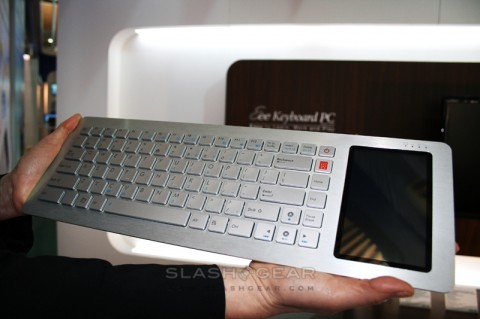
Mike
_________________
Doing HD since the last century!
Last edited by MikeEby on Fri May 29, 2009 4:48 am; edited 1 time in total
|
|
| Back to top |
|
|
AnalogRocks
Forum Moderator
Joined: 08 Mar 2006
Posts: 26706
Location: Toronto, Ontario, Canada
TV/Projector: Sony 1252Q, AMPRO 4000G
|
| Posted: Fri May 29, 2009 4:46 am Post subject: |
|
|
Nom no keyboard needed but I'd like to have one of those in a proper ergonomic keyboard.
_________________
Tech support for nothing
CRT.
HD done right!
|
|
| Back to top |
|
|
MikeEby
Joined: 24 Jun 2007
Posts: 5237
Location: Osceola, Indiana
|
|
| Back to top |
|
|
|
|




