| Author |
Message |
AnalogRocks
Forum Moderator

Joined: 08 Mar 2006
Posts: 26706
Location: Toronto, Ontario, Canada
TV/Projector: Sony 1252Q, AMPRO 4000G
|
| Posted: Sun May 10, 2009 5:08 pm Post subject: Need the lowest power consumption PC available |
|
|
I am doing a new project.
I need to build a PC that will run WinXP home. Just barely.
A slow processor doens't matter.
I want it to use the least power available as it will need to be on 24/7.
Quiet is a must too.
What would you recommend?
_________________
Tech support for nothing
CRT.
HD done right!
|
|
| Back to top |
|
 |
emdawgz1

Joined: 14 Mar 2006
Posts: 7949
|
|
| Back to top |
|
|
garyfritz

Joined: 08 Apr 2006
Posts: 12088
Location: Fort Collins, CO
|
| Posted: Sun May 10, 2009 5:29 pm Post subject: |
|
|
|
Does it need a display? If it's running XP Home you really can't run many services (like Terminal Services / Remote Desktop) on it, but you could install VNC or similar and only access it remotely. Then minimize the RAM you need, maybe run a solid-state drive instead of a mechanical disk? Or if you run a mech disk, can it spend most of its time parked and shut down?
|
|
| Back to top |
|
|
ecrabb
Forum Moderator

Joined: 13 Mar 2006
Posts: 15909
Location: Utah
TV/Projector: JVC RS40, Epson 5010
|
| Posted: Sun May 10, 2009 7:13 pm Post subject: |
|
|
I know some of you guys are totally anti-Mac, but for 24/7 duty with low power consumption, check out the new Mac mini. It's drawing <13w at idle. It's very small, very quiet (almost silent), and very low-power. It's basically a notebook in a tiny box. It's not dirt cheap at $599, but it's very full-featured with built-in gigabit ethernet, 802.11n, BlueTooth, FireWire 800 and Nvidia 9400M graphics. The nice thing is it's a 2.0 Ghz Core 2 Duo, so even though it's very low-power sitting idle, you still have plenty of horsepower on tap when you need it for CPU-intensive tasks.
http://www.apple.com/macmini/
SC
|
|
| Back to top |
|
|
AnalogRocks
Forum Moderator
Joined: 08 Mar 2006
Posts: 26706
Location: Toronto, Ontario, Canada
TV/Projector: Sony 1252Q, AMPRO 4000G
|
| Posted: Mon May 11, 2009 5:15 am Post subject: |
|
|
No Mac's need apply. Wayyyyyyyyyyy to expensive!
Thanks though.
I'll look at the Mini ITX systems. I'll only need graphics to set it up. I was thinking of using an 8GB CF card for a drive.
_________________
Tech support for nothing
CRT.
HD done right!
|
|
| Back to top |
|
|
emdawgz1
Joined: 14 Mar 2006
Posts: 7949
|
| Posted: Mon May 11, 2009 10:53 am Post subject: |
|
|
| AnalogRocks wrote: | No Mac's need apply. Wayyyyyyyyyyy to expensive!
Thanks though.
I'll look at the Mini ITX systems. I'll only need graphics to set it up. I was thinking of using an 8GB CF card for a drive. |
w/ the Zotac ion you can use onboard video.
_________________
Follow my blog
www.thesinglebrother.com
|
|
| Back to top |
|
|
AnalogRocks
Forum Moderator
Joined: 08 Mar 2006
Posts: 26706
Location: Toronto, Ontario, Canada
TV/Projector: Sony 1252Q, AMPRO 4000G
|
| Posted: Mon May 11, 2009 6:23 pm Post subject: |
|
|
The Zotac is a little pricy plus it's SATA only. I need an ATA slot of CF slot so I can plug in the CF card.
_________________
Tech support for nothing
CRT.
HD done right!
|
|
| Back to top |
|
|
emdawgz1
Joined: 14 Mar 2006
Posts: 7949
|
| Posted: Mon May 11, 2009 6:26 pm Post subject: |
|
|
| AnalogRocks wrote: | | The Zotac is a little pricy plus it's SATA only. I need an ATA slot of CF slot so I can plug in the CF card. |
I'm slow on the abb's today. CF???
_________________
Follow my blog
www.thesinglebrother.com
|
|
| Back to top |
|
|
emdawgz1
Joined: 14 Mar 2006
Posts: 7949
|
| Posted: Mon May 11, 2009 6:31 pm Post subject: |
|
|
You get 6 usb slots onboard... you cant get a COMPACT FLASH reader card w/ usb??? 
_________________
Follow my blog
www.thesinglebrother.com
|
|
| Back to top |
|
|
AnalogRocks
Forum Moderator
Joined: 08 Mar 2006
Posts: 26706
Location: Toronto, Ontario, Canada
TV/Projector: Sony 1252Q, AMPRO 4000G
|
| Posted: Mon May 11, 2009 6:55 pm Post subject: |
|
|
| emdawgz1 wrote: | | You get 6 usb slots onboard... you cant get a COMPACT FLASH reader card w/ usb??? |
I could but will it boot reliably? Plus there's that cheap factor it ain't
_________________
Tech support for nothing
CRT.
HD done right!
|
|
| Back to top |
|
|
emdawgz1
Joined: 14 Mar 2006
Posts: 7949
|
| Posted: Mon May 11, 2009 7:06 pm Post subject: |
|
|
| AnalogRocks wrote: | | emdawgz1 wrote: | | You get 6 usb slots onboard... you cant get a COMPACT FLASH reader card w/ usb??? |
I could but will it boot reliably? Plus there's that cheap factor it ain't |
You arent going to use the CF to boot???? Are ya? 
_________________
Follow my blog
www.thesinglebrother.com
|
|
| Back to top |
|
|
AnalogRocks
Forum Moderator
Joined: 08 Mar 2006
Posts: 26706
Location: Toronto, Ontario, Canada
TV/Projector: Sony 1252Q, AMPRO 4000G
|
| Posted: Mon May 11, 2009 7:07 pm Post subject: |
|
|
Yes I am, it'll be on 24/7 so speed isn't an issue.
_________________
Tech support for nothing
CRT.
HD done right!
|
|
| Back to top |
|
|
emdawgz1
Joined: 14 Mar 2006
Posts: 7949
|
| Posted: Mon May 11, 2009 7:26 pm Post subject: |
|
|
| AnalogRocks wrote: | | Yes I am, it'll be on 24/7 so speed isn't an issue. |
So you are going to use a CF memory card as your Hard drive. You will install your OS there???
_________________
Follow my blog
www.thesinglebrother.com
|
|
| Back to top |
|
|
emdawgz1
Joined: 14 Mar 2006
Posts: 7949
|
|
| Back to top |
|
|
AnalogRocks
Forum Moderator
Joined: 08 Mar 2006
Posts: 26706
Location: Toronto, Ontario, Canada
TV/Projector: Sony 1252Q, AMPRO 4000G
|
| Posted: Mon May 11, 2009 7:32 pm Post subject: |
|
|
I'd rather use a CF card, no moving parts and it doens't make any heat. Plus if I can find just the right board it'll already have a CF reader wired into the IDE port.
_________________
Tech support for nothing
CRT.
HD done right!
|
|
| Back to top |
|
|
ecrabb
Forum Moderator
Joined: 13 Mar 2006
Posts: 15909
Location: Utah
TV/Projector: JVC RS40, Epson 5010
|
| Posted: Mon May 11, 2009 7:34 pm Post subject: |
|
|
Absolutely! When the notebook drive in my old PowerBook G3 home automation computer finally dies, I'm going to slap an ATA CF card adapter in there, throw an 8GB CF card in and have a low-power, no-heat, totally silent boot drive in there. The computer has a tiny fan, but it never runs. The drive is getting noisy now, but when I put the ATA card in there, it will be perfectly silent... Silent as in literally zero sound emission.
Here's an SATA2CF adapter:
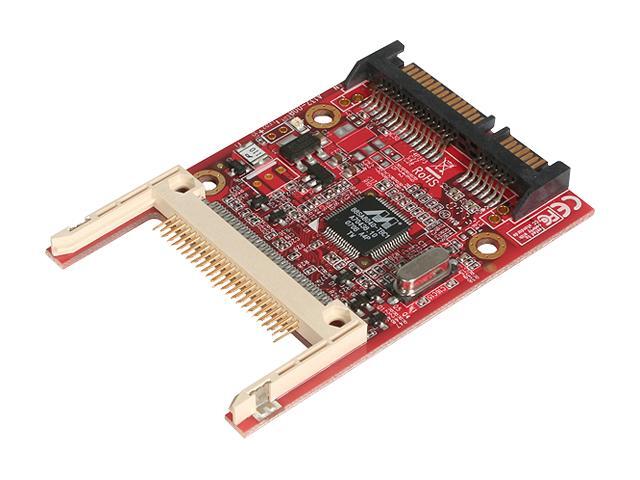
There are the same for PATA, too.
SC
|
|
| Back to top |
|
|
AnalogRocks
Forum Moderator
Joined: 08 Mar 2006
Posts: 26706
Location: Toronto, Ontario, Canada
TV/Projector: Sony 1252Q, AMPRO 4000G
|
| Posted: Mon May 11, 2009 7:41 pm Post subject: |
|
|
Yep I know. I was just thinking if I can find it all on the motherboard the co$t would lessen. I'm aiming at $300-350 looks like. Less is better.
It's kind of fun specing something that doens't require 4 gb ram and 1 gig video super uber fast everything in a sexey case. In this case ( pun ) less is more. Silent, cool running with a low speed, or no speed fan and a huge heat sink would be just what the audiologist ordered.
_________________
Tech support for nothing
CRT.
HD done right!
|
|
| Back to top |
|
|
emdawgz1
Joined: 14 Mar 2006
Posts: 7949
|
| Posted: Mon May 11, 2009 7:49 pm Post subject: |
|
|
I have hade 2 USB flash drives "give up the ghost" in less than 2 weeks... but you guys know i'm just a novice.
_________________
Follow my blog
www.thesinglebrother.com
|
|
| Back to top |
|
|
AnalogRocks
Forum Moderator
Joined: 08 Mar 2006
Posts: 26706
Location: Toronto, Ontario, Canada
TV/Projector: Sony 1252Q, AMPRO 4000G
|
| Posted: Mon May 11, 2009 7:51 pm Post subject: |
|
|
Yeah I don't trust USB drives for long term storage. I had 2 years of vacation video's on one 8gb drive. They played twice, then when I went to play them 3 moths later they were toast.
I had other copies plus the orgional tape but I would have thgought that flash drives would be more robust.
_________________
Tech support for nothing
CRT.
HD done right!
|
|
| Back to top |
|
|
garyfritz
Joined: 08 Apr 2006
Posts: 12088
Location: Fort Collins, CO
|
| Posted: Mon May 11, 2009 8:29 pm Post subject: |
|
|
|
When you guys are using CF drives for your boot (and C:\ ?) drives, are you doing anything to minimize writes to the "disk" ? Flash drives have a limited lifespan of writes, generally around 100,000 or so. You can burn through 100k writes real fast if your OS thinks it's talking to a regular hard drive.
|
|
| Back to top |
|
|
|
|




