| Author |
Message |
Curt Palme
CRT Tech
Joined: 08 Mar 2006
Posts: 24396
Location: Langley, BC
TV/Projector: All of them!
|
| Posted: Tue Mar 24, 2009 3:10 pm Post subject: Opinion needed re tube wear |
|
|
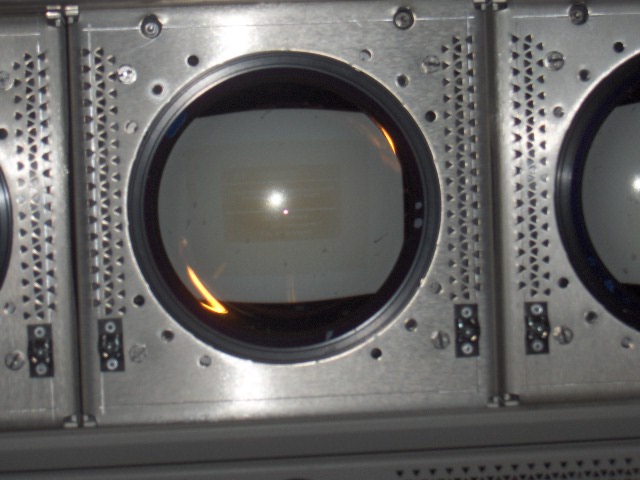
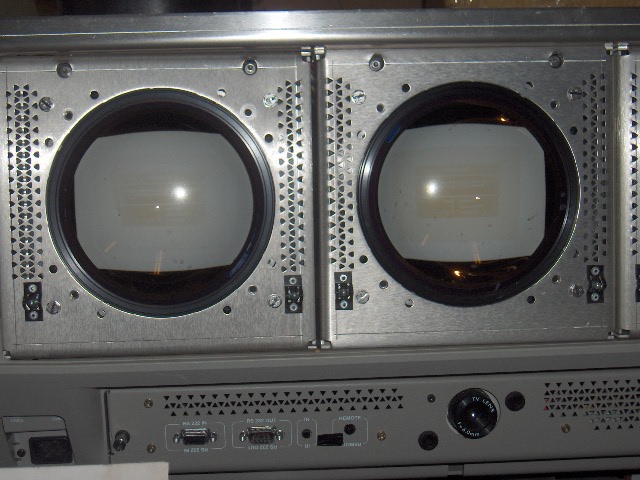
Guys, take a look at the below pix. These are from a Barco 1209s installed locally. I looked at the set, and saw that all three tubes (red tube is minimal) have text wear from a satellite error message that was left on the screen.
Can you give me a guesstimate as to how long you figure the static image was left on for assuming normal contrast and brightness?
Total projector run time is 12,800. There is a very slight 4:3 wear pattern from the installation (projector was sold new apparently a few years ago) showing normal wear, it's the satellite image burn that I'm concerned about.
I took the below pix with flash, but they are accurate of what I see just looking at the tubes.
Thanks!
| Description: |
|
| Filesize: |
87.27 KB |
| Viewed: |
7413 Time(s) |
|
| Description: |
|
| Filesize: |
113.39 KB |
| Viewed: |
7413 Time(s) |
|
|
|
| Back to top |
|
 |
ecrabb
Forum Moderator

Joined: 13 Mar 2006
Posts: 15909
Location: Utah
TV/Projector: JVC RS40, Epson 5010
|
| Posted: Tue Mar 24, 2009 4:59 pm Post subject: |
|
|
Well, we've heard the stories of people making a noticeable burn by passing out in the wee hours and waking up the next morning with a static DVD menu on the screen...
So, if noticeable burn can happen in <8 hours, how long would that take? 48 hours? 36 hours? Even 24 hours? If the contrast was cranked pretty good, would that even take a day or two to burn like that? Full intensity color (full green/blue - cyan or white error box?) would be pretty wicked on the phosphor. Maybe somebody left it running, the error showed up during the night, and somebody found it a day or two later?
The other possibility is that it's a cumulative thing. Maybe the error message popped up 300 times, and got left on for 30 minutes every time, over the course of the 2-3 years. 30 minutes 300 times = 1 hour 150 times = 150 hours once. They're all 900 minutes.
Or, maybe it happened 3 or 4 times, overnight each time...
SC
|
|
| Back to top |
|
|
barcoguy
Joined: 05 Feb 2008
Posts: 128
|
| Posted: Wed Mar 25, 2009 1:00 am Post subject: |
|
|
|
few hundred hours????
|
|
| Back to top |
|
|
lostmandan
Joined: 09 Jul 2008
Posts: 146
Location: Kitchener/Waterloo, Ontario, Canada
|
| Posted: Wed Mar 25, 2009 2:22 am Post subject: |
|
|
Maybe someone was on hold with Bell Expressvu tech support long enough to burn the tubes with the error message 
|
|
| Back to top |
|
|
bbfarmht

Joined: 27 May 2006
Posts: 1273
Location: Where the Mississippi runs east to west!!
|
| Posted: Wed Mar 25, 2009 2:28 am Post subject: |
|
|
| lostmandan wrote: | | Maybe someone was on hold with Bell Expressvu tech support long enough to burn the tubes with the error message |
That would not say a whole lot for their Tech support!!! 
_________________
Adam
"Any society that would give up a little liberty to gain a little security will deserve neither and lose both"
Benjamin Franklin
|
|
| Back to top |
|
|
Curt Palme
CRT Tech
Joined: 08 Mar 2006
Posts: 24396
Location: Langley, BC
TV/Projector: All of them!
|
| Posted: Wed Mar 25, 2009 2:36 am Post subject: |
|
|
What the deal is is that there's apparently a conflict between the various people that have used this projector. Owners are rarely at the house, other people use it. Owner is astounded that there are 12,800 hours on it, and 'someone' left on the set on this satellite error screen.
I figured with the say 6 out of 10' wear on the green, and the blue being about a 7, that this would take well into the 100s of hours, if not 2-3000 hours. Maybe I'm high on that count, but I certainly don't think you'd wear a tube down to a 6 or 7 over a couple or a few days, assuming contrast was at about 60 or so, typical running range for a Barco 9" set. I figured that somehow the set was left running, satellite went down, set was on 24/7 for a few months, and this is the end result. Everyone involved claims that my scenario is impossible.
So I told the owners and tech involved that I'd put up a neutral thread here without any bias. I was called in last, and have had nothing to do with this set until about 2 weeks ago when it was brought to the shop to be checked out.
|
|
| Back to top |
|
|
kal
Forum Administrator

Joined: 06 Mar 2006
Posts: 18114
Location: Ottawa, Canada
TV/Projector: JVC DLA-NZ7
|
| Posted: Wed Mar 25, 2009 3:19 am Post subject: |
|
|
Curt's absolutely right: Unless contrast is set into blooming (over 80 or 90 on that Barco likely) you're not going to get that sort of burn-in in only a few days.
A properly set up/calibrated projector can display a static image for many weeks with zero burn-in. Burn-in or wear is cumulative. A hour a day for 10 days is the same as 10 hours straight. I've spend a few hundreds over the course of year playing a certain game were the same status items were displayed on then screen. Zero wear.
I put 5-6 thousand hours on my last projector all of which had the same image width so you think you'd have some wear showing the sides of the screen on the tubes. Nope. Zero wear.
Same with my current projector: ~3000 hours or so doing constant image width meaning that at all times there's something displayed across the screen width so you'd think there was something worn in just a bit on the edges of the tubes. Nope. As I expected, zero wear/burn in.
I'm not stingy with contrast either. Getting 12 ft/L on my 8' wide screen.
Kal
_________________

Support our site by using our affiliate links. We thank you!
My basement/HT/bar/brewery build 2.0
|
|
| Back to top |
|
|
drice1234

Joined: 07 Oct 2006
Posts: 1309
Location: Allen, Texas
|
| Posted: Wed Mar 25, 2009 3:28 am Post subject: |
|
|
|
I have been running my D50 at 80 contrast for 1 1/2 years and my son often leaves the Wii or PS3 on for 4 or 5 hours at a time with a static screen and I have no burn in.
|
|
| Back to top |
|
|
Curt Palme
CRT Tech
Joined: 08 Mar 2006
Posts: 24396
Location: Langley, BC
TV/Projector: All of them!
|
| Posted: Wed Mar 25, 2009 3:39 am Post subject: |
|
|
|
OK, thank you, that backs up what I've emailed all involved so far. I've linked them all to this thread, so any other useful opinions would be great.
|
|
| Back to top |
|
|
draganm

Joined: 08 Mar 2006
Posts: 8990
Location: Colorado
|
| Posted: Wed Mar 25, 2009 4:09 am Post subject: |
|
|
| Curt Palme wrote: | | What the deal is is that there's apparently a conflict between the various people that have used this projector. Owners are rarely at the house, other people use it. Owner is astounded that there are 12,800 hours on it, and 'someone' left on the set on this satellite error screen. |
CRT projectors don't do well when they're community property. Pretty much true of any other electronic device or appliance. Used by everyone and loved by no one results in a beat up, burned up piece of crap. 
|
|
| Back to top |
|
|
huggy

Joined: 02 Aug 2008
Posts: 927
Location: Melbourne,Australia
|
| Posted: Wed Mar 25, 2009 4:35 am Post subject: |
|
|
Do any of you guy's running htpc's worry about desktop icons being burnt in over time or do you think it's a good idea to move them around occasionally?
Dave
|
|
| Back to top |
|
|
Brooklyn

Joined: 17 Sep 2007
Posts: 494
Location: Morgan Hill, CA
|
| Posted: Wed Mar 25, 2009 5:28 am Post subject: |
|
|
| huggy wrote: | Do any of you guy's running htpc's worry about desktop icons being burnt in over time or do you think it's a good idea to move them around occasionally?
Dave |
Only if you are watching your desktop for an extended period of time...
|
|
| Back to top |
|
|
NewbieDAN

Joined: 09 Mar 2006
Posts: 319
Location: Bunbury Western Australia
|
| Posted: Wed Mar 25, 2009 7:14 am Post subject: |
|
|
I'd kill anyone who treated my 1209s like that.
_________________
Sorting the fly sh*t from the pepper
|
|
| Back to top |
|
|
Mark_A_W
Joined: 15 Mar 2006
Posts: 3068
Location: Sunny Melbourne Australia
|
| Posted: Wed Mar 25, 2009 9:09 am Post subject: |
|
|
| huggy wrote: | Do any of you guy's running htpc's worry about desktop icons being burnt in over time or do you think it's a good idea to move them around occasionally?
Dave |
Desktop on one screen...CRT projector on the other monitor connection.....no problemo.
I have tweaked a G70 with the "XP green hill" burnt lightly into the green tube. Took hundreds of hours I guess. I changed the background to black and told him not to leave it on the desktop.
|
|
| Back to top |
|
|
AnalogRocks
Forum Moderator

Joined: 08 Mar 2006
Posts: 26706
Location: Toronto, Ontario, Canada
TV/Projector: Sony 1252Q, AMPRO 4000G
|
| Posted: Wed Mar 25, 2009 12:47 pm Post subject: |
|
|
| huggy wrote: | Do any of you guy's running htpc's worry about desktop icons being burnt in over time or do you think it's a good idea to move them around occasionally?
Dave |
I keep my dektop the same with my CRT rear projection TV, I have had the PC on that TV for 4 years. No desktop burn in. I do turn the contrast down a little (5 or 6 clicks ) but it's more because the desktop is too bright to look at.
I've also had the same desktop background up for the last 4 years. I use that PC for my upscalled DVD's and over the air digital this is my main TV.
I have spent hours editing OTA video with static screens and static screens in the DVD burning program. More recently I added a Pioneer DVD recorder to the system, it also uses static screens while editing video. I just have even tube wear. I've put about 6000 hours on that TV in the last 4 years.
_________________
Tech support for nothing
CRT.
HD done right!
|
|
| Back to top |
|
|
akajester

Joined: 09 Jul 2008
Posts: 934
Location: Wisconsin
|
| Posted: Wed Mar 25, 2009 4:51 pm Post subject: |
|
|
| NewbieDAN wrote: | | I'd kill anyone who treated my 1209s like that. |
I second that. someone had to leave this sit for a really long time unattended to do that much damage.
|
|
| Back to top |
|
|
Dave Lister
Joined: 16 Jan 2007
Posts: 436
Location: Adelaide, South Australia
|
| Posted: Fri Mar 27, 2009 1:43 pm Post subject: |
|
|
It being used by lots of people except the owners for most of the time I wouldn't doubt that people had been adjusting the brightness and contrast to suit their viewing taste, I have seen some shocking brightness, contrast and colour settings on many normal TV's and also on a few projectors.
On occasion when I have mentioned it and offered to adjust it and they haven't objected I have set it properly and they sometimes grudgingly accept that it looks better and other times state how amazingly more lifelike the image looks.
Those that grudgingly accept that it is better have usually readjusted it back to what it was or worse by the next time I have seen it. 
I have had people look at my old Sony and say it is too dark or doesn't have enough colour, I have readjusted it until they like it and then pointed out the faults, I then reset it back to what I normally have it and they then say "oh yeah, I see what you mean now".
Some people like to have it set so the grass glows green, almost like the grass is near Chernobyl  or to have skin tones that look like cartoon characters or dolls. or to have skin tones that look like cartoon characters or dolls.
I wouldn't put it past the other users having adjusted it to suit them and then readjusted it back before the owners see it or maybe one user sets it higher then another comes along and resets it then another sets it higher and another resets it etc.
The owner should consider putting up a sign saying "DON'T leave ANY static images on screen" or maybe use a scaler with a screen saver function (if they have that function) even if no scaling is needed or better still do both.
_________________
I don't believe in pixels or flaries!
Owner of a VPH1000QM with over 80,000 hours on the tubes.
Beat that you digital technicolour flashlight owners.
Stuff for sale;
http://www.quicksales.com.au/buy/auctions.aspx?i=&d=0&min=&max=&sort=0&pg=1&cat=0&keyword=&view=List&f1=&f2=&type=c&type2=&type3=&type4=&type5=tardis-workshop&s=&pcode=&dis=0&freepost=
http://www.ebay.com.au/sch/tardis_workshop/m.html?_dmd=1&_ipg=50&_sop=10&_rdc=1
|
|
| Back to top |
|
|
|
|




