| Author |
Message |
Zubinell
Joined: 10 Feb 2009
Posts: 39
|
| Posted: Mon Mar 23, 2009 11:19 pm Post subject: BD 808s Sync issue |
|
|
I connected my BD808s to the RGB output of my satellite receiver in the same manner my VPH-1292 connects. (with RGB and HV 5 wire connection) There must be some sync set up that I am overlooking. The image have a continual roll as if there is a maladjusted vertical hold. The image is crisp and stable on video inputs. Any suggestions?
Thanks
|
|
| Back to top |
|
 |
barcoguy
Joined: 05 Feb 2008
Posts: 128
|
| Posted: Mon Mar 23, 2009 11:49 pm Post subject: |
|
|
|
try pressing 5 or 4 on the remote
|
|
| Back to top |
|
|
Zubinell
Joined: 10 Feb 2009
Posts: 39
|
| Posted: Tue Mar 24, 2009 12:28 am Post subject: |
|
|
|
Oh yes I do need to do that to select the RGB input so I can display the improperly sync'd image. I can switch inputs with no trouble. The manual discusses the that the input can accept sync on green or separate H & V sync. All of the illustrations in the manual show only 4 connections to the projector and no connection to v-sync even thought the text discusses it. To be clear, my receiver output offers only separate H & V sync signals.
|
|
| Back to top |
|
|
scotha
Joined: 27 Mar 2006
Posts: 167
Location: Lilburn, Ga.
|
| Posted: Tue Mar 24, 2009 8:35 pm Post subject: |
|
|
I have my bd808s hooked up to samsung 360 rgbhv out directly to pj with no problem. Maybe try switching your hv connections.
_________________
pj. BD808s, BD801s
|
|
| Back to top |
|
|
tri_joel

Joined: 03 Jul 2007
Posts: 646
Location: Northern Virginia
|
| Posted: Tue Mar 24, 2009 8:44 pm Post subject: |
|
|
Does teh BD808 have negative sync? I think your receiver more than likely has positive sync.
_________________
www.vawinesnob.com
|
|
| Back to top |
|
|
scotha
Joined: 27 Mar 2006
Posts: 167
Location: Lilburn, Ga.
|
| Posted: Tue Mar 24, 2009 9:31 pm Post subject: |
|
|
My bd 808s works with positive or negative sync.
_________________
pj. BD808s, BD801s
|
|
| Back to top |
|
|
Zubinell
Joined: 10 Feb 2009
Posts: 39
|
| Posted: Tue Mar 24, 2009 11:59 pm Post subject: |
|
|
|
I did note while surfing the manual that there is a switch setting for Neg Sync and a setting for Auto sync. I will check the setting of this switch when I am at the pj. perhaps it is set for neg and the rec is positive. I hope so there does not seem to be many options here. Thanks for the follow up.
|
|
| Back to top |
|
|
Zubinell
Joined: 10 Feb 2009
Posts: 39
|
| Posted: Wed Mar 25, 2009 1:33 am Post subject: |
|
|
|
Ok It is official..this is driving me nuts. I confirmed the setting is set for auto +/- sync. I changed the cables.. I don't know why, they work perfect on the Sony set. I hooked my laptop to the projector using the same wires and it works perfect on the RGB input. I set the satellite receiver output for 1080i - 720p - 480p .. all with the same disappointing result. Can't be the receiver, it works perfect with the Sony pj. It can't be the wires they work perfect with the Sony connected to the receiver and with the laptop connected to both pj's. It can't be the pj input, it works perfect with the laptop. I will see what happens if I connect it to the scaler output, but I think I can predict what that will do.
|
|
| Back to top |
|
|
Elaine Benes
Joined: 25 Apr 2006
Posts: 1416
|
| Posted: Wed Mar 25, 2009 2:12 pm Post subject: |
|
|
| Zubinell wrote: | | Ok It is official..this is driving me nuts. I confirmed the setting is set for auto +/- sync. I changed the cables.. I don't know why, they work perfect on the Sony set. I hooked my laptop to the projector using the same wires and it works perfect on the RGB input. I set the satellite receiver output for 1080i - 720p - 480p .. all with the same disappointing result. Can't be the receiver, it works perfect with the Sony pj. It can't be the wires they work perfect with the Sony connected to the receiver and with the laptop connected to both pj's. It can't be the pj input, it works perfect with the laptop. I will see what happens if I connect it to the scaler output, but I think I can predict what that will do. |
Where is this switch for auto synch located ?
|
|
| Back to top |
|
|
jkruger

Joined: 24 Oct 2007
Posts: 2435
Location: Carlsbad, CA
|
| Posted: Wed Mar 25, 2009 2:21 pm Post subject: |
|
|
|
Have you tried swapping the H and V connectors on the projector input?
|
|
| Back to top |
|
|
Zubinell
Joined: 10 Feb 2009
Posts: 39
|
| Posted: Wed Mar 25, 2009 2:47 pm Post subject: |
|
|
|
The auto sync sw is on the "auto sync tracking module" as illustrated on pg 7.2 of the install manual. I have tried switching the H/V many times. Still have not yet connected the scaler yet.
|
|
| Back to top |
|
|
AnalogRocks
Forum Moderator

Joined: 08 Mar 2006
Posts: 26706
Location: Toronto, Ontario, Canada
TV/Projector: Sony 1252Q, AMPRO 4000G
|
| Posted: Wed Mar 25, 2009 3:14 pm Post subject: |
|
|
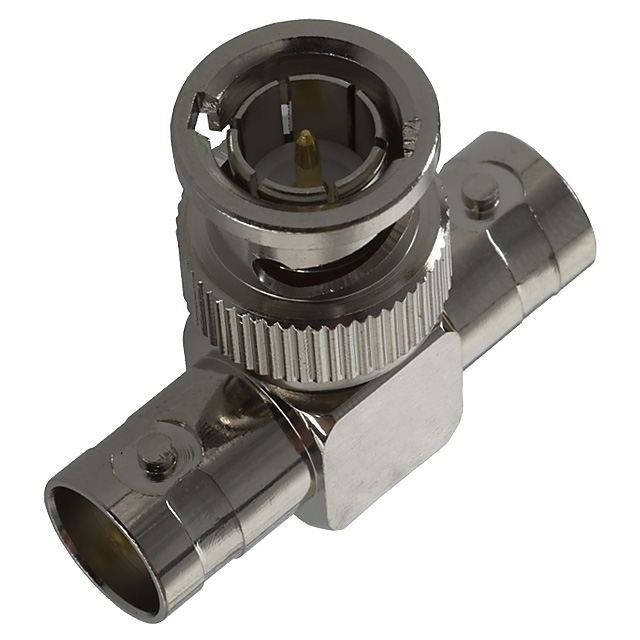
Have you tired T'ing the H+V lines together?
| Description: |
|
| Filesize: |
108.95 KB |
| Viewed: |
6782 Time(s) |
|
_________________
Tech support for nothing
CRT.
HD done right!
|
|
| Back to top |
|
|
secstate
Joined: 20 Mar 2006
Posts: 720
|
| Posted: Wed Mar 25, 2009 6:47 pm Post subject: |
|
|
|
I had a Barco once that wouldn't sync to 1080i. I would get rolling vertical picture just like old TV sets with the vertical hold misadjusted. I pulled one of the sync cables on the back (cannot remember if it was H or V) and it worked fine. I just left it that way as it worked fine and I couldn't be bothered to figure out how to correct (it was a set I was using as a test bed).
|
|
| Back to top |
|
|
Zubinell
Joined: 10 Feb 2009
Posts: 39
|
| Posted: Wed Mar 25, 2009 7:08 pm Post subject: |
|
|
|
I have tried to disconnect each of the sync wires and have seen no improvement. I will try the tie together thing.. I thing I hve a couple of BNC "T" connectors. Thanks
|
|
| Back to top |
|
|
Elaine Benes
Joined: 25 Apr 2006
Posts: 1416
|
| Posted: Wed Mar 25, 2009 10:36 pm Post subject: |
|
|
I *think* if you're using BNC connectors(ie. Port 4 or 5) the synch choice switch you referred to has no effect. I have an 808s and it exhibits similar issues, and I don't even have one of those auto synch cards installed in it...
From what I've read, you're likely having a positive synch issue, regardless of where that switch is set...If you have an Extron box that will convert all output to negative synch, put that in the chain and see if it improves the situation.
If you don't have an Extron, try using Port 3(the DB9 connector) and see if that makes a difference...
I can't remember where I read it, but the Port 3 input is supposedly optimized for weak or odd signals, whereas the Port 4/5 input is more appropriate for strong standardized signals. The output from ANY device varies by quite a bit, personally, I have a lot of devices which output "standard" HDTV 1080i, yet some will not work with some devices further down in the chain, like a transcoder...
|
|
| Back to top |
|
|
Zubinell
Joined: 10 Feb 2009
Posts: 39
|
| Posted: Thu Mar 26, 2009 1:19 am Post subject: |
|
|
|
Thanks Elaine the port 3 thing was going to be my next shot in the dark... if that does not work I might just try poking a stick in the thing and rattle it around a bit.
|
|
| Back to top |
|
|
tommo2

Joined: 03 Jun 2006
Posts: 226
Location: Ireland
|
| Posted: Thu Mar 26, 2009 7:04 pm Post subject: |
|
|
Quite simple really... your source is outputting separate H and V sync signals on the H and V sync cables.
You do not have the V sync connected. You need to T the 2 sync connectors together. This will give you composite sync. I bet your scaler is set to output composite sync, that is why it works.
Your PJ needs to see both H and V sync signals to work. Just because you have only 4 connectors does not mean that V sync is not needed.
You need to feed either sync on green (RGsB) or composite sync (RGBS) and opposed to separate H and V sync (RGBHV)
Composite sync uses only four wires, with both sync signals (composite sync) on the H sync wire (I think it is H wire anyways.
Maybe your source cannot be set to output RGBS, so you need to improvise.
To test:
Try to fix a piece of wire to the central core of each of the H and V signal wires, and tie these two together. Stuff this into the central pin of the sync connector on the pj. Then, hold the outer metal casing of one of the connectors against the metal casing of the same connector on the Pj. Make sure you do not have any stray strands of wire shorting out the centre pins to the grounded outer casings of the connectors.
If the image stabilises, just buy a cheap T-piece as shown above.
This should sort you out.
_________________
pull up the handbrake and walk away
Barco Data 701s
iScan HD scaler with sdi mod
Oppo 981HD with sdi mod
Xbox 360
Playstation 2
Denon AVR 1507 7.1 AV receiver
Wharfedale Diamond 9.4 floorstanders (front)
Wharfedale EVO2 (center)
Pioneer 100W (sides)
Wharfedale Diamond 9.1 (rear)
Wharfedale SW150 active subwoofer
Photos on the way!
|
|
| Back to top |
|
|
Zubinell
Joined: 10 Feb 2009
Posts: 39
|
| Posted: Thu Mar 26, 2009 11:19 pm Post subject: |
|
|
Analog Rocks does it again! The suggestion of "T"ing the H&V together was the magic bullet. ..
OK got past that hurdle.. what's next?
Thank you very much for the imaginative suggestion
|
|
| Back to top |
|
|
|
|





