| Author |
Message |
contemplationaveugle

Joined: 23 Mar 2008
Posts: 45
|
| Posted: Tue Mar 10, 2009 10:59 am Post subject: CALIBRATION SONY G90 |
|
|
First of all sorry for my bad English
Hi I post this subject in France for those interested in the calibration sony G90.
It was the dochlywd's Sony g90
Video Configuration:
- Platinum source TOSHIBA HD XE1 (fw 2.7)
- HDMI / DVI REAL CABLE (5m)
- Broadcaster tritube SONY VPH G90
- Input card IFB DVI johnHWman
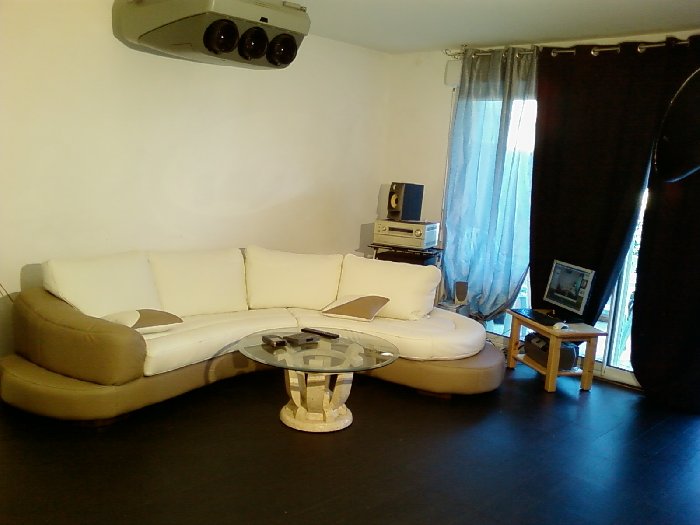
- Screen for the moment there is not projected on the wall but it will happen
- Room not dedicated black soil
Calibration configuration
- PC xp pro
- Software HCFR
- Spyder probe 2
- HD DVD AVS Rods
- Measurement of the window 100 IRE to 12.8 ftl
Settings:
- TOSHIBA XE1
-contrast -7 (large white or burnt)
7-lum
-sat -1
- SONY G90
defocal-on
Defocus-blue + between 20 and 30 (important for any TT that gamma is blue in the right place!)
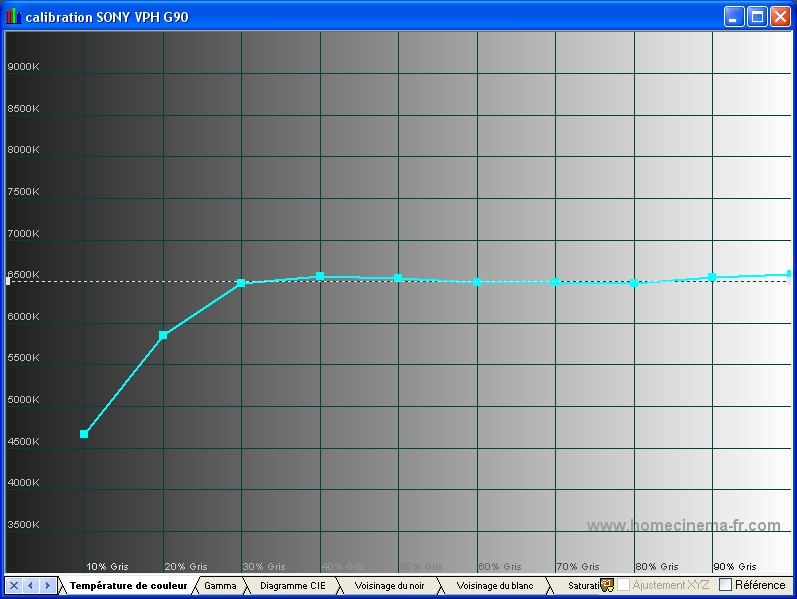
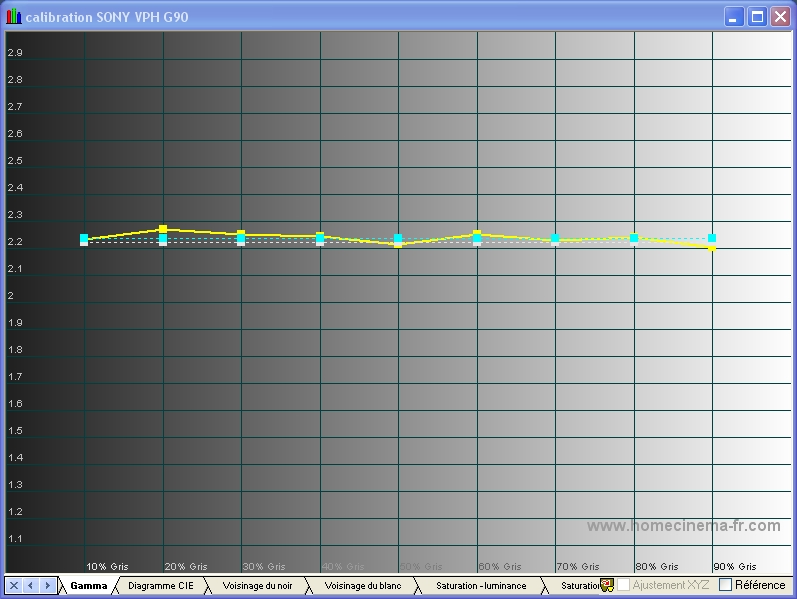
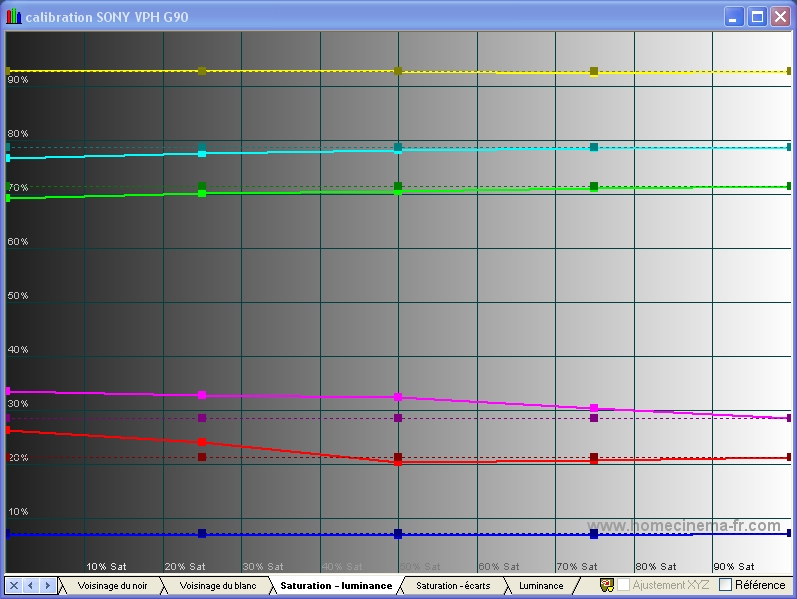
Result:
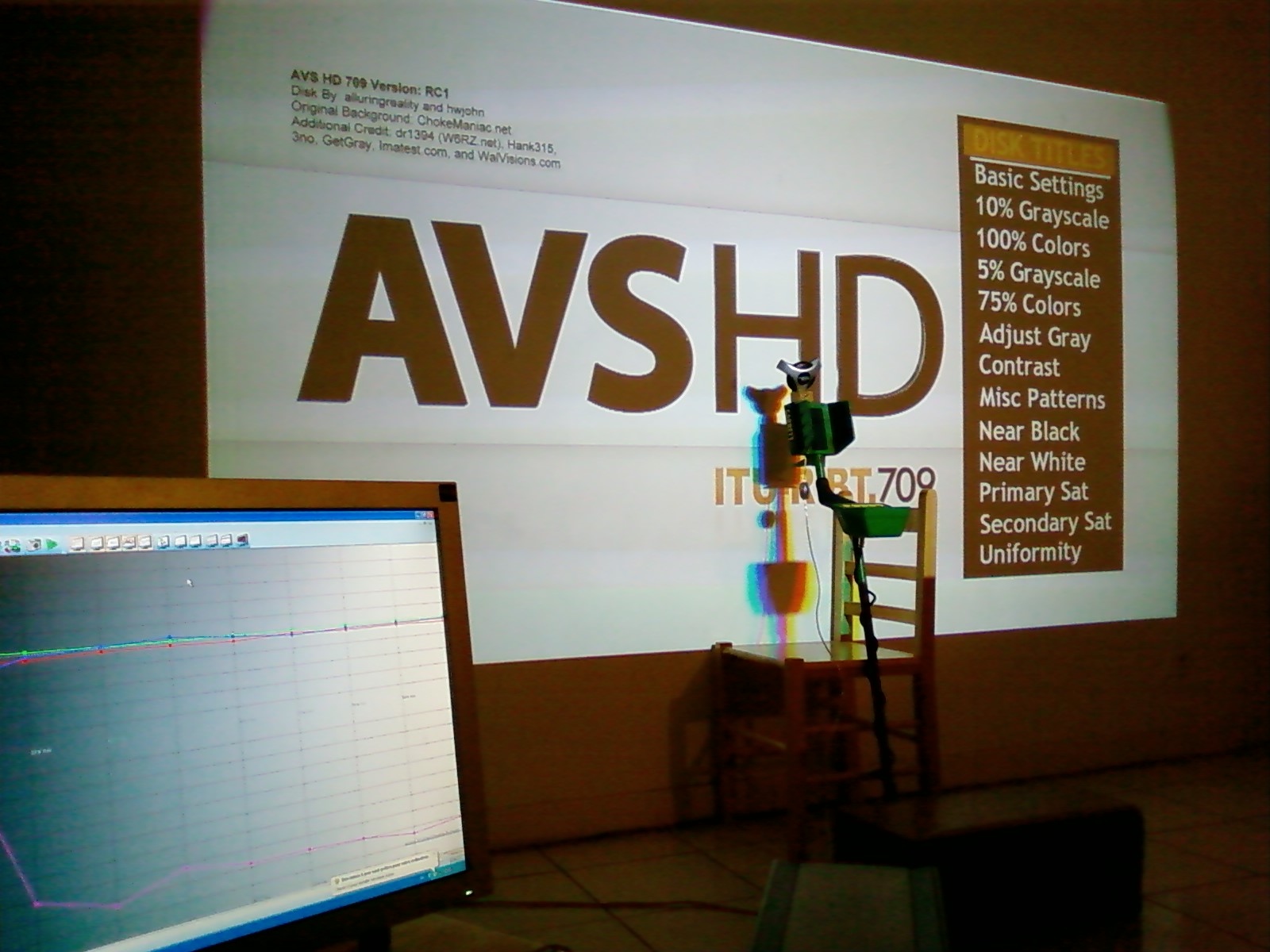
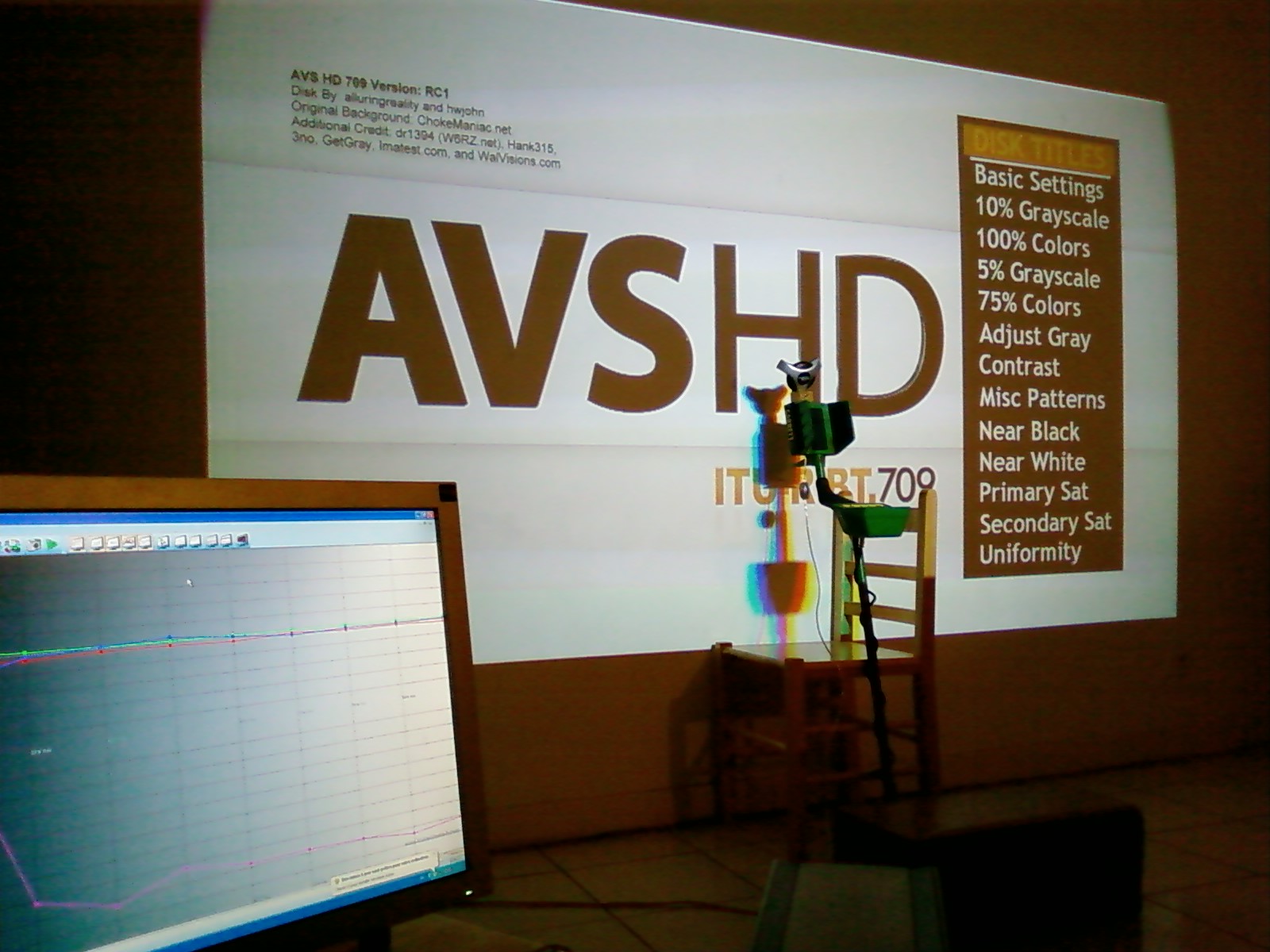
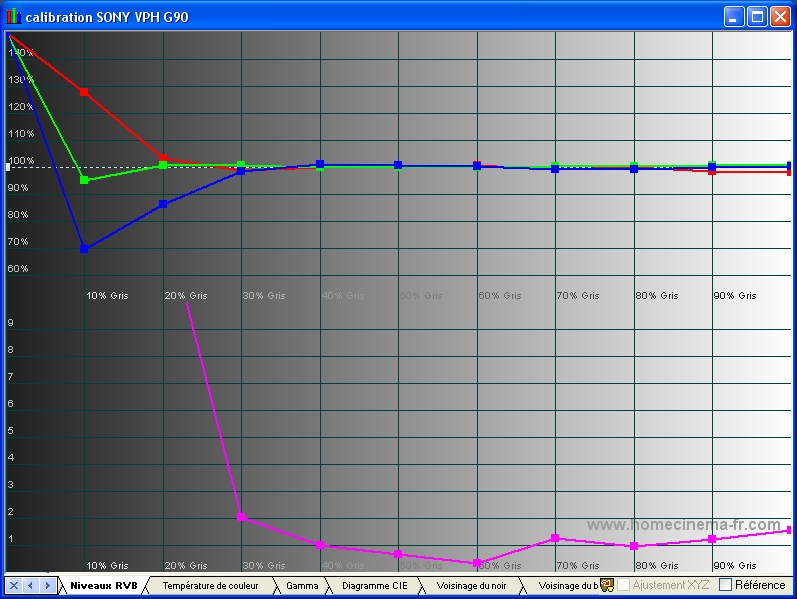
Below 30 IRE the spyder 2 is not quite accurate, I will make a new measurement with the probe HCFR
| Description: |
|
| Filesize: |
253.98 KB |
| Viewed: |
16204 Time(s) |
|
| Description: |
|
| Filesize: |
46.76 KB |
| Viewed: |
18047 Time(s) |
|
| Description: |
|
| Filesize: |
253.98 KB |
| Viewed: |
16199 Time(s) |
|
| Description: |
|
| Filesize: |
214.11 KB |
| Viewed: |
18047 Time(s) |
|
| Description: |
|
| Filesize: |
172.95 KB |
| Viewed: |
18047 Time(s) |
|
| Description: |
|
| Filesize: |
191.32 KB |
| Viewed: |
18047 Time(s) |
|
| Description: |
|
| Filesize: |
212.17 KB |
| Viewed: |
18047 Time(s) |
|
|
|
| Back to top |
|
 |
huggy
Joined: 02 Aug 2008
Posts: 927
Location: Melbourne,Australia
|
| Posted: Tue Mar 10, 2009 11:23 am Post subject: |
|
|
I wish I knew what those graphs meant 
Dave
|
|
| Back to top |
|
|
contemplationaveugle
Joined: 23 Mar 2008
Posts: 45
|
| Posted: Tue Mar 10, 2009 11:33 am Post subject: |
|
|
This graphics software HCFR colorimetry.
The curves correspond to the RGB levels, the color temperature must be at 6500, the gammas to be located at 2.2 and the color saturation
|
|
| Back to top |
|
|
WTS
Joined: 08 Mar 2006
Posts: 1276
Location: Calgary
|
| Posted: Tue Mar 10, 2009 1:12 pm Post subject: |
|
|
I have never used the probe that you are using but I would say it looks pretty good overall except for the extreme low end.
_________________
Thanks
Walter
|
|
| Back to top |
|
|
n@t
Joined: 02 Apr 2006
Posts: 63
|
| Posted: Tue Mar 10, 2009 1:50 pm Post subject: |
|
|
Hi,
your Gamma Settings are bad!
2,5-2,6 is better.
Regards Bernd
_________________
think positiv
|
|
| Back to top |
|
|
kal
Forum Administrator

Joined: 06 Mar 2006
Posts: 18114
Location: Ottawa, Canada
TV/Projector: JVC DLA-NZ7
|
| Posted: Tue Mar 10, 2009 4:14 pm Post subject: |
|
|
| n@t wrote: | Hi,
your Gamma Settings are bad!
2,5-2,6 is better.
Regards Bernd |
Not true. Anywhere between 2.2 and 2.5 is good. It all depends on the room and viewer preferences.
If the room is a 'bat cave' (100% black) with lots of light control to get rid of reflections off the walls/floor/ceiling then closer to 2.5 (less gamma boost) may be ok.
If the room is the way I see it above with white walls I would suggest that he stick with more gamma of around 2.2 (lower numbers means more gamma boost).
For what it's worth my room's somewhere in between and I still prefer 2.2 on my setup.
Really nice results on the graphs! Other than the sub-30 IRE readings (which few meters do right) everything looks bang on to me! I wouldn't change a thing!
Kal
_________________

Support our site by using our affiliate links. We thank you!
My basement/HT/bar/brewery build 2.0
Last edited by kal on Tue Mar 10, 2009 8:01 pm; edited 1 time in total
|
|
| Back to top |
|
|
kal
Forum Administrator
Joined: 06 Mar 2006
Posts: 18114
Location: Ottawa, Canada
TV/Projector: JVC DLA-NZ7
|
|
| Back to top |
|
|
dochlywd
Joined: 25 Apr 2006
Posts: 346
Location: Saint Louis, Missouri
|
| Posted: Tue Mar 10, 2009 4:51 pm Post subject: |
|
|
Cedric!
Glad to hear you're dialing it in!!! I hope you are enjoying the great pic that the G90 can produce. I forgot to ask what screen you are using? It almost looks like a painted flat wall.
|
|
| Back to top |
|
|
contemplationaveugle
Joined: 23 Mar 2008
Posts: 45
|
| Posted: Tue Mar 10, 2009 6:00 pm Post subject: |
|
|
| kal wrote: | | n@t wrote: | Hi,
your Gamma Settings are bad!
2,5-2,6 is better.
Regards Bernd |
Not true. Anywhere between 2.2 and 2.5 is good. It all depends on the room and viewer preferences.
If the room is a 'bat cave' (100% black) with lots of light control to get rid of reflections off the walls/floor/ceiling then closer to 2.5 (less gamma boost) may be ok.
If the room is the way I see it above with white walls I would suggest that he stick with more gamma of around 2.2 (lower numbers means more gamma boost).
Really nice results on the graphs! Other than the sub-30 IRE readings (which few meters do right) everything looks bang on to me! I wouldn't change a thing!
Kal |
Exactly, kal, you have anticipated me for the answer!
Gamma to 2.2 was necessary because I don't have a completely dark room.
For values below 30 IRE I think the spyder probe is not precise enough to measure. I'll try another probe (HCFR) is better in measures of dark or with my crysatlio 2 I will try to correct these values.
|
|
| Back to top |
|
|
contemplationaveugle
Joined: 23 Mar 2008
Posts: 45
|
| Posted: Tue Mar 10, 2009 6:06 pm Post subject: |
|
|
| dochlywd wrote: | Cedric!
Glad to hear you're dialing it in!!! I hope you are enjoying the great pic that the G90 can produce. I forgot to ask what screen you are using? It almost looks like a painted flat wall. |
Thank you, exactly for the time being I plan on painting my wall, but the screen will happen!
My resolution is 1920x817p71.94
|
|
| Back to top |
|
|
CIR Engineering

Joined: 25 Aug 2008
Posts: 4269
Location: Chicago USA & Berlin Germany
|
| Posted: Tue Mar 10, 2009 7:01 pm Post subject: |
|
|
| contemplationaveugle wrote: | | dochlywd wrote: | Cedric!
Glad to hear you're dialing it in!!! I hope you are enjoying the great pic that the G90 can produce. I forgot to ask what screen you are using? It almost looks like a painted flat wall. |
Thank you, exactly for the time being I plan on painting my wall, but the screen will happen!
My resolution is 1920x817p71.94 |
Nice choice on that resolution... one of my favorites 
Charts look really good too. And as you suggest, the Spider will not measure accurately below 30 IRE. Most likely your gray scale is good below 30 IRE because G90's track very flatly in general.
Have you ever spoke with John? He's a fellow Frenchman who is very good with the G90's. Here is a link to his web page.
http://johnhwman.free.fr//index.html
craigr
_________________
JETI 1501-HiRes 2nm Spectroradiometer
JETI 1211 Spectroradiometer
Photo Research PR-650 Spectroradiometer
Klein K10-A Colorimeter
Murideo Fresco SIX-G HDMI 2.x Multimedia Generator
Murideo Fresco SIX-A HDMI 2.x Analyzer
Light Illusion ColourSpace XPT Color Calibration Software
Light Illusion LightSpace XPT Pro Version 10.x Color Calibration Software
OMARDRIS JVC Software Patch to use K10-A and Jeti with JVC OEM AutoCal Software!
Sencore CR7000 CRT Tube Analyzer / Rejuvenater
Authorized Dealer for Lumagen & just about everything worth buying 
www.CIR-Engineering.com - craigr@cir-engineering.com
Phone: 865-405-6892
|
|
| Back to top |
|
|
CIR Engineering
Joined: 25 Aug 2008
Posts: 4269
Location: Chicago USA & Berlin Germany
|
| Posted: Tue Mar 10, 2009 7:11 pm Post subject: |
|
|
Also, for what it's worth, I think gamma of around 2.2 on a G90 is plenty high. The G90's somehow appear to have a higher gamma than they really do. Don't ask me why or how that can be, but I usually set G90's up with 2.2 ~ 2.3.
craigr
_________________
JETI 1501-HiRes 2nm Spectroradiometer
JETI 1211 Spectroradiometer
Photo Research PR-650 Spectroradiometer
Klein K10-A Colorimeter
Murideo Fresco SIX-G HDMI 2.x Multimedia Generator
Murideo Fresco SIX-A HDMI 2.x Analyzer
Light Illusion ColourSpace XPT Color Calibration Software
Light Illusion LightSpace XPT Pro Version 10.x Color Calibration Software
OMARDRIS JVC Software Patch to use K10-A and Jeti with JVC OEM AutoCal Software!
Sencore CR7000 CRT Tube Analyzer / Rejuvenater
Authorized Dealer for Lumagen & just about everything worth buying
www.CIR-Engineering.com - craigr@cir-engineering.com
Phone: 865-405-6892
|
|
| Back to top |
|
|
kal
Forum Administrator
Joined: 06 Mar 2006
Posts: 18114
Location: Ottawa, Canada
TV/Projector: JVC DLA-NZ7
|
|
| Back to top |
|
|
contemplationaveugle
Joined: 23 Mar 2008
Posts: 45
|
| Posted: Tue Mar 10, 2009 8:19 pm Post subject: |
|
|
I know john! I see that it is successful here.
I have often over the phone, I learned a lot with him, it is a person available who is listening.
He helped me to communicate with dochlywd to bring the G90 in France.
|
|
| Back to top |
|
|
CIR Engineering
Joined: 25 Aug 2008
Posts: 4269
Location: Chicago USA & Berlin Germany
|
| Posted: Tue Mar 10, 2009 8:29 pm Post subject: |
|
|
| contemplationaveugle wrote: | I know john! I see that it is successful here.
I have often over the phone, I learned a lot with him, it is a person available who is listening.
He helped me to communicate with dochlywd to bring the G90 in France. |
John has given me a lot of help over the years too
Very smart man.
craigr
_________________
JETI 1501-HiRes 2nm Spectroradiometer
JETI 1211 Spectroradiometer
Photo Research PR-650 Spectroradiometer
Klein K10-A Colorimeter
Murideo Fresco SIX-G HDMI 2.x Multimedia Generator
Murideo Fresco SIX-A HDMI 2.x Analyzer
Light Illusion ColourSpace XPT Color Calibration Software
Light Illusion LightSpace XPT Pro Version 10.x Color Calibration Software
OMARDRIS JVC Software Patch to use K10-A and Jeti with JVC OEM AutoCal Software!
Sencore CR7000 CRT Tube Analyzer / Rejuvenater
Authorized Dealer for Lumagen & just about everything worth buying
www.CIR-Engineering.com - craigr@cir-engineering.com
Phone: 865-405-6892
|
|
| Back to top |
|
|
contemplationaveugle
Joined: 23 Mar 2008
Posts: 45
|
|
| Back to top |
|
|
contemplationaveugle
Joined: 23 Mar 2008
Posts: 45
|
| Posted: Wed Mar 11, 2009 12:45 am Post subject: |
|
|
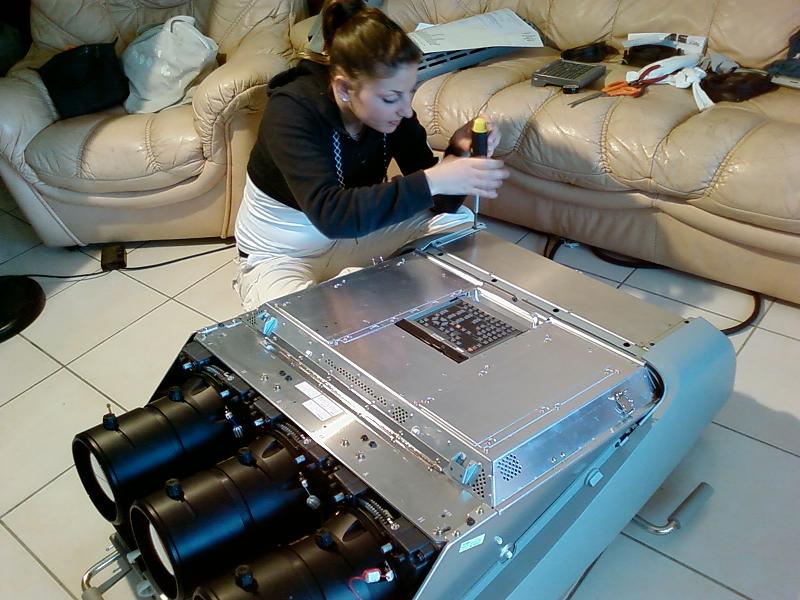
For the eyes
| Description: |
|
| Filesize: |
98.62 KB |
| Viewed: |
17916 Time(s) |
|
|
|
| Back to top |
|
|
NewbieDAN

Joined: 09 Mar 2006
Posts: 319
Location: Bunbury Western Australia
|
| Posted: Wed Mar 11, 2009 1:11 am Post subject: |
|
|
| contemplationaveugle wrote: | | For the eyes |
A bikini would make this shot much better
_________________
Sorting the fly sh*t from the pepper
|
|
| Back to top |
|
|
Spanky Ham

Joined: 22 Mar 2006
Posts: 5643
Location: Comedy Central
|
| Posted: Wed Mar 11, 2009 2:11 am Post subject: |
|
|
I don't get it is she going to stab you in the eyes for bringing this big monstrosity into her home?
On your link, it looks like you bought it last year. I hope you get good use out of it. With the chip issue, the G90s are risky purchases these days.
|
|
| Back to top |
|
|
CIR Engineering
Joined: 25 Aug 2008
Posts: 4269
Location: Chicago USA & Berlin Germany
|
| Posted: Wed Mar 11, 2009 1:48 pm Post subject: |
|
|
| Spanky Ham wrote: | I don't get it is she going to stab you in the eyes for bringing this big monstrosity into her home?
On your link, it looks like you bought it last year. I hope you get good use out of it. With the chip issue, the G90s are risky purchases these days. |
The issue with the failing chip is being blown out of proportion IMHO. I mean how many have actually failed this way??? I know of no more than 10 G90's, and most were fixed with doner YA boards out of parts units. Sure it is a pain if you own one, but parts unit G90's are becoming available these days and the chances that you will be effected are very low...
craigr
_________________
JETI 1501-HiRes 2nm Spectroradiometer
JETI 1211 Spectroradiometer
Photo Research PR-650 Spectroradiometer
Klein K10-A Colorimeter
Murideo Fresco SIX-G HDMI 2.x Multimedia Generator
Murideo Fresco SIX-A HDMI 2.x Analyzer
Light Illusion ColourSpace XPT Color Calibration Software
Light Illusion LightSpace XPT Pro Version 10.x Color Calibration Software
OMARDRIS JVC Software Patch to use K10-A and Jeti with JVC OEM AutoCal Software!
Sencore CR7000 CRT Tube Analyzer / Rejuvenater
Authorized Dealer for Lumagen & just about everything worth buying
www.CIR-Engineering.com - craigr@cir-engineering.com
Phone: 865-405-6892
|
|
| Back to top |
|
|
|
|






