|
As this forum is rarely used anymore, we've locked it. Feel free to browse and read. Questions? Please reach out to us directly. Cheers! |

|
 |
|
|
| Author |
Message |
audimushroom
Joined: 25 Jun 2007
Posts: 44
|
| Posted: Sat Jan 10, 2009 6:35 pm Post subject: Geomentry / Convergence problem |
|
|
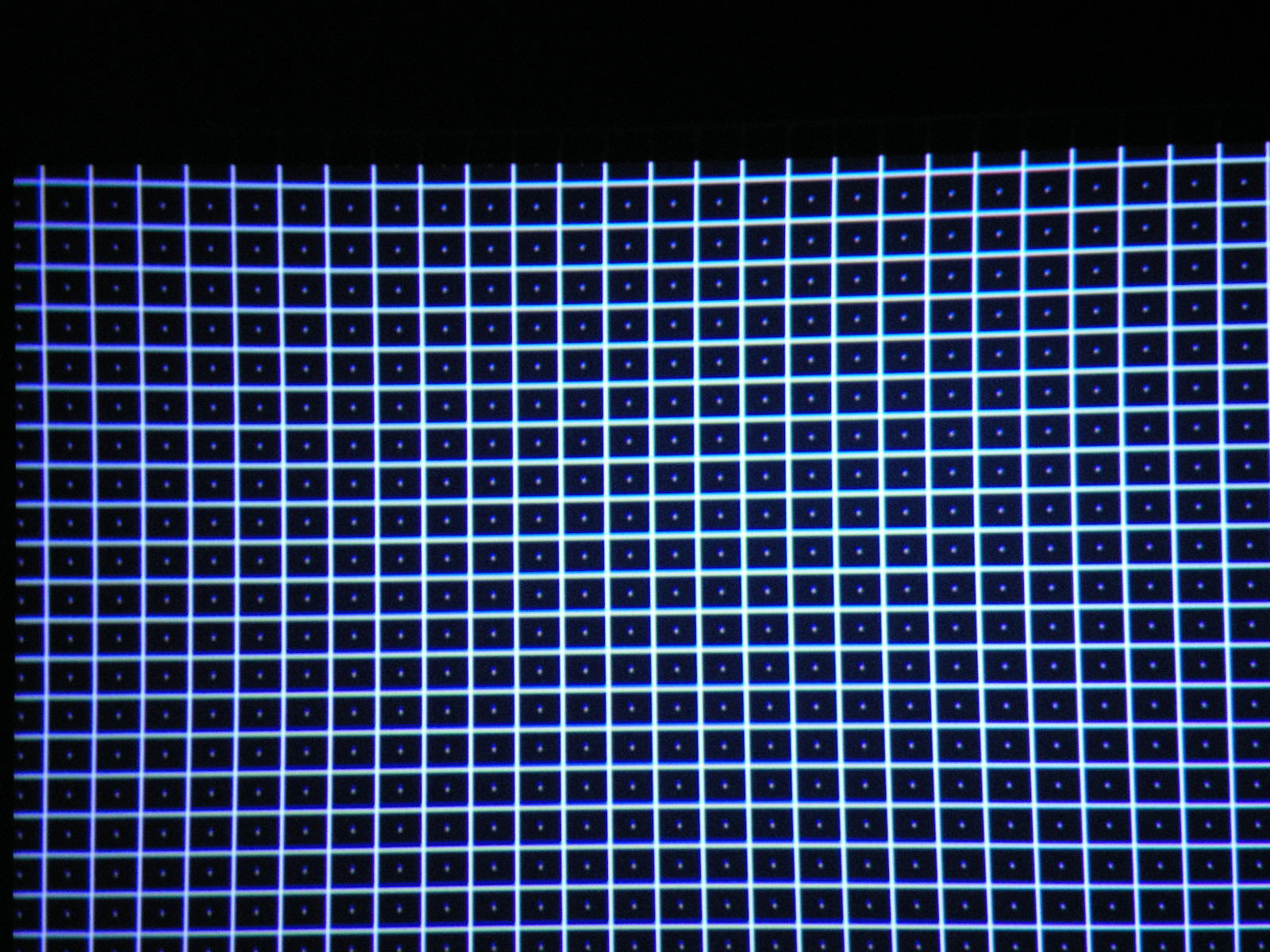
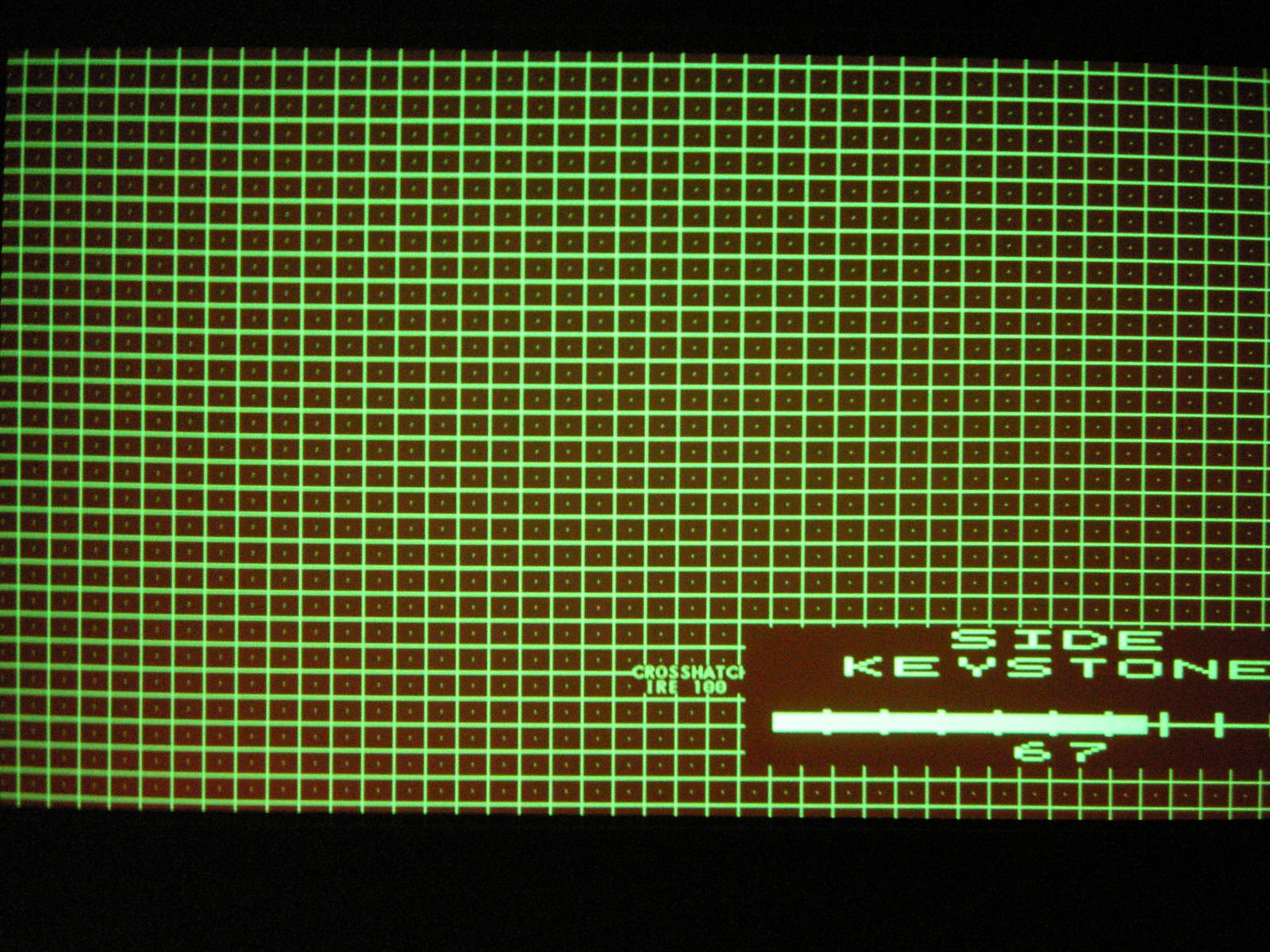
After some work trying to get good geometry it would appear I'm having difficulty getting a straight line..
can all experts cast an eye over these screenshots to give an opinion
is this possibly a PJ fault, this has been tried at different resolutions and I get the the same issue
this a low hours Barco 1208 /2
| Description: |
|
| Filesize: |
358.22 KB |
| Viewed: |
2173 Time(s) |
|
| Description: |
|
| Filesize: |
410.2 KB |
| Viewed: |
2170 Time(s) |
|
|
|
| Back to top |
|
 |
Nashou66

Joined: 12 Jan 2007
Posts: 16171
Location: West Seneca NY
|
|
| Back to top |
|
|
barcoguy
Joined: 05 Feb 2008
Posts: 128
|
| Posted: Sat Jan 10, 2009 11:39 pm Post subject: |
|
|
I am not an expert but. Is the projector square to the screen?
Did you reset the projector to mid position and delete all blocks?
I have done that and it gives better results.
But everything you have done so far will be lost.
|
|
| Back to top |
|
|
rabies_70

Joined: 15 Feb 2007
Posts: 1189
Location: Carlsbad, CA
TV/Projector: Sony G70Q
|
| Posted: Sun Jan 11, 2009 12:19 am Post subject: |
|
|
If not you're starting from the correct start point. i.e. THE VERY BEGINNING GROUND ZERO, square to the screen, all electronic points centered in their scales, points marked on screen that are true plumb,and level, rough mechanical focus ,Get the green as perfect as you can and converge red then blue to it, losing where he is now is a mute point because where he might be now is actually nowhere. You really can't start from anywhere on a fresh setup but from the exact beginning and progress logically from there. The final result is built upon the building blocks of a solid foundation of proper setup and convergence. So I have found it's no big deal (in the grand scheme of things)(and SO very worth the extra "hassle")as a complete noob novice to start from scratch. Period. I, as well as most of us I'm sure, have had to redo and redo again our first (2nd and 3rd in my case) attempts at setup and convergence. Probably, although highly unlikely, even Mr Ken Whitcomb himself had to redo the very first crt he ever tried to setup before he got the, and I use this term loosely in his case, "the hang of it".
Buddy the best advice I can give you is the advice I took away from curts site and "other" places with crt pointers. And that advice is to sit in front of the computer for a few dozen hours reading and rereading all the manuals and setup guides you can find relevant to your machine and situation. Then go for it and realize that it's not going to magically happen perfect the first time . Hell I didn't even realize the on my Sony the key and key balance, pin and pin balance did completely different things. Why would I have? I didn't design the Sony. But after messing with it a few times I started to realize something was moving differently than I had expected so I reread some stuff and sure as sh*t. Four totally different animals for 3 different colors = 12 completely different and completely inter related adjustments that ended up making my lines straight for all three colors all across the screen. I would imagine that the Barco 1208 has adjustments that are similar, easier and better designed than my much loved G70.
Right before you feel like you actually are going to lose your mind and give up you'll get a small piece of the puzzle and then another and eventually voila. You're watching movies 
Then you'll need new seats, then you'll need speakers, then you'll need different speakers then you'll want to make the greyscale correct then the color gambut then a new screen then a new video processor then a fresh re setup then the wife will think you're crazy then you'll buy a club membership here then you'll spend more money then you'll spend more money
Did I mention the you might even get to watch movies too?
While I can't offer you squat for advice on the Barco setup procedure, I think the above ^^^^ will set you in the right direction. It did me.
_________________
Ray
I am an iconoclast
|
|
| Back to top |
|
|
audimushroom
Joined: 25 Jun 2007
Posts: 44
|
| Posted: Sun Jan 11, 2009 11:03 am Post subject: |
|
|
| Nashou66 wrote: | Does the Barco have a separate Green Convergence in the service menu Like the Marquee's do?If so then you need to gonverge green so its nice and even, then converge the other colors to it.
Athanasios |
Thanks for the reply, The Convergence on Green board(COG) is not standard on the 1208 and I don't have the board at the moment, they also tend to be rarely up for sale.
I may have to try and find one....
Last edited by audimushroom on Sun Jan 11, 2009 11:12 am; edited 1 time in total
|
|
| Back to top |
|
|
audimushroom
Joined: 25 Jun 2007
Posts: 44
|
| Posted: Sun Jan 11, 2009 11:07 am Post subject: |
|
|
| barcoguy wrote: | I am not an expert but. Is the projector square to the screen?
Did you reset the projector to mid position and delete all blocks?
I have done that and it gives better results.
But everything you have done so far will be lost. |
Yes all checked as square and all blocks deleted, all set to mid position
The green geometry is where I started as we all should and that is what appears to have this uneven kink in it so its like the bow etc don't operate evenly over the whole screen width which is wierd.
|
|
| Back to top |
|
|
audimushroom
Joined: 25 Jun 2007
Posts: 44
|
| Posted: Sun Jan 11, 2009 11:12 am Post subject: |
|
|
| rabies_70 wrote: | If not you're starting from the correct start point. i.e. THE VERY BEGINNING GROUND ZERO, square to the screen, all electronic points centered in their scales, points marked on screen that are true plumb,and level, rough mechanical focus ,Get the green as perfect as you can and converge red then blue to it, losing where he is now is a mute point because where he might be now is actually nowhere. You really can't start from anywhere on a fresh setup but from the exact beginning and progress logically from there. The final result is built upon the building blocks of a solid foundation of proper setup and convergence. So I have found it's no big deal (in the grand scheme of things)(and SO very worth the extra "hassle")as a complete noob novice to start from scratch. Period. I, as well as most of us I'm sure, have had to redo and redo again our first (2nd and 3rd in my case) attempts at setup and convergence. Probably, although highly unlikely, even Mr Ken Whitcomb himself had to redo the very first crt he ever tried to setup before he got the, and I use this term loosely in his case, "the hang of it".
Buddy the best advice I can give you is the advice I took away from curts site and "other" places with crt pointers. And that advice is to sit in front of the computer for a few dozen hours reading and rereading all the manuals and setup guides you can find relevant to your machine and situation. Then go for it and realize that it's not going to magically happen perfect the first time . Hell I didn't even realize the on my Sony the key and key balance, pin and pin balance did completely different things. Why would I have? I didn't design the Sony. But after messing with it a few times I started to realize something was moving differently than I had expected so I reread some stuff and sure as sh*t. Four totally different animals for 3 different colors = 12 completely different and completely inter related adjustments that ended up making my lines straight for all three colors all across the screen. I would imagine that the Barco 1208 has adjustments that are similar, easier and better designed than my much loved G70.
Right before you feel like you actually are going to lose your mind and give up you'll get a small piece of the puzzle and then another and eventually voila. You're watching movies
Then you'll need new seats, then you'll need speakers, then you'll need different speakers then you'll want to make the greyscale correct then the color gambut then a new screen then a new video processor then a fresh re setup then the wife will think you're crazy then you'll buy a club membership here then you'll spend more money then you'll spend more money
Did I mention the you might even get to watch movies too?
While I can't offer you squat for advice on the Barco setup procedure, I think the above ^^^^ will set you in the right direction. It did me. |
Thanks for the pointers, I have setup a Sony 1272 in the past, a barco 808 which I did get straight lines, they were also not square to the screen where the 1208 is square and when I start from scratch I get the same kink each time which is the reason for my query if anyone had the same uneven horizonal line and how they fixed it. I just wonder if it is a PJ fault or not....
|
|
| Back to top |
|
|
|
|
|
|
|
You cannot post new topics in this forum
You cannot reply to topics in this forum
You cannot edit your posts in this forum
You cannot delete your posts in this forum
You cannot vote in polls in this forum
You cannot attach files in this forum
You can download files in this forum
|
Forum powered by phpBB © phpBB Group
|
|




