| Author |
Message |
rickp
Joined: 29 Oct 2008
Posts: 25
|
| Posted: Sun Nov 23, 2008 1:41 am Post subject: Please advise Wilsonart or AT screen, flat, curved or torus? |
|
|
After spending many, many hours reading about screens I am ready to pull the trigger.
I have a 13' wide by 23' long dedicated HT room, I figure I can use a 100" wide 16:9 solid screen or a much wider AT screen and hide my speakers behind it.
I will be using 2 XG110's side by side stack on the ceiling which is 8'6'' high.
Before I start asking a million questions I would like some experienced advise to get me started in the right direction.
Thanks for all of your help in advance. Rick.
[img]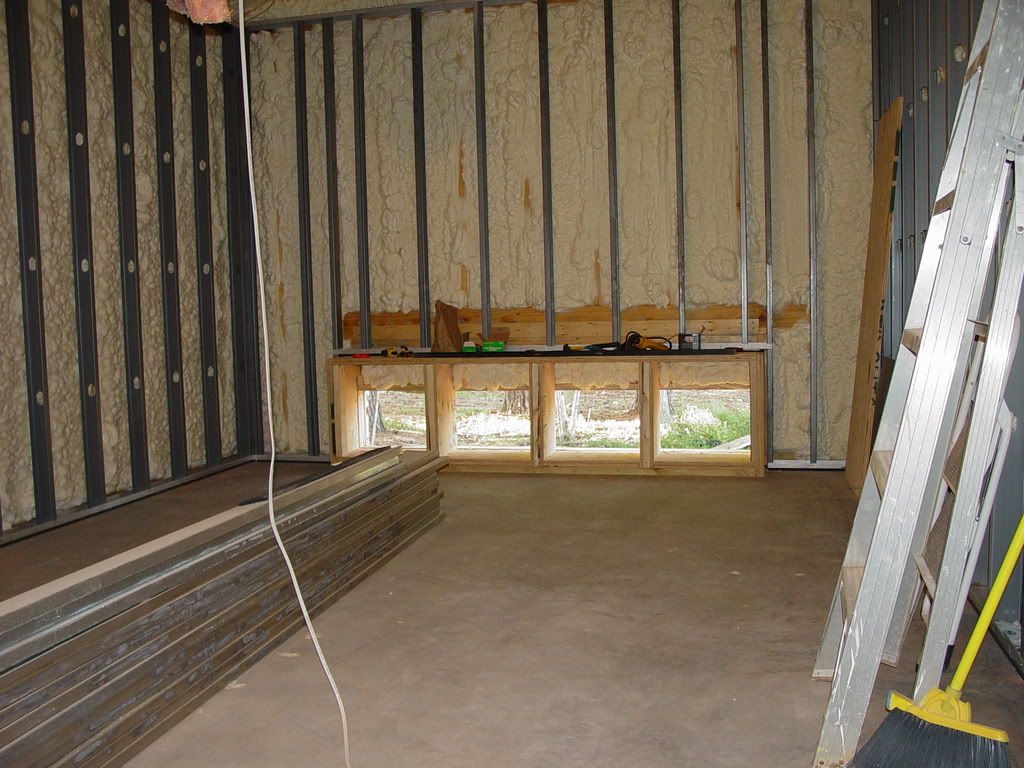 [/img] [/img]
|
|
| Back to top |
|
 |
Zebu Fellenz
Joined: 21 Dec 2006
Posts: 2567
|
| Posted: Sun Nov 23, 2008 2:10 am Post subject: |
|
|
|
Have you considered going with an almost full width ~12' wide AT CIH screen and blending the two XG's?
|
|
| Back to top |
|
|
rickp
Joined: 29 Oct 2008
Posts: 25
|
| Posted: Sun Nov 23, 2008 2:37 am Post subject: |
|
|
| Quote: | | Have you considered going with an almost full width ~12' wide AT CIH screen and blending the two XG's? |
I like the idea of a 12' AT screen.
What does CIH stand for?
I would really like to blend however it looks way to expensive (Blendzilla), unless there is something reasonable I haven't stumbled across yet.
|
|
| Back to top |
|
|
Zebu Fellenz
Joined: 21 Dec 2006
Posts: 2567
|
| Posted: Sun Nov 23, 2008 2:40 am Post subject: |
|
|
| rickp wrote: | | Quote: | | Have you considered going with an almost full width ~12' wide AT CIH screen and blending the two XG's? |
I like the idea of a 12' AT screen.
What does CIH stand for?
I would really like to blend however it looks way to expensive (Blendzilla), unless there is something reasonable I haven't stumbled across yet. |
CIH is constant image height aka a 2.35:1 or 2.40:1 screen aspect ratio.
A blend will be expensive but there are options cheaper than the blendzilla, Tv-one has blend units that some CRT users have been playing with. Member Nashou66 here has a TV-one setup and will be using two Marquees.
-Erik
|
|
| Back to top |
|
|
Zebu Fellenz
Joined: 21 Dec 2006
Posts: 2567
|
|
| Back to top |
|
|
rickp
Joined: 29 Oct 2008
Posts: 25
|
| Posted: Sun Nov 23, 2008 1:39 pm Post subject: |
|
|
I reread the post again this morning It sounds like a great unit but at 10K it is out of the question at this time. I forgot to mention I am building a house right now and that 10K needs to be spent on the kitchen, I wonder if I could get my wife to cook in the HT room on the Tvone? 
If the Tvone is the most inexpensive blender around I won't be blending for a while.  SO the side by side stack is my plan of action. Thats one question firmed up. SO the side by side stack is my plan of action. Thats one question firmed up.
That being said anything DIY for the screen will do.
I am going to build these speakers, possibly in an OB set up, it's a shame to hide them behind the screen
but if I do I can use 1 for the center channel also 
[img]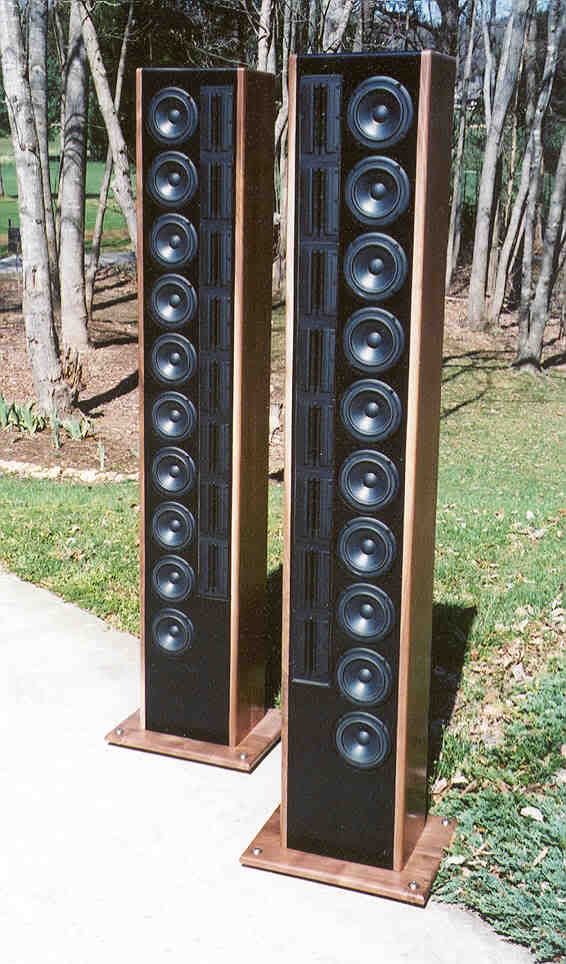 [/img] [/img]
|
|
| Back to top |
|
|
MikeEby

Joined: 24 Jun 2007
Posts: 5237
Location: Osceola, Indiana
|
| Posted: Sun Nov 23, 2008 3:03 pm Post subject: |
|
|
I don't want to rain on your parade but stacking two 8" projectors may not be real practical. Getting 1080p to resolve halfway decent on just one 8" CRT is pretty tough. Keeping two of them aligned with good convergence and geometry in a stack would be a daunting task to say the least.
A blend is the way to go because you don’t have to push the projectors as hard. I think if you shop around you could find the blending hardware from TVOne for about 4.5K. When you say 12’ screen are we talking 12’ wide, if so that’s pretty big for stack also, should be easy for a blend though
_________________
Doing HD since the last century!
|
|
| Back to top |
|
|
rickp
Joined: 29 Oct 2008
Posts: 25
|
| Posted: Tue Nov 25, 2008 6:59 pm Post subject: |
|
|
Ok I will start with one projector, now about the screen it will be fixed and CIH so which is better a 100' wide DW or a 12" AT screen. Would a curved DW screen or a Torus AT screen have an advantage with an NEC xg1100?
Thanks, Rick
|
|
| Back to top |
|
|
benareeno
Joined: 22 Mar 2006
Posts: 1614
Location: ottawa, canada
|
| Posted: Wed Nov 26, 2008 2:08 am Post subject: |
|
|
|
you must be kidding about those speakers....you must be!
|
|
| Back to top |
|
|
Person99
Joined: 09 Mar 2006
Posts: 4899
Location: Flower Mound, TX
|
| Posted: Mon Dec 01, 2008 11:14 pm Post subject: |
|
|
| rickp wrote: | Ok I will start with one projector, now about the screen it will be fixed and CIH so which is better a 100' wide DW or a 12" AT screen. Would a curved DW screen or a Torus AT screen have an advantage with an NEC xg1100?
Thanks, Rick |
1 projector will not be bright enough for a 100" wide CIH Setup. It is just barely bright enough for a 100" wide CIW (16:9) set up.
I agree that these days, the stacking and blending ROI is not really worth it given the performance of a comparably priced less of a hassle digital. I assume that the 23' will be used as a two row theater. If so, you could do a false wall about 5' in from one wall. Do a DW 16:9 screen of 92 or 96 inches wide, and hide all the front speakers behind the false wall (and still have enough standoff from the true wall to sound great). You can then put seating at about 11' from the screen and 16' from the screen.
_________________
Dave
A train station is where the train stops. A bus station is where the bus stops. On my desk, I have a work station....
|
|
| Back to top |
|
|
Person99
Joined: 09 Mar 2006
Posts: 4899
Location: Flower Mound, TX
|
| Posted: Mon Dec 01, 2008 11:15 pm Post subject: |
|
|
One last thing, you know what is involved in a torus--right? They are a PITA to build.
_________________
Dave
A train station is where the train stops. A bus station is where the bus stops. On my desk, I have a work station....
|
|
| Back to top |
|
|
rickp
Joined: 29 Oct 2008
Posts: 25
|
| Posted: Tue Dec 02, 2008 1:20 am Post subject: |
|
|
Thanks for the tips Person99 I am new to the CRT thing, if the projector will only be bright enough for a 100" 16.9 screen that narrows my options dramatically. Building a DW curved screen and false wall was my second option but looks to be the best one now.
Any other tips would be appreciated.
Thanks, Rick.
|
|
| Back to top |
|
|
Person99
Joined: 09 Mar 2006
Posts: 4899
Location: Flower Mound, TX
|
| Posted: Tue Dec 02, 2008 4:17 pm Post subject: |
|
|
| rickp wrote: | Thanks for the tips Person99 I am new to the CRT thing, if the projector will only be bright enough for a 100" 16.9 screen that narrows my options dramatically. Building a DW curved screen and false wall was my second option but looks to be the best one now.
Any other tips would be appreciated.
Thanks, Rick. |
Actually, I should say I lied to you. I was being too terse. 100" wide CIH and CIW will be about the same brightness. But there are other issues with CIH on a CRT that must be addressed (I don't think a non-blend CIH is worth it). Further, you will need an external scaler to really do CIH. If you heart is set on CIH, do some research.
Also, if CIH interests you and you want to stick with CRT, I would suggest some research into pseudo-CIA build around a 2.05:1 screen. That might tickle your fancy and be practical. And if the XG is in really good shape and really well set up, you could probably do a CIA screen without an external scaler.
_________________
Dave
A train station is where the train stops. A bus station is where the bus stops. On my desk, I have a work station....
|
|
| Back to top |
|
|
rickp
Joined: 29 Oct 2008
Posts: 25
|
| Posted: Tue Dec 02, 2008 5:07 pm Post subject: |
|
|
I will be running a scaler, VFC4404 Runco for now and am looking at a HDMI converter with gamma boost.
What screen size would have the best picture for the XG1100?
Please help with abbreviations.
CIH = constant image height
CIW = ?
CIA = ?
Thanks, Rick
|
|
| Back to top |
|
|
Person99
Joined: 09 Mar 2006
Posts: 4899
Location: Flower Mound, TX
|
| Posted: Tue Dec 02, 2008 5:15 pm Post subject: |
|
|
| rickp wrote: | | I will be running a scaler, VFC4404 Runco for now and am looking at a HDMI converter with gamma boost. |
I think that is an older VP, I'm not sure it supports processing HD which is what you would need for CIH.
| rickp wrote: | | What screen size would have the best picture for the XG1100? |
image quality is inversely proportional to screen size. Your projector is capable of a truly reference quality picture on an 80" wide screen. Once you start getting into the mid-90" size, you are sacrificing a small bit of sharpness and dropping below 12 ftL on bright scenes (consequently, the image does not have as much "punch"). But, it still looks pretty good. Much over the mid-90" size and you are really starting to sacrifice dynamic range, image brightness, etc. Even on a 1.3 gain screen, 100" plus will look a whole lot "flatter" that on 80" and not as sharp.
| rickp wrote: | Please help with abbreviations.
CIH = constant image height
CIW = ?
CIA = ?
Thanks, Rick |
Constant Image Width
Constant Image Area
_________________
Dave
A train station is where the train stops. A bus station is where the bus stops. On my desk, I have a work station....
|
|
| Back to top |
|
|
rickp
Joined: 29 Oct 2008
Posts: 25
|
| Posted: Tue Dec 02, 2008 6:04 pm Post subject: |
|
|
The reason I purchased 2 of the XG's was to stack so I could have a bigger brighter screen, MikeEby recommends not to, is this suggestion correct? I would like the best picture possible so an 80" screen isn't a problem although 90" would be better.
If CIH = 2.35:1, 2.4:1 what is ?
CIW =
CIA =
| Quote: | | I would suggest some research into pseudo-CIA build around a 2.05:1 screen. That might tickle your fancy and be practical. |
Are you saying build a 4.3:1 screen and mask it to 2.05:1? assuming CIA = 4.3:1
Thanks for your patience, Rick.
|
|
| Back to top |
|
|
Person99
Joined: 09 Mar 2006
Posts: 4899
Location: Flower Mound, TX
|
| Posted: Tue Dec 02, 2008 7:39 pm Post subject: |
|
|
| rickp wrote: | The reason I purchased 2 of the XG's was to stack so I could have a bigger brighter screen, MikeEby recommends not to
, is this suggestion correct? |
He was just pointing out the "headache" factor. The best thing to do with two is blend them. That is $$$. For the same $$$ as blending two CRTs, you can do a kick-ass digital set up. So, it is not really worth it.
That leaves stacking. His point is correct. Stacking is a pain. Things like signal distribution and all that are the easy parts. Keeping them perfectly converged is the hard part. The will likely drift. Drift that you might not notice for awhile with 1 PJ, becomes horrible with 2. You may be converging them every 2-4 movies. Not for the faint of heart.
Add to the pain of installing the two PJs and all that and his point was that it just is not worth it. If you need bigger and brighter, just suck it up and go digi as it is much less pain and costs about the same and the newer ones look pretty good.
So, bottom line: his opinion is the ROI is not worth it. I happen to agree with him. Others (and I can name a few) would not agree with us.
| rickp wrote: | | I would like the best picture possible so an 80" screen isn't a problem although 90" would be better. |
90" will be fine and look great to you.
| rickp wrote: |
| Quote: | | I would suggest some research into pseudo-CIA build around a 2.05:1 screen. That might tickle your fancy and be practical. |
Are you saying build a 4.3:1 screen and mask it to 2.05:1? assuming CIA = 4.3:1
Thanks for your patience, Rick. |
No, you build a 2.05:1 screen. You use 4 way masking if you want, or if you have a completely light controlled theater, you don't have to really. Basically, 16:9 is shown on the full height of the screen, but not the full width. 2.35:1 is shown the full width but not the full height. Basically, both aspect ratio's image is of the same area.
Read the first post in this thread: https://www.curtpalme.com/forum_archived/viewtopic.php@t=13016.html
_________________
Dave
A train station is where the train stops. A bus station is where the bus stops. On my desk, I have a work station....
|
|
| Back to top |
|
|
rickp
Joined: 29 Oct 2008
Posts: 25
|
| Posted: Sat Dec 06, 2008 2:06 am Post subject: |
|
|
Wow that took a while but it was well worth it, I recommend to anyone who is researching screens to read this post 
Ok, I ordered a piece of DW 5'x8' and it will be here next week. I will be building a 90" wide 2.05 CIA screen.
Now that I have all that straight Is there a advantage in building a curved screen over a flat screen???
Thanks, Rick.
|
|
| Back to top |
|
|
VideoGrabber
Joined: 09 Apr 2006
Posts: 933
Location: Michigan
|
| Posted: Sat Dec 06, 2008 4:38 am Post subject: |
|
|
rickp wrote:
> I will be building a 90" wide 2.05 CIA screen. <
Good choice. I think you'll be very impressed with it.
> I ordered a piece of DW 5'x8' and it will be here next week <
Wouldn't a 4x8 piece have been significantly cheaper?
> Is there a advantage in building a curved screen over a flat screen??? <
Curved screens are useful for: (a) high-gain surfaces (uniformity and hot-spot elimination), or (b) dealing with geometry errors in the optics of your display device. Neither of which will apply to you, so you'll be able to enjoy the ease and simplicity of a flat screen.
_________________
- Tim
|
|
| Back to top |
|
|
rickp
Joined: 29 Oct 2008
Posts: 25
|
| Posted: Sat Dec 06, 2008 2:05 pm Post subject: |
|
|
Thanks to all who helped me make the proper choice of screen size and type, I wish there was a place that has all this knowledge listed by projector types, but at the same time I enjoy the interaction with others who are obsessed about doing the job right the first time 
I am also considering building 100" Torus screen out of Silver Lame for a back to back comparison with the DA screen. My thinking is that I can build a bigger screen and turn the brightness down to make up for the high gain of the material. Am I CRAZY 
I know some of you are thinking " why doesn't this guy just stop and enjoy what he has!" and the answer is? It is just how I am wired, I enjoy overcoming challenges, you know when someone says you can't do that! my immediate thought is, WATCH ME! sometimes it works out, sometimes not, but suprisingly things do work more often than not. This is what I do for a living, I build race cars and have been doing it since high school (1975) which was a loooooong time ago! A few months ago I finished restoring the Penske-Mark Donahue-Lola T70, you can see it at prismacars.com.
Thanks, Rick.
|
|
| Back to top |
|
|
|
|




