| Author |
Message |
JPM
Joined: 18 Nov 2008
Posts: 17
|
| Posted: Tue Nov 18, 2008 6:56 pm Post subject: Marquee 8500 - can't move raster in horizontal direction |
|
|
Hi,
I'm new in this board. My english isn't very well. About 2 weeks ago i bought a Marquee 8500. I have a problem now. I can't center the raster on the tubes. If I try to do this in the mechanical setup, the raster will only move in vertical directions, but not horizontal. I have read something about "the golden rule",which says, that a centered raster is obviously one of the most important settings. My raster is too far at the right side of the tube.
Can anybody help me?
Thank you!
JPM
|
|
| Back to top |
|
 |
Nashou66

Joined: 12 Jan 2007
Posts: 16171
Location: West Seneca NY
|
|
| Back to top |
|
|
1031

Joined: 22 Mar 2006
Posts: 657
Location: Finland
|
|
| Back to top |
|
|
JPM
Joined: 18 Nov 2008
Posts: 17
|
| Posted: Wed Nov 19, 2008 1:02 pm Post subject: |
|
|
Thank you for the answers.
@1031: It is the steps 5 up to 8 in the mechanical setup guide, where i have to look into the tubes und move the raster by remote control. I just reseated the HDM 2 or 3 times with no effect. I'll try to clean it and the control module, like you said.
@Nashou66: This looks like a method, that would definitely solve my problem, but i'll better try cleaning the boards first, because i'm not familliar with replacing tubes or lenses.
JPM
|
|
| Back to top |
|
|
Nashou66
Joined: 12 Jan 2007
Posts: 16171
Location: West Seneca NY
|
| Posted: Wed Nov 19, 2008 1:08 pm Post subject: |
|
|
| JPM wrote: | Thank you for the answers.
@1031: It is the steps 5 up to 8 in the mechanical setup guide, where i have to look into the tubes und move the raster by remote control. I just reseated the HDM 2 or 3 times with no effect. I'll try to clean it and the control module, like you said.
@Nashou66: This looks like a method, that would definitely solve my problem, but i'll better try cleaning the boards first, because i'm not familliar with replacing tubes or lenses.
JPM |
Yes try the cleaning first, but like you said earlier the less electronic control the better the stability of the convergence and all other geometry functions along with the dreaded marquee banding. And its not an entire removal of the tubes they stay put, you just loosen the three wing nuts and the focus yoke and then be moved up down side to side to center the raster. but before you do your set up make sure you initialize the set first to zero out any previous settings.
Athanasios
_________________
Don't blame your underwear for your crooked ass~ unknown Greek philosopher
"Republicans believe every day is the Fourth of July, but the Democrats believe every day is April 15." --- President Reagan
One Smart Dog!!!
Marquee High Performance Bellows now shipping!!
Marquee Modifications and Performance Enhancement
Marquee C-element and Bellow removal
|
|
| Back to top |
|
|
Curt Palme
CRT Tech
Joined: 08 Mar 2006
Posts: 24396
Location: Langley, BC
TV/Projector: All of them!
|
| Posted: Wed Nov 19, 2008 3:58 pm Post subject: |
|
|
|
A failure on the HDM will also cause the center square not to move left or right on all tubes.
|
|
| Back to top |
|
|
JPM
Joined: 18 Nov 2008
Posts: 17
|
| Posted: Wed Nov 19, 2008 4:50 pm Post subject: |
|
|
Hi,
would this mean, that I need a new hdm board, or would it be enough to center the raster with the focus coil, like Nashou66 said? The cleaning needs some time, my electronics dealer has no cleaning spray fpr high voltage electronic parts, so I have to order it via internet.
JPM
|
|
| Back to top |
|
|
Nashou66
Joined: 12 Jan 2007
Posts: 16171
Location: West Seneca NY
|
| Posted: Wed Nov 19, 2008 5:13 pm Post subject: |
|
|
You can just pull the chips out and put them back in a few times to clean any oxidation that might be on them for now till you get the cleaner or use Denatured alcohol and clean the chips and the whole board with a soft toothbrush. use the alcohol liberally and then use a compressed can of air to blow out any from in the pins, let dry over night or at least a few hours and then blow some air around chips to see if any is left, I have done he claening and used the board a few hours later.
I would go and do a complete re initialization of the machine now and center the magnetics now while you wait for the cleaner to clean the chips. see if the grids are all level with the horizon and are centered to the tube face, not the screen. if they are not centered on the tube face use the magnetics first. then after you can fine tune with the electronics, however i must say this is only good if you know for sure there is nothing wrong with the electronic centering. Because the electronics may be shifting the raster over now with a fault present , so after you center via the mags and then the electronics are fixed and you zero out all settings you may need to revisit the mags again, i think i just went against what i told you you should do !   Some times I confuse myself ! Some times I confuse myself !
But i think you should now wait till you know for sure its not the CLM or the HDM as Curt stated, but you should definitely check the mags after you know everything is ok electronic wise. The less you need electronic adjustment the better off in the long run.
Athanasios
_________________
Don't blame your underwear for your crooked ass~ unknown Greek philosopher
"Republicans believe every day is the Fourth of July, but the Democrats believe every day is April 15." --- President Reagan
One Smart Dog!!!
Marquee High Performance Bellows now shipping!!
Marquee Modifications and Performance Enhancement
Marquee C-element and Bellow removal
|
|
| Back to top |
|
|
draganm

Joined: 08 Mar 2006
Posts: 8990
Location: Colorado
|
| Posted: Wed Nov 19, 2008 6:04 pm Post subject: |
|
|
| Curt Palme wrote: | | A failure on the HDM will also cause the center square not to move left or right on all tubes. |
it doesn't need to be a failure, having the Horizontal Deflection yoke leads switched around will do this also. I bet green is on red or blue.
Last edited by draganm on Thu Nov 20, 2008 9:11 pm; edited 2 times in total
|
|
| Back to top |
|
|
JPM
Joined: 18 Nov 2008
Posts: 17
|
| Posted: Thu Nov 20, 2008 2:18 pm Post subject: |
|
|
Hi,
I reseated the HDM and the CLM for a few times. How can I find out, if there is a failure on the HDM? No effects. I think cleaning wouldn't help, if there is a failure, isn't it?
@draganm: Which leads do you talk about exactly? The same you have to switch for scan reversal?
Thank you.
JPM
|
|
| Back to top |
|
|
Curt Palme
CRT Tech
Joined: 08 Mar 2006
Posts: 24396
Location: Langley, BC
TV/Projector: All of them!
|
| Posted: Thu Nov 20, 2008 2:56 pm Post subject: |
|
|
|
You need to do board swaps at this point, or send me some of the boards to test for you in a working set.
|
|
| Back to top |
|
|
JPM
Joined: 18 Nov 2008
Posts: 17
|
| Posted: Thu Nov 20, 2008 4:18 pm Post subject: |
|
|
So,
I've tried to center the raster with the fucos coil, it moved a little bit, but its still not in the middle of the tube. Now I believe, it is really a failure on the HDM or dirt on the boards/chips. I won't be able to fix the problem by magnetics alignment.
|
|
| Back to top |
|
|
Nashou66
Joined: 12 Jan 2007
Posts: 16171
Location: West Seneca NY
|
| Posted: Thu Nov 20, 2008 4:37 pm Post subject: |
|
|
| JPM wrote: | So,
I've tried to center the raster with the fucos coil, it moved a little bit, but its still not in the middle of the tube. Now I believe, it is really a failure on the HDM or dirt on the boards/chips. I won't be able to fix the problem by magnetics alignment. |
Hmmm When I loosen the three wing nuts and the one hex nut inside the focus coil(there is an openeing to access it) I can move the raster right off the edge of the tube, a good inch or more in either direction up,down,and left or right. Are you sure you loosend them all and broke any glue on the front of the focus coil near the wing nuts?
But the grids should move in the onscreen set up guide so it could be board failure, but you wont know for sure till you remove the chips on the CLM and the CLM's daughter board the DPB, that board can cause many weird things as it has many geometry signals going to and from it. U7 is the chip on the DPB that needs the cleaning and the connector pins from the DPB to the CLM.
Athanasios
_________________
Don't blame your underwear for your crooked ass~ unknown Greek philosopher
"Republicans believe every day is the Fourth of July, but the Democrats believe every day is April 15." --- President Reagan
One Smart Dog!!!
Marquee High Performance Bellows now shipping!!
Marquee Modifications and Performance Enhancement
Marquee C-element and Bellow removal
|
|
| Back to top |
|
|
JPM
Joined: 18 Nov 2008
Posts: 17
|
| Posted: Thu Nov 20, 2008 7:07 pm Post subject: |
|
|
|
Hm, maybe i should try the alignment again. I found a new dealer, where i can buy the cleaner tomorrow.
|
|
| Back to top |
|
|
draganm
Joined: 08 Mar 2006
Posts: 8990
Location: Colorado
|
| Posted: Thu Nov 20, 2008 9:12 pm Post subject: |
|
|
| JPM wrote: | @draganm: Which leads do you talk about exactly? The same you have to switch for scan reversal?
Thank you.
JPM |
yes.
|
|
| Back to top |
|
|
JPM
Joined: 18 Nov 2008
Posts: 17
|
| Posted: Mon Nov 24, 2008 7:12 pm Post subject: |
|
|
Hi Nashou66,
can you tell me, how I can get the U7 chip out of its socket?
|
|
| Back to top |
|
|
Nashou66
Joined: 12 Jan 2007
Posts: 16171
Location: West Seneca NY
|
|
| Back to top |
|
|
JPM
Joined: 18 Nov 2008
Posts: 17
|
| Posted: Fri Nov 28, 2008 1:27 pm Post subject: |
|
|
Hi,
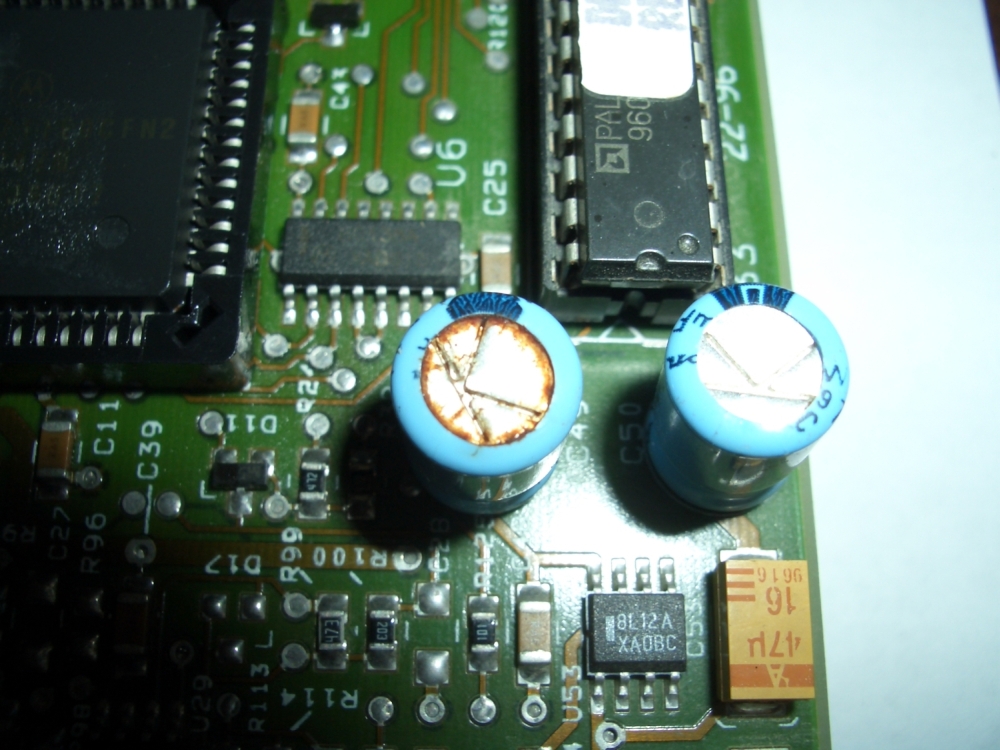
while cleaning the CLB I saw that a german called ELKO looks like being not ok. I made a picture of it. It is directly beside the U7 chip. Could this be the reason of my problem?
Thanks.
JPM
| Description: |
|
| Filesize: |
479.49 KB |
| Viewed: |
7646 Time(s) |
|
|
|
| Back to top |
|
|
Joust
Joined: 05 May 2006
Posts: 2429
Location: Almonte, Ontario, Canada
TV/Projector: Marquee 8501LC
|
| Posted: Fri Nov 28, 2008 1:35 pm Post subject: |
|
|
That cap has leaked out its magic alright. good place to start in replacing the caps on that board.
If one board is starting to exhibit bad caps, chances are others are too.
|
|
| Back to top |
|
|
Nashou66
Joined: 12 Jan 2007
Posts: 16171
Location: West Seneca NY
|
| Posted: Fri Nov 28, 2008 2:54 pm Post subject: |
|
|
Those are buffering caps for some amps on the DPB, I would think they may have something to do with it yes. Need too look at the Schematics more it may also be for U7. Its the only electrolytics on that board or the CLM. The SWB next to the DPB has some also. As these sets age changing all caps is just a good idea but can get expensive for the whole PJ.
Athanasios
_________________
Don't blame your underwear for your crooked ass~ unknown Greek philosopher
"Republicans believe every day is the Fourth of July, but the Democrats believe every day is April 15." --- President Reagan
One Smart Dog!!!
Marquee High Performance Bellows now shipping!!
Marquee Modifications and Performance Enhancement
Marquee C-element and Bellow removal
|
|
| Back to top |
|
|
|
|




