| Author |
Message |
charlez
Joined: 16 Nov 2006
Posts: 78
Location: Belgium
|
| Posted: Thu Nov 06, 2008 5:53 pm Post subject: The blue hump |
|
|
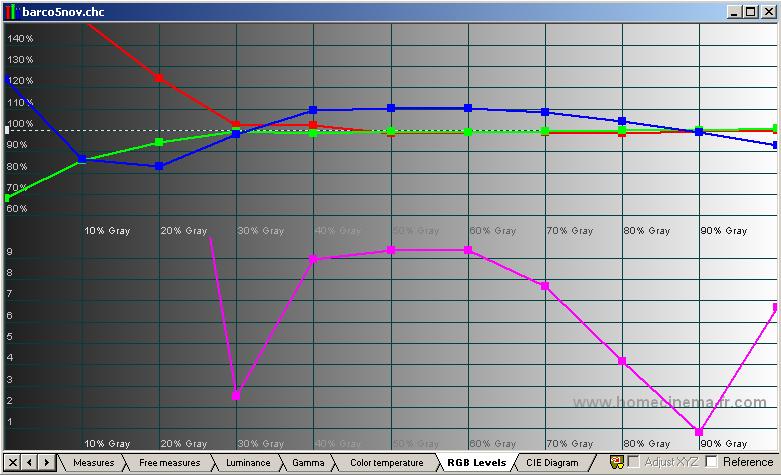
Can't get rid of the well known blue hump.
When i defocus (menu) the hump get's even worse.
I have a BD808s LC
Are there any other tricks to get the blue good ?
| Description: |
|
| Filesize: |
64.35 KB |
| Viewed: |
7342 Time(s) |
|
|
|
| Back to top |
|
 |
kal
Forum Administrator

Joined: 06 Mar 2006
Posts: 18114
Location: Ottawa, Canada
TV/Projector: JVC DLA-NZ7
|
|
| Back to top |
|
|
charlez
Joined: 16 Nov 2006
Posts: 78
Location: Belgium
|
| Posted: Thu Nov 06, 2008 9:50 pm Post subject: |
|
|
I get the best focus around 60.
On 50 ire i have about 110% blue then.
When i go down or up it goes to max 119% blue.
|
|
| Back to top |
|
|
zGman
Joined: 22 May 2006
Posts: 599
|
| Posted: Thu Nov 06, 2008 11:43 pm Post subject: |
|
|
Hi,
Have you set blue midlights to Zero?
Try also blue breakpoint at 22, and slope at max -2.
I usually go + 6 or +8 from best focus.
Usually end up with blue bottom around 16, top around 68.
G
|
|
| Back to top |
|
|
charlez
Joined: 16 Nov 2006
Posts: 78
Location: Belgium
|
| Posted: Fri Nov 07, 2008 4:27 pm Post subject: |
|
|
blue midlights where Zero
set blue breakpoint at 22, and slope at max -2
Did not make any difference.
|
|
| Back to top |
|
|
zGman
Joined: 22 May 2006
Posts: 599
|
| Posted: Fri Nov 07, 2008 10:18 pm Post subject: |
|
|
OK, what is your Contrast and Brightness settings?
G
|
|
| Back to top |
|
|
charlez
Joined: 16 Nov 2006
Posts: 78
Location: Belgium
|
| Posted: Sat Nov 08, 2008 1:29 am Post subject: |
|
|
| zGman wrote: | OK, what is your Contrast and Brightness settings?
G |
both 42
|
|
| Back to top |
|
|
zGman
Joined: 22 May 2006
Posts: 599
|
| Posted: Sat Nov 08, 2008 3:18 am Post subject: |
|
|
Well, that makes sense now - try 72 for contrast - you need to have more
power on the top end to straighten out the curves - and will still need to
redo the c/o and gains most likely....
G
|
|
| Back to top |
|
|
AFryia

Joined: 09 Mar 2006
Posts: 965
Location: S.E. Michigan VPH-G70Q
|
| Posted: Sat Nov 08, 2008 4:39 pm Post subject: |
|
|
| zGman wrote: | you need to have more
power on the top end to straighten out the curves |
My experience is the opposite. I see blue is saturating faster than red/green. Blue can not keep up with red/green
Defocusing blue electronically will help. Then you need to lower the red/green Gain/Contrast so the blue can keep up. This will have the effect of flatten the curves (improve grey scale tracking).
But here is the trade off, grey scale accuracy for light output. I have a light controlled room so I shoot for the best grey scale and contrast possible. But I can't watch with the house light on.

|
|
| Back to top |
|
|
zGman
Joined: 22 May 2006
Posts: 599
|
| Posted: Sat Nov 08, 2008 4:54 pm Post subject: |
|
|
HI,
On a Barco, I have never had any luck at all getting good greyscale with lowered contrast settings -
always end up around 72-75 contrast, and 42 brightness....Other's results with other PJ's may differ.
G
|
|
| Back to top |
|
|
kal
Forum Administrator
Joined: 06 Mar 2006
Posts: 18114
Location: Ottawa, Canada
TV/Projector: JVC DLA-NZ7
|
| Posted: Sun Nov 09, 2008 4:23 am Post subject: |
|
|
| charlez wrote: | | zGman wrote: | OK, what is your Contrast and Brightness settings?
G |
both 42 |
What kind of foot lamberts are you getting with contrast at 42? (Check the 100 IRE 'Y' value for the measurements you saved above).
42 seems really low. Unless you're running a really small screen and/or a high gain screen it's probably considerably under 10 ftL, no?
Kal
_________________

Support our site by using our affiliate links. We thank you!
My basement/HT/bar/brewery build 2.0
|
|
| Back to top |
|
|
charlez
Joined: 16 Nov 2006
Posts: 78
Location: Belgium
|
| Posted: Tue Nov 11, 2008 11:19 pm Post subject: |
|
|
72 for contrast is very high i think.
My screen is only 1m60 wide (62 inch).
Gain is 1 or 1.1 and using all new tubes.
|
|
| Back to top |
|
|
zGman
Joined: 22 May 2006
Posts: 599
|
| Posted: Tue Nov 11, 2008 11:39 pm Post subject: |
|
|
Charles,
Out of many Barco setups, I have found the contrast setting relates to the shape of the response curve.
You are setting cut-offs and gains to get your bottom and top end, but I think you will discover
that the machine is tracking contrast settings to shape the gamma curves. If C=72 is too much,
try reducing the gains &/or try C=65 --- just try some different settings, and get some more data
points - I think you will find your way to a nice greyscale.....if you can be a little more flexible and
do some more experiments...I have spent hundreds of hours fiddling with these things, and have
observed exactly your results when Contrast is too low...
Regards,
Galen
|
|
| Back to top |
|
|
charlez
Joined: 16 Nov 2006
Posts: 78
Location: Belgium
|
| Posted: Fri Nov 14, 2008 3:00 pm Post subject: |
|
|
I was getting 6 foot lamberts with contrast at 42.
Now i'm getting 14 with contrast on 60
|
|
| Back to top |
|
|
kal
Forum Administrator
Joined: 06 Mar 2006
Posts: 18114
Location: Ottawa, Canada
TV/Projector: JVC DLA-NZ7
|
|
| Back to top |
|
|
jkruger

Joined: 24 Oct 2007
Posts: 2435
Location: Carlsbad, CA
|
| Posted: Fri Nov 14, 2008 4:47 pm Post subject: |
|
|
Every time I see this topic I think of a Smurf porno.... 
|
|
| Back to top |
|
|
stefuel

Joined: 07 Mar 2006
Posts: 3353
Location: Green Harbor MA USA
|
| Posted: Sun Nov 16, 2008 12:42 am Post subject: |
|
|
"The blue hump"....Is that what you call it after being married for 25 years 
_________________
Chip
A Barco is only a AmPro with training wheels
Card carrying member of the AVS chain gang.
|
|
| Back to top |
|
|
AnalogRocks
Forum Moderator

Joined: 08 Mar 2006
Posts: 26706
Location: Toronto, Ontario, Canada
TV/Projector: Sony 1252Q, AMPRO 4000G
|
| Posted: Sun Nov 16, 2008 12:51 am Post subject: |
|
|
| jkruger wrote: | | Every time I see this topic I think of a Smurf porno.... |
BOW CHICHA LA LA
Bow Chicha LA LA LA LA ......LA la LAH la LAAAAA
_________________
Tech support for nothing
CRT.
HD done right!
|
|
| Back to top |
|
|
|
|




