| Author |
Message |
damien55
Joined: 20 Oct 2008
Posts: 101
Location: UK
|
| Posted: Mon Oct 20, 2008 7:02 pm Post subject: Problems on BARCO Data 800 - Scheimpflug adjustment |
|
|
Hi,
This is my first message on this forum. I just bought a BARCO Data 800 on Ebay for £1.20 and for that price it obviously doesn't work perfectly.
First one of the Video output board needs a new FET (I ordered it today).
And then the blue tube is badly burnt but the two others are in very good condition.
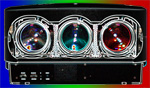
Pictures of the tubes : (Click to enlarge)
 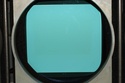 
The guy I bought the projector from said that the previous owner changed the blue tube because it was damaged and never really used it because of the FET probleme on the RED tube. As you can see the green and red tubes look fine but the "blue" is burnt and White!!! I read that the tubes are filled with colored glycol. Would it be possible that the blue one is empty? Or, is the Blue tube usually filled with non colored Glycol?
If you have any suggestions...
Thanks in advance
Damien
Last edited by damien55 on Mon Nov 03, 2008 10:44 am; edited 1 time in total
|
|
| Back to top |
|
 |
jantje112
Joined: 17 Jul 2006
Posts: 328
|
| Posted: Mon Oct 20, 2008 7:08 pm Post subject: |
|
|
|
Blue is transparant because the blue is not needed to be filtered
|
|
| Back to top |
|
|
jkruger

Joined: 24 Oct 2007
Posts: 2435
Location: Carlsbad, CA
|
| Posted: Mon Oct 20, 2008 7:08 pm Post subject: |
|
|
|
The blue is filled with clear glycol. Does it look like there is fluid in it? Bubble at the top maybe?
|
|
| Back to top |
|
|
Brooklyn

Joined: 17 Sep 2007
Posts: 494
Location: Morgan Hill, CA
|
| Posted: Mon Oct 20, 2008 8:07 pm Post subject: |
|
|
|
You can also probably fit a 16:9 raster in the wear area of the blue tube and still get a decent picture.
|
|
| Back to top |
|
|
damien55
Joined: 20 Oct 2008
Posts: 101
Location: UK
|
| Posted: Mon Oct 20, 2008 8:50 pm Post subject: |
|
|
Thanks a lot for your precious help. 
The projector will be used to watch DVDs and other movies from a HTPC. I think I need to have a look at a software called Powerstrip to generate my signals with negative syncs and everything.
Do you know if the Data 800 can run in 720p 50Hz/60Hz and 72Hz to cover all the different framerates (25/30 and 24img/sec)?
Thanks again, for your help
Damien
|
|
| Back to top |
|
|
damien55
Joined: 20 Oct 2008
Posts: 101
Location: UK
|
| Posted: Mon Oct 20, 2008 9:44 pm Post subject: Another problem, again... |
|
|
Hi,
As I told you already I just bought a very cheap BD 800 and I just keep finding little problems.
I just pulled out the main power supply to check the solders and I found that some of the pins on both connectors are bent.
I think that's not a feature of the board but can you just tell me what to do as the unit is working. Should I try to bend them back in place very carfully or should I just put it back like that.
It's on this board: (Click to enlarge)

And it is these pins:


Thanks
Damien
|
|
| Back to top |
|
|
Brooklyn
Joined: 17 Sep 2007
Posts: 494
Location: Morgan Hill, CA
|
| Posted: Mon Oct 20, 2008 9:46 pm Post subject: |
|
|
|
It looks like someone bents the pins by forcing the board in the slot. 1080i is what you should be running, 720p will look too soft (blurry).
|
|
| Back to top |
|
|
km987654

Joined: 25 Jul 2007
Posts: 2874
Location: Australia
TV/Projector: Barco BG809s
|
| Posted: Tue Oct 21, 2008 9:24 am Post subject: |
|
|
|
All the pins need to be straight. You should be able to straighten them with say a small jewellers screw driver. Don't force the board back into place it should be a firm fit but not difficult to insert.The blue is supposed to be clear.
|
|
| Back to top |
|
|
damien55
Joined: 20 Oct 2008
Posts: 101
Location: UK
|
| Posted: Mon Nov 03, 2008 10:41 am Post subject: |
|
|
I'm back,
I changed the FET and Brian is back on track ( My housemate gave a name to the projector  ). ).
We are running it at 720p50Hz and 1080i50Hz without any problem but the picture is definetly soft as you can see on the pictures below:
The pictures were taken with a DSLR on a tripod. This is out of a 720p trailer.
  
As you can see on the last picture the definition is there but it is just very soft (If I can't get it sharper I'll call it cinema look  ). What you can't see on the picture is that the top and bottom of the picture are less sharp than the middle. I think it is due to the lack of scheimpflug adjustment on the Data 800. I then had a look at the service manual (That one: http://www.curtpalme.com/docs/BarcoData800_Service_Addon.zip ) and I found two very interesting pages about washers to place on the lenses or tubes (did really understand where they go) to optimise the focus depending on the screen size. Here is a copy of the two pages: ). What you can't see on the picture is that the top and bottom of the picture are less sharp than the middle. I think it is due to the lack of scheimpflug adjustment on the Data 800. I then had a look at the service manual (That one: http://www.curtpalme.com/docs/BarcoData800_Service_Addon.zip ) and I found two very interesting pages about washers to place on the lenses or tubes (did really understand where they go) to optimise the focus depending on the screen size. Here is a copy of the two pages:
 
According to this document, my screen being 1.70m long I should have brown and black Washers somewhere on the CRT/Lens assembly but I couldn't find anything on mine to be honest with you. So it looks like my projector is set up for a massive screen!!
Could someone tell me where they are supposed to go, where can I find the washers or at least what are the thickness of the different washers?
Thanks again for your precious help
Damien
|
|
| Back to top |
|
|
messerfloh

Joined: 04 Dec 2007
Posts: 18
Location: Bavaria, Germany
|
| Posted: Tue Nov 04, 2008 8:46 am Post subject: |
|
|
Hello Damien!
First, congratulations to your first PJ!
I Have a Sony 1272 (quite similar in performance to yours) and had the same issues. Sony uses so-called "spacers" in 3 different sizes to fit different screen sizes.
In fact, all the spacers and washers do is to tilt the R and B tubes relatively to the green one which stays in position.
I do not know how the barco´s tubes are mounted but I guess it´s similar to the sony with 4 bolts at the corners of the tube housing.
Now, what you first want to achieve is aligning the 3 tubes mechanically as good as you can so that you only have to do minor adjustments electronically.
Here´s the way I did it:
1) make sure your PJ sits EXACTLY perpendicular to your screen. Can´t be said too often so important is it!
2) put on the crosshair pattern and center it on each tube face (electronic centering to middle point)
3) loosen the mounting bolts of R and B tubes (just loosen!) and try to align the crosshairs by tilting the whole tube assembly carefully. When this is done, you will see a gap between the tube plate and the chassis; this gap has to be filled with washers or spacers.
You might consider to make the spring conversion (insert a spring in the gap instead of washers) so you can tilt the tubes just by turning the nuts. This allows a pretty exact aligning. see here:
http://www.curtpalme.com/Sony125x_SpacerMod1.shtm
Should work with your Barco, too.
After that, you can proceed with convergence and all the other...
And maybe you should start looking for a decent blue 07MS tube...
So, good luck to you and let us know how it goes!
Floh
|
|
| Back to top |
|
|
Ile

Joined: 09 Mar 2006
Posts: 1491
Location: Jyväskylä, Finland
|
|
| Back to top |
|
|
damien55
Joined: 20 Oct 2008
Posts: 101
Location: UK
|
| Posted: Tue Nov 04, 2008 10:40 am Post subject: |
|
|
Thanks a lot messerfloh and Ile for you precious help,
Funnily enough I started playing with Lens just before Ile replied to this post. Am I right to use the BARCO Data 801S with the HD8rev lenses? I have a BARCO 800Data with the HD8revB lenses.
I found the "hidden page" where you get the scheimpflug washers thickness.
As I'm at work  I don't have the real values to feed into the software but I sort of remember that my screen is at 2.4m from the projector. I don't have the real values to feed into the software but I sort of remember that my screen is at 2.4m from the projector.
That's what Lens gives me for this distance:

It gives me an horizontal Scheimpflug of 0.486mm (or 0.23deg) and a vertical Scheimpflug of 1.591mm (or 0.6deg).
Does it mean that I have to put the 0.486mm washers on the line B and the 1.591mm washers on the line A or is it the opposite. In other words do I correct the horizontal Scheimpflug by putting washers on the vertical line B and correct the vertical Scheimpflug by putting washers on the horizontal line A. (Check my previous post for the line A line B thing)
I'll work out the real values tonight and post an update
Thanks
Damien
|
|
| Back to top |
|
|
Ile
Joined: 09 Mar 2006
Posts: 1491
Location: Jyväskylä, Finland
|
| Posted: Tue Nov 04, 2008 11:24 am Post subject: |
|
|
| damien55 wrote: | Am I right to use the BARCO Data 801S with the HD8rev lenses?
|
Yes. BD801s works just fine, because both projectors have same sized tubes and same lenses.
| damien55 wrote: | | It gives me an horizontal Scheimpflug of 0.486mm (or 0.23deg) and a vertical Scheimpflug of 1.591mm (or 0.6deg). |
Horizontal is for R/B side tilt (washers under inner bolts) and vertical for whole bolt row. Table mounted projector have vertical washers in top bolt row and ceiling mounted in bottom bolt row.
So two R/B bolts have those both values.
See placement picture in my previous post. (ceiling mounted)
|
|
| Back to top |
|
|
damien55
Joined: 20 Oct 2008
Posts: 101
Location: UK
|
| Posted: Wed Nov 05, 2008 1:23 am Post subject: |
|
|
Hi,
Thanks Ile for the little drawing.
I measured the distance Screen projector in my actual setup and my previous guess was actually almost spot on (246cm instead of 244.6cm). So we can assume that the previous data are correct.
I would like you to confirm (or not) if what I think is correct.
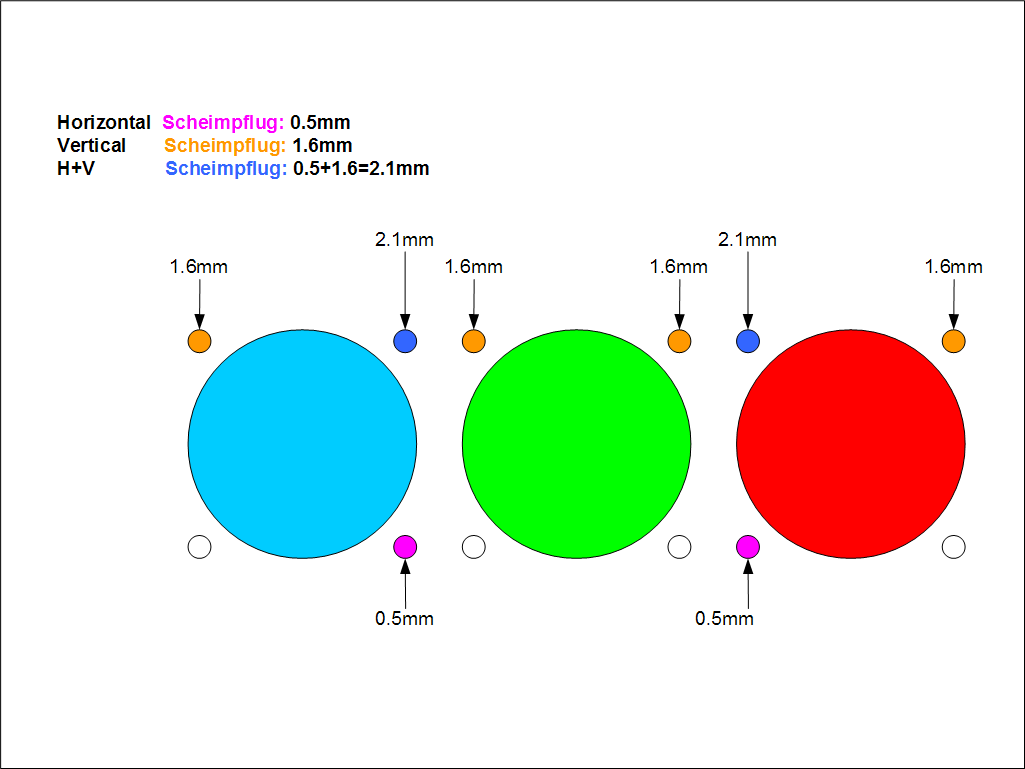
I am in a Front table configuration with the projector flat on a little table. I think the shims should be placed as shown on this diagram:

Questions:
Is my diagram correct?
Where do I put the shims: On the lens side or on the CRT side? (Lens side would be sooooo much easier  ) )
I rounded up the thicknesses to the nearest 0.1mm, Is that accurate enough? (I think it is, I'm just checking)
Do you think I will notice the difference between now and with the washers?
Thanks
Damien
|
|
| Back to top |
|
|
Ile
Joined: 09 Mar 2006
Posts: 1491
Location: Jyväskylä, Finland
|
| Posted: Wed Nov 05, 2008 8:58 am Post subject: |
|
|
I can't see your link from my work computer (non-work-related Internet sites), but heres what I get.
Actually it doesn't matter which side you put shims, but lot easier on the lens side.
0.1 mm accuracy is good enough. Now you should get top/bottom/sides focused at same optical focus setting.
|
|
| Back to top |
|
|
damien55
Joined: 20 Oct 2008
Posts: 101
Location: UK
|
| Posted: Wed Nov 05, 2008 9:59 am Post subject: |
|
|
Thanks again for the nice drawing Ile. Your drawing and mine look like twins so I guess I'm good. I also couldn't look at your first drawing from work because of the firewall.
For the people in the UK who want to get some 0.1, 0.2, 0.3 or 0.5mm shims, you can find them on this website:
http://gb.vario-helicopter.biz/shop/product_info.php?products_id=30398
Thanks again Ile for your time and expertise.
Damien
PS: I attached the picture so that you can see it.
| Description: |
|
| Filesize: |
39.82 KB |
| Viewed: |
9964 Time(s) |
|
|
|
| Back to top |
|
|
|
|





