| Author |
Message |
Mr. Green

Joined: 23 Feb 2007
Posts: 1394
Location: Calgary
TV/Projector: Marquee 9501LC / NEC 9PG+
|
| Posted: Sat Oct 18, 2008 5:42 am Post subject: What causes this... |
|
|
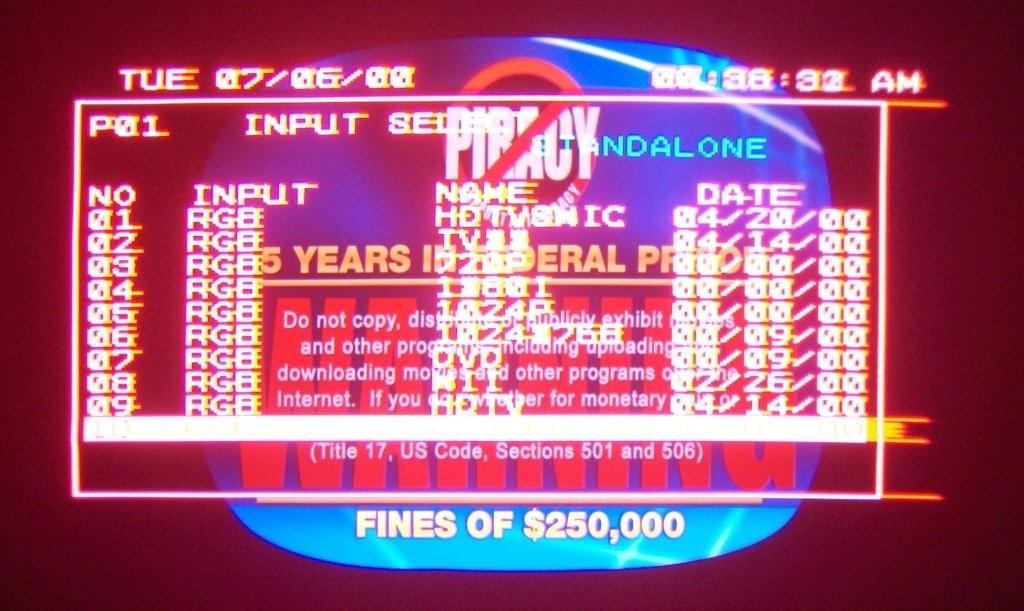
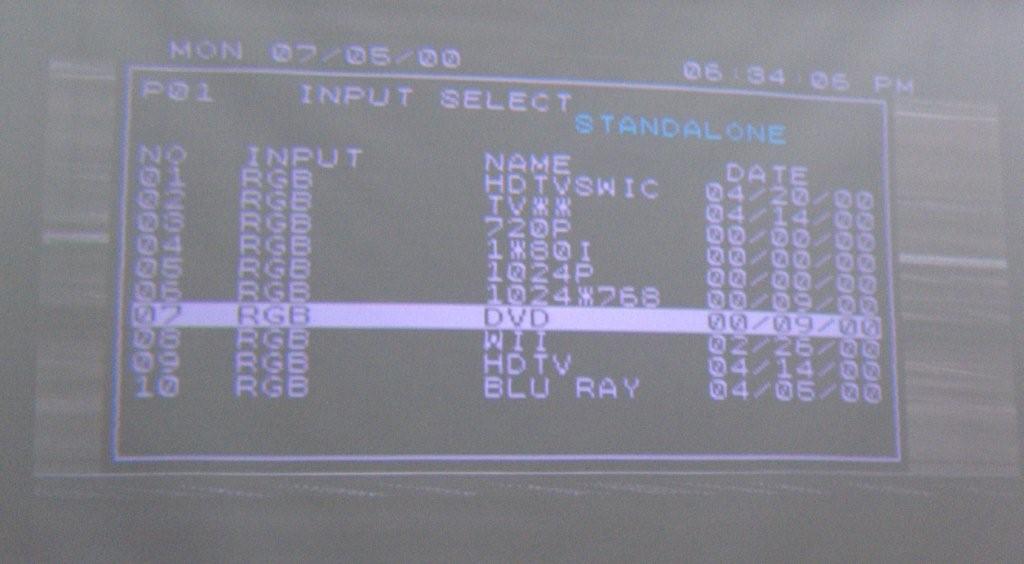
This strange bleeding of the red only affects menu's and not all of the time. Usually after the projector has been running for a while. What causes it and should I be worried? It's done this since day one.
Here are 2 pictures. The bleeding red menu and the normal menu (ignore the faded image as the picture is from daylight). Since it doesn't appear to affect anything else I hope it isn't serious.
I know Curt is about to be busy for a while and Doug Baisey hasn't been around since early August (I hope he's ok). Any idea's would be appreciated. 
| Description: |
|
| Filesize: |
103.6 KB |
| Viewed: |
9284 Time(s) |
|
| Description: |
|
| Filesize: |
56.65 KB |
| Viewed: |
9284 Time(s) |
|
_________________
You can be young only once but, you can be immature forever.
Current Projector Marquee9501LC with PS3 (BLu-Ray) at 1080P LOVE IT! Screen is an Elunevision 120" 4:3 (2.4 gain - no hotspots). (also own a NEC 9PG+)
|
|
| Back to top |
|
 |
Nashou66

Joined: 12 Jan 2007
Posts: 16171
Location: West Seneca NY
|
|
| Back to top |
|
|
winduptoy
Joined: 25 Nov 2006
Posts: 187
Location: Lunenburg, Nova Scotia
|
| Posted: Sat Oct 18, 2008 12:52 pm Post subject: |
|
|
|
Good job describing the problem. Since you have said that it only affects menus, and I assume internally generated test patterns, I don't think the source is G2. If your external sources are never affected, something about the internally generated signal is causing red G2 levels to become unstable. This sounds like something Curt could diagnose when he gets back.
|
|
| Back to top |
|
|
stuffandpuff
Joined: 30 Jul 2008
Posts: 69
|
| Posted: Sat Oct 18, 2008 4:44 pm Post subject: |
|
|
|
Try turning contrast way down when you have the menu up. If the problem goes away at least you have somewhere to start, You'll know that the RED is getting to much contrast. Shouldn't be too hard to troubleshoot after that. It certianly looks like blooming.
|
|
| Back to top |
|
|
Zebu Fellenz
Joined: 21 Dec 2006
Posts: 2567
|
| Posted: Sat Oct 18, 2008 6:07 pm Post subject: |
|
|
|
Looks like blooming to me. Does your NEC have seperate contrast controls for the menu's like a Marquee?
|
|
| Back to top |
|
|
winduptoy
Joined: 25 Nov 2006
Posts: 187
Location: Lunenburg, Nova Scotia
|
| Posted: Sat Oct 18, 2008 6:11 pm Post subject: |
|
|
|
If your picture looks fine from external sources (DVD, Blu-Ray etc.) leave your contrast and brightness settings where they are. I would be more concerned about burning the red tube when the G2 goes out of whack for the menus. For this I would probably turn off the red crt when navigating the menus and turn it back on for normal viewing. If you mess with the brightness and contrast (or G2) to fix the menu problem when it occurs, your movies will look way too dark and blue-green. Not using the red tube for menu navigation will save it from burning until the cause of the problem can be identified and fixed. In the meantime you can enjoy it for what it was meant for; the Home Theater Experience.
|
|
| Back to top |
|
|
Mr. Green
Joined: 23 Feb 2007
Posts: 1394
Location: Calgary
TV/Projector: Marquee 9501LC / NEC 9PG+
|
| Posted: Sat Oct 18, 2008 6:54 pm Post subject: |
|
|
Thanks for the replies. I didn't notice until yesterday that Curt was going away. So I'll have to wait. I'm only just starting to use the projector for a movie or 2 every couple nights. I've posted pictures on page 5 of this thread http://www.curtpalme.com/forum/viewtopic.php?p=146949#146949 the reddish hue is due to the camera. It's terrible.
I confirmed it is only affecting the menu's. The grid pattern is fine (un-bloomed). As I said it starts out normal, but after it warms up the menus start to bloom.
There is no separate control for contrast on each tube (that I'm aware of). The image used to be too red for me and the red tube is showing a hint of wear, but the green and blue are mint. The image has always seemed a bit too red...
(This bit of info might help)... To combat the red, I've turned down the red kelvin to 15 and Green and blue are at 25. Contrast and brightness are at 40 each. If I turn the kelvin up any more (especially red or blue) it looks like I've got the brightness cranked and it might as well be an LCD projector (greys not blacks). With the kelvin that low, the image in dark areas look black with contrast and brightness set to 30 each, but until I get my 25 ft vga-bnc cable I can't use my box 1040 to eliminate the black crush, so they are both set to 40 right now.
Since I have to have the contrast, brightness and kelvin settings so low, is it possible the G2 pots have been messed with? I'm guessing those are the pots with the plastic cover that says "DO NOT TOUCH!"? To confirm, I know not to touch them, but I guess I might at some point depending on what is said.
Thanks again!
Chris
_________________
You can be young only once but, you can be immature forever.
Current Projector Marquee9501LC with PS3 (BLu-Ray) at 1080P LOVE IT! Screen is an Elunevision 120" 4:3 (2.4 gain - no hotspots). (also own a NEC 9PG+)
|
|
| Back to top |
|
|
Mark_A_W
Joined: 15 Mar 2006
Posts: 3068
Location: Sunny Melbourne Australia
|
| Posted: Sat Oct 18, 2008 8:57 pm Post subject: |
|
|
Did you fiddle with Kelvin B (black) or Kelvin (W)?
B has more of an affect on the whole range, W just tweaks the top end.
If you raise B for all colours to around 50%, then you will need to reduce the brightness control. The are the same control in effect. Normally, the Green B setting will be around 50%.
Kelvin W is contrast control for each tube. Kelvin B is brightness for each tube.
If you bought the projector from Curt then he should have done (or at least checked) the mechanical white balance. You will not be able to adjust G2, and you should not need to. And you will screw the projector if you try.
Whatever you do, write your current settings down first.
|
|
| Back to top |
|
|
Mr. Green
Joined: 23 Feb 2007
Posts: 1394
Location: Calgary
TV/Projector: Marquee 9501LC / NEC 9PG+
|
| Posted: Sat Oct 18, 2008 9:35 pm Post subject: |
|
|
Both B and W settings are 15 red, 25 blue/green. I tweaked both b & w. I will ramp up the "B" to 50% on all and leave the "W" as you suggest to see what happens.
Isn't it strange to you, that the numbers seem to need to be that low to get a decent black level? It seems that most NEC owners have bright at about 50% and contrast at 60% (not sure about the kelvin settings). Most of them have dedicated theatres so they shouldn't need to push the projector as hard as I should in theory, but instead my settings are way lower. I don't understand why.
Write which settings down? Are you talking about if I decide to try the G2 pots? Where are the settings shown? I won't play with them unless I absolutely have to. I'm hoping Curt will have a solution.
_________________
You can be young only once but, you can be immature forever.
Current Projector Marquee9501LC with PS3 (BLu-Ray) at 1080P LOVE IT! Screen is an Elunevision 120" 4:3 (2.4 gain - no hotspots). (also own a NEC 9PG+)
|
|
| Back to top |
|
|
Mark_A_W
Joined: 15 Mar 2006
Posts: 3068
Location: Sunny Melbourne Australia
|
| Posted: Sat Oct 18, 2008 9:49 pm Post subject: |
|
|
Banging my head against a brick wall here.
Write your Fricking Kelvin settings down.
Adjust your Frickin Kelvin B settings to 50% (Kelvin W to 50% too).
AND THEN ADJUST YOUR FRICKIN BRIGHTNESS TO SET THE BLACK LEVEL. The number doesn't really matter.
It doesn't really matter if the Kelvin B is up and the brightness is down, but it is normal to have the Kelvin settings closer to 50%. They both adjust black level, however one is global and one is colour specific.
Tweak your Kelvin B and W settings to get good colours, use another PC monitor as a reference with a greyscale test pattern.
If you screw it up, return to the settings you WROTE DOWN.
DO NOT FIDDLE WITH YOUR G2 POTS. YOU WILL END UP PAYING CURT A LARGE AMOUNT OF MONEY TO CORRECT THEM.
|
|
| Back to top |
|
|
stefuel

Joined: 07 Mar 2006
Posts: 3353
Location: Green Harbor MA USA
|
| Posted: Sat Oct 18, 2008 10:40 pm Post subject: |
|
|
"Banging my head against a brick wall here."
Please stop that right now. Didn't anyone ever tell you that you can cause permanant wall damage doing that.
_________________
Chip
A Barco is only a AmPro with training wheels
Card carrying member of the AVS chain gang.
|
|
| Back to top |
|
|
Mr. Green
Joined: 23 Feb 2007
Posts: 1394
Location: Calgary
TV/Projector: Marquee 9501LC / NEC 9PG+
|
| Posted: Sat Oct 18, 2008 10:50 pm Post subject: |
|
|
Ah, sorry. I'm not trying to frustrate you. I'm already there myself.
I didn't understand the "write it down" as I already told you what the settings were (they are written down here). Besides, I can always create a new input and data copy the one I normally use for playing with it. If I screw it up, I'll just delete it.
The projector came with the kelvin for both B&W at 50% for all tubes. The red has always seemed too strong.
I posted some screenshots a while back and someone told me I had it set way too bright despite the brightness was only 40 and contrast 50. I adjusted brightness and contrast to extremely low and could not achieve anything but a dark grey (instead of black), which is when I discovered the the kelvin settings while reading other posts. Only by dropping the kelvin way down do I now have black.
My main concern is why the red is wearing more than the other tubes as well as what's with the red blooming in menus. There's obviously something wrong with some aspect of the red or it wouldn't be wearing out a lot faster than the other tubes. At least that makes sense to me.
I thought someone may have fiddled with the G2 pots as I've read they really mess things up if you don't know what you are doing. That's the only reason I brought it up.
I really do appreciate your help.
_________________
You can be young only once but, you can be immature forever.
Current Projector Marquee9501LC with PS3 (BLu-Ray) at 1080P LOVE IT! Screen is an Elunevision 120" 4:3 (2.4 gain - no hotspots). (also own a NEC 9PG+)
|
|
| Back to top |
|
|
Zebu Fellenz
Joined: 21 Dec 2006
Posts: 2567
|
| Posted: Sun Oct 19, 2008 2:21 am Post subject: |
|
|
| stefuel wrote: | "Banging my head against a brick wall here."
Please stop that right now. Didn't anyone ever tell you that you can cause permanant wall damage doing that. |
Mind if I quote you on that?
permanant wall damage 
|
|
| Back to top |
|
|
Tinman

Joined: 09 Mar 2006
Posts: 1326
Location: Carson City Nevada
|
| Posted: Sun Oct 19, 2008 5:40 pm Post subject: |
|
|
Bleeding can be caused by improper G2 voltage, a weak 10uF 160v volt capacitor on the Video out board, or a weak cathode.
Usually, if it only happens on peak white, either it's G2 or the tube's getting tired.
Marc
_________________
This space for rent.
|
|
| Back to top |
|
|
Mr. Green
Joined: 23 Feb 2007
Posts: 1394
Location: Calgary
TV/Projector: Marquee 9501LC / NEC 9PG+
|
| Posted: Sun Oct 19, 2008 7:41 pm Post subject: |
|
|
I hope the tube isn't tired. The projector only has 13XX hours on it total.
_________________
You can be young only once but, you can be immature forever.
Current Projector Marquee9501LC with PS3 (BLu-Ray) at 1080P LOVE IT! Screen is an Elunevision 120" 4:3 (2.4 gain - no hotspots). (also own a NEC 9PG+)
|
|
| Back to top |
|
|
Mr. Green
Joined: 23 Feb 2007
Posts: 1394
Location: Calgary
TV/Projector: Marquee 9501LC / NEC 9PG+
|
| Posted: Tue Oct 21, 2008 3:12 am Post subject: |
|
|
I paid attention today. It blooms after about 5 minutes of running time. I've tried decreasing the red Kelvin (B&W) way down and it didn't go away.
I put picture mute on when I had to step out for an hour and when I came back the menu was normal again... for about 5 minutes.
It's only the red tube and only with the on screen menus.
Any thoughts on what I can do to narrow it down for Curt when he gets back?
_________________
You can be young only once but, you can be immature forever.
Current Projector Marquee9501LC with PS3 (BLu-Ray) at 1080P LOVE IT! Screen is an Elunevision 120" 4:3 (2.4 gain - no hotspots). (also own a NEC 9PG+)
|
|
| Back to top |
|
|
Nashou66
Joined: 12 Jan 2007
Posts: 16171
Location: West Seneca NY
|
|
| Back to top |
|
|
Mr. Green
Joined: 23 Feb 2007
Posts: 1394
Location: Calgary
TV/Projector: Marquee 9501LC / NEC 9PG+
|
| Posted: Tue Oct 21, 2008 3:59 am Post subject: |
|
|
I'm game to try... uh what do I swap to see if it stays with the red? I'll try that first, then depending on what happens with that we can try the neck boards.
_________________
You can be young only once but, you can be immature forever.
Current Projector Marquee9501LC with PS3 (BLu-Ray) at 1080P LOVE IT! Screen is an Elunevision 120" 4:3 (2.4 gain - no hotspots). (also own a NEC 9PG+)
|
|
| Back to top |
|
|
Curt Palme
CRT Tech
Joined: 08 Mar 2006
Posts: 24396
Location: Langley, BC
TV/Projector: All of them!
|
| Posted: Wed Oct 29, 2008 9:23 pm Post subject: |
|
|
|
I am guessing that the red CRT socket is bad. I've seen that before. Try swapping out the red CRT socket with the green. All three are identical. If the problem switches to the green, then you know the socket is bad. I can fix that.
|
|
| Back to top |
|
|
bbfarmht

Joined: 27 May 2006
Posts: 1273
Location: Where the Mississippi runs east to west!!
|
| Posted: Wed Oct 29, 2008 9:35 pm Post subject: |
|
|
My barco was doing the same thing. I'm hoping that it was the quad because that went out right after it started.
If not I hope Curt isn't busy cause I'll need help.
_________________
Adam
"Any society that would give up a little liberty to gain a little security will deserve neither and lose both"
Benjamin Franklin
|
|
| Back to top |
|
|
|
|




