| Author |
Message |
JackRabbit
Joined: 30 Sep 2008
Posts: 20
|
| Posted: Tue Sep 30, 2008 12:24 am Post subject: Red tube go byebye? :( |
|
|
Hi all,
new to the forum and I wish it would have been under better circumstances.
Let me first say that my knowledge on CRT's isn't all that great, but I do know how to set my PJ up and usually that is more than enough for me.
Unfortunately, after making some changes to the HT recently, I had to move my BG808s by myself from the floor up onto a table which you can imagine ended up being quite a struggle 
Sure, a lot of sweating, swearing and less gentle actions towards the PJ were involved (not that I dropped it or something else mind you  ), only to find out that after firing my baby up, the red tube had gone dim. ), only to find out that after firing my baby up, the red tube had gone dim.
By 'gone dim' I mean that I can still see picture on the tube itself, but compared to the G and B tube nowhere near the same light intensity is produced and this ofcourse translates to a pretty poor colour balance on the screen.
Checking the cabling first, and subsequently checking all the lights (all green...) and system status didn't provide me with anything useful as everything looked fine to my, be it untrained, eye.
The green light on top of the tube itself is also on...
To be honest, I'm at a loss and am really hoping that this has an easy fix or else I might have to go digital! Nooooooooooooooooooo... 
So please anyone with an inkling as to what might have happened, please chime in 
|
|
| Back to top |
|
 |
JackRabbit
Joined: 30 Sep 2008
Posts: 20
|
| Posted: Tue Sep 30, 2008 12:32 am Post subject: |
|
|
Oh, forgot to mention: Projecting a raster does provide a fully lit red tube....
I've already reseated the input boards to no avail though.....
|
|
| Back to top |
|
|
Curt Palme
CRT Tech
Joined: 08 Mar 2006
Posts: 24396
Location: Langley, BC
TV/Projector: All of them!
|
| Posted: Tue Sep 30, 2008 12:33 am Post subject: |
|
|
|
Change the CRT socket on the back of the red tube to the green. All three CRT sockets/video amps are identical between tubes. See if the problem follows the red CRT socket/video amp, or if it stays with the red tube.
|
|
| Back to top |
|
|
JackRabbit
Joined: 30 Sep 2008
Posts: 20
|
| Posted: Tue Sep 30, 2008 12:39 am Post subject: |
|
|
| Curt Palme wrote: | | Change the CRT socket on the back of the red tube to the green. All three CRT sockets/video amps are identical between tubes. See if the problem follows the red CRT socket/video amp, or if it stays with the red tube. |
Ouch, that doesn't look easy...
Any clues as to how long I have to wait after unplugging it so I don't fry myself? 
I've never been too comfortable hanging around coils and such
|
|
| Back to top |
|
|
Zebu Fellenz
Joined: 21 Dec 2006
Posts: 2567
|
| Posted: Tue Sep 30, 2008 12:46 am Post subject: |
|
|
| JackRabbit wrote: | | Curt Palme wrote: | | Change the CRT socket on the back of the red tube to the green. All three CRT sockets/video amps are identical between tubes. See if the problem follows the red CRT socket/video amp, or if it stays with the red tube. |
Ouch, that doesn't look easy...
Any clues as to how long I have to wait after unplugging it so I don't fry myself?
I've never been too comfortable hanging around coils and such |
Wait you mean people turn off and unplug their projectors before they work on them, I always thought it was better to leave it on so you could see what you were doing and how it was affecting the picture 
Seriously, I think a minute or so is long enough for the HV to dissipate but if you want you could wait longer 
Welcome to the forums BTW
|
|
| Back to top |
|
|
JackRabbit
Joined: 30 Sep 2008
Posts: 20
|
| Posted: Tue Sep 30, 2008 12:48 am Post subject: |
|
|
| Zebu Fellenz wrote: | | JackRabbit wrote: | | Curt Palme wrote: | | Change the CRT socket on the back of the red tube to the green. All three CRT sockets/video amps are identical between tubes. See if the problem follows the red CRT socket/video amp, or if it stays with the red tube. |
Ouch, that doesn't look easy...
Any clues as to how long I have to wait after unplugging it so I don't fry myself?
I've never been too comfortable hanging around coils and such |
Wait you mean people turn off and unplug their projectors before they work on them, I always thought it was better to leave it on so you could see what you were doing and how it was affecting the picture
Seriously, I think a minute or so is long enough for the HV to dissipate but if you want you could wait longer
Welcome to the forums BTW |
Haha, yeah, after being zapped by 220V a couple of times, I'm not particularly looking forward to potentially getting zapped by 35000kV
Thx for the harty welcome
Last edited by JackRabbit on Tue Sep 30, 2008 12:51 am; edited 2 times in total
|
|
| Back to top |
|
|
JackRabbit
Joined: 30 Sep 2008
Posts: 20
|
| Posted: Tue Sep 30, 2008 12:50 am Post subject: |
|
|
| Curt Palme wrote: | | Change the CRT socket on the back of the red tube to the green. All three CRT sockets/video amps are identical between tubes. See if the problem follows the red CRT socket/video amp, or if it stays with the red tube. |
Curt, do you by any chance mean just plugging the cable (front top of the CRT socket, just in front of those heatsinks) from the green tube into the red tube??
Thx!
|
|
| Back to top |
|
|
Zebu Fellenz
Joined: 21 Dec 2006
Posts: 2567
|
| Posted: Tue Sep 30, 2008 12:53 am Post subject: |
|
|
| JackRabbit wrote: | | Curt Palme wrote: | | Change the CRT socket on the back of the red tube to the green. All three CRT sockets/video amps are identical between tubes. See if the problem follows the red CRT socket/video amp, or if it stays with the red tube. |
Curt, do you by any chance mean just plugging the cable (front top of the CRT socket, just in front of those heatsinks) from the green tube into the red tube??
Thx! |
No,
You need to swap the neckboards (CRT sockets) shown in the picture below
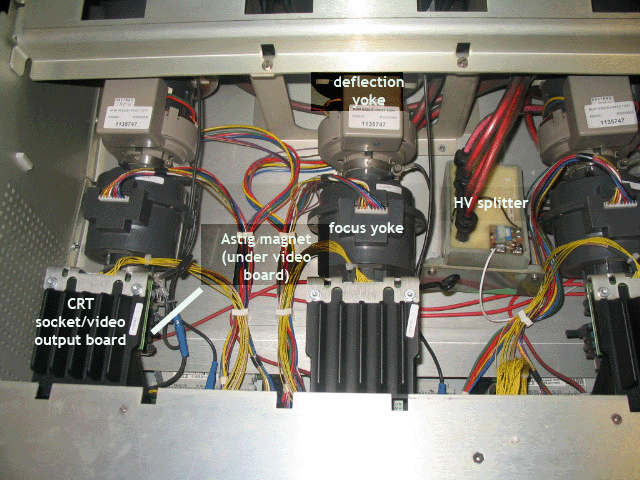
|
|
| Back to top |
|
|
JackRabbit
Joined: 30 Sep 2008
Posts: 20
|
| Posted: Tue Sep 30, 2008 12:58 am Post subject: |
|
|
| Zebu Fellenz wrote: | | JackRabbit wrote: | | Curt Palme wrote: | | Change the CRT socket on the back of the red tube to the green. All three CRT sockets/video amps are identical between tubes. See if the problem follows the red CRT socket/video amp, or if it stays with the red tube. |
Curt, do you by any chance mean just plugging the cable (front top of the CRT socket, just in front of those heatsinks) from the green tube into the red tube??
Thx! |
No,
You need to swap the neckboards (CRT sockets) shown in the picture below
|
That's what I was afraid of....
Damn that seems like tricky work...
Any risk of screwing things up even more?
Or is there some kind of tutorial on this somewhere?
|
|
| Back to top |
|
|
Zebu Fellenz
Joined: 21 Dec 2006
Posts: 2567
|
| Posted: Tue Sep 30, 2008 1:03 am Post subject: |
|
|
I'm not sure how hard it is on a Barco but I've swapped the neckboards on a Marquee many times without problems with the Marquee above my head. Just take it slow, make sure you understand how it is attached and remember where all the wires go. I'm sure some of the Barco guys will be along soon with better advice.
Good Luck,
Erik
|
|
| Back to top |
|
|
JackRabbit
Joined: 30 Sep 2008
Posts: 20
|
| Posted: Tue Sep 30, 2008 1:04 am Post subject: |
|
|
| Zebu Fellenz wrote: | I'm not sure how hard it is on a Barco but I've swapped the neckboards on a Marquee many times without problems with the Marquee above my head. Just take it slow, make sure you understand how it is attached and remember where all the wires go. I'm sure some of the Barco guys will be along soon with better advice.
Good Luck,
Erik |
Hope so too, Ill need it 
Thx for your help so far though!
|
|
| Back to top |
|
|
JackRabbit
Joined: 30 Sep 2008
Posts: 20
|
|
| Back to top |
|
|
HighDefDude
Joined: 02 May 2008
Posts: 20
Location: Netherlands
|
| Posted: Tue Sep 30, 2008 10:38 am Post subject: |
|
|
| JackRabbit wrote: |
Haha, yeah, after being zapped by 220V a couple of times, I'm not particularly looking forward to potentially getting zapped by 35000kV
Thx for the harty welcome |
 35000kV !! Thats 35,000,000 Volts!!.. What kind of projector do you have there !!?? 35000kV !! Thats 35,000,000 Volts!!.. What kind of projector do you have there !!??
I would not feel safe closer than 10 metres from a projector like that!
A bit more seriously: I had the same problem with my BG1209: Cleanig neckboard-contacts solved the problem. But I'm not
shure because you stated that the internal testpattern looked normal..
All the best,
HDD.
|
|
| Back to top |
|
|
JackRabbit
Joined: 30 Sep 2008
Posts: 20
|
| Posted: Tue Sep 30, 2008 11:14 am Post subject: |
|
|
| HighDefDude wrote: | | JackRabbit wrote: |
Haha, yeah, after being zapped by 220V a couple of times, I'm not particularly looking forward to potentially getting zapped by 35000kV
Thx for the harty welcome |
35000kV !! Thats 35,000,000 Volts!!.. What kind of projector do you have there !!??
I would not feel safe closer than 10 metres from a projector like that!
A bit more seriously: I had the same problem with my BG1209: Cleanig neckboard-contacts solved the problem. But I'm not
shure because you stated that the internal testpattern looked normal..
All the best,
HDD. |
Yes I know, I have flair for the dramatic
Leaving the k out of the equation does seem a bit more realistic I agree
I started work on the PJ just moments ago and I see wat needs to be done now.
1 questions still:
- Is there a trick for disconnecting the ground wires since they are really connected tight with those blue sockets...
I'm afraid if I try to exert any more force, I will slip and ruin the entire inside of the PJ
|
|
| Back to top |
|
|
JackRabbit
Joined: 30 Sep 2008
Posts: 20
|
| Posted: Tue Sep 30, 2008 11:18 am Post subject: |
|
|
ok nevermind, twisting seems to help 
Didn't know they were round connectors, I feared they were spade, hence my reluctance to initially try twisting
|
|
| Back to top |
|
|
JackRabbit
Joined: 30 Sep 2008
Posts: 20
|
| Posted: Tue Sep 30, 2008 11:40 am Post subject: |
|
|
Ok, good news first: changing neckboards is a piece of cake once you know what to do and once your hands stop shaking
The bad news unfortunately is that the problem is NOT with the neckboard 
After switching between red and green, the problem still remains on the red tube
So now what?
Any more ideas??
|
|
| Back to top |
|
|
Curt Palme
CRT Tech
Joined: 08 Mar 2006
Posts: 24396
Location: Langley, BC
TV/Projector: All of them!
|
| Posted: Tue Sep 30, 2008 2:11 pm Post subject: |
|
|
|
It's going to either be the tube or something in the video circuits. How many hours are on the chassis? (look in the service menu for the 'run time' meter..)
|
|
| Back to top |
|
|
JackRabbit
Joined: 30 Sep 2008
Posts: 20
|
| Posted: Tue Sep 30, 2008 2:22 pm Post subject: |
|
|
| Curt Palme wrote: | | It's going to either be the tube or something in the video circuits. How many hours are on the chassis? (look in the service menu for the 'run time' meter..) |
please don't say it's the tube, pleaaaase
The chassis is only at 4500 hours or so if I remember correctly...
Isn't there anything else that might have come loose during the move as this problem did not present itself prior to this?
Also, since the rasters are still full-strenght doesn't this eliminate the tube itself as a culprit?
Also, upping the brightness does still influence the picture on the red tube but ofcourse not to the same degree of the B and G. They logically stay in the same bright/bright/dim rapport.
I did not use the PJ for a while prior to moving it, but last time it was fired from it's last location it performed perfectly.
|
|
| Back to top |
|
|
Curt Palme
CRT Tech
Joined: 08 Mar 2006
Posts: 24396
Location: Langley, BC
TV/Projector: All of them!
|
| Posted: Tue Sep 30, 2008 2:23 pm Post subject: |
|
|
|
OK, I don't think it's the tube. Not at 4500 hours. Are the test patterns dim too? Hvae you tried one of the other video inputs (video. Svideo?) Do those work at full strength on the red tube?
|
|
| Back to top |
|
|
JackRabbit
Joined: 30 Sep 2008
Posts: 20
|
| Posted: Tue Sep 30, 2008 2:30 pm Post subject: |
|
|
HURRAAAAAAYYYYY, everything working again!!!
I switched the RGBHV cable from the first output on my graph card to my 2nd output and all is well again!
Pfffeeeeew, what a relief!
As long as it's 'only' the graph card I can live with it
Sorry to not have checked this sooner guys, but my graphcard has never given me any issues, so I had not thought of switching the outputs till now.
Ah well, at least I learned from the experience so now I can change neckboards should the need ever arise for real
Anyway, thanks again for all the help you have given, I'll be sure to stay in touch with the forum, it's been great!
|
|
| Back to top |
|
|
|
|




