|
As this forum is rarely used anymore, we've locked it. Feel free to browse and read. Questions? Please reach out to us directly. Cheers! |

|
 |
|
|
| Author |
Message |
Satanier
Joined: 25 Aug 2008
Posts: 185
|
| Posted: Tue Sep 09, 2008 12:45 am Post subject: |
|
|
Slight issue, when I pull up a convergence grid from my PC the bottom is cut off... should I try to approximate alignment amplitude to get what I can see of the circle as close to circular as I can?
Picture:


|
|
| Back to top |
|
 |
Elaine Benes
Joined: 25 Apr 2006
Posts: 1416
|
| Posted: Tue Sep 09, 2008 12:48 am Post subject: |
|
|
That is a combination of POSITION SHIFT and SIZE. Resize it smaller, shift it to be centered.
It *may* also be a reflection of pc timings...they are a whole nuther kettle of fish...
|
|
| Back to top |
|
|
Satanier
Joined: 25 Aug 2008
Posts: 185
|
| Posted: Tue Sep 09, 2008 12:49 am Post subject: |
|
|
|
Also, do I need to adjust anything other than amplitude and keystone in the adjust menu before I try to start converging?
|
|
| Back to top |
|
|
Elaine Benes
Joined: 25 Apr 2006
Posts: 1416
|
| Posted: Tue Sep 09, 2008 12:53 am Post subject: |
|
|
| Satanier wrote: | | Also, do I need to adjust anything other than amplitude and keystone in the adjust menu before I try to start converging? |
Personal preference.
*I* prefer to do my Alignment AFTER I've converged, then touch up my convergence again if necessary. I like to do it this way because I find that when I do Alignment, using the internal patterns before convergence, it is always off when compared to the actual signal, so what I do is converge and align in that order using a pattern from my actual source.
You can do Alignment first if you prefer. If you do that, turn off red and blue and ONLY look at the green grid when doing Alignment...
|
|
| Back to top |
|
|
Satanier
Joined: 25 Aug 2008
Posts: 185
|
| Posted: Tue Sep 09, 2008 12:57 am Post subject: |
|
|
POSITION SHIFT and SIZE didn't correct the problem, but movies seem unaffected so I don't care.
I think my image tapers to be less tall on the left than it is on the right... is this normal?
And when you say I can align first if I prefer and to look only at the green grid, do you mean one from my PC or the internal grid?


|
|
| Back to top |
|
|
Elaine Benes
Joined: 25 Apr 2006
Posts: 1416
|
| Posted: Tue Sep 09, 2008 1:04 am Post subject: |
|
|
I prefer to use a grid from the source, NOT the internal ones, but again, that is a personal preference. You turn the red and blue guns OFF with the remote when you're doing Alignment, whether you use an internal pattern or external, it makes no difference in that respect.
Use a grid from your source this time, just to get through it tonight.
I can't say for sure *why* your grid may not be perfectly symmetrical in all directions. It can be projector placement in relation to the screen, it has to be PERFECT in its physical positioning. If that is perfect, then it is an electronic control, in the Alignment menu, which you correct when you "do" your Alignment...
Remember, YOU set the projector, it doesn't do ANYTHING automatically. You're using someone else's settings too, there is no guarantee they apply to your installation.
PS: That frame is from "The Bourne Identity"...
|
|
| Back to top |
|
|
Satanier
Joined: 25 Aug 2008
Posts: 185
|
| Posted: Tue Sep 09, 2008 1:15 am Post subject: |
|
|
Ok so i've set it up to fit the screen basically using alignment.
Back to convergence, should I be using the internal test patterns for this?
And I'm totally lost from step one here, =\
|
|
| Back to top |
|
|
Elaine Benes
Joined: 25 Apr 2006
Posts: 1416
|
| Posted: Tue Sep 09, 2008 1:25 am Post subject: |
|
|
| Satanier wrote: | Ok so i've set it up to fit the screen basically using alignment.
Back to convergence, should I be using the internal test patterns for this?
And I'm totally lost from step one here, =\ |
You're just new to it, don't worry, it will be old hat very quickly...
Use the pattern from your source, you can turn on the crt's you need just as well using an external grid, and personally, I think it makes for a more accurate convergence...
Start with the first pair of adjustments, Tilt/Skew and Bow work together...start with them.
Remember, you only need to look at the general area circled in the earlier picture...
Generally, what you want to do is adjust the Tilt/Skew till the amount of misconvergence is equal on one side of the reference green line, then use Bow to adjust that equal misconvergence out.
|
|
| Back to top |
|
|
Satanier
Joined: 25 Aug 2008
Posts: 185
|
| Posted: Tue Sep 09, 2008 1:27 am Post subject: |
|
|
I'm still a bit confused as to what exactly I do with tilt and skew, sorry =\
Thank you SO much for walking me through this by the way, I was about ready to sell the thing before @_@
|
|
| Back to top |
|
|
Elaine Benes
Joined: 25 Apr 2006
Posts: 1416
|
| Posted: Tue Sep 09, 2008 1:42 am Post subject: |
|
|
Ok, look at this image from my XG75 I threw onto the coffee table so I could have a reference to help walking you through this...
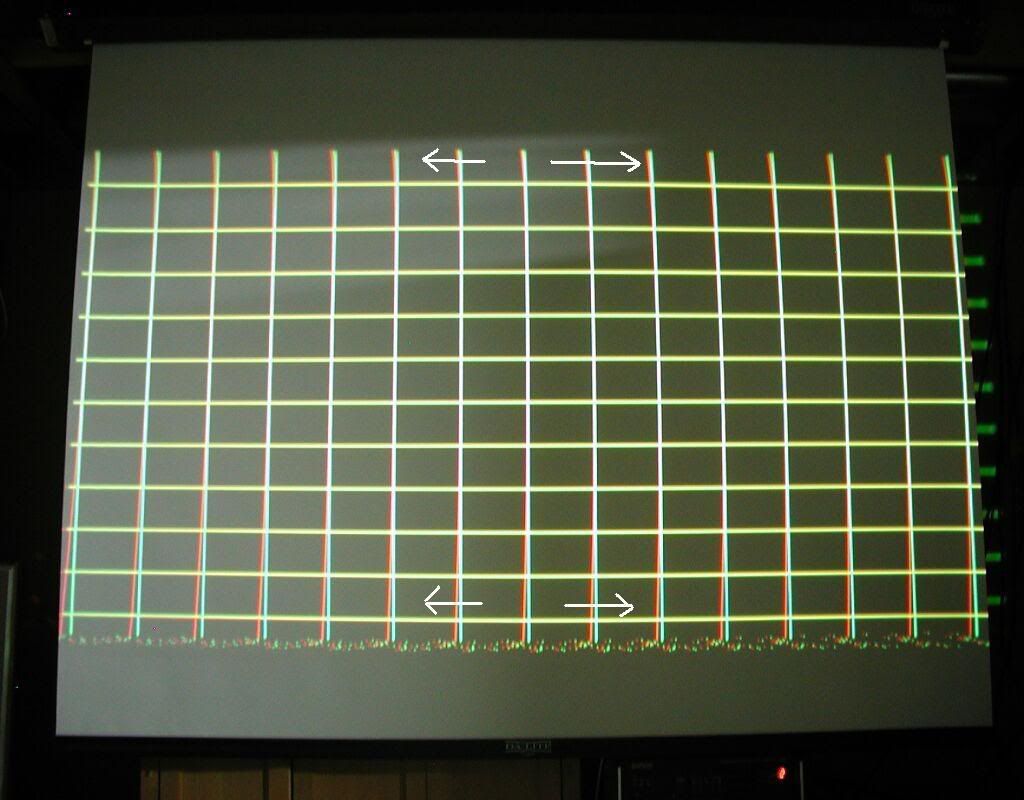
I've put arrows on the image to show you HOW Tilt/Skew affects the red line. It will move it AT BOTH TOP AND BOTTOM left/right, what you do is move it using Tilt/Skew till the amount it is OUT is EVEN on ONE side of the green line....
As you can see in the photo, the top has the red out of alignment less than the bottom but they're both on one side of the green line, that means this is very close, just shove the red using your left/right cursor buttons till it is EVENLY out of alignment on ONE side of the green line. When the amount the red is out from the green is the same at the top point, AND the bottom point, then you can use BOW, which affects BOTH top and bottom EQUALLY to pull/push it into the green line.
Your center is already aligned by doing correct raster centering/phase/toe in and touching up with STATIC, so now your outermost points in the center will end up perfectly aligned too...
PS: As a testament to doing it right...this XG75 sat on my floor all summer, today I put it back onto my coffee table, pushed it around for about 30 seconds to get it to the approximate position it had been in when I last had it setup, tweaked the STATIC a couple of clicks, and have an image that is virtually perfectly converged over the whole screen. It hasn't moved at all, even after being unused AND moved around for months....The misconvergence you see, I introduced on purpose for the purpose of the picture...
|
|
| Back to top |
|
|
Satanier
Joined: 25 Aug 2008
Posts: 185
|
| Posted: Tue Sep 09, 2008 1:58 am Post subject: |
|
|
I think I'm starting to understand bow and skew, that final description you just posted helped a LOT
Is this correct for the red?


|
|
| Back to top |
|
|
Elaine Benes
Joined: 25 Apr 2006
Posts: 1416
|
| Posted: Tue Sep 09, 2008 2:08 am Post subject: |
|
|
That looks good. You're getting it.
Now, since you've got Tilt/Skew and Bow dialed in, it highlights the need for Linearity/Amplitude adjustment.
REMEMBER: You're only concerned with the middles of the grid at this point, do NOT look at the corners yet...
Before you adjust Amplitude and Linearity, make sure to go into "Linear-Bal", number 7 in the Convergence menu, and null it out by doing a Cancel/Yes and save....
After you've nulled all "Linear-Bal", number 7 in the Convergence menu, iterate between Linearity and Amplitude. It is a very similar experience as Tilt/Skew/Bow, basically you get the lines along the center axis to be evenly distributed with one control, then pull them in with the other...
Try it and you'll see how it works. Start in the horizontal plane first, its easier to see as you naturally look along the horizontal middle line. Pay careful attention to the outermost vertical line along the horizontal center when you're doing this.
Last edited by Elaine Benes on Tue Sep 09, 2008 2:11 am; edited 1 time in total
|
|
| Back to top |
|
|
Satanier
Joined: 25 Aug 2008
Posts: 185
|
| Posted: Tue Sep 09, 2008 2:10 am Post subject: |
|
|
is it the linearity with separate controls for each side? or the total one, and what zones am i trying to focus on with this one?
And what about how it looks like some of the middles of the grid need to be tilted, and not just moved in one direction>\?
Last edited by Satanier on Tue Sep 09, 2008 2:12 am; edited 1 time in total
|
|
| Back to top |
|
|
Elaine Benes
Joined: 25 Apr 2006
Posts: 1416
|
| Posted: Tue Sep 09, 2008 2:11 am Post subject: |
|
|
|
Re-read my previous post, I edited it to make it more clear....
|
|
| Back to top |
|
|
Satanier
Joined: 25 Aug 2008
Posts: 185
|
| Posted: Tue Sep 09, 2008 2:21 am Post subject: |
|
|
I think I see, its VERY IMPORTANT to only look at the four circled locations you sent me, and the rest falls into place when you focus on THOSE only!!!
heres my progress after the amplitude //// linearity
Should I wait until the red is fully finished before working on the blue? And what's the next step?

Thank you SO much man, I had lost all hope but things are coming together now!!!
Last edited by Satanier on Tue Sep 09, 2008 2:24 am; edited 1 time in total
|
|
| Back to top |
|
|
Elaine Benes
Joined: 25 Apr 2006
Posts: 1416
|
| Posted: Tue Sep 09, 2008 2:21 am Post subject: |
|
|
| Satanier wrote: | is it the linearity with separate controls for each side? or the total one, and what zones am i trying to focus on with this one?
And what about how it looks like some of the middles of the grid need to be tilted, and not just moved in one direction>\? |
Looking at your last picture, it appears you need to tweak the Bow in the vertical plane a slight bit, there appears to be a bit of red, evenly below the middle horizontal line, at either end. So you go to Bow, use your up/dn cursors to adjust that Bow till the ends of the horizontal middle line are perfectly aligned.
The "middle" of the grid I think you're worried about will come in when we get to the corners. Just do it one piece at a time, really, ONLY worry about the circled areas for Tilt/Skew/Bow.
As for Amplitude/Linearity, you are only concerned with a rectangular box area along the center horizontal and vertical lines, and more primarily, initially, with the same circled area as you were looking at for the first pair of adjustments...
|
|
| Back to top |
|
|
dropzone7

Joined: 12 Jun 2007
Posts: 1069
Location: Charlotte, NC
|
| Posted: Tue Sep 09, 2008 2:24 am Post subject: |
|
|
Wow, you are getting real time help here from Paul. This is great! If you only knew how much time he is saving you. Listen very closely as you are getting great advice here. I'm taking pointers myself...
_________________
"Coffee is for Closers."
|
|
| Back to top |
|
|
Elaine Benes
Joined: 25 Apr 2006
Posts: 1416
|
| Posted: Tue Sep 09, 2008 2:25 am Post subject: |
|
|
| Satanier wrote: | I think I see, its VERY IMPORTANT to only look at the four circled locations you sent me, and the rest falls into place when you focus on THOSE only!!!
heres my progress after the amplitude //// linearity
Should I wait until the red is fully finished before working on the blue? And what's the next step?
|
EXCELLENT PROGRESS....
Yes, you are very much getting it, and YES, concentration on ONLY the area of screen where you are trying to get pulled in is very important, don't let the rest distract you.
And yes, finish with red, get a sense of accomplishment, then do exactly the same process with blue onto green....
Next step is the next set of Convergence controls, KeyStone/PinCushion...
I'll make a separate post for them...
|
|
| Back to top |
|
|
Elaine Benes
Joined: 25 Apr 2006
Posts: 1416
|
| Posted: Tue Sep 09, 2008 2:34 am Post subject: |
|
|
Before you get to the corners, I'd like to point out to you that you do NOT need to use ANY Linear-Bal as evidenced by the tightness of your grid along the horizontal and vertical centers, from middle to outermost edge...
It is important to note this, because when you started, I'd bet some had been used, but it was used in error to overcome ANOTHER error which was made during setup, likely from not doing Phase properly...
On to the corners...
Basically, Key and Pin(short for KeyStone and PinCushion) are complementary adjustments which only affect the ENDS of their adjustment area. Their adjustment area are the rectangular boxes I super-imposed on your previous picture. Imagine the rectangle is the adjustment area for Key and Pin, you choose which box to adjust with CTL and the correct Cursor key when you're in the particular adjustment you are trying to make.
So, for instance, we start with top Key, so we go to Adjust, Convergence, KeyStone, then hit CTL and Cursor Up. Now you'll see that the arrow is solid colored at the top position, this indicates it is the active convergence zone.
You adjust these two controls iteratively, just like the previous two sets of controls. First KeyStone, it will even out the distribution of the ends of the lines, anchored in the middle of the rectangle you are adjusting. So, watching only the ends of the top rectangle, adjust Key up and down till the lines are evenly distributed in the horizontal plane. When you've got only the ends of the box evenly on one side, then go to Pin, use the same zone, and adjust it whichever way you need to push/pull the ends up/dn to the green.
I realize that's a pretty wordy explanation, I'll try and make a pic to illustrate it better...
|
|
| Back to top |
|
|
MikeEby

Joined: 24 Jun 2007
Posts: 5237
Location: Osceola, Indiana
|
| Posted: Tue Sep 09, 2008 2:43 am Post subject: |
|
|
| dropzone7 wrote: | | Wow, you are getting real time help here from Paul. This is great! If you only knew how much time he is saving you. Listen very closely as you are getting great advice here. I'm taking pointers myself... |
Me too!
Kal should make this sticky.
Mike
_________________
Doing HD since the last century!
|
|
| Back to top |
|
|
|
|
|
|
|
You cannot post new topics in this forum
You cannot reply to topics in this forum
You cannot edit your posts in this forum
You cannot delete your posts in this forum
You cannot vote in polls in this forum
You cannot attach files in this forum
You can download files in this forum
|
Forum powered by phpBB © phpBB Group
|
|




