| Author |
Message |
lostmandan
Joined: 09 Jul 2008
Posts: 146
Location: Kitchener/Waterloo, Ontario, Canada
|
| Posted: Tue Sep 09, 2008 12:31 am Post subject: |
|
|
My system board is PWC-3869 with ink stamp of '1W0-154AJ'.
Talked to a friendly fellow at Hammerhead today and he confirmed that this should be the right board for the NEC 9PG+ unit. He seemed to think that dbaisey and Curt would have a good idea of the matches between various ink stamps, PJ models, and firmware versions.
His opinion was that the 9PG+ has a max horizontal frequency of 65KHz. Can anyone confirm or deny the maximum sync ranges for the 9PG+ with actual hand-on evidence (rather than in print)?
Just throwing this out there, but it might be interesting to take hex dumps from the EPROMs and Flash ROMs on these boards and archive them. Maybe someone is already doing this?
|
|
| Back to top |
|
 |
Elaine Benes
Joined: 25 Apr 2006
Posts: 1416
|
| Posted: Tue Sep 09, 2008 1:12 am Post subject: |
|
|
I've got an Xtra in the garage, I can test it for max horizontal frequency if you like, see if it coincides with the printed spec, but sorry, no 9100 in the house presently...
PS: Was that Darrell you were talking to ? I've never actually spoken to him, but he's been GREAT do deal with via email for years, a really good guy, very fair.
|
|
| Back to top |
|
|
lostmandan
Joined: 09 Jul 2008
Posts: 146
Location: Kitchener/Waterloo, Ontario, Canada
|
| Posted: Tue Sep 09, 2008 1:24 am Post subject: |
|
|
Hi Elaine,
Yes I believe it was Darrell (I am terrible with names). I thought just give them a call today given I was at work and this was on my mind. He seemed knowledgeable and quite friendly. From the sounds of it he knows Doug and Curt reasonably well too.
I think the Xtra will have a significantly higher horizontal frequency than the 9100 so I don't want to get you to haul around another PJ just for testing 
|
|
| Back to top |
|
|
macgyver655
Joined: 22 Aug 2007
Posts: 8508
|
| Posted: Tue Sep 09, 2008 1:36 am Post subject: |
|
|
|
It pretty much boils down to this. I have a 6PG+ that I use as a test unit for working on the system board issues. Any 6PG+ system board I've tested will sync onto 1080p and display out of range. Perfect picture, perfect display. Now the 9PG+ should sync and display 1080p. Even if by some chance a 6PG+ system or deflection board was replaced in your projector, it should still, at the least sync to the picture. If it wont, such as in your case, there's a problem. Could be system board or could be deflection board. And thats pretty much end of story.
|
|
| Back to top |
|
|
lostmandan
Joined: 09 Jul 2008
Posts: 146
Location: Kitchener/Waterloo, Ontario, Canada
|
| Posted: Tue Sep 09, 2008 1:50 am Post subject: |
|
|
Just to confirm that I understand this properly:
The 6PG+ system board is 'soft limited' to something under 1080p and although it is capable of syncing, it throws up an error saying that it is out of range. Furthermore, regardless of having a 6PG+ or 9PG+ system board, I should still get 1080p/60 to sync.
A few questions, if I may:
1) Is what I am seeing the 'dreaded scrambled mess' or something different?
2) Is the deflection board commonly available? I am have been tempted to purchase a spare anways. If I do, I would want to know without a doubt that it works in another 9PG+ as per spec.
3) If this is a system board issue, would you guess that it is repairable or not worth the effort? After all, many folks agree that this PJ is too soft for 1080p. My best guess is that (if this is a system board issue) there is some sort of scaling/dividing done on the system board when the horizontal sync is processed and for some reason it is being enabled when it shouldn't be and therefore the measured H sync is very near to 1/2 of what it should be.
4) If there is a fault with the system board, in your experience, is it likely to get worse over time?
I know you can't say with any certainty, but I'd like to get a bit of a feel for things.
Thanks again for your continued help! I do appreciate it and don't want to be a pain in the a**.. I just want to understand
Cheers,
Dan
|
|
| Back to top |
|
|
Elaine Benes
Joined: 25 Apr 2006
Posts: 1416
|
| Posted: Tue Sep 09, 2008 2:02 am Post subject: |
|
|
I can't answer a lot of your questions, but it certainly doesn't *look* like scrambled mess to me, and since your menu's are in synch, and you can do a Signal Entry, I'd say that pretty much rules scrambled mess out, at least as it typically manifests itself...
As for your projector being "too soft" to "do" 1080p, I'd say you should definitely try it first, lots of people talk about stuff without actually trying it... just because your projector may not be spec'd to perfectly display 1080p, doesn't at all mean that it won't look great, and perhaps be a preferable image for *you*.
I use 1080p 72Hz refresh on a Marquee 8500. There is no way it comes close to "resolving" it, but from the HTPC, I prefer this resolution, it just looks better to me than 1080i...
|
|
| Back to top |
|
|
macgyver655
Joined: 22 Aug 2007
Posts: 8508
|
| Posted: Tue Sep 09, 2008 2:22 am Post subject: |
|
|
Just to confirm that I understand this properly:
The 6PG+ system board is 'soft limited' to something under 1080p and although it is capable of syncing, it throws up an error saying that it is out of range. Furthermore, regardless of having a 6PG+ or 9PG+ system board, I should still get 1080p/60 to sync.
This is correct.
A few questions, if I may:
1) Is what I am seeing the 'dreaded scrambled mess' or something different?
No this is not the scrambled mess
2) Is the deflection board commonly available? I am have been tempted to purchase a spare anways. If I do, I would want to know without a doubt that it works in another 9PG+ as per spec.
Not sure about availability but it must be from a 9PG+
3) If this is a system board issue, would you guess that it is repairable or not worth the effort? After all, many folks agree that this PJ is too soft for 1080p. My best guess is that (if this is a system board issue) there is some sort of scaling/dividing done on the system board when the horizontal sync is processed and for some reason it is being enabled when it shouldn't be and therefore the measured H sync is very near to 1/2 of what it should be.
This is one of the issues I've been working on however your's is not as severe as other's I've done.
4) If there is a fault with the system board, in your experience, is it likely to get worse over time?
Unfortunately, any system board can get worse
I know you can't say with any certainty, but I'd like to get a bit of a feel for things.
Thanks again for your continued help! I do appreciate it and don't want to be a pain in the a**.. I just want to understand Smile
You are by no means a pain and dont hesitate to ask any questions
Cheers,
Dan
|
|
| Back to top |
|
|
kschmit2
Joined: 09 Mar 2006
Posts: 1141
Location: Heidelberg, Germany
|
| Posted: Tue Sep 09, 2008 5:40 am Post subject: |
|
|
| lostmandan wrote: |
Talked to a friendly fellow at Hammerhead today and he confirmed that this should be the right board for the NEC 9PG+ unit. [...]
His opinion was that the 9PG+ has a max horizontal frequency of 65KHz. Can anyone confirm or deny the maximum sync ranges for the 9PG+ with actual hand-on evidence (rather than in print)? |
A working PG6100 scans to 65 kHz, a PG9100 to 93 kHz. No need to question that info. The max scanrate is the most prominent difference between the 6PG and 9PG series. It has no effect on PQ though when using the same scanrate on both models.
|
|
| Back to top |
|
|
Mr. Green

Joined: 23 Feb 2007
Posts: 1394
Location: Calgary
TV/Projector: Marquee 9501LC / NEC 9PG+
|
| Posted: Tue Sep 23, 2008 12:16 am Post subject: |
|
|
Did anybody get any furthur on this?
I'll be pulling my 9pg+ down and doing another complete setup again in a week or so in preparation for its new mount. I'll be re-examining if I can get it to do 1080p.
_________________
You can be young only once but, you can be immature forever.
Current Projector Marquee9501LC with PS3 (BLu-Ray) at 1080P LOVE IT! Screen is an Elunevision 120" 4:3 (2.4 gain - no hotspots). (also own a NEC 9PG+)
|
|
| Back to top |
|
|
deronmoped
Joined: 03 Nov 2006
Posts: 1154
Location: San Diego
|
| Posted: Tue Sep 23, 2008 5:21 am Post subject: |
|
|
This is what I did to address the heat and get the image out to the edge of my tubes.
1) I added two small fans to the deflection heat sink, runs cool to the touch now.
2) Pulled the deflection yokes back.
3) I'm running smaller porches.
If I remember correctly I'm actually have the H-width pot lower then the 1.8 volts it calls for.
Deron.
|
|
| Back to top |
|
|
kschmit2
Joined: 09 Mar 2006
Posts: 1141
Location: Heidelberg, Germany
|
| Posted: Tue Sep 23, 2008 8:42 am Post subject: |
|
|
| deronmoped wrote: |
2) Pulled the deflection yokes back.
Deron. |
As soon as the electron beam hits the glass bell the tube will implode, so one has to be extremely careful when moving the deflection yoke back.
|
|
| Back to top |
|
|
garysorenson
Joined: 17 Jul 2007
Posts: 63
Location: Milwaukee, Wisconsin
|
| Posted: Tue Sep 23, 2008 12:46 pm Post subject: Throw distance |
|
|
As far as the questions about resolutions and such go, I'll let the experts deal with those, however the absolute best way to figure out the throw distance is as such:
Start out with the settings in the book. (Screen size vs. throw distance)
Zero out any and all controls that affect the amplitude of the raster.
Center up and or size the rasters according to Curt Palme.
Now, whether you use a coffee table or a cart with wheels, move the PJ in towards the screen to reduce the size and out to enlarge the size, until it fills your screen. At the same time, refocusing it.
I ended up with my PJ about 10 percent further than the manual instructed, using slightly less of the tube face. I think the factory set up procedure leaves little room for error.
|
|
| Back to top |
|
|
Mr. Green
Joined: 23 Feb 2007
Posts: 1394
Location: Calgary
TV/Projector: Marquee 9501LC / NEC 9PG+
|
| Posted: Wed Sep 24, 2008 11:40 pm Post subject: |
|
|
| deronmoped wrote: | This is what I did to address the heat and get the image out to the edge of my tubes.
1) I added two small fans to the deflection heat sink, runs cool to the touch now.
2) Pulled the deflection yokes back.
3) I'm running smaller porches.
If I remember correctly I'm actually have the H-width pot lower then the 1.8 volts it calls for.
Deron. |
So you managed a 108P picture? How does it look compared to 1080i?
_________________
You can be young only once but, you can be immature forever.
Current Projector Marquee9501LC with PS3 (BLu-Ray) at 1080P LOVE IT! Screen is an Elunevision 120" 4:3 (2.4 gain - no hotspots). (also own a NEC 9PG+)
|
|
| Back to top |
|
|
kschmit2
Joined: 09 Mar 2006
Posts: 1141
Location: Heidelberg, Germany
|
| Posted: Thu Sep 25, 2008 6:10 am Post subject: |
|
|
1080p48 should look about the same as 1080i96 when properly set up.
With one major difference: p48 will flicker, while i96 does not flicker.
|
|
| Back to top |
|
|
Mr. Green
Joined: 23 Feb 2007
Posts: 1394
Location: Calgary
TV/Projector: Marquee 9501LC / NEC 9PG+
|
| Posted: Thu Sep 25, 2008 6:18 am Post subject: |
|
|
I like the 1080i, but want to know if it's worth trying to obtain 1080P. I'm guessing based on the replies that 1080p/60 is beyond the projectors capability?
I don't use a HTPC, so I'm limited to whatever 1080p the PS3 puts out.
_________________
You can be young only once but, you can be immature forever.
Current Projector Marquee9501LC with PS3 (BLu-Ray) at 1080P LOVE IT! Screen is an Elunevision 120" 4:3 (2.4 gain - no hotspots). (also own a NEC 9PG+)
|
|
| Back to top |
|
|
kschmit2
Joined: 09 Mar 2006
Posts: 1141
Location: Heidelberg, Germany
|
| Posted: Thu Sep 25, 2008 9:42 am Post subject: |
|
|
|
just give it a try at 1080p60 then
|
|
| Back to top |
|
|
Mark_A_W
Joined: 15 Mar 2006
Posts: 3068
Location: Sunny Melbourne Australia
|
| Posted: Thu Sep 25, 2008 10:55 am Post subject: |
|
|
I've been PM'd and asked to give my opinion..
Basically, I've never had a PG Plus, but with my Xtra, I found 1080i 72hz to be the best.
If you have to use 1080i 60hz or 1080p 60hz, use whatever looks best to your eyes.
But 1080i 60hz will be much kinder to the projector, and easier to set up.
|
|
| Back to top |
|
|
grogthegreat
Joined: 16 May 2007
Posts: 166
Location: San Diego, CA
|
| Posted: Thu Sep 25, 2008 6:43 pm Post subject: |
|
|
I've used 1080p on my projector but found it be a little too soft for me. I had more detail at lower resolutions. I personally haven't given 1080i a try but I think that for my next setup, I'll try 1080i72.
I can't test 1280x720 because the projector refuses to lock onto the signal. Maybe a new system board might fix it but I don't want to buy anything until I'm sure.
-Greg
_________________
First projector: Sony 1252q with 3500 hours
Second projector: NEC 9PG+
current projector: Sony G90
100" 3:4 draper screen.
I must keep upgrading till the voices stop!!
"I CAN HAZ CRT PRUJEKTER."
-Curt Palme
|
|
| Back to top |
|
|
Mr. Green
Joined: 23 Feb 2007
Posts: 1394
Location: Calgary
TV/Projector: Marquee 9501LC / NEC 9PG+
|
| Posted: Sat Oct 11, 2008 4:16 am Post subject: |
|
|
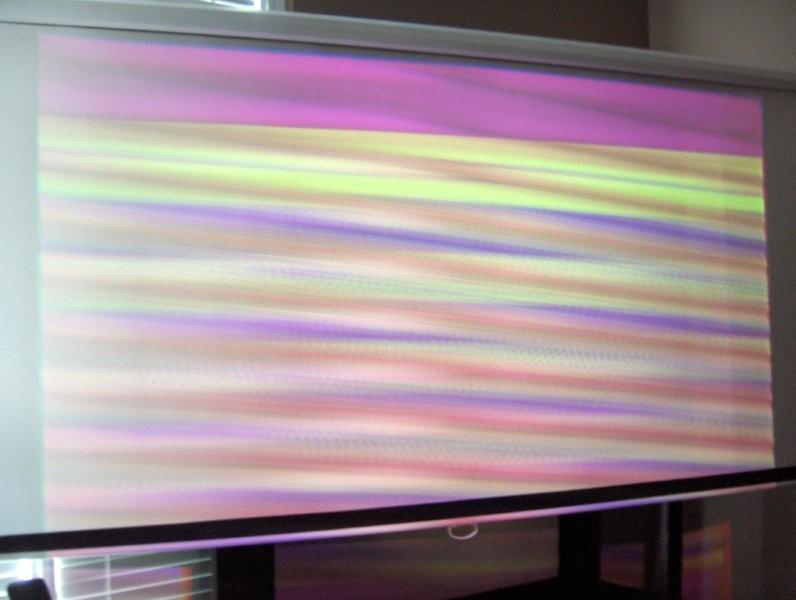
Hey everybody,
So here's 1080p on my 9pg+...
Look familair?  I really want to get 1080p to work... I really want to get 1080p to work...
| Description: |
|
| Filesize: |
44.04 KB |
| Viewed: |
6902 Time(s) |
|
_________________
You can be young only once but, you can be immature forever.
Current Projector Marquee9501LC with PS3 (BLu-Ray) at 1080P LOVE IT! Screen is an Elunevision 120" 4:3 (2.4 gain - no hotspots). (also own a NEC 9PG+)
|
|
| Back to top |
|
|
AnalogRocks
Forum Moderator

Joined: 08 Mar 2006
Posts: 26706
Location: Toronto, Ontario, Canada
TV/Projector: Sony 1252Q, AMPRO 4000G
|
| Posted: Sat Oct 11, 2008 4:20 am Post subject: |
|
|
| Mr. Green wrote: | Hey everybody,
So here's 1080p on my 9pg+...
Look familair? I really want to get 1080p to work... |
Yeah I did a tye dye kite in grade school that looked alot like that. 
_________________
Tech support for nothing
CRT.
HD done right!
|
|
| Back to top |
|
|
|
|





