| Author |
Message |
lostmandan
Joined: 09 Jul 2008
Posts: 146
Location: Kitchener/Waterloo, Ontario, Canada
|
| Posted: Sat Sep 06, 2008 7:52 pm Post subject: |
|
|
Ok, so here is the scoop:
With the VGA out from a PC, I can get the PJ to sync up to 1080p/58Hz, but any vertical refresh rate higher than 58 (59, 60) will cause the same sync issue as shown in the photos above.
A few notes:
a) The on-screen display works fine even when the PJ is not synced to the at 1080p/60. The PJ Signal Information reports H ~34KHz, V=59.9Hz. I believe that H should be around 65KHz given that at V=58Hz, I am seeing H just under 65KHz. Somehow it is being detected at a much lower frequency.
b) Even with the video out of sync at 1080p/60 I have done 'Signal Entry' and confirmed that the convergence and geometry settings are sucessfully applied from a known-good entry. Only the video is out of sync.
c) Using powerstrip and bumping the V refresh up/down around 58-60Hz does not reveal an exact point where the video loses sync and regains it. On occasion it seems to sync at 59Hz, but most times not.
An ESR meter on the caps close by IC5004 (H Osc chip) shows that they measure a few ohms ESR (say up to 5 ohm on 1uF) but nothing alarming.
Is there an adjustment procedure for the H OSC at higher frequencies that is out of adjustment just enough not to sync properly at high H frequencies? I read that the service information and, aside from generating the exact H frequencies, it seems straightforward.
Any thoughts on next steps?
|
|
| Back to top |
|
 |
Elaine Benes
Joined: 25 Apr 2006
Posts: 1416
|
| Posted: Sat Sep 06, 2008 7:53 pm Post subject: |
|
|
| lostmandan wrote: | Thanks macgyver, I will do that with a direct RGBHV analog connection to the unit.
As an aside .. I've been using an HD FURY on the end of a 10ft DVI cable but without the external 5V supply. I wonder if maybe this could cause sync issues with higher scanrate video. |
Absolutely it could...
HDMI is very finicky...if everything isn't "just so" you can have all kinds of odd issues. I've thought for the last month that my Marquee was screwed, as my image was shaking on all inputs. All my inputs are HDMI, through a switcher(which has worked flawlessly with an HD Fury Gamer Edition) and a new Moome EXT-HD. Well, someone suggested maybe the Moome was causing my shaking, so I took it out and it was the cause...BUT, the real cause was the interaction of the HDMI switcher AND the Moome. Either works perfectly on their own, but together they produce shaking on the image on my Marquee...Go figure...
|
|
| Back to top |
|
|
macgyver655
Joined: 22 Aug 2007
Posts: 8508
|
| Posted: Sat Sep 06, 2008 8:32 pm Post subject: |
|
|
| lostmandan wrote: | Ok, so here is the scoop:
With the VGA out from a PC, I can get the PJ to sync up to 1080p/58Hz, but any vertical refresh rate higher than 58 (59, 60) will cause the same sync issue as shown in the photos above.
A few notes:
a) The on-screen display works fine even when the PJ is not synced to the at 1080p/60. The PJ Signal Information reports H ~34KHz, V=59.9Hz. I believe that H should be around 65KHz given that at V=58Hz, I am seeing H just under 65KHz. Somehow it is being detected at a much lower frequency.
b) Even with the video out of sync at 1080p/60 I have done 'Signal Entry' and confirmed that the convergence and geometry settings are sucessfully applied from a known-good entry. Only the video is out of sync.
c) Using powerstrip and bumping the V refresh up/down around 58-60Hz does not reveal an exact point where the video loses sync and regains it. On occasion it seems to sync at 59Hz, but most times not.
An ESR meter on the caps close by IC5004 (H Osc chip) shows that they measure a few ohms ESR (say up to 5 ohm on 1uF) but nothing alarming.
Is there an adjustment procedure for the H OSC at higher frequencies that is out of adjustment just enough not to sync properly at high H frequencies? I read that the service information and, aside from generating the exact H frequencies, it seems straightforward.
Any thoughts on next steps? |
I would have to say that the circuit is just off enough so as not to sync to 1080P@60. So now comes the big question. How much does it mean to you to attempt to resolve this setting. The problem could be either the system board or the deflection board. And even if your were to be able to get it to sync at that resolution, how well would it resolve it. That resolution is extremely pushing the electronics of this set. You indicated you were able to get it to sync to 1080p@50. Did it say unrecognized signal or unregistered signal?
|
|
| Back to top |
|
|
Mr. Green

Joined: 23 Feb 2007
Posts: 1394
Location: Calgary
TV/Projector: Marquee 9501LC / NEC 9PG+
|
| Posted: Sun Sep 07, 2008 7:09 am Post subject: |
|
|
I'll chime in with my experiences to date...
I bought one from Curt last fall too. I'm reading your post and the replies and I'll give you what info I can. I have almost "ZERO" as far as electronics background, but I'm managing.
I'll reply as I read through this thread. I don't have the attention span to read it then reply as if I remember what I read.
I have tried to get 1080P to work on mine. I have failed to do it to date, but I haven't tried very hard. Oh, your picture "9PG+ with 1080P/60 from HD Leeza - note lack of sync" is what I got without your leeza right from my PS3. I switched it to output 1080i and so far I'm happy.
I've heard of one guy on here doing 1080P with a 9PG+ successfully though. My unit apparently has 1300 hours on it and an original system board, so I'm not sure the system board the issue - not that I know anything about it, just that I have the same problem. I've found with high def TV and Blu-ray @1080i seemed to take a lot more playing around to get it to sync. I also hear that 1080P is really soft on projectors that can "barely" handle the signal. I guess we should both try to get it to work and go from there. I'm running a PS3 with 1080i and it looks REALLY nice and that's before a proper geometry setup.
The scan lines are noticeable, but the image is SHARP. If I can get 1080P to work almost as sharp without the scanlines, I'll be happy. I just bought a new ceiling mount so I will be re-doing my setup in a couple weeks so I'll try to do 1080P at that time. I'm only using my receiver, no scaler, unless the receiver has one??? Then again, I have no idea. I was told using a PC with that powerstrip program is one way to go. I thought htpc was the way to go at first, but I've managed an amazing image with just a nice receiver managing all my components. I might hook the PC up to it at some point. I really like the idea of getting a Harmony remote (which can also control the NEC by the way).
As far as raster size, I've maximized mine. I was told no more than 1/2" from the tube edge (12mm). That's what I'm using. I am running the contrast at 40% and brightness at 30% at the moment. I'll be getting the box1040 or RTC2200 box soon, because I find the "back crush" way more annoying than scan lines. I hate not being able to see everything in the shadows.
As far as heat, I've heard one bad thing is having them right on the ceiling for airflow. Mine will be hanging from a 12 foot ceiling, so probably 4-5 feet down. No airflow issue here. I keep that room colder than everything else too. I know heat is an issue, but you have to make it do what you want it to as well.
I notice a lot of people mention how hard it is to get the corner focus dialed in. If you are willing to put your hands in the machine and move the astig magnets around it's easy. At one point I had the corner focus laser sharp and even better than the center. The problem is you move one and mess up the other... it's a tough balance. I opted for better center focus as it is where you are usually looking. I'll play with it more when my ceiling mount comes in a week or 2.
Oh and composite from DVD?!!! DUDE!!! forget the Blu-ray drive, they are garbage. Get a PS3! I am NOT a console advocate either. The nice thing about the PS3 is it has the best blu-ray player and you can hook it up to the internet for firmware updates. It took about 15 minutes to figure it out. It plays all your standard DVD's (upscaled) too. Toss your old player out once you get one. 
I agree 1080i is really amazing. If you follow the 1.3 times the screen width for viewing distance you'll never see the scan lines. I often sit 4 feet away from a 7 foot wide screen and they aren't "that" distracting.
I'll leave the technical stuff to the experts. Hopefully, Doug will chime in as well. He should have some insight to a lot of this.
Hope this helps.
Chris
_________________
You can be young only once but, you can be immature forever.
Current Projector Marquee9501LC with PS3 (BLu-Ray) at 1080P LOVE IT! Screen is an Elunevision 120" 4:3 (2.4 gain - no hotspots). (also own a NEC 9PG+)
|
|
| Back to top |
|
|
lostmandan
Joined: 09 Jul 2008
Posts: 146
Location: Kitchener/Waterloo, Ontario, Canada
|
| Posted: Sun Sep 07, 2008 2:07 pm Post subject: |
|
|
I am not sure that I want to run 1080p because when it syncs at 50Hz it is a bit soft. I haven't done a proper setup on the unit either, so that is part of it I am sure.
Ideally I'd like to get the PJ running and know everything is 'perfect', even if I don't use it. If there is a problem on the deflection board or system board that prevents it from syncing at 1080p/60, then what is to say it won't change and cause problems at other resolutions, like the one(s) I choose to use.
My understanding from reading forum posts is, if it is a system board issue then, the OSD would be out of sync when the video is out of sync.
|
|
| Back to top |
|
|
lostmandan
Joined: 09 Jul 2008
Posts: 146
Location: Kitchener/Waterloo, Ontario, Canada
|
| Posted: Sun Sep 07, 2008 2:22 pm Post subject: |
|
|
Thanks for your insight Mr. Green
I remember reading posts around the time that I bought my PJ from Curt and I think he must have shipped us our respective units within the same month or so.
I've been flip-flopping between HTPC and PS3 for months now. PS3 is the best value Blu-ray player - relatively cheap and entirely upgradeable firmware.
A HTPC with proper audio over HDMI that would allow me to use the hi-def audio codecs on my HT receiver seems to be not quite there. I think even the newest G45 chipsets have shakey support for hi-def audio over HDMI.
I want to maximize the width of the raster as well. I would rather install fans on the deflection board heatsink and buy a spare deflection board than run with small rasters. I have a 122" DIY 16:9 screen (Wilsonart DW) which looks reasonably good at Contrast/Bright of 50/50, but things are not set up properly yet.
It is interesting that your PS3 @ 1080p shows the same out-of-sync video as I see from HTPC and HD Leeza scaler. I would be very interested to see if it loses sync around 1080p/58Hz because this would be two units with the same behaviour and therefore more likely to be a 'design feature' than a problem with my unit.
If someone has gotten this PJ working in 1080p, maybe they could respond to this topic? I would be interested in finding out what their experiences were for comparison.
|
|
| Back to top |
|
|
macgyver655
Joined: 22 Aug 2007
Posts: 8508
|
| Posted: Sun Sep 07, 2008 2:36 pm Post subject: |
|
|
|
How about 1280x1024@60. It should sync and lock to that resolution and it's almost the same as 1080p.
|
|
| Back to top |
|
|
macgyver655
Joined: 22 Aug 2007
Posts: 8508
|
| Posted: Sun Sep 07, 2008 2:38 pm Post subject: |
|
|
|
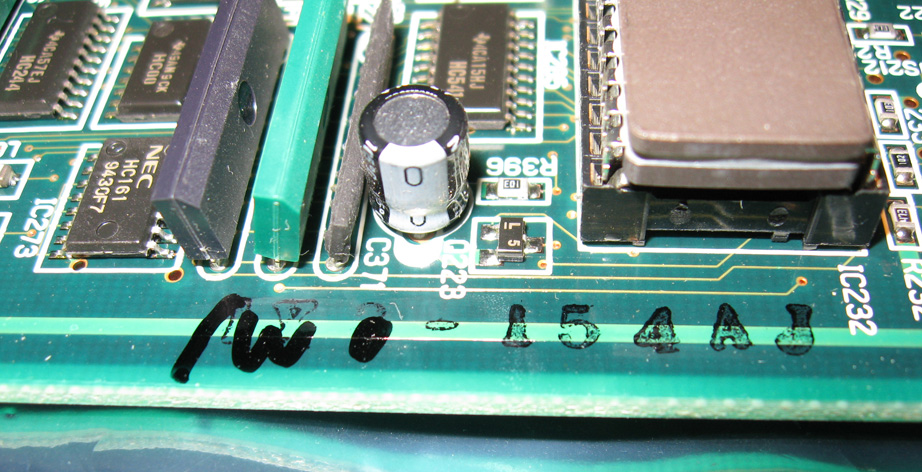
Oh, and whats the ink stamp on your system board?
|
|
| Back to top |
|
|
lostmandan
Joined: 09 Jul 2008
Posts: 146
Location: Kitchener/Waterloo, Ontario, Canada
|
| Posted: Sun Sep 07, 2008 3:34 pm Post subject: |
|
|
I can sync to 1280x1024/60Hz without a problem. I thought maybe 1600x1200/60Hz too (but I really need to check this to confirm).
System Board Ink stamp is:
"1W0 - 154AJ"
Note that the '1W0' has been written in black Sharpie marker over something that looks like '1X3' (or '1X8' - see attached closeup). The '1W0' matches the labes on the system ROMs.
What type of system board does that mark indicate?
What type of board was the '1X3' or '1X8'?
| Description: |
| Ink Stamp on my NEC 9PG+ System Board |
|
| Filesize: |
258.62 KB |
| Viewed: |
7328 Time(s) |
|
|
|
| Back to top |
|
|
lostmandan
Joined: 09 Jul 2008
Posts: 146
Location: Kitchener/Waterloo, Ontario, Canada
|
| Posted: Mon Sep 08, 2008 6:36 am Post subject: |
|
|
Alright!
So, I did some more troubleshooting and came up with concrete information.
The projector sync is related to Horizontal frequency. If the horizontal frequency is above 65.80KHz the video is out of sync every time. The menus are in-sync. At 65.850KHz input, the 'Info' button display reports 33.5KHz which is about 1/2 of the actual input frequency. This phenomenon occurs reliably at any resolution that pushes the horizontal scan frequency above 65.80KHz. This is regardless of vertical frequency as I have seen it happen in a range from 58-88 Hz vertical without any change in the issue.
So, system board or deflection board? I've taken a hard look at the circuitry and I am wondering if the system board clocks the deflection sync circuitry or if the deflection sync circuitry clocks the system board. Obviously the on-screen display is generated in sync with the horizontal and vertical to make sure it is static on screen.
What are your thoughts macguyver?
So.. I learned about the WDT switch (aka Heart Attack switch)  Turns out it is easy to bump when taking photos and wrapping the board in antistatic bags. I was sure scratching my head when the PJ standby supply came up but the status LEDs on the panel weren't lighting! I live, I learn. Turns out it is easy to bump when taking photos and wrapping the board in antistatic bags. I was sure scratching my head when the PJ standby supply came up but the status LEDs on the panel weren't lighting! I live, I learn.
|
|
| Back to top |
|
|
kschmit2
Joined: 09 Mar 2006
Posts: 1141
Location: Heidelberg, Germany
|
| Posted: Mon Sep 08, 2008 5:14 pm Post subject: |
|
|
PG6000 scans to 60 kHz, PG6100 to 65 kHz, and PG Xtra to 67 kHz.
I have unfortunately misplaced my Excel file with board numbers and revisions 
There was info in there on which boards can be made to work in which model.
|
|
| Back to top |
|
|
Elaine Benes
Joined: 25 Apr 2006
Posts: 1416
|
| Posted: Mon Sep 08, 2008 6:01 pm Post subject: |
|
|
It sure is sounding more and more like its either a whole system board from a 6100, or some critical component is the 6100 variety instead of the correct 9100 variety...
That is assuming it won't show ANYTHING over 65.80KHz ?
|
|
| Back to top |
|
|
lostmandan
Joined: 09 Jul 2008
Posts: 146
Location: Kitchener/Waterloo, Ontario, Canada
|
| Posted: Mon Sep 08, 2008 6:28 pm Post subject: |
|
|
If you could find that spreadsheet I'd appreciate it greatly.
Correct - the video will not lock to anything over 65.8KHz. The On-screen display (menus) do not get scrambled over 65.8KHz, but the video does.
The 'Info' display reports a horizontal frequency of approximately 1/2 of what it should be.
I did purchse this unit from Curt and I trust that it is all the right parts, but it might be worth swapping the system board with another 9PG+ board (if anyone even has these anymore).
Cheers,
Dan
|
|
| Back to top |
|
|
macgyver655
Joined: 22 Aug 2007
Posts: 8508
|
| Posted: Mon Sep 08, 2008 6:39 pm Post subject: |
|
|
|
I have some thoughts on this but I need to look at a few more things first. I'll check later and let you know what I find.
|
|
| Back to top |
|
|
lostmandan
Joined: 09 Jul 2008
Posts: 146
Location: Kitchener/Waterloo, Ontario, Canada
|
| Posted: Mon Sep 08, 2008 7:15 pm Post subject: |
|
|
Thanks, I appreciate it 
|
|
| Back to top |
|
|
Elaine Benes
Joined: 25 Apr 2006
Posts: 1416
|
| Posted: Mon Sep 08, 2008 9:21 pm Post subject: |
|
|
|
I've got a 3717 System Board, but I'm not sure what model its for...It's a PG, just not sure if its a 6000/9000, 6100/9100, or what... If you can find the definitive part number for the board you need, post it.
|
|
| Back to top |
|
|
macgyver655
Joined: 22 Aug 2007
Posts: 8508
|
| Posted: Mon Sep 08, 2008 11:07 pm Post subject: |
|
|
|
The 3717 is for a regular PG. Could be either 6000 or 9000. Is the ink stamp 1E72-1 or something else? How about the sticker numbers on the ic's?
|
|
| Back to top |
|
|
Elaine Benes
Joined: 25 Apr 2006
Posts: 1416
|
| Posted: Mon Sep 08, 2008 11:10 pm Post subject: |
|
|
| macgyver655 wrote: | | The 3717 is for a regular PG. Could be either 6000 or 9000. Is the ink stamp 1E72-1 or something else? How about the sticker numbers on the ic's? |
Since it won't help lostmandan it makes no difference, I'll just throw it back on the pile...
|
|
| Back to top |
|
|
macgyver655
Joined: 22 Aug 2007
Posts: 8508
|
| Posted: Mon Sep 08, 2008 11:14 pm Post subject: |
|
|
|
It makes a difference to me. I'm trying to put together info on what boards fit what models based on the ink stamp and software stickers.
|
|
| Back to top |
|
|
macgyver655
Joined: 22 Aug 2007
Posts: 8508
|
| Posted: Mon Sep 08, 2008 11:15 pm Post subject: |
|
|
|
Unless someone already has this info.
|
|
| Back to top |
|
|
|
|





