|
As this forum is rarely used anymore, we've locked it. Feel free to browse and read. Questions? Please reach out to us directly. Cheers! |

|
 |
|
|
| Author |
Message |
lostmandan
Joined: 09 Jul 2008
Posts: 146
Location: Kitchener/Waterloo, Ontario, Canada
|
| Posted: Tue Sep 02, 2008 8:14 pm Post subject: NEC 9PG+ H. Width and Resolution - May I pick your brain? |
|
|
Hello, (please bear with the long post) 
I am a so-called 'CRT Newbie' but I've been around electronics design and doing a lot of my own repair work for over 10 years so I am pretty familiar with electronics from that point of view.
I purchased an NEC 9PG+ from Curt last fall (thanks Curt!) and I have been learning about various aspects of the projector, setup, screen construction, and convergence ever since.
Recently I built myself a screen and I am now looking to properly setup this PJ using the excellent guides from this site.
I have a few questions regarding this PJ:
Horizontal width:
I have read a number of posts mentioned the sensitivity of the deflection board to be 'over driven' and that there is a fine balance between horizontal width, optimal usage of phosphor area, and long-term reliability. I have noticed myself that increasing the Horiz. Amplitude (H.AMP) via remote causes the horiz. deflection stage to run hotter.
When I center the alignment and convergence settings, and center the raster, the raster occupies the middle 60-70% of the tube face (at least 18mm from either edge). I'd like to maximize this without compromising the deflection circuitry.
1) Can anyone with one of these sets comment on their H.AMP settings, horizontal raster size (with respect to total phosphor area on horizontal axis), so I can get a better feel for what I should be looking for?
2) The obvious rule with semiconductor is the cooler the better, but given that these will never be cold.. How hot should I expect the deflection sink to run and still be OK long term?
3) Has anyone experimented with adding a small brushless fan to increase airflow over this heat-sink?
4) Is there an 'electronic sweet spot' to use in terms of input resolution and vertical refresh? (ie: cooler running temp, optimal raster width, etc)
Resolution Support:
I am currently running with an HD Leeza scaler at 1440x960p and it looks quite reasonable (not completely set up mind you).
1) Aside from being too soft, what is the maximum resolution I should expect the PJ to sync to? I notice 1080p is results in an Unrecognized Signal message but this should be a horizontal sync of just under 65KHz (1080 x 60) .. unless I am missing something there?
I am really interested in hearing advice from other 9PG owners and would really appreciate any input from the CRT PJ technical/electronic experts who browse the forum.
Best Regards,
Dan
|
|
| Back to top |
|
 |
Elaine Benes
Joined: 25 Apr 2006
Posts: 1416
|
| Posted: Wed Sep 03, 2008 12:14 am Post subject: |
|
|
It's been a while since I had a PG running, but the top scan rates for PG, PG+ and PG Xtra are all slightly different. You should look up the top scan rate for the 9100 iteration of the PG to be sure you're not exceeding it. That being said, I don't think you are with 1080p, and "Unrecognized Signal" simply means there is no memory slot created for it. Simply feed the signal to it, hit the Adjust button on your remote, and perform a Signal Entry where you define the basics for the signal and name it so it appears in your list of "recognized" signal entries.
NEC's are sharp enough to look good at resolutions they shouldn't really use...what I mean is, even though I don't think you'd be able to fully resolve much over about 960p, the NEC's are plenty sharp that even at 1080p, not fully resolved, it will look good. See how high you need to go to make the scan lines less prominent, typically, at 1080i on an NEC, the scan lines are so sharp and distinct as to be distracting.
As for your H.Width setting, there is a TP somewhere, I think, that you should use to set the H.AMP pot. Did you search over at AVS ? I'm sure this has been discussed at length there years ago, but I just can't remember the particulars.
Personally, having setup a fair number of NEC's, I'd recommend sticking fairly closely to the manual for distance from the screen, however, do a setup where you can judge critically the sharpness you are able to achieve over the entire screen before you decide. NEC's tend to be much harder to focus and converge at the edges the farther from the factory position you place them. When you set up an NEC to "maximize" the raster, you are giving up some sharpness and exactitude in convergence, also some optical focus since there is no infinitely variable lens flapping on any NEC.
Yes, add a fan if you want to, it has been done before...
|
|
| Back to top |
|
|
macgyver655
Joined: 22 Aug 2007
Posts: 8508
|
| Posted: Wed Sep 03, 2008 12:28 am Post subject: |
|
|
exactitude......that just sounds funny...  I actually had to look that up to see if it was really a word....and so it is. Never heard that before. Hope I'm not the first. I actually had to look that up to see if it was really a word....and so it is. Never heard that before. Hope I'm not the first.
Anyways, one suggestion. Before you go turning the horz width pot on the deflection board, I would first turn off the projector, get a small screwdriver and turn that pot back and forth multiple time to clean off the wiper. Its a know fact that a dirty contact there can take out the board.
|
|
| Back to top |
|
|
lostmandan
Joined: 09 Jul 2008
Posts: 146
Location: Kitchener/Waterloo, Ontario, Canada
|
| Posted: Wed Sep 03, 2008 1:14 am Post subject: |
|
|
I'd really like to hear more experiences/ideas/tips from other members too.
I am on a research mission, so please don't be upset - I value your advice and tips.
Elaine Benes,
True enough - the *Unrecognized Signal* message is definitely something I saw for every new scan 'mode' when I was trying various output resolutions on the scaler.
Probably important (and I forgot to mention in my original post) that the video behind the Unrecognized Signal message was scrambled, definitely out of horiz and vertical sync. I assume these means the PJ was unable to lock to it.
A few points from other posts come to mind:
- possibly some issue with the System board that causes scrambly video in certain modes.
- possibly an issue with how the scaler composes the video signal at 1080/60p - front or back porch length, for example.
Signal path is:
DVD Player (Composite Out) --> HD Leeza --> DVI Output --> HDFury --> RGBHV direct to PJ inputs
Has anyone had experience with the Key Digital HD Leeza and sync timings with 1080p output?
Should I definitely be seeing the image sync'd, even if the adjustments/convergence is not proper (until I add the mode)?
macgyver,
Sound advice regarding the H WIDTH pot - I've seen a few older power amp output stages short when dirty bias adjustments are tweaked without a shot of Nutrol worked into them.
Curt had mentioned that he preset the H WIDTH pot so I am hoping that it is OK set as-is.
How hot should the deflection board run? Any idea of F/C temp values?
I definitely am considering mounting a small fan on it as long as the magnetics don't affect the green tube below.
Cooler = better
By the way, after I posted my original post I noticed that for some reason today (of all days) my questions about the H WIDTH adjustment are posted again  Go figure! Go figure!
I am intrigued by the idea of moving the yokes back a slight bit, although I really don't want to mess with things too much until I have a good understanding.
Thanks,
Dan
|
|
| Back to top |
|
|
beachbunnyfl
Joined: 12 Sep 2007
Posts: 27
Location: Seminole, FL
|
| Posted: Wed Sep 03, 2008 2:06 am Post subject: |
|
|
lostmandan,
Relative newbie here as well- though I have bled my tubes and replaced the blue one- all thanks to this website!!
I also use a LEEZA w/ my NEC- an XG110.
I was stuck at 1440x960p for a while, unable to resolve 1080- had mostly a red screen.
but after a reload of the firmware was able to finally get it set up at 1920x1080p.
It has been very stable at the 1920x1080A resolution selection, w/ positive sync.
I did mistakenly try the 1920x1080B choice which resulted in light purplish
flaring?- mossy artifacts wherever the image had what should have been just bright white!
It drove me nuts and had me trying the RS-232 control functions to eliminate it.
It was just a change back to the 1920x1080A selection and all was fine again- that'a a TIP!
I really like the Leeza, which I bought mainly for the gamma boost (KD-PE).
I have tweaked contrast and saturation in the LEEZA as well as individual color settings-
via RS-232 and Hyper Terminal.
I have tried the lower resolution from my sources (480i/ 480p/720p)
but I like the 1080i to the LEEZA the best!
My signal path is:
DVD Player Toshiba HD-A3>HDMI 1080i
Scientific Atlanta 8300 HD DVR> HDMI fixed at 1080i !>> (thanks Doug B.)
Both into Monoprice HDX-402 Matrix switcher >Out 1 to Olevia 747i
>Out 2 to JVC RX-D402 receiver >HD Leeza > DVI Output > HDFury > RGBHV direct to PJ inputs
Best of luck, Robin
_________________
NEC XG110
HD FURY
Key Digital HD1080P-Leeza
Monoprice HDX-402
|
|
| Back to top |
|
|
perisoft

Joined: 29 Aug 2007
Posts: 2920
Location: Ithaca, NY
|
| Posted: Wed Sep 03, 2008 11:43 am Post subject: |
|
|
| lostmandan wrote: |
DVD Player (Composite Out) |
??!
_________________

|
|
| Back to top |
|
|
lostmandan
Joined: 09 Jul 2008
Posts: 146
Location: Kitchener/Waterloo, Ontario, Canada
|
| Posted: Wed Sep 03, 2008 12:23 pm Post subject: |
|
|
|
*laughing* I know, I know. I have plans to put together a decent HTPC with a Bluray drive, but I haven't seen much concrete information on decent chipsets that allow full support of multi-channel audio, DTS-MA, etc over the video card HDMI connector. I figure in the next couple of chipset gens this support will become more standard and less buggy. Until then, SD DVD player, satellite, and VGA out from a laptop.
|
|
| Back to top |
|
|
lostmandan
Joined: 09 Jul 2008
Posts: 146
Location: Kitchener/Waterloo, Ontario, Canada
|
| Posted: Wed Sep 03, 2008 9:09 pm Post subject: |
|
|
*bump*
Any thoughts on 1080p with a 9PG+ (not Xtra)? Just curious to know what this unit should be able to do.
I have seen conflicting information thus far, so please chime in if you have any thoughts. I appreciate it
- Dan
|
|
| Back to top |
|
|
Elaine Benes
Joined: 25 Apr 2006
Posts: 1416
|
| Posted: Thu Sep 04, 2008 12:29 am Post subject: |
|
|
Ok, I dug out the actual PAPER manual for the 6100/9100 and it states the top scan frequencies are 15 to 65kHz for the PG6+(6100) and 15 to 93kHz(9100). So, I think you should be able to display the 1080p signal you're feeding it...
Perhaps you have a touch of the "scrambled mess" after all ?? I've seen it where the scrambled mess only affects certain frequency ranges...
However, if you have "scrambled mess" it means you can't read your menu's, which you state you CAN read the menu's, just not see a synched signal, right ?
Have you tried to do a signal entry ?
BTW, the manual states this exactly about their capabilities respectively: "7" CRT's with deflection angle 90 degrees produce a detailed picture with a resolution of 1500x1200 pixels(PG-9100/PG-9100G)and 1280x1024 pixels(PG-6100/PG-6100G).
|
|
| Back to top |
|
|
macgyver655
Joined: 22 Aug 2007
Posts: 8508
|
| Posted: Thu Sep 04, 2008 1:13 am Post subject: |
|
|
|
Ok, let me throw a little info your way. A 6100 at 1080P will display "OUT OF RANGE" on the screen with a synced picture but if you try selecting anything with the remote it will do nothing. A 9100 will do 1080p however if someone changed the system board with a 6100 board you will get the out of range. If your getting unregistered signal then you have to do a signal entry but the entry must lock to the signal. How well it will resolve 1080p if you get it to lock is another issue all together.
|
|
| Back to top |
|
|
lostmandan
Joined: 09 Jul 2008
Posts: 146
Location: Kitchener/Waterloo, Ontario, Canada
|
| Posted: Thu Sep 04, 2008 3:18 am Post subject: |
|
|
Thanks Elaine, macgyver
So, did a bit more testing tonight and took some quick shots of the PJ up on screen.
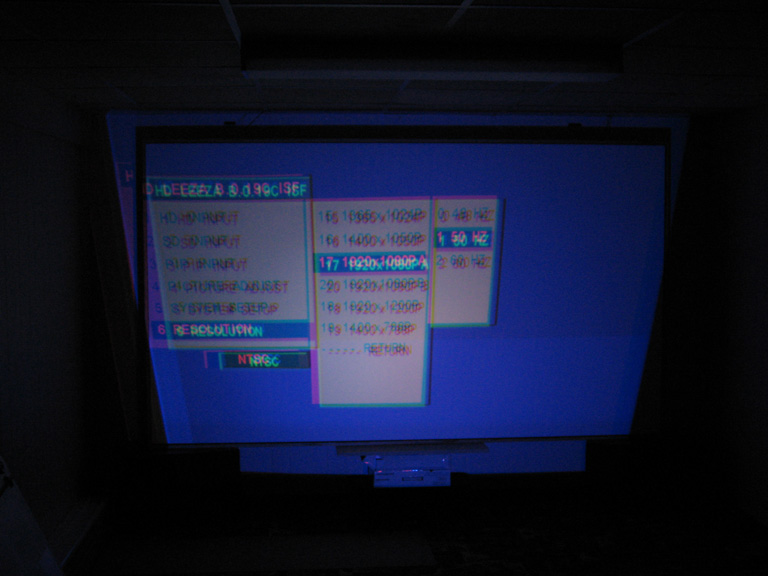
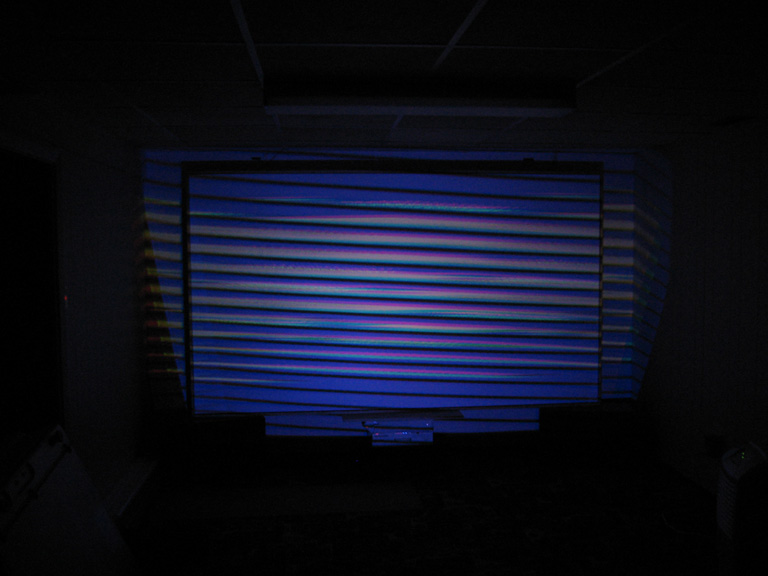
1060p @ 60Hz - scrambled video, Unrecognized Signal
1060p @ 50Hz - locked video, Unrecognized Signal (need to add this mode, then would be fine)
So it seems as though a 50Hz refresh is OK, but 60Hz causes problem. Judging by the specs and comments posted, this should not be the case.
I know that there is ongoing investigation and no certain answer but, if this is 'scrambled mess', what causes this?
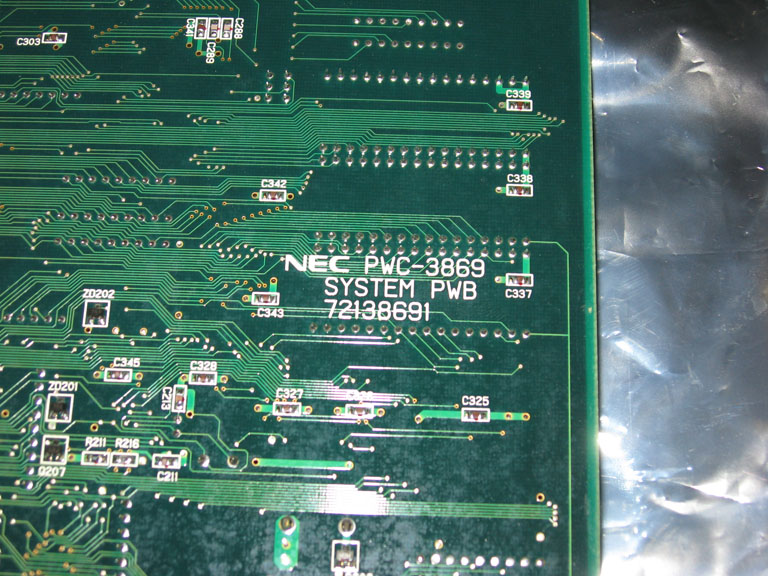
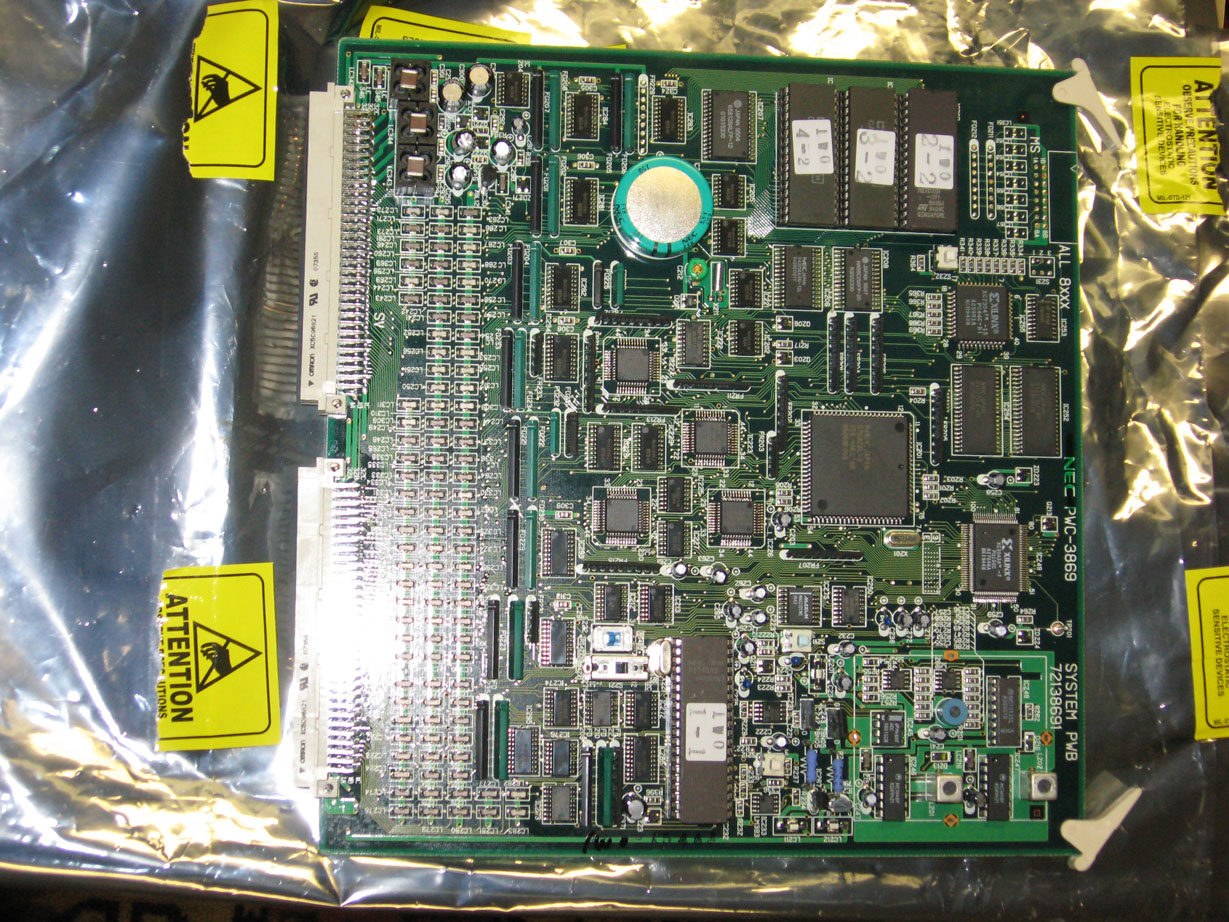
Also, I added a snapshot of both sides of my system board. I believe this is a 9PG board.
I'd like to get to the bottom of this, not necessarily because I want to run 1080p, but because I want to be able to see what it looks like and decide what modes are best. Plus, if the PJ is working in all modes I know it is rock solid.
Thanks again for your help and I greatly appreciate the support
Cheers,
Dan
| Description: |
| System Board - solder side, showing PN silkscreen |
|
| Filesize: |
183.75 KB |
| Viewed: |
11230 Time(s) |
|
| Description: |
| System Board - component side |
|
| Filesize: |
441.43 KB |
| Viewed: |
8602 Time(s) |
|
| Description: |
| 9PG+ with 1080p/50 - note proper sync @ 50Hz |
|
| Filesize: |
125.36 KB |
| Viewed: |
11230 Time(s) |
|
| Description: |
| 9PG+ with 1080p/60 from HD Leeza - note lack of sync |
|
| Filesize: |
120.53 KB |
| Viewed: |
11230 Time(s) |
|
|
|
| Back to top |
|
|
Elaine Benes
Joined: 25 Apr 2006
Posts: 1416
|
| Posted: Thu Sep 04, 2008 3:34 am Post subject: |
|
|
Have you tried to vary the output from your scaler at all ? Are there any adjustments you can make to it ?
That doesn't look like the typical "scrambled mess" to me, and if you get visible menus with the signal connected, then it pretty much isn't the typical "scrambled mess"...
|
|
| Back to top |
|
|
lostmandan
Joined: 09 Jul 2008
Posts: 146
Location: Kitchener/Waterloo, Ontario, Canada
|
| Posted: Thu Sep 04, 2008 5:28 am Post subject: |
|
|
I've been looking for pics of the typical scrambled mess and been reading a lot of different things in the process.
Yup, I definitely get solid menus in all modes, except for 1080p/60 - in fact I think I was even OK at 1200p/60.
You had mentioned that you were using a HD Leeza scaler - do you mind checking your firmware revision for comparison?
I will check the settings on the scaler tomorrow, but I do not remember seeing anything obvious. I will review the docs and see what I can find.
Cheers,
Dan
|
|
| Back to top |
|
|
kschmit2
Joined: 09 Mar 2006
Posts: 1141
Location: Heidelberg, Germany
|
| Posted: Thu Sep 04, 2008 11:53 am Post subject: |
|
|
| lostmandan wrote: | *bump*
Any thoughts on 1080p with a 9PG+ (not Xtra)? Just curious to know what this unit should be able to do.
I have seen conflicting information thus far, so please chime in if you have any thoughts. I appreciate it
- Dan |
give it a shot at 1080i96 (same requirements as 1080p48, but less flicker) using the following settings in Powerstrip:
http://www.curtpalme.com/forum/viewtopic.php?p=32777#32777
ohh, and here's a screenshot I took in late May:
| kschmit2 wrote: | NEC 6PG Plus at 1080i96:
 |
Kai
|
|
| Back to top |
|
|
lostmandan
Joined: 09 Jul 2008
Posts: 146
Location: Kitchener/Waterloo, Ontario, Canada
|
| Posted: Fri Sep 05, 2008 7:21 pm Post subject: |
|
|
Hi Kai,
That is really an impressive example! I will definitely try 1080i/96 when I have a HTPC set up
Not to keep on about this but..
What sorts of faults would cause the PJ not to sync to 1080p @ 60Hz (but is sync at 50Hz - as in the photos above)?
I have been reading a lot about aging caps around the horizontal oscillator IC. Would this be a symptom?
I'm no stranger to older electrolytics with terrible ESR readings.
- Dan
|
|
| Back to top |
|
|
kschmit2
Joined: 09 Mar 2006
Posts: 1141
Location: Heidelberg, Germany
|
| Posted: Fri Sep 05, 2008 7:44 pm Post subject: |
|
|
|
I would guess a wrong board like others have suggested already.
|
|
| Back to top |
|
|
macgyver655
Joined: 22 Aug 2007
Posts: 8508
|
| Posted: Fri Sep 05, 2008 10:25 pm Post subject: |
|
|
|
I do not have any experience with the Leeza so I can't comment on that. If it was me I would get my vga to rgbhv cable and hook up my pc or laptop to the projector and see if 1080p will sync and/or lock to that. Then I could give you more advice.
|
|
| Back to top |
|
|
lostmandan
Joined: 09 Jul 2008
Posts: 146
Location: Kitchener/Waterloo, Ontario, Canada
|
| Posted: Sat Sep 06, 2008 5:03 pm Post subject: |
|
|
I will take the Leeza out of the equation.
Any suggestions for Powerstrip settings for 1080p on this projector? I would rather not feed it anything that could hurt the deflection electronics.
Thanks
|
|
| Back to top |
|
|
macgyver655
Joined: 22 Aug 2007
Posts: 8508
|
| Posted: Sat Sep 06, 2008 5:09 pm Post subject: |
|
|
|
At this point do not use powerstrip. Just use the windows settings.
|
|
| Back to top |
|
|
lostmandan
Joined: 09 Jul 2008
Posts: 146
Location: Kitchener/Waterloo, Ontario, Canada
|
| Posted: Sat Sep 06, 2008 5:11 pm Post subject: |
|
|
Thanks macgyver, I will do that with a direct RGBHV analog connection to the unit.
As an aside .. I've been using an HD FURY on the end of a 10ft DVI cable but without the external 5V supply. I wonder if maybe this could cause sync issues with higher scanrate video.
|
|
| Back to top |
|
|
|
|
|
|
|
You cannot post new topics in this forum
You cannot reply to topics in this forum
You cannot edit your posts in this forum
You cannot delete your posts in this forum
You cannot vote in polls in this forum
You cannot attach files in this forum
You can download files in this forum
|
Forum powered by phpBB © phpBB Group
|
|



