| Author |
Message |
garyfritz

Joined: 08 Apr 2006
Posts: 12088
Location: Fort Collins, CO
|
| Posted: Sat Aug 02, 2008 12:25 am Post subject: Adjusting gamma |
|
|
I finally got a chance to adjust the gamma on my EXT-HD, and I find that even with both the screw and the IR controls maxed, I STILL don't have as much boost as I think I need.
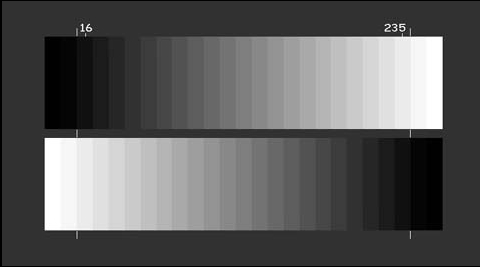
I displayed the "5% step" pattern from the GetGray disk. (See below -- note, this is copied from the GetGray manual, it's NOT a screenshot! The first two bars are "blacker than black." The 3rd bar is "black" or 0%, the 4th bar is 5%, etc.) This pattern shows 5% levels going from 0 to 100%. With the EXT-HD fully maxed out, I can see the 10% step but not the 5% step.
I can see a 5% window just fine, but that's with the rest of the screen black. With other bright things on the screen -- which is when you NEED the boost -- I can't get enough "oomph."
I know the box is working. I can see the boost increasing as I rotate the screw CCW, until it starts to click. I can see the boost changing as I use the IR control, and I've got it maxed. I still can't see some of the shadow detail.
Am I expecting too much? Those of you using the EXT-HD, do you have the GetGray disk or similar 5% pattern? Or does that pattern have too high APL to see the 5% level with an AC projector, even with a gamma boost?
Gary
| Description: |
|
| Filesize: |
17.81 KB |
| Viewed: |
12419 Time(s) |
|
|
|
| Back to top |
|
 |
Nashou66

Joined: 12 Jan 2007
Posts: 16171
Location: West Seneca NY
|
|
| Back to top |
|
|
garyfritz
Joined: 08 Apr 2006
Posts: 12088
Location: Fort Collins, CO
|
| Posted: Sat Aug 02, 2008 1:24 am Post subject: |
|
|
Yes, did it before;
no, haven't done it after yet.
Yes, blue is very defocused.
(I did actually tweak the blue gain without doing a full grayscale, because the blue was too bright at 0% while R & G were black. Now I have a pretty dark screen at 0%, whereas before it was plenty bright. But I need to go back and do a proper grayscale.)
|
|
| Back to top |
|
|
jbryngelson
Joined: 02 Jan 2008
Posts: 14
|
| Posted: Sun Aug 03, 2008 10:18 pm Post subject: |
|
|
Seems like just the opposite of my problem. I can not adjust the Gamma, and it is far too much on my unit. If I open the box, is there an internal pot to change the GAMMA, or is it only by remote. My remote is not doing anything.
Jeff
|
|
| Back to top |
|
|
garyfritz
Joined: 08 Apr 2006
Posts: 12088
Location: Fort Collins, CO
|
| Posted: Sun Aug 03, 2008 10:33 pm Post subject: |
|
|
The remote should make a yellow LED flicker on the face of the box. (The side that the HDMI cables plug into, next to the 7-segment LED display.) When it's maxed all the way up or down, the yellow LED stays on.
Open the box and you'll find a little blue rectangular box, about 3/4" by 1/4" by 1/2", under the ribbon cable behind the LED display. It has a tiny brass screw on one side. Adjust that 25 turns CLOCKWISE to minimize the boost. Then back it off about 12 turns. That should put you in the middle of the screw-adjust range.
I just re-measured my grayscale. The gamma is a bit low (levels too high), gamma = about 2.18, so I guess I should back off on the boost some. But it still looks mighty dark in the shadows. Of course it doesn't help that I'm watching Blade Runner. 
|
|
| Back to top |
|
|
jbryngelson
Joined: 02 Jan 2008
Posts: 14
|
| Posted: Mon Aug 04, 2008 11:19 am Post subject: |
|
|
Well, my unit is not responding to the remote. I have changed the batteries to other known working AAA, and I get the same results. I will try brand new batteries today. Any tricks to get the remote to work with the unit? Drop the box from 6" to the counter (JUST KIDDING). Throw the remote at the wall? (STILL KIDDING). It might make me feel better. This is my third Moome product that does not work right. GRRRRRR. I so want it to work!!!!!
Any suggestions?
Also, if I do open the box and adjust the GAMMA Pot, it will affect the Component and HDMI equally - correct? Gamma on the Component is very good.
Jeff in Detroit
|
|
| Back to top |
|
|
ralpharch
Joined: 02 Nov 2007
Posts: 211
Location: Derwood
|
| Posted: Fri Aug 29, 2008 3:00 am Post subject: |
|
|
| garyfritz wrote: | The remote should make a yellow LED flicker on the face of the box. (The side that the HDMI cables plug into, next to the 7-segment LED display.) When it's maxed all the way up or down, the yellow LED stays on.
Open the box and you'll find a little blue rectangular box, about 3/4" by 1/4" by 1/2", under the ribbon cable behind the LED display. It has a tiny brass screw on one side. Adjust that 25 turns CLOCKWISE to minimize the boost. Then back it off about 12 turns. That should put you in the middle of the screw-adjust range.
I just re-measured my grayscale. The gamma is a bit low (levels too high), gamma = about 2.18, so I guess I should back off on the boost some. But it still looks mighty dark in the shadows. Of course it doesn't help that I'm watching Blade Runner. |
So I just adjusted my gamma screw inside by Ext-HD box (original version that was sent back for fixes) for the first time tonight. Thought I was following directions by turning the pot screw fully CCW and then I adjusted the IR full up to the stop and full down. Looked to me like I really need full control to see the whole field of stars at the beginning of Stranger than Fiction ( I also thought that I wasn't getting much gamma adjust but I could see a significant change with above so I think I will leave it full on.
But my problem (???);
I didn't see the pot screw under the ribbon you are referring to. I adjusted the one out in the open fully CCW like 20 turns.
Did I ruin something? Still seems to be working ok (on HDMI) . What does the pot I turned do? Or maybe it is the right pot??
Edit - from the sync post back in december - where moome posted the pots - looks like I got the right one and Gary must have tweeked the wrong one. Maybe that's why his adjustments didn't have enough range?
The data sheet is kind of misleading with a yellow box for gamma adjust under the ribbon Gary mentions; but the pot itself is clearly circled on the next page
https://www.curtpalme.com/forum_archived/viewtopic.php@t=7697.html
Last edited by ralpharch on Fri Aug 29, 2008 3:16 am; edited 3 times in total
|
|
| Back to top |
|
|
ralpharch
Joined: 02 Nov 2007
Posts: 211
Location: Derwood
|
| Posted: Fri Aug 29, 2008 3:03 am Post subject: |
|
|
| jbryngelson wrote: | Well, my unit is not responding to the remote. I have changed the batteries to other known working AAA, and I get the same results. I will try brand new batteries today. Any tricks to get the remote to work with the unit? Drop the box from 6" to the counter (JUST KIDDING). Throw the remote at the wall? (STILL KIDDING). It might make me feel better. This is my third Moome product that does not work right. GRRRRRR. I so want it to work!!!!!
Any suggestions?
|
My remote will work a key press or two/three whenever unit turned off and back on - then it can take 30 seconds or so to respond to another signal for it to work. So it does work but its a PITA to wait several minutes to say go full scale on the gamma because it hangs up
|
|
| Back to top |
|
|
garyfritz
Joined: 08 Apr 2006
Posts: 12088
Location: Fort Collins, CO
|
| Posted: Fri Aug 29, 2008 3:54 am Post subject: |
|
|
| ralpharch wrote: | I didn't see the pot screw under the ribbon you are referring to. I adjusted the one out in the open fully CCW like 20 turns.
Edit - from the sync post back in december - where moome posted the pots - looks like I got the right one and Gary must have tweeked the wrong one. Maybe that's why his adjustments didn't have enough range? |
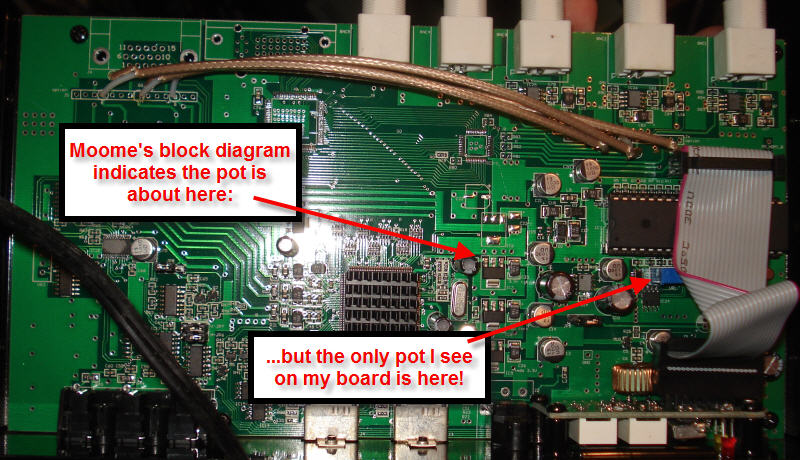
?? I don't see a clearly-circled photo anywhere, just a rough block diagram. That diagram does show the pot closer to the center of the board, but I don't see any pot there on my board. And my gamma did definitely change when I adjusted the pot under the ribbon.
This is what my board looks like. Doesn't yours look like this??
| Description: |
|
| Filesize: |
114.98 KB |
| Viewed: |
12173 Time(s) |
|
|
|
| Back to top |
|
|
ralpharch
Joined: 02 Nov 2007
Posts: 211
Location: Derwood
|
| Posted: Fri Aug 29, 2008 4:10 am Post subject: |
|
|
| garyfritz wrote: |
?? I don't see a clearly-circled photo anywhere, just a rough block diagram. That diagram does show the pot closer to the center of the board, but I don't see any pot there on my board. And my gamma did definitely change when I adjusted the pot under the ribbon.
This is what my board looks like. Doesn't yours look like this?? |
Mine is a lot differnt from yours (Edit - see photo in link several posts down) - so I guess it was me who adjusted the wrong pot (Again for anyone what it the other pot for and do I need to get it fixed?
In my case I have the vga out and dvi (test) out - so I have some ICs you don't have in the upper left of your photo below where the DVI out goes- plus a separate gamma daughterboard that attaches behind the vga port in that row of holes where you have three wires soldered in. The pot I adjusted is to the left and below the daughterboard where your board just has a row of empty holes.
Last edited by ralpharch on Sat Sep 06, 2008 5:31 pm; edited 1 time in total
|
|
| Back to top |
|
|
ralpharch
Joined: 02 Nov 2007
Posts: 211
Location: Derwood
|
| Posted: Fri Aug 29, 2008 3:53 pm Post subject: |
|
|
Since I haven't heard anything I emailed moome for feedback. Will post here if I receive a response:
Moome - I have one of the original Ext-HD boxes with VGA and test DVI out. It has two pots on it versus others only have one with the RGBHV BNC version of the card.
Can you please let me know which pot is supposed to be adjusted to change the gamma steps for the box I have? I adjusted the one near the gamma daughterboard (actually just set it to maximum by turning it counterclockwise a number of turns). But another forum member adjusted the pot below the ribbon cable and that appeared to work for him.. Did I mess something up by adjusting that pot? Why are there two pots on my version and one on the BNC version?
see this thread for photo and further description
http://www.curtpalme.com/forum/viewtopic.php?p=137532#137532
Email Moome directly instead of PM'ing him: moome@curtpalme.com.
EDIT
feedback from server
Final-Recipient: RFC822; moome@curtpalme.com
X-Actual-Recipient: RFC822; moome@seed.net.tw
Action: failed
Status: 5.1.1
Remote-MTA: DNS; mx.seed.net.tw
Diagnostic-Code: SMTP; 550 Spam suspect,Your are not Yahoo Server
Last-Attempt-Date: Fri, 29 Aug 2008 11:52:43 -0400
so I tried sending directly to moome instead of through curtpalm.com
|
|
| Back to top |
|
|
ralpharch
Joined: 02 Nov 2007
Posts: 211
Location: Derwood
|
| Posted: Sat Aug 30, 2008 3:02 am Post subject: |
|
|
reply back from Moome:
hi,
you should adjust the VR1 near the DIP40 CPU~
_____
Which doesn't help me much as I don't have a clue what the dip40 cpu is but if I had to guess would be the 40 pin IC near the pot Gary adjusted.
So I assume I probably adjusted the wrong one. (yes)
But maybe not (Wrong) - the manuals Moome provided for the original Ext HD box did show separate VR1s for the VGA and the BNC gamma boost, and all the boards I could see that were in his box showed 2 pots so Gary's seems different in that regard. Even if I did understand still doesn't help to know what the other VR1 does. Oh well, if its not broken don't try to fix it;
http://picasaweb.google.com/Ralpharchi/MoomeBox/photo#5240140230038768882
edit - the below earlier manual for ext-hd did show separate adjustment points for vga and bnc
http://www.curtpalme.com/forum/download.php?id=2961
EDIT- doesn't matter - VR1 it is
VR3 which is clearly labled on board is for component sync - Don;t adjust
Last edited by ralpharch on Wed Oct 01, 2008 12:17 am; edited 2 times in total
|
|
| Back to top |
|
|
AnalogRocks
Forum Moderator

Joined: 08 Mar 2006
Posts: 26706
Location: Toronto, Ontario, Canada
TV/Projector: Sony 1252Q, AMPRO 4000G
|
| Posted: Sun Aug 31, 2008 8:07 am Post subject: |
|
|
| jbryngelson wrote: |
Also, if I do open the box and adjust the GAMMA Pot, it will affect the Component and HDMI equally - correct? Gamma on the Component is very good.
Jeff in Detroit |
Hi Jeff, it sounds like you are having a similar experiance as me but with a different moome product. I have a Sony IFB 2007 HDMI/component card in my PC1271 switcher. The component inputs look fantastic but the HDMI is too dark and the signal so weak my monitor and projector wouldn't sync to it properly, if at all. I added an extron box to the output to boost the signal and all the gamma levels on HDMI finaly looked good.
_________________
Tech support for nothing
CRT.
HD done right!
|
|
| Back to top |
|
|
|
|





