| Author |
Message |
Arno P
Joined: 01 Jan 2007
Posts: 282
Location: The Netherlands
|
| Posted: Wed Jul 23, 2008 8:42 pm Post subject: |
|
|
| Nashou66 wrote: | Use an index card and go up to the screen and place the card right up to the screen,then bring it forward till it is in focus(at the edges,top bottom. this will help you determine which way you need to either move the PJ or adjust Schiemphlug.
Athanasios |
Tried the card trick before...good thing to use it also for scheimpflug...
Is there also a way to adjust the red and blue tube/pattern with the basics as it is for green...skew, bow, etc?
I am used to the sony and this was possible....or is the only option to adjust R/B in the "dirty" way by conv to green (dont like this since the coarse adjustments that are needed at the start are too large to just compensate this with the subtel zone conv)
_________________
"Obviously you're not a golfer"
|
|
| Back to top |
|
 |
Gino
Joined: 22 Apr 2006
Posts: 1363
Location: Trinity Beach, AUSTRALIA
|
| Posted: Thu Jul 24, 2008 2:38 am Post subject: |
|
|
you can adjust red/blue vertical size in the service menu and the red/blue width size with the slugs on the HDM. once you've done that and toe'd in properly, you'll be driving the convergence less when matching to green.
it's a shame that the marquee's don't have individual geometry control for each colour.
EDIT: forgot to add, need to rotate scan yokes to make sure red/blue are level to green also, and to adjust focus coil so that everything is close to centered in relation to green. if you do all the above correctly, you should find that convergence adjustments are minimal. start with interpolated then finish with guided convergence modes.
also, make sure to do all these adjustments with convergence nulled.
_________________
( B ) ( G ) ( R ) Blendzilla Down Under ( R ) ( G ) ( B ) - Tubes of Fury
|
|
| Back to top |
|
|
Arno P
Joined: 01 Jan 2007
Posts: 282
Location: The Netherlands
|
| Posted: Thu Jul 24, 2008 7:21 am Post subject: |
|
|
| Gino wrote: | you can adjust red/blue vertical size in the service menu and the red/blue width size with the slugs on the HDM. once you've done that and toe'd in properly, you'll be driving the convergence less when matching to green.
it's a shame that the marquee's don't have individual geometry control for each colour.
EDIT: forgot to add, need to rotate scan yokes to make sure red/blue are level to green also, and to adjust focus coil so that everything is close to centered in relation to green. if you do all the above correctly, you should find that convergence adjustments are minimal. start with interpolated then finish with guided convergence modes.
also, make sure to do all these adjustments with convergence nulled. |
Ah thx, so no individual Geom Cont for R/B (can't have it all)
The tube aligment is nearly perfect now H and V 
Edit: Can't find a way to shift the total pattern (R+G+B) when displaying the internal testpattern (in the guide it's a matter of using the arrows on the remote...so the function must be there....and phase is only for the source/external signal right?)
_________________
"Obviously you're not a golfer"
|
|
| Back to top |
|
|
Gino
Joined: 22 Apr 2006
Posts: 1363
Location: Trinity Beach, AUSTRALIA
|
| Posted: Thu Jul 24, 2008 9:24 am Post subject: |
|
|
First shift using your focus yokes.
Electronically, to shift green, use green convergence in the convergence service menu.
Use guided convergence at centre only to shift red or blue.
_________________
( B ) ( G ) ( R ) Blendzilla Down Under ( R ) ( G ) ( B ) - Tubes of Fury
|
|
| Back to top |
|
|
Arno P
Joined: 01 Jan 2007
Posts: 282
Location: The Netherlands
|
| Posted: Thu Jul 24, 2008 10:28 am Post subject: |
|
|
| Gino wrote: |
Electronically, to shift green, use green convergence in the convergence service menu.
|
Am I wrong that with the green the red is always present and that the red is shifted in that case? I missed the green only convergence (or is it possible to switch red off?)
_________________
"Obviously you're not a golfer"
|
|
| Back to top |
|
|
Gino
Joined: 22 Apr 2006
Posts: 1363
Location: Trinity Beach, AUSTRALIA
|
| Posted: Thu Jul 24, 2008 12:51 pm Post subject: |
|
|
You need to go in to Convergence service mode, then you get green convergence. From here you can tweak your geometry to perfection also. This mode has no influence on red/blue.
_________________
( B ) ( G ) ( R ) Blendzilla Down Under ( R ) ( G ) ( B ) - Tubes of Fury
|
|
| Back to top |
|
|
Arno P
Joined: 01 Jan 2007
Posts: 282
Location: The Netherlands
|
| Posted: Thu Jul 24, 2008 7:39 pm Post subject: |
|
|
| Gino wrote: | | You need to go in to Convergence service mode, then you get green convergence. From here you can tweak your geometry to perfection also. This mode has no influence on red/blue. |
Excellent, going to check this...THX 
_________________
"Obviously you're not a golfer"
|
|
| Back to top |
|
|
speedyandre
Joined: 18 Dec 2006
Posts: 291
Location: Netherlands
|
| Posted: Thu Jul 24, 2008 9:36 pm Post subject: |
|
|
| Arno P wrote: | | Gino wrote: | | You need to go in to Convergence service mode, then you get green convergence. From here you can tweak your geometry to perfection also. This mode has no influence on red/blue. |
Excellent, going to check this...THX |
If you find what the password is for the service menu, let me know 
André
_________________
I'll be broke
|
|
| Back to top |
|
|
David_Web
Joined: 02 May 2007
Posts: 418
Location: Sweden
|
| Posted: Thu Jul 24, 2008 9:37 pm Post subject: |
|
|
0901
_________________
SNR of people are ridiculously low.
|
|
| Back to top |
|
|
speedyandre
Joined: 18 Dec 2006
Posts: 291
Location: Netherlands
|
| Posted: Thu Jul 24, 2008 9:54 pm Post subject: |
|
|
Thanks, it works on my Vision 1 
This gives some more focus options for each colour and also the astig
André
_________________
I'll be broke
|
|
| Back to top |
|
|
Arno P
Joined: 01 Jan 2007
Posts: 282
Location: The Netherlands
|
| Posted: Thu Jul 24, 2008 10:10 pm Post subject: |
|
|
| speedyandre wrote: | | Arno P wrote: | | Gino wrote: | | You need to go in to Convergence service mode, then you get green convergence. From here you can tweak your geometry to perfection also. This mode has no influence on red/blue. |
Excellent, going to check this...THX |
If you find what the password is for the service menu, let me know
André |
0901 is correct
_________________
"Obviously you're not a golfer"
|
|
| Back to top |
|
|
Arno P
Joined: 01 Jan 2007
Posts: 282
Location: The Netherlands
|
| Posted: Thu Jul 24, 2008 10:12 pm Post subject: |
|
|
| speedyandre wrote: | Thanks, it works on my Vision 1
This gives some more focus options for each colour and also the astig
André |
The options are excellent compared to a 1272
_________________
"Obviously you're not a golfer"
|
|
| Back to top |
|
|
speedyandre
Joined: 18 Dec 2006
Posts: 291
Location: Netherlands
|
| Posted: Thu Jul 24, 2008 10:19 pm Post subject: |
|
|
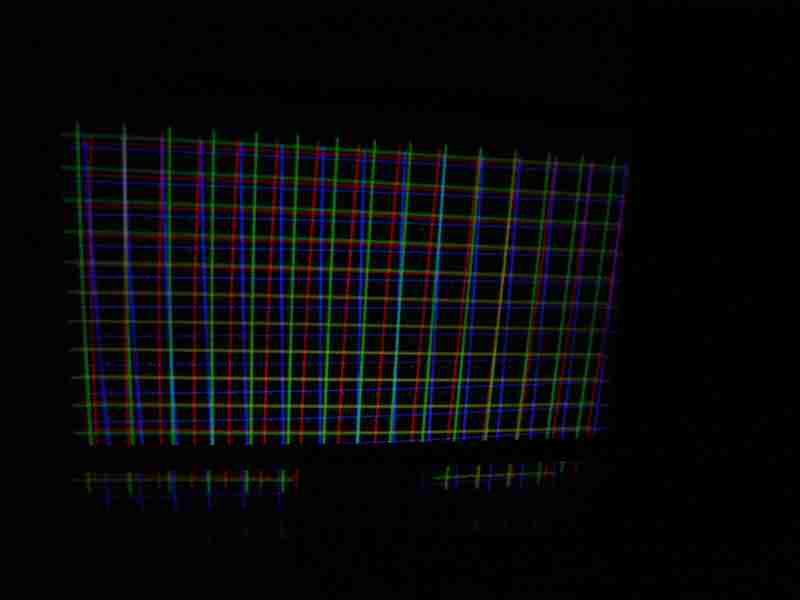
Next is to align the tubes, Reinier told me about the 2 screws near the lenses but I also have to align the center of red and blue on green.
In my topic you can see what a mess it is rightnow 
Resetting in the service menu made it some better but centering is a mechanical thing.
I think the screws on the bottom of the tube housings should be adjusted.
André
| Description: |
|
| Filesize: |
18.59 KB |
| Viewed: |
3562 Time(s) |
|
_________________
I'll be broke
Last edited by speedyandre on Thu Jul 24, 2008 10:32 pm; edited 1 time in total
|
|
| Back to top |
|
|
Arno P
Joined: 01 Jan 2007
Posts: 282
Location: The Netherlands
|
| Posted: Thu Jul 24, 2008 10:20 pm Post subject: |
|
|
| speedyandre wrote: | Next is to align the tubes, Reinier told me about the 2 screws near the lenses but I also have to alighn the center of red and blue on green.
In my topic you can see what a mess it is rightnow
Resetting in the service menu made it some better but centering is a mechanical thing.
I think the screws on the bottom of the tube housings should be adjusted.
André |
Andre, see the PM on the other forum
_________________
"Obviously you're not a golfer"
|
|
| Back to top |
|
|
|
|




