| Author |
Message |
whatagoof
Joined: 20 Jul 2008
Posts: 45
|
| Posted: Thu Jul 31, 2008 6:14 pm Post subject: |
|
|
Hi Nash
The exact processing unit in consideration at the moment isn't a Lumagen but it's still quite good. It still sounds like I could get the same performance out of DScaler for DVD's...but I guess I need something for my laserdiscs. Too bad I have so few.
I am still weighing that Marquee against another local option. I'll have made a decision by tomorrow. But I still haven't a screen or any idea how I'll fit a CRT projector into my room, haha. 
That reminds me - I've heard that you can cause your tubes to wear faster if you've put your projector too far away from your screen. Does that mean that if you've less space between your projector and your screen, you'll wear them more slowly? Is the only mechanism influencing this the brightness/contrast settings?
I have another concern, sorry! I should've asked this a long time ago...
If I enjoy viewing quite close-up, then how can I make sure that I do not sit "in the way" of the projected light? I would like to be pretty close...about 3 or 4 feet, I think. (I know this is changing my mind from earlier, where I said about 5 or six, sorry.)
|
|
| Back to top |
|
 |
Nashou66

Joined: 12 Jan 2007
Posts: 16171
Location: West Seneca NY
|
| Posted: Thu Jul 31, 2008 7:08 pm Post subject: |
|
|
The lumagen will do 1080p. The other one you mentioned is old tech and you'd be better off with a lumagen and for 600 or so dollars for a 1500 dollar Video processor is a great deal.
Trust us if you get a CRT you wont want to sit close, you can go big enough were you wont need to its that Big. 1.2 times the screen width should be fine for you
to sit and you'd have to either put the PJ on the ceiling or an a high table so it projects over your head.
Tube wear is not caused by distance it depends on how bright you run them with contrast and G2 settings. They simplified it by saying distance since the further away the larger the screen will be and then the harder you'll need to drive the tubes to light the surface area of the screen . I have a huge screen 12 feet and run it at a contrast of 50, some say this is too low but i think it looks great, so it all depends on what you want. In a completely dark room you do not have to run the contrast high. But the Marquee and Lumagen is a sweet set up, thats what i use.
Athanasios
_________________
Don't blame your underwear for your crooked ass~ unknown Greek philosopher
"Republicans believe every day is the Fourth of July, but the Democrats believe every day is April 15." --- President Reagan
One Smart Dog!!!
Marquee High Performance Bellows now shipping!!
Marquee Modifications and Performance Enhancement
Marquee C-element and Bellow removal
|
|
| Back to top |
|
|
whatagoof
Joined: 20 Jul 2008
Posts: 45
|
| Posted: Thu Jul 31, 2008 7:32 pm Post subject: |
|
|
Hi Nash, thanks for your reply.
I have read in another thread of a fellow who compared the quality of Lumagen versus the model I listed earlier, and he said he liked the non-Lumagen better. So to feel confident I think I need more information from you. Could you please detail what is better about the Lumagen, or if you have seen them both tell me in what ways the picture is better with Lumagen? Thank you!
I don't even have the space in my room to sit as far back as "1.2 times the screen width." I like the screen to almost totally fill my field of view.
The wall onto which I will be projecting has a useable vertical area of about 4 and a half feet (subtracting from the extreme top of the wall and also from the area at and below the intended level of the projector) so I think that a 4:3 ratio screen for my wall should not exceed about 5-6 feet in width. The distance from the projector to this screen will be approximately 6.5 feet.
My only option at the moment in my room is to set the projector on top of a very sturdy cabinet with a height of about 2 and a half feet, level with the bottom of the approximately 4 1/2 feet high projection screen. I will recline on the floor in front of the projection screen, looking up at it, emulating a kind of "front row" effect.
But now I begin to worry that I just might not have the space for a projector in my tiny room. Also, after taking measurements, the cabinet that I wanted to put it atop - the width of the cabinet is only a little more than half of the width of the projector. Doesn't sound safe to me.
If I'm going to get the projector, I better come up with a plan fast. 
Anyway, thanks again, bye!
|
|
| Back to top |
|
|
whatagoof
Joined: 20 Jul 2008
Posts: 45
|
| Posted: Thu Jul 31, 2008 10:03 pm Post subject: |
|
|
Good news: I've found another table to use.
Bad news: The car I've got might not be big enough to transport one of the projectors that I'm considering. 
|
|
| Back to top |
|
|
AnalogRocks
Forum Moderator

Joined: 08 Mar 2006
Posts: 26706
Location: Toronto, Ontario, Canada
TV/Projector: Sony 1252Q, AMPRO 4000G
|
| Posted: Thu Jul 31, 2008 11:02 pm Post subject: |
|
|
| whatagoof wrote: | Good news: I've found another table to use.
Bad news: The car I've got might not be big enough to transport one of the projectors that I'm considering. |
What kind of car?
_________________
Tech support for nothing
CRT.
HD done right!
|
|
| Back to top |
|
|
whatagoof
Joined: 20 Jul 2008
Posts: 45
|
| Posted: Thu Jul 31, 2008 11:19 pm Post subject: |
|
|
|
It's a little cheap Japanese throwaway car. But I just found out that it'll work, so no worries.
|
|
| Back to top |
|
|
Nashou66
Joined: 12 Jan 2007
Posts: 16171
Location: West Seneca NY
|
| Posted: Thu Jul 31, 2008 11:34 pm Post subject: |
|
|
I hope you get the marquee as it will last a long time if the tubes are
fine and for the hight of the PJ the more towards the center of the screen
the sharper a pick you'll get as geometry strain will be at its minumum there.
well good luck with what ever you get, but the HDP Lumagen is a great processor:
and the one on Videogon is half this price.
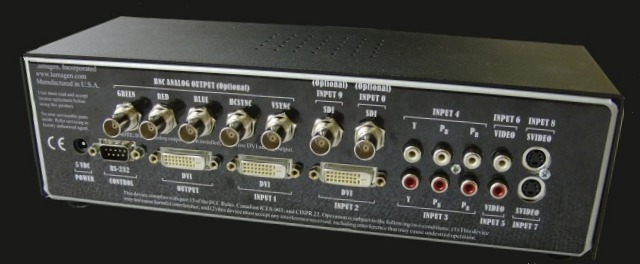
MSRP $1199
Including:
Remote Control
Universal power supply
Serial cable for updating
Manual
Limited 1 year warranty
Key Features:
- HD analog/digital inputs with transcoding and scaling
- SD analog/digital inputs with transcoding and scaling
- SD and HD (newly added) per-pixel motion adaptive deinterlacing
- User adjustable image enhancement
- Transcode Component and RGB analog HD sources
- Component and DVI inputs auto-switch between SD and HD source modes.
- DVI input accepts 480/576i, 1080i, 1080p24, 480p to 720p input formats
- Source aspect ratio selectable as 4:3, letter-box, 16:9 and 1.85
- Programmable output aspect ratio from 1.33 to 2.35
- Panamorph mode 1 and 2 compatibility
- Zoom in any source up to 33%
- RS232 interface for field upgradeability and control
- NTSC, PAL and SECAM auto-detection
- Programmable output resolution from 480p to 1080p, plus 1080i
- 10 bit DAC for analog outputs - Four configuration memories per input
- All setup parameters are unique for each memory.
- Can correct for red or green push in a display
- Input-cropping, black, contrast, color and hue setup
- Adjustable non-linear stretch display mode
- Y/C-delay calibration.
- Primary gamut correction
- 2/5/11 point parametric grayscale calibration
- Gamma calibration
- CUE and ICP filtering
- Extensive suite of built-in test patterns
- Programmable input and output color-space
- 2:2, 3:2, 3:3 pull-down for film sources
- Universal power supply
- Optional rack mount ears
Input configurability:
- Inputs 1,2 can be DVI, HDMI 444 or 422 component
- Input 3 can be Component (HD/SD), Scart or RGBS (uses in6 for sync), RGsB
- Input 4 can be Component (HD/SD), RGBS (uses in5 for sync), RGsB,
RGBHV (uses 5 & 6 for H & V sync) - Input 5,6 always Composite
- Input 7,8 always SVideo
- Inputs 9,10 optional SDI
Features above the VisionDVI:
- Output resolution up to 1080p for analog and digital outputs
- 10 bit DAC with oversampling for analog outputs
- 1080i deinterlacing at up to 1080p output
- Larger video processing chip for improved video processing quality
- Sharpness control on all input sources (VisionDVI only S-Video & composite)
Options:
- Dual SDI inputs $400 (shown above)
- BNC outputs $100 (shown above)
Copyright (C) all rights reserved
Athanasios
_________________
Don't blame your underwear for your crooked ass~ unknown Greek philosopher
"Republicans believe every day is the Fourth of July, but the Democrats believe every day is April 15." --- President Reagan
One Smart Dog!!!
Marquee High Performance Bellows now shipping!!
Marquee Modifications and Performance Enhancement
Marquee C-element and Bellow removal
|
|
| Back to top |
|
|
whatagoof
Joined: 20 Jul 2008
Posts: 45
|
| Posted: Thu Jul 31, 2008 11:41 pm Post subject: |
|
|
Thanks for the info Nash!
I read on another forum that if you have one of the HDMI cards, and use the output from your PC or PS3, that you don't then need an upscaler, as you can accomplish upscaling/deinterlacing relatively cheaply on a PC or PS3.
So I was thinking that I could just get an HDMI card for my projector (possibly the Marquee, but just-as-likely it could be the Barco 1209/2) and hook it into my PC, then use my PC to play my DVD's. And I could hook-up my laserdisc player to the video-in of my PC, then just output it the same way as DVD's, so that it would be upscaled/de-interlaced too. I think this might be a more cost-effective solution for me! What do you guys all think about that?
Okay, bye!!!!
|
|
| Back to top |
|
|
Nashou66
Joined: 12 Jan 2007
Posts: 16171
Location: West Seneca NY
|
|
| Back to top |
|
|
whatagoof
Joined: 20 Jul 2008
Posts: 45
|
| Posted: Fri Aug 01, 2008 12:00 am Post subject: |
|
|
Thanks again Nash!
Okay, I guess it really depends upon which projector I get then. For the moment though, it seems like I would get an overall better PQ from an HDMI card and no stand-alone upscaler than I would from a stand-alone upscaler and no HDMI card - and those are my only two options (unless I get neither!) because I do not have much money to work with. I'll let you know what I do next!
Also, could you please tell me what that HDMI option for Barco is? Thanks!
Thanks again, bye!
|
|
| Back to top |
|
|
whatagoof
Joined: 20 Jul 2008
Posts: 45
|
| Posted: Fri Aug 01, 2008 12:07 am Post subject: |
|
|
Also, I still need more info to know how close I can sit without casting a shadow on the screen. I've been "testing out" the position/posture I mentioned a few posts ago, and I really think that I'd rather have my view centered just a bit closer to the center of the screen. But regardless of whether the projector is casting the image from above or below, I'm just not sure how I could keep from getting in the way. Hm..
EDIT: Whoops, sorry for posting twice in a row again!
|
|
| Back to top |
|
|
whatagoof
Joined: 20 Jul 2008
Posts: 45
|
| Posted: Fri Aug 01, 2008 3:10 am Post subject: |
|
|
Sorry to post three times in a row, but I thought of yet another question:
Earlier in this thread I asked if projectors can do 24p all right and I got the reply that CRT projectors can handle anything. But I just now found another thread on this forum where it seems like it's VERY complicated to get a CRT projector to display 24/p. So can someone please tell me what is going on with this? I make film myself and I anticipate that at some point in the future I would like to feed a direct 24/p signal from the finished, edited composition on my PC out to my CRT projector. So can it take it or not? Thanks!
|
|
| Back to top |
|
|
AnalogRocks
Forum Moderator
Joined: 08 Mar 2006
Posts: 26706
Location: Toronto, Ontario, Canada
TV/Projector: Sony 1252Q, AMPRO 4000G
|
| Posted: Fri Aug 01, 2008 4:18 am Post subject: |
|
|
Nope 24/p will either not display or will flicker like crazy. If you are outputting from your PC you want to set it at 48 or 72Hz. That's double 24 or tripple. CRT projectors work great at these refresh rates.
_________________
Tech support for nothing
CRT.
HD done right!
|
|
| Back to top |
|
|
whatagoof
Joined: 20 Jul 2008
Posts: 45
|
| Posted: Fri Aug 01, 2008 4:46 am Post subject: |
|
|
So 24/p will play so long as I output it at double or tripple its rate? That seems like a fine solution; but in the other thread they made it seem so much more complicated than that...
Anyway, I'll be checking out the projectors near me within a few days, so answers to my previous two posts (before the one about 24/p) would be appreciated too.
Anyway, thanks again! Bye!
|
|
| Back to top |
|
|
AnalogRocks
Forum Moderator
Joined: 08 Mar 2006
Posts: 26706
Location: Toronto, Ontario, Canada
TV/Projector: Sony 1252Q, AMPRO 4000G
|
| Posted: Fri Aug 01, 2008 7:44 am Post subject: |
|
|
| whatagoof wrote: | Thanks again Nash!
Okay, I guess it really depends upon which projector I get then. For the moment though, it seems like I would get an overall better PQ from an HDMI card and no stand-alone upscaler than I would from a stand-alone upscaler and no HDMI card - and those are my only two options (unless I get neither!) because I do not have much money to work with. I'll let you know what I do next!
Also, could you please tell me what that HDMI option for Barco is? Thanks!
Thanks again, bye! |
Not and intnernal card but the HDFury with Barco port 3 cable was designed especially for the Barco.
Quote:
from here
RED (HD15 VGA female to Barco Port 3 DB9 male cable): Choose this if you wish to use the RGBHV compatible Port 3 DB9 connector of your Barco projector. Click here for information on Barco Port 3 and compatible projectors. This is custom made cable to ensure that it does not impede performance in any way up to 1080p for HT users. It is very short, gold plated, properly terminated/75 Ohm cable. Note: Barco owners may also choose to use the green (5-BNC) cable of course
_________________
Tech support for nothing
CRT.
HD done right!
|
|
| Back to top |
|
|
AnalogRocks
Forum Moderator
Joined: 08 Mar 2006
Posts: 26706
Location: Toronto, Ontario, Canada
TV/Projector: Sony 1252Q, AMPRO 4000G
|
| Posted: Fri Aug 01, 2008 7:48 am Post subject: |
|
|
| whatagoof wrote: | Also, I still need more info to know how close I can sit without casting a shadow on the screen. I've been "testing out" the position/posture I mentioned a few posts ago, and I really think that I'd rather have my view centered just a bit closer to the center of the screen. But regardless of whether the projector is casting the image from above or below, I'm just not sure how I could keep from getting in the way. Hm..
EDIT: Whoops, sorry for posting twice in a row again! |
There's a third option. You could mount the PJ on a cart and project over top of your head. Although it's not considered optimal for front projection some times you have to make do with where you can put it. I built a cart out of skids and some wheels to hold the projector. With my chair in front of it I can sit with my arms over my head relaxing and I don't interfere with the picture.
_________________
Tech support for nothing
CRT.
HD done right!
|
|
| Back to top |
|
|
Nashou66
Joined: 12 Jan 2007
Posts: 16171
Location: West Seneca NY
|
|
| Back to top |
|
|
whatagoof
Joined: 20 Jul 2008
Posts: 45
|
| Posted: Fri Aug 01, 2008 8:53 pm Post subject: |
|
|
Well - I just missed out on the deal for the Barco. And $500 seems too much for the Marquee 8500. So now I guess I'm back to waiting for another good deal to show up. Sorry to rush you guys with the advice there.
Thanks again, bye.
|
|
| Back to top |
|
|
whatagoof
Joined: 20 Jul 2008
Posts: 45
|
| Posted: Sat Aug 02, 2008 2:50 am Post subject: |
|
|
Hi again everybody.
I've a question about achieving sharpness/clarity:
I know that the size of the tubes (7, 8, 9) has the biggest effect, but would moving the projector closer to the screen - and projecting onto a smaller-sized screen as a result - add sharpness too?...or only brightness?
Okay, thanks, bye!
|
|
| Back to top |
|
|
Nashou66
Joined: 12 Jan 2007
Posts: 16171
Location: West Seneca NY
|
| Posted: Mon Aug 04, 2008 10:54 pm Post subject: |
|
|
| whatagoof wrote: | Well - I just missed out on the deal for the Barco. And $500 seems too much for the Marquee 8500. So now I guess I'm back to waiting for another good deal to show up. Sorry to rush you guys with the advice there.
Thanks again, bye. |
that marquee was the right price dude! I would have taken it if i didn't think that was the one you wanted.
And no shipping charges for you ! damn you missed out!
do you know what it went for? i saw one bid for the 500 and that was it.
Athanasios
_________________
Don't blame your underwear for your crooked ass~ unknown Greek philosopher
"Republicans believe every day is the Fourth of July, but the Democrats believe every day is April 15." --- President Reagan
One Smart Dog!!!
Marquee High Performance Bellows now shipping!!
Marquee Modifications and Performance Enhancement
Marquee C-element and Bellow removal
|
|
| Back to top |
|
|
|
|




