| Author |
Message |
garysorenson
Joined: 17 Jul 2007
Posts: 63
Location: Milwaukee, Wisconsin
|
| Posted: Wed Jul 16, 2008 6:04 pm Post subject: Hooking up my PC to my NEC PG9 |
|
|
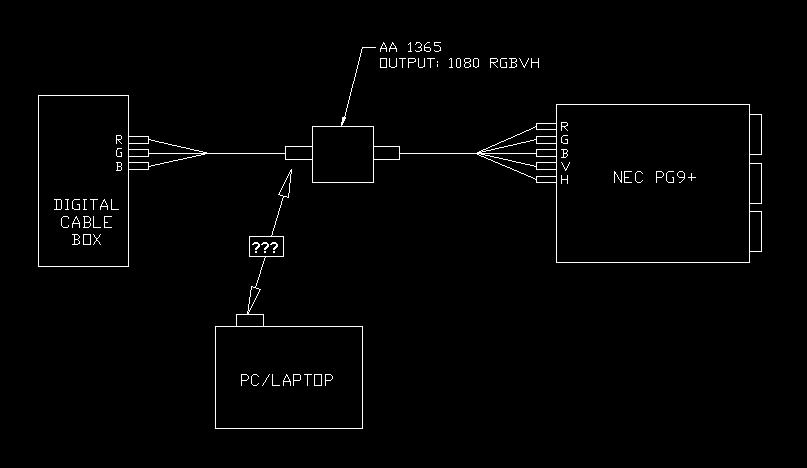
OK, Ive been watching standard defenition on my NEC long enough, although I'M using an AA1365 scaler outputting 1080, I'm only inputting 480 from my digital cable box and DVD player. I'm proposing on hooking up my laptop to the NEC or if I cant for whatever reason, I'd like to hook up a PC. I've drawn a diagram of my current setup. I have the HD15 to HD15 cable supplied with the AA1365, is this the cable that I use?. I also need to know what my input and output setting need to be for the AA and the NEC. Any and all help is greatly appreciated.
| Description: |
|
| Filesize: |
26.22 KB |
| Viewed: |
2069 Time(s) |
|
|
|
| Back to top |
|
 |
dbaisey
Joined: 09 Mar 2006
Posts: 821
Location: Southern Cal LA / Seattle WA
|
| Posted: Wed Jul 16, 2008 7:16 pm Post subject: |
|
|
Not real familiar with this scaler but I think its 480I in only.
To answer your question you can look for a used VGA switcher like the Extron SW2 VGA, it has high bandwidth if you need it down the road.
Hook the output of the AA to one of the inputs and the computer to the other. The output of the SW2 would go to the projector.
On the PC you can set for 1080I or 1280X720P or even 1440X960P. Depends on the set up and screen size format. If your mechanical was done at a low kHz value lets say 480P you may want to stay in the lower resolutions.
Many other better options out there for HDSTB and DVD but not what your question was. Doug
|
|
| Back to top |
|
|
kschmit2
Joined: 09 Mar 2006
Posts: 1141
Location: Heidelberg, Germany
|
| Posted: Wed Jul 16, 2008 8:09 pm Post subject: |
|
|
My setup is as follows:
Sources (any incl. HDMI) into NEC ISS-6020 (equipped with VGA, RGBHV, Video, HDMI and Component inputs) into NEC 6PG+
I run my HTPC at 1080i96 into a moome ISS-HD input card
Kai
|
|
| Back to top |
|
|
Brooklyn

Joined: 17 Sep 2007
Posts: 494
Location: Morgan Hill, CA
|
| Posted: Wed Jul 16, 2008 11:18 pm Post subject: |
|
|
|
I have used an AA 1365 with my 6PG. You don't have to run through the scaler, but you can if you like. Just use the HD15-HD15 cable. You should decide what resolution you want to output to the projector. I'd say 1024x768 or 1280x720. You have to set this resolution on your computer and in the scaler. Or you can just plug the computer directly into the projector using the BNC breakout cable.
|
|
| Back to top |
|
|
|
|




