| Author |
Message |
jacket_fan
Joined: 02 Sep 2007
Posts: 99
|
| Posted: Mon Jun 16, 2008 10:55 am Post subject: NEC XG - Blue tube shut down for Father's Day |
|
|
Father's day at the Holmes household ended in disaster. While watching the US Open, the blue tube went out on my NEC XG135. This is after the green tube died last August. I know that one of the advantages of CRT projectors is that they are repairable, but this is getting expensive.
When the green tube died, it cracked and was obvious. I could hear and feel the tube moving around when I put pressure on it.
It does not appear the blue tube cracked, and if it did, it is not as severe as the green. I tried a visual inspection, but do not see anything obvious.
The fault indicator still reads 00.
Gentlemen, any help would be appreciated in trouble shooting the problem.
Thanks,
_________________
Mark
|
|
| Back to top |
|
 |
dropzone7

Joined: 12 Jun 2007
Posts: 1069
Location: Charlotte, NC
|
| Posted: Mon Jun 16, 2008 1:06 pm Post subject: |
|
|
I guess you checked that all pins on the tube end are inserted fully into the CRT socket and that the red G2 wire is in place? If you are sure that there is nothing physically wrong with the blue tube then you might try switching the CRT socket from the green tube to your blue just to rule out the CRT socket.
_________________
"Coffee is for Closers."
|
|
| Back to top |
|
|
dbaisey
Joined: 09 Mar 2006
Posts: 821
Location: Southern Cal LA / Seattle WA
|
| Posted: Mon Jun 16, 2008 1:36 pm Post subject: |
|
|
|
Might try swapping the blue RGB cable with the red at the input of the projector. Next check to see if the menus work on blue. Check to see if you have heater glow at the end of the tube. Swap neck cards. Doug
|
|
| Back to top |
|
|
Curt Palme
CRT Tech
Joined: 08 Mar 2006
Posts: 24396
Location: Langley, BC
TV/Projector: All of them!
|
| Posted: Mon Jun 16, 2008 3:03 pm Post subject: |
|
|
THe tube is OK if the heater is on (glow at the back of the tube). Chances are the neck board has gone bad, I've got lots of spares.
If you get a blue glow at the top/bottom of the tube but no image, then your V board has failed. DO NOT run the set until the V board is repaired, that CAN snap the tube neck if you keep playing with it.
|
|
| Back to top |
|
|
dbaisey
Joined: 09 Mar 2006
Posts: 821
Location: Southern Cal LA / Seattle WA
|
| Posted: Mon Jun 16, 2008 3:10 pm Post subject: |
|
|
|
Curt beat me to it, I was going to edit my post about the V drive. The glow top and bottom is important when trouble shooting a dropped color. Doug
|
|
| Back to top |
|
|
jacket_fan
Joined: 02 Sep 2007
Posts: 99
|
| Posted: Mon Jun 16, 2008 8:53 pm Post subject: |
|
|
Thanks for the replys.
I'll check for the glow this evening. Is it really apparent or is it subtle? I am trying to remember from yesterday, but I do not recall seeing anything glowing in the tube after I opened eveything up.
_________________
Mark
|
|
| Back to top |
|
|
dbaisey
Joined: 09 Mar 2006
Posts: 821
Location: Southern Cal LA / Seattle WA
|
| Posted: Mon Jun 16, 2008 9:00 pm Post subject: |
|
|
V Drive:
Looking in the tube face you will see a faint glow at the very top or bottom of the tube face. If you do see it shut it off. Its superheating the neck of the tube at the bell and neck.
Heater Glow:
This is at the very rear of the tube just before the socket. Dim orange glow the same from all three tubes. Doug
|
|
| Back to top |
|
|
jacket_fan
Joined: 02 Sep 2007
Posts: 99
|
| Posted: Mon Jun 16, 2008 9:12 pm Post subject: |
|
|
Thanks for the clarification. Now to get home and look for glows. 8)
_________________
Mark
|
|
| Back to top |
|
|
jacket_fan
Joined: 02 Sep 2007
Posts: 99
|
| Posted: Mon Jun 16, 2008 11:10 pm Post subject: |
|
|
I get a glow at the back of the tube. Similar to the other two. I do not see anyting when I look in the lens.
Is a neck card an easy replacement?
_________________
Mark
|
|
| Back to top |
|
|
Curt Palme
CRT Tech
Joined: 08 Mar 2006
Posts: 24396
Location: Langley, BC
TV/Projector: All of them!
|
| Posted: Mon Jun 16, 2008 11:48 pm Post subject: |
|
|
|
Yes, that's the board on the back of each tube. You need to raise/lower (if ceiling mounted) the chassis to get to them, see the 'tips' section for the NEC XG on how to do that on the main site. To test, you can actually swap the B and G CRT sockets to see if the problem switches to the green.
|
|
| Back to top |
|
|
jacket_fan
Joined: 02 Sep 2007
Posts: 99
|
| Posted: Tue Jun 17, 2008 12:54 am Post subject: |
|
|
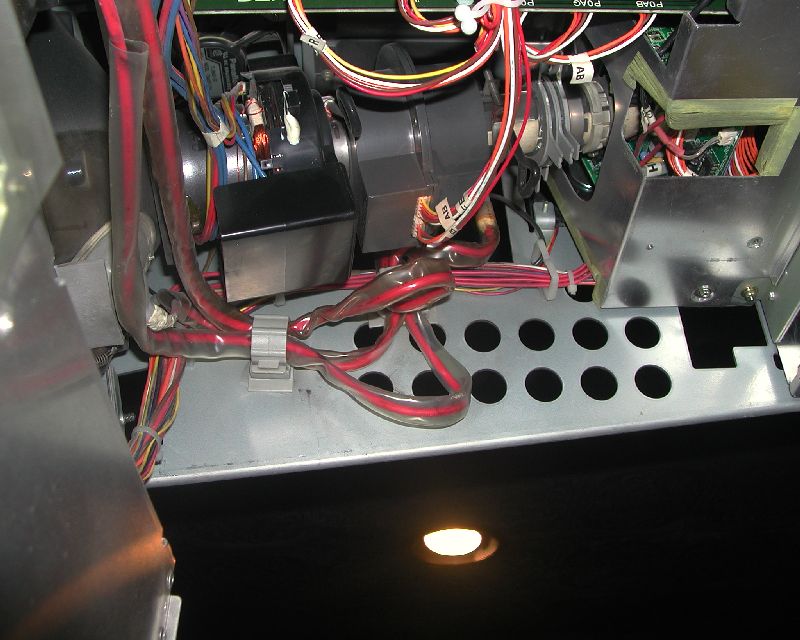
Curt, please be patient with me. Is the connector you are recommending swapping the one shown in the attached pic. It has the label AB on the wires?
| Description: |
|
| Filesize: |
96.55 KB |
| Viewed: |
9768 Time(s) |
|
_________________
Mark
|
|
| Back to top |
|
|
Curt Palme
CRT Tech
Joined: 08 Mar 2006
Posts: 24396
Location: Langley, BC
TV/Projector: All of them!
|
|
| Back to top |
|
|
dropzone7
Joined: 12 Jun 2007
Posts: 1069
Location: Charlotte, NC
|
| Posted: Tue Jun 17, 2008 1:20 am Post subject: |
|
|
They are pretty easy to handle as they just float around in there. Just be careful moving it around while the tube is still plugged in.
_________________
"Coffee is for Closers."
|
|
| Back to top |
|
|
macgyver655
Joined: 22 Aug 2007
Posts: 8508
|
| Posted: Tue Jun 17, 2008 1:38 am Post subject: |
|
|
|
Did you atleast check to see if the blue came on with the projector menu's?
|
|
| Back to top |
|
|
jacket_fan
Joined: 02 Sep 2007
Posts: 99
|
| Posted: Tue Jun 17, 2008 2:11 am Post subject: |
|
|
Thanks guys.
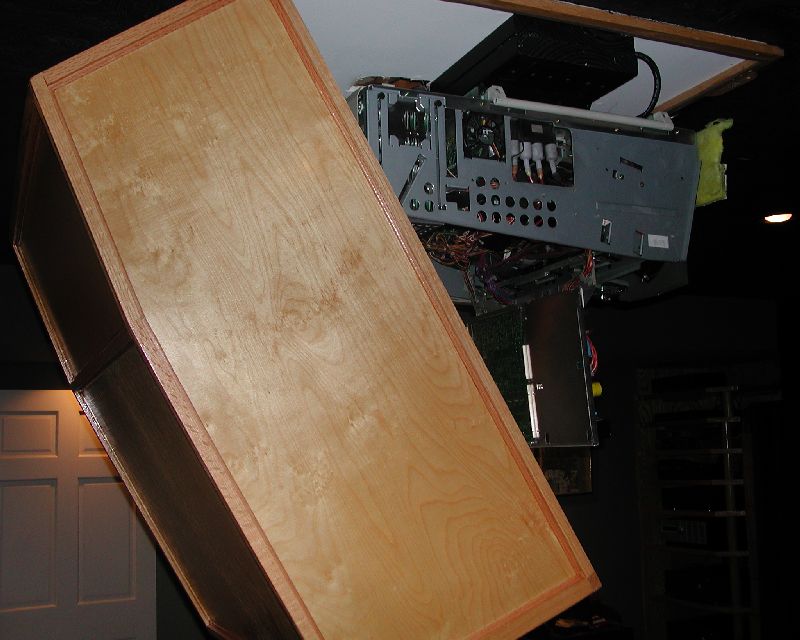
The phots Curt referenced show access to the cards from the back of the projector.
To do so, I will have to remove my hush box. That is going to require some effort and another person. I know someone built a hush box out of foam. This one is plywood and hardwood and heavy.
Before I go through the effort, I just want to make sure that I acces the boards from the back and that I can do this without having to take the projector down.
| Description: |
|
| Filesize: |
83.53 KB |
| Viewed: |
9751 Time(s) |
|
_________________
Mark
|
|
| Back to top |
|
|
dropzone7
Joined: 12 Jun 2007
Posts: 1069
Location: Charlotte, NC
|
| Posted: Tue Jun 17, 2008 2:19 am Post subject: |
|
|
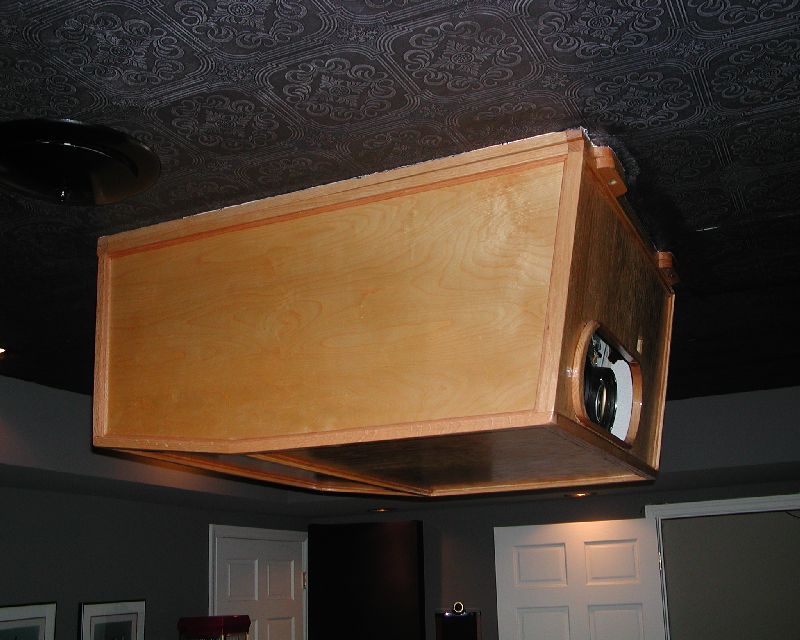
Not that you don't already have enough to do but I'm curious about your hushbox. What are the approximate dimensions and how are you pulling air out of it? Have any more pictures? I need to build one for my XG soon.
_________________
"Coffee is for Closers."
|
|
| Back to top |
|
|
jacket_fan
Joined: 02 Sep 2007
Posts: 99
|
| Posted: Tue Jun 17, 2008 2:51 am Post subject: |
|
|
I would be glad to give you more info on the hush box. It was one of the best additions to the theater to date. And with an XG, I would say it is a necessity because they are so loud.
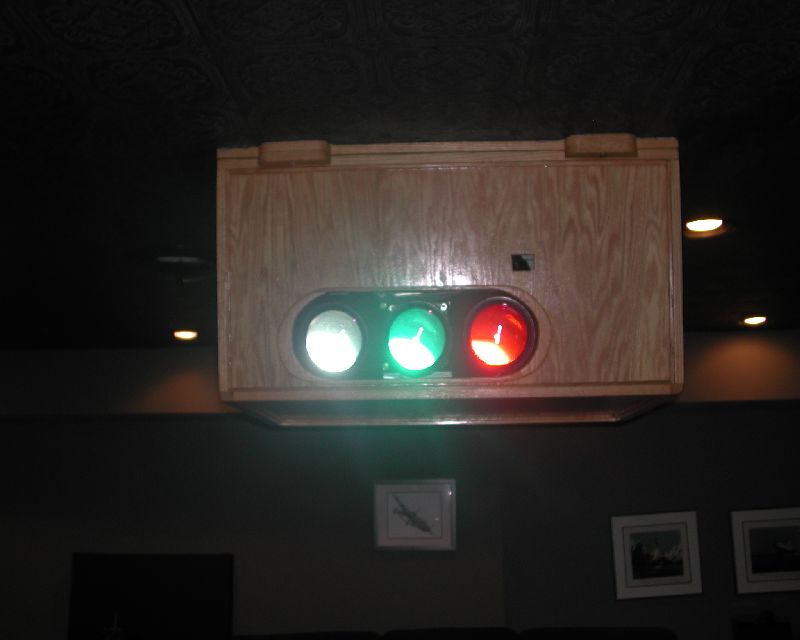
The inside dimensions are 35.5 by 41. The depth is about 18 inches at the deepest. The depth is the limiting factor because I believe you need some air flow around the projector. The air is sucked in through the hole for the lenses. I also had a hole for the IR sensor. I have a RF remote now and don't need the hole anymore.
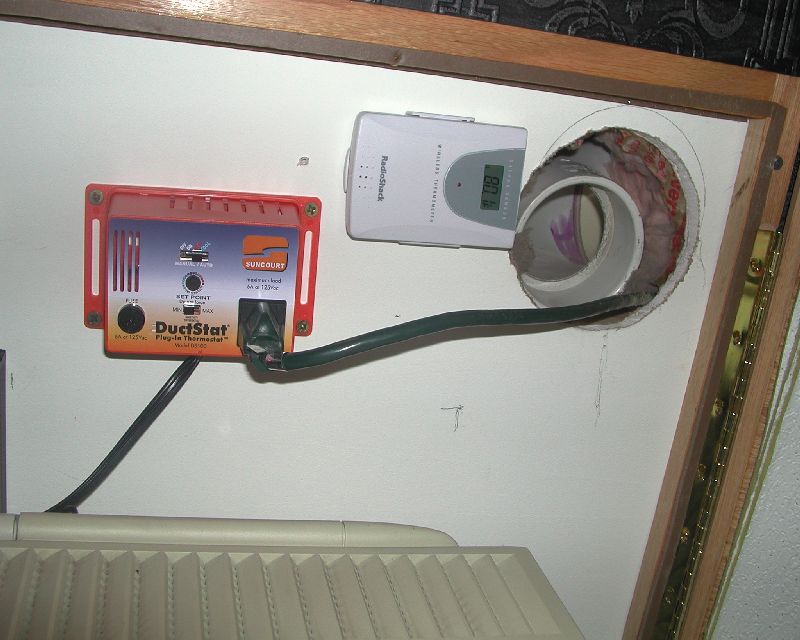
I exhaust air via a hole in the ceiling that has a PVC pipe leading to an adjoing utility room in the basement. I have two fans, I forget the CFM they pull, at the end of the 10 foot PVC.
The fans are triggered by a device I got from Smarthome that detects the increased hot air flow when the projector comes on. It has worked well. It is fairly straight forward. It was a bit more difficult because I added it after the room was finished. But it can be done even if you have a sheetrock ceiling.
It is hinged by a long piano hinge.
If you want more detail or better pictures, (I realize these are not the best photos), let me know and I will do what I can.
Most hush boxes I have seen are black, and is the best choice, but this was a woodworking project for me so I went with oak and a natural clear finish.
| Description: |
|
| Filesize: |
85.67 KB |
| Viewed: |
9744 Time(s) |
|
| Description: |
|
| Filesize: |
45.12 KB |
| Viewed: |
9744 Time(s) |
|
| Description: |
|
| Filesize: |
86.11 KB |
| Viewed: |
9744 Time(s) |
|
_________________
Mark
|
|
| Back to top |
|
|
dropzone7
Joined: 12 Jun 2007
Posts: 1069
Location: Charlotte, NC
|
|
| Back to top |
|
|
Mark_A_W
Joined: 15 Mar 2006
Posts: 3068
Location: Sunny Melbourne Australia
|
| Posted: Tue Jun 17, 2008 10:37 am Post subject: |
|
|
So....did the blue tube work with the menus?
Might be a source or cable issue, you need to check the menu (but check for the blue glow top or bottom of tube first).
|
|
| Back to top |
|
|
jacket_fan
Joined: 02 Sep 2007
Posts: 99
|
| Posted: Tue Jun 17, 2008 11:08 am Post subject: |
|
|
| Quote: | Do you leave your XG case on inside the hushbox or do you take everything off of it before closing it in? Also, what did you line the inside of the box with for sound absorption? Was there a big difference in fan noise after adding the box? For me it's not just the noise but the heat that it pumps into the room...
|
I have read that you can do it either way. I left the top cover off and the sides on for airflow through the existing vents. I don't know if it really makes much of a difference.
The box is lined with ceiling tiles. I used two types in two layers. The outer layer was the really dense ceiling tile and the second layer was the lighter fiberglass type. The noise reduction is substantial.
The seats in the theater are directly below the projector. I don't remember exactly what the Rat Shack meter read before the hushbox, but after, the dBs dropped below what the meter can measure. I think it was in the 60s to start with. Sorry I don't have specific numbers. I did post some info on AVS a while back. I also did some temperature measurements inside the projector because I was worried that I was not drawing enough air. Ended up adding a second fan just to be safe.
Some folks have tried using optical glass to completely enclose the box, but that may be more trouble than it is worth in my humble opinion. Issues with reflections and such. With this box, if you are under or behind the projector, it is barely audible. If you get in front of it you can hear the fans through the front hole.
The concern about drawing heat out of the room. Again, no specific numbers, but without a doubt, the room is cooler because it does draw the heat to the other room.
Total cost for everything was around $350 including fans, sensors and materials. I used oak plywood and 3/4 in solid oak.
| Quote: | I just found your DuctStat device. Thanks for the tip on that! Great idea!
|
I cannot take credit for the idea. Someone on AVS recommended it.
| Quote: | So....did the blue tube work with the menus?
Might be a source or cable issue, you need to check the menu (but check for the blue glow top or bottom of tube first). |
I did check for a blue glow on the face of the tube but did not see any light. Only the orange glow at the base of the tube.
_________________
Mark
|
|
| Back to top |
|
|
|
|




