|
As this forum is rarely used anymore, we've locked it. Feel free to browse and read. Questions? Please reach out to us directly. Cheers! |

|
 |
|
|
| Author |
Message |
bubsnews
Joined: 08 Jun 2008
Posts: 15
|
| Posted: Sun Jun 08, 2008 3:05 pm Post subject: Any 'aces'...HCFR before and after help with gamma please... |
|
|
Hello, very new to this level of display calibration (previous use was AVIA and DVE). Just purchased the Eye One LT colorimeter and am using the HCFR software.
My gamma was spot on in the before readings but my greyscale was horrible. After running the HCFR software, my greyscale numbers are unreal (delta E; 316.1, 9.4, 1.7, 1.6, 1.8, 1.5, 3.0, 1.6, 1.5, 5.5, 5.1) but my gamma has gone all to hell.
I've read and re-read the guide but cannot figure out how or why this has happened but my gamma went from an almost perfect tracking of 2.2 to this, at 10% all four colors (which all track very close to each other throughout the range) are below 2.1, at 20%, they are down to 2.0, 30% around 1.9, at 50% down to 1.7 and 70% all the way down to below 1.4 and still dropping very steep.
Can someone point out why this happened and how I go about getting my gamma back to where it was before without losing my greyscale?
I adjusted Brightness and Contrast using the X .0065 method described in the guide and it worked wonderfully to my eye as the -4 bar was completely invisible and the +2 bar was just barely visible.
Thanks, I really appreciate any guidance here,
George -bub
Sorry, thought my gear would show up easier...
Optoma HD7100 720p DLP
Optoma HD3000 video processor
Tosh XA2
I used a combination of the DVE HD disk (only for needle and steps pattern) and the other reference DVD from the files made available here, HD DVD RC1 (used this for the greyscale percentages patterns).
Can someone explain why I can't EVER find any of the video calibration patterns on the DVE HD disk??? I consider myself a fairly intelligent person but I do not see the options available on that disk that is mentioned in the guide. I can not find any of the calibration patterns no matter which permutation of menu choices I make. I get so frustrated using the DVE disks that I have to really struggle with myself not to yank that POS out of my XA2 (I even have the BD version for my PS3) and stomp its guts out!
|
|
| Back to top |
|
 |
kal
Forum Administrator

Joined: 06 Mar 2006
Posts: 18114
Location: Ottawa, Canada
TV/Projector: JVC DLA-NZ7
|
|
| Back to top |
|
|
kal
Forum Administrator
Joined: 06 Mar 2006
Posts: 18114
Location: Ottawa, Canada
TV/Projector: JVC DLA-NZ7
|
| Posted: Sun Jun 08, 2008 6:36 pm Post subject: Re: Any 'aces'...HCFR before and after help with gamma pleas |
|
|
| bubsnews wrote: | | Can someone explain why I can't EVER find any of the video calibration patterns on the DVE HD disk??? I consider myself a fairly intelligent person but I do not see the options available on that disk that is mentioned in the guide. I can not find any of the calibration patterns no matter which permutation of menu choices I make. I get so frustrated using the DVE disks that I have to really struggle with myself not to yank that POS out of my XA2 (I even have the BD version for my PS3) and stomp its guts out! |
The steps in the guide are for the DVE: HD Basics disc (either in Blu-ray or HD DVD). Is this the one you're using? If not the patterns will likely be in different spots.
Kal
_________________

Support our site by using our affiliate links. We thank you!
My basement/HT/bar/brewery build 2.0
|
|
| Back to top |
|
|
bubsnews
Joined: 08 Jun 2008
Posts: 15
|
| Posted: Sun Jun 08, 2008 6:50 pm Post subject: Re: Any 'aces'...HCFR before and after help with gamma pleas |
|
|
| kal wrote: | | bubsnews wrote: | | Can someone explain why I can't EVER find any of the video calibration patterns on the DVE HD disk??? I consider myself a fairly intelligent person but I do not see the options available on that disk that is mentioned in the guide. I can not find any of the calibration patterns no matter which permutation of menu choices I make. I get so frustrated using the DVE disks that I have to really struggle with myself not to yank that POS out of my XA2 (I even have the BD version for my PS3) and stomp its guts out! |
The steps in the guide are for the DVE: HD Basics disc (either in Blu-ray or HD DVD). Is this the one you're using? If not the patterns will likely be in different spots.
Kal |
Thanks Kal... Yes, I am using the DVE High Definition HD DVD combo format disk (I also have the BD version as well as the SD version of AVIA).
Anyways, the guide says to, "Cue up the first pattern on the Digital Video Essentials: HD Basics test disk. The 0 IRE pattern can be found by choosing the disc's menu option 'Complete Program Menu' -> 'Advanced Video Test Patterns' -> 1080p or 720p -> 'Video Black w/ new PLUGE'."
So, by comparison, my disk is called 'DVD High Definition Digital Video Essentials Test and Demonstration Materials'. There is nothing called, 'Complete Program Menu', anywhere on my disk that I can find. There also is nothing called, 'Advanced Video Test Patterns' on my disk either nor is there any test pattern called, 'Video Black w/ new PLUGE'. The absolutely only thing on my disk that matches the guide is the 1080p or 720p selection. I could be a complete idiot, I'm not sure.
I always have had a problem with DVE, as all the guides that I've seen do not match up with what I see when I try to use the disk. Any help or explanation would be awesome.
I am copying my HCFR files from my notebook and will post them shortly. Thank you very much for your help. In order to adjust IRE at the different values, I lowered red gain to -8 and green gain to -10, red cut to -1 and green cut to -1 in my Optoma HD7100 projector (the changes to contrast and brightness where done in the HD3000 video processor (couldn't find any advanced settings for cuts and gains in the HD3000 although they might be there somewhere)).
George
|
|
| Back to top |
|
|
bubsnews
Joined: 08 Jun 2008
Posts: 15
|
| Posted: Sun Jun 08, 2008 7:07 pm Post subject: |
|
|
| kal wrote: | Can you post your before and after HCFR files? Much easier to figure out what's going on. Thanks.
Kal |
Thanks again Kal, I will try to post my files. There are three of them, the before (w/o any tweaks), the after (only setting contrast and brightness) and then a X3 (after adjusting cuts and gains (I'm thinking now looking at the HCFR software, I may have inadvertently adjusted the blue gains and cuts instead of the green)).
I bet you that is why my gamma is shot to hell.
George
OK, re-read the instructions and I see that red and green were the two colors I should have changed and those were the ones I did change. I thought I remembered that blue was reference not green. I guess I thought that because my old Mits rear projection, when doing the convergence we left blue along and adjust red and green.
| Description: |
| after messing up the blue gains and cuts I now think |
|

Download |
| Filename: |
Colorx3.chc |
| Filesize: |
14.44 KB |
| Downloaded: |
19 Time(s) |
| Description: |
|
Download |
| Filename: |
Color_aftr.chc |
| Filesize: |
19.18 KB |
| Downloaded: |
10 Time(s) |
| Description: |
|
Download |
| Filename: |
Color_b4.chc |
| Filesize: |
14.38 KB |
| Downloaded: |
9 Time(s) |
|
|
| Back to top |
|
|
kal
Forum Administrator
Joined: 06 Mar 2006
Posts: 18114
Location: Ottawa, Canada
TV/Projector: JVC DLA-NZ7
|
| Posted: Mon Jun 09, 2008 2:10 pm Post subject: Re: Any 'aces'...HCFR before and after help with gamma pleas |
|
|
| kal wrote: | | The steps in the guide are for the DVE: HD Basics disc (either in Blu-ray or HD DVD). Is this the one you're using? If not the patterns will likely be in different spots. |
| bubsnews wrote: | | Thanks Kal... Yes, I am using the DVE High Definition HD DVD combo format disk (I also have the BD version as well as the SD version of AVIA). |
The combo disc is not "DVE: HD Basics". It's a completely different disc.
Our guide will show you exactly where to find the patterns needed using the DVE: HD Basics disc. The other discs work too (like DVE High Definition), but the disc menus are different so you'll have to look at our pictures and find the pattern yourself.
| Quote: | Anyways, the guide says to, "Cue up the first pattern on the Digital Video Essentials: HD Basics test disk. The 0 IRE pattern can be found by choosing the disc's menu option 'Complete Program Menu' -> 'Advanced Video Test Patterns' -> 1080p or 720p -> 'Video Black w/ new PLUGE'."
So, by comparison, my disk is called 'DVD High Definition Digital Video Essentials Test and Demonstration Materials'. There is nothing called, 'Complete Program Menu', anywhere on my disk that I can find. There also is nothing called, 'Advanced Video Test Patterns' on my disk either nor is there any test pattern called, 'Video Black w/ new PLUGE'. The absolutely only thing on my disk that matches the guide is the 1080p or 720p selection. |
Correct. You're not using DVE: HD Basics, so the menus are completely different. It's a different disc.
| Quote: | | I always have had a problem with DVE, as all the guides that I've seen do not match up with what I see when I try to use the disk. Any help or explanation would be awesome. |
There are dozens of test discs out there... they all have similar patterns. Just look at the screenshots and explanations I give in the guide and find the same pattern on the test disc you're using. Or pick up either version of the DVE: HD Basics test disc. It's dirt cheap (under $20).
Kal
_________________
Support our site by using our affiliate links. We thank you!
My basement/HT/bar/brewery build 2.0
|
|
| Back to top |
|
|
kal
Forum Administrator
Joined: 06 Mar 2006
Posts: 18114
Location: Ottawa, Canada
TV/Projector: JVC DLA-NZ7
|
| Posted: Mon Jun 09, 2008 2:54 pm Post subject: |
|
|
| bubsnews wrote: | Thanks again Kal, I will try to post my files. There are three of them, the before (w/o any tweaks), the after (only setting contrast and brightness) and then a X3 (after adjusting cuts and gains (I'm thinking now looking at the HCFR software, I may have inadvertently adjusted the blue gains and cuts instead of the green)).
I bet you that is why my gamma is shot to hell. |
Looking at your after files (both of them), your 90 IRE and 100IRE light output (Y value) readings are the same. That's not good. Your contrast is therefore set too high as you're max'ing out the light output and peaking early.
Kal
_________________
Support our site by using our affiliate links. We thank you!
My basement/HT/bar/brewery build 2.0
|
|
| Back to top |
|
|
bubsnews
Joined: 08 Jun 2008
Posts: 15
|
| Posted: Mon Jun 09, 2008 4:44 pm Post subject: |
|
|
| kal wrote: |
Looking at your after files (both of them), your 90 IRE and 100IRE light output (Y value) readings are the same. That's not good. Your contrast is therefore set too high as you're max'ing out the light output and peaking early.
Kal |
Thanks Kal, I really appreciate your input.
Here is how I set contrast... I read through your guide and used the technique where you adjust contrast to get the maximum ftL reading at 100 IRE, then adjust brightness for .65% at 10 IRE. So, for my equipment, that meant raising contrast +7. Interesting though, any adjustment over +7 (all the way to +20) made no change in the ftL reading. That is why I settled on +7, I just adjust contrast to +20, then backed it down until I saw a ftL drop in the reading.
Then, I adjusted brightness to .65% of the ftL reading at the 10 IRE screen. Is that not correct?
I am more than willing to go back in and recalibrate. If I did something wrong with using your method above for setting contrast and brightness, could you point out what I did wrong? I really like that method better than eyeballing the 3 black bars (-4, +4 and +2).
I wasn't sure how best to deal with my initial adjustment of contrast as the instructions stated to use that adjustment to increase the ftL readings to the maximum.
Thank you once again Kal!
George
PS I had no idea there were two different DVE disks, wow!!! I did download and burn the calibration DVD that is mentioned elsewhere on this site (sorry, can't remember for sure where) and used that for the greyscale calibrations.
Kal, I forgot to mention that I do have a video processor, the Optoma HD3000. I'm not sure if you are familiar with that piece of equipment or not. I think it has a gamma boost, it has a gamma setting that has a range from -5 through +5. Should I be using that? I was able to get a ftL reading on the 100 IRE screen at about 13 ftL. That is w/o any adjustment of gamma with the HD3000.
And, could you advise me on how best to adjust contrast if the above method isn't going to work for me because of the way my equipment, there is no increase in ftL readings above the +7 contrast setting? I believe I really need to get my contrast adjusted correctly before I can proceed as without a correct contrast setting, I can't use your guide to then adjust brightness or proceed onto the greyscale calibrations, thank you.
Also, one last edit sorry... I do have the BD version of HD Basics and will use that with my PS3 during this next round of re-calibration. I'm not kidding, this is the very first I learned that there were two different disks and that my two HD and BD versions were not the same as each other...
|
|
| Back to top |
|
|
kal
Forum Administrator
Joined: 06 Mar 2006
Posts: 18114
Location: Ottawa, Canada
TV/Projector: JVC DLA-NZ7
|
| Posted: Mon Jun 09, 2008 6:00 pm Post subject: |
|
|
| bubsnews wrote: | | kal wrote: |
Looking at your after files (both of them), your 90 IRE and 100IRE light output (Y value) readings are the same. That's not good. Your contrast is therefore set too high as you're max'ing out the light output and peaking early.
Kal |
Thanks Kal, I really appreciate your input.
Here is how I set contrast... I read through your guide and used the technique where you adjust contrast to get the maximum ftL reading at 100 IRE, then adjust brightness for .65% at 10 IRE. |
Don't adjust contrast to get max ftL at 100IRE, you position the sensor to get max ftL reading which then ensures the sensor is positioned correctly.
You then adjust contrast to try and fall within the suggested range mentioned in the guide. You may not be able to get into that range.
| Quote: | | So, for my equipment, that meant raising contrast +7. Interesting though, any adjustment over +7 (all the way to +20) made no change in the ftL reading. That is why I settled on +7, I just adjust contrast to +20, then backed it down until I saw a ftL drop in the reading. |
Interesting. That's what I was going to suggest you do, but it looks like you'll have to go even lower as your 90 and 100 IRE numbers are the same.
| Quote: | | Then, I adjusted brightness to .65% of the ftL reading at the 10 IRE screen. Is that not correct? |
Yup. That's correct.
| Quote: | | Kal, I forgot to mention that I do have a video processor, the Optoma HD3000. I'm not sure if you are familiar with that piece of equipment or not. I think it has a gamma boost, it has a gamma setting that has a range from -5 through +5. Should I be using that? I was able to get a ftL reading on the 100 IRE screen at about 13 ftL. That is w/o any adjustment of gamma with the HD3000. |
Never used it or hear of it, but if you need to increase/decrease gamma then by all means use it.
| Quote: | | And, could you advise me on how best to adjust contrast if the above method isn't going to work for me because of the way my equipment, there is no increase in ftL readings above the +7 contrast setting? |
Reduce contrast until your luminance graph looks fairly even at the top end, and results in 90 and 100 not having the same reading.
| Quote: | | I believe I really need to get my contrast adjusted correctly before I can proceed as without a correct contrast setting, I can't use your guide to then adjust brightness or proceed onto the greyscale calibrations, thank you. |
Yup. Every step has to be done correctly before moving to the next.
| Quote: | | Also, one last edit sorry... I do have the BD version of HD Basics and will use that with my PS3 during this next round of re-calibration. I'm not kidding, this is the very first I learned that there were two different disks and that my two HD and BD versions were not the same as each other... |
I added some text to the guide to make it more obvious. I incorrectly assumed that by having different names people would realize it's not the same disc. 
Kal
_________________
Support our site by using our affiliate links. We thank you!
My basement/HT/bar/brewery build 2.0
|
|
| Back to top |
|
|
picree
Joined: 31 Mar 2006
Posts: 351
Location: Johnson City, TN
|
| Posted: Mon Jun 09, 2008 8:15 pm Post subject: Same questions here |
|
|
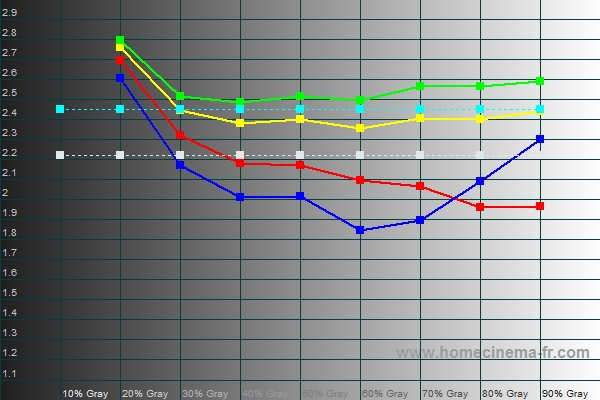
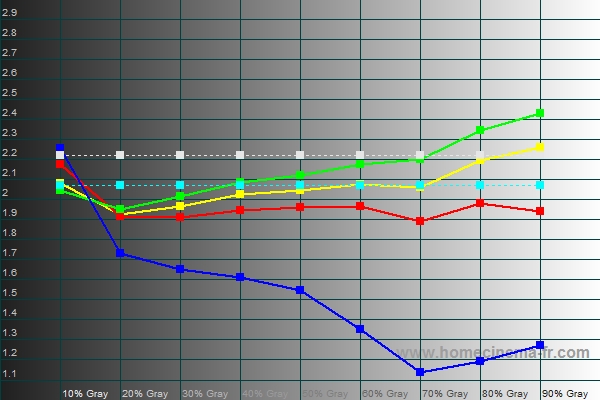
Don't feel alone bubsnews. I have the same problem (See before and after). I've asked this question here recently but I have found that there aren't too many offers to help (other than kal who wrote the great guide and whose time is, I'm sure limited). I suppose this is because many don't want to post on the forum just exactly how they make all the graphs line up properly (self-preservation). So, while having all these tools is cool, this is probably going to be primarily an individual effort. 
This was much easier before HCFR. Getting grayscale flat was not really a problem. Now that I can see in charts that I was also messing with the overall gamma I'm really confused. For me the gamma went from over 2.4 to less than 2.1.  The image is noticably more washed out and less punchy but I don't know how to adjust it other than trial and error. The image is noticably more washed out and less punchy but I don't know how to adjust it other than trial and error.
I've pretty much resigned myself to figuring this out by trial and error at this point as most of the folks who know how to do this typically don't reply. If I figure out any tricks I will be sure to post results
| Description: |
| Before making "improvements" |
|
| Filesize: |
133.13 KB |
| Viewed: |
186 Time(s) |
|
| Description: |
|
| Filesize: |
133.49 KB |
| Viewed: |
186 Time(s) |
|
_________________
MAIN THEATER: (JVC RS2000; Yamaha UDP-LX500; Yamaha RX-V2400; Lumagen Radiance Pro, Vertex)
SECOND WII-ATER: (BG808; WII; Oppo 971H; Moome external box; BG-DVI transcoder; tse gamma box; Extron)
|
|
| Back to top |
|
|
bubsnews
Joined: 08 Jun 2008
Posts: 15
|
| Posted: Mon Jun 09, 2008 8:44 pm Post subject: Re: Same questions here |
|
|
| picree wrote: | Don't feel alone bubsnews. I have the same problem (See before and after). I've asked this question here recently but I have found that there aren't too many offers to help (other than kal who wrote the great guide and whose time is, I'm sure limited). I suppose this is because many don't want to post on the forum just exactly how they make all the graphs line up properly (self-preservation). So, while having all these tools is cool, this is probably going to be primarily an individual effort.
This was much easier before HCFR. Getting grayscale flat was not really a problem. Now that I can see in charts that I was also messing with the overall gamma I'm really confused. For me the gamma went from over 2.4 to less than 2.1. The image is noticably more washed out and less punchy but I don't know how to adjust it other than trial and error.
I've pretty much resigned myself to figuring this out by trial and error at this point as most of the folks who know how to do this typically don't reply. If I figure out any tricks I will be sure to post results |
Wow, what a dramatic difference. I feel my image is flat and washed out now too but I believe that Kal has straightened me out on what to do to correct it. I'm lucky as I have a video processor and I can boost gamma a bit (I don't think my fall in gamma is anywhere near the dramatic decrease that you have though). Do you have any ideas at all as to how to correct for this and not lose your greyscale calibration?
Wouldn't it have to have something to do with the way you adjusted contrast and brightness? I was able to go back and adjust contrast and brightness without using the calibration tools, just eyeballing it for now, and my image looks much much better. I'm going to run a calibration results before changing anything and I bet my gamma is a lot flatter and much closer to 2.2 as well.
Before, my gamma was always a bit low (of course I didn't know that before but I'm pretty sure I can boost it with my HD3000 and then re-calibrate and get it up close to 2.2) but very flat in all colors. After my initial attempt at calibration, my gamma was low and sloping off the chart at the higher IRE's. Kal helped a lot with explaining that to me. I'm sure he would have some excellent advice for you as well.
I will report back here later tonight after my re-calibration. Good luck to you.
George
|
|
| Back to top |
|
|
kal
Forum Administrator
Joined: 06 Mar 2006
Posts: 18114
Location: Ottawa, Canada
TV/Projector: JVC DLA-NZ7
|
|
| Back to top |
|
|
bubsnews
Joined: 08 Jun 2008
Posts: 15
|
| Posted: Mon Jun 09, 2008 11:07 pm Post subject: |
|
|
Kal, one thing I'm still confused about is how to set contrast initially? It seems that it is an arbitrary setting. And since all the other settings are based off this initial setting, doesn't that make the entire calibration process a crap shoot?
At least in my case, I turned contrast all the way up, then backed down until my ftL readings dropped (there was no change between +7 and +20). This is where I started my calibration, from contrast setting +7, which Kal advised was messing up my Y values in the upper range, which I believe affects gamma.
I would think that if contrast is as important as I think it is, meaning this is where you start to do all the rest of the calibrations, this adjustment should not be arbitrary but more precise using some absolute (or as near as could reasonably be) formula or technique.
And Kal, could you clarify the gamma boost for me? I have a gamma adjustment with my HD3000, range being -5 through +5, would this be considered gamma boost? And, if my gamma curve is low, meaning below 2.2 (say 1.9 or so), would increasing the gamma adjustment, say +2, would that move my gamma curve closer to 2.2 or farther away???
Thanks again for all your guidance and for the great guide Kal! I'm really interested to get as far through the calibration as I can with my projector. I'm really liking the changes so far.
George
|
|
| Back to top |
|
|
kal
Forum Administrator
Joined: 06 Mar 2006
Posts: 18114
Location: Ottawa, Canada
TV/Projector: JVC DLA-NZ7
|
| Posted: Tue Jun 10, 2008 12:14 am Post subject: |
|
|
| bubsnews wrote: | Kal, one thing I'm still confused about is how to set contrast initially? It seems that it is an arbitrary setting. And since all the other settings are based off this initial setting, doesn't that make the entire calibration process a crap shoot?
At least in my case, I turned contrast all the way up, then backed down until my ftL readings dropped (there was no change between +7 and +20). This is where I started my calibration, from contrast setting +7, which Kal advised was messing up my Y values in the upper range, which I believe affects gamma.
I would think that if contrast is as important as I think it is, meaning this is where you start to do all the rest of the calibrations, this adjustment should not be arbitrary but more precise using some absolute (or as near as could reasonably be) formula or technique. |
The target is the ftL range I noted in the guide (depending on the display technology you use). But at the same time you have to ensure that all 3 colours are changing between 90 and 100 IRE as well at the contrast setting. Otherwise go down in contrast even more.
I could certainly be clearer about that in the guide.
| Quote: | | And Kal, could you clarify the gamma boost for me? I have a gamma adjustment with my HD3000, range being -5 through +5, would this be considered gamma boost? |
No idea as I've never heard of or used the device you talk about. I have no idea what they're doing with that "gamma adjustment" control. Best way to figure out what it does is to take before/after readings and SEE what it does.
| Quote: | | And, if my gamma curve is low, meaning below 2.2 (say 1.9 or so), would increasing the gamma adjustment, say +2, would that move my gamma curve closer to 2.2 or farther away??? |
Actually I would call gamma below a value of 2.2 to be a "high" gamma. as you're increasing light output too much.
Again, I have no idea idea how this HD3000 device works. There are litterally 1000's of devices out there each with their own names, descriptions and implementations of controls. I can't possibly know how they all work.
Try it and find out. Takes 5 minutes to adjust and re-run a set of points.
Kal
_________________
Support our site by using our affiliate links. We thank you!
My basement/HT/bar/brewery build 2.0
|
|
| Back to top |
|
|
bubsnews
Joined: 08 Jun 2008
Posts: 15
|
| Posted: Tue Jun 10, 2008 4:19 pm Post subject: |
|
|
OK, another round of calibration last night. Following Kal's advice, I reset contrast to zero and re-adjusted brightness (my earlier calibrations had contrast at +7 and brightness at -3, new calibrations were contrast 0 and brightness -7). I really wanted to set contrast maybe +2 or +3 and recalibrate but the HCFR software crashed and I would have had to dismount the sensor and I just didn't want to go through that all again right then. I think contrast at +7 was too high, and now contrast at 0 too low, that's why I was looking forward to trying +2 or +3.
Anyways, I did three calibrations with only the following changes, the tb4 file will be with my HD3000 gamma settings at +3, the t2 file with gamma set at 0, and the t3 file with gamma at -2.
As Kal suggested, when setting gamma to -2, that actually increases the gamma average from 2.07 to 2.23 without affecting the curve very much at all. Interestingly enough, when setting gamma to +3, average gamma was still about 2.07 but the curve was much flatter. At gamma -2 and 0, the curve was well above 2.2 at the lower percentages and well below over towards the higher percentages (about 2.65 to the left and about 1.9 to the right). So, I guess the HD3000 does a better job of subtracting gamma than it does adding gamma, at least as far as the gamma curve (I'm a bit stumped as to why the gamma set at 0 is not flat, anybody?).
The Optoma HD7100 tracks D65 very well with the RGB levels almost spot on above 20%, luminance curve is very tight, and the delta E numbers great, especially between 20 IRE and 100 IRE (144.8, 10.3, 1.2, 2.6, 0.4, 2.5, 1.0, 1.9, 0.3, 2.3, 1.3).
My concerns are down to two. I really need to try again with contrast set somewhere between zero and +7 as I think zero is too low and obviously +7 is too high (the dang HCFR software keeps crashing after about an hour of calibration and it is too hard to remove the sensor from the mount without having to completely start everything over, not something I feel like doing after calibrating for an hour or so already).
The second concern is why the gamma reading isn't as flat after calibration as it is before calibration. It's odd that setting the HD3000 to +3 gamma flattens the gamma curve but a -2 gamma or zero gamma setting causes the curve to slope dramatically. If anybody has any advice, I'm all ears.
I will attach the three files.
Thanks and good luck everybody,
George
| Description: |
|
Download |
| Filename: |
t3.chc |
| Filesize: |
17.78 KB |
| Downloaded: |
6 Time(s) |
| Description: |
|
Download |
| Filename: |
t2.chc |
| Filesize: |
71.07 KB |
| Downloaded: |
3 Time(s) |
| Description: |
|
Download |
| Filename: |
tb4.chc |
| Filesize: |
71.05 KB |
| Downloaded: |
4 Time(s) |
|
|
| Back to top |
|
|
GEBrown

Joined: 08 Mar 2006
Posts: 729
Location: Denver
|
| Posted: Tue Jun 10, 2008 5:35 pm Post subject: |
|
|
I was interested in just what this Optoma HD3000 was, as I'd never heard of it in the Video Processors forum on the "A" site. I Googled it and found this review by Tom Huffman: http://www.avsforum.com/avs-vb/showthread.php?t=704674
His initial impressions were VERY rosy, but then in a subsequent post he backs off a little - but still, it seems like a pretty good VP. It has a Gennum VXP processor in it.
Just a couple of observations: Earlier Bubsnews you complained that you weren't getting much "help" with calibrating your DLP projector. That's probably because this site is overall primarily a CRT Front Projector site (analog) and there aren't too many digital guys here. Also, my impressions from using HCFR (on my Marquee) were frustrating at first. A colorimeter is a pretty technical toy and it just takes a lot of practice and MANY passes at greyscale calibration to begin to get stuff figured out. After all, there are professional calibrators out there - not that they use HCFR - but it is a skill that they use to make their living with.
But it seems that you are making good progress now.
My 2 cents,
Gary
_________________
Member of the Marquee Maniacs Club
|
|
| Back to top |
|
|
kal
Forum Administrator
Joined: 06 Mar 2006
Posts: 18114
Location: Ottawa, Canada
TV/Projector: JVC DLA-NZ7
|
| Posted: Tue Jun 10, 2008 6:14 pm Post subject: |
|
|
| bubsnews wrote: | | My concerns are down to two. I really need to try again with contrast set somewhere between zero and +7 as I think zero is too low and obviously +7 is too high |
Why do you think zero is too low? You're getting around 12 ftL which should be plenty bright, but brighter may be better I suppose (as long as your 90/100 IRE numbers don't crush together).
| Quote: | | The second concern is why the gamma reading isn't as flat after calibration as it is before calibration. It's odd that setting the HD3000 to +3 gamma flattens the gamma curve but a -2 gamma or zero gamma setting causes the curve to slope dramatically. If anybody has any advice, I'm all ears. |
That's an odd one. No idea as I've never used your projector or video processor.
Kal
_________________
Support our site by using our affiliate links. We thank you!
My basement/HT/bar/brewery build 2.0
|
|
| Back to top |
|
|
bubsnews
Joined: 08 Jun 2008
Posts: 15
|
| Posted: Tue Jun 10, 2008 9:15 pm Post subject: |
|
|
| GEBrown wrote: | Earlier Bubsnews you complained that you weren't getting much "help" with calibrating your DLP projector.
My 2 cents,
Gary |
Gary, I hope I got that quote out without losing any context. I think you have me confused with somebody else. Not only have I never posted I didn't feel I was getting much help, I never even thought that. Kal has responded very promptly to EVERY one of my posts, thank you very much Kal (and to the others who have responded as well, thank you)!!!
George
|
|
| Back to top |
|
|
GEBrown
Joined: 08 Mar 2006
Posts: 729
Location: Denver
|
| Posted: Thu Jun 12, 2008 4:55 pm Post subject: |
|
|
Bubsnews - I'm sorry - I didn't double-check my sources before publishing that report!! LOL
It's PICREE who was the culprit.
Old-age and good memory are on oxymoron!!
Again, my apologies.
Gary
_________________
Member of the Marquee Maniacs Club
|
|
| Back to top |
|
|
bubsnews
Joined: 08 Jun 2008
Posts: 15
|
| Posted: Thu Jun 12, 2008 6:44 pm Post subject: |
|
|
| GEBrown wrote: | Bubsnews - I'm sorry - I didn't double-check my sources before publishing that report!! LOL
It's PICREE who was the culprit.
Old-age and good memory are on oxymoron!!
Again, my apologies.
Gary |
Hey Gary, no apology necessary. I just wanted to point it out that it wasn't me who felt my questions were going unanswered. All the help I've received in just this short amount of time was great and very much appreciated. I just wanted to make sure those who responded to me with advice and consult didn't feel like I was unappreciative.
The story does go downhill though... My projector has failed so off the the factory for repairs (the third time in 6 months). I will have to restart the calibration journey over once again.
Hey, I still feel like I'm not fully understanding how to initially set contrast. Should I select a contrast setting, then calibrate and then go back and adjust contrast and start again? For example, I had contrast set at +7 and calibrated. Kal pointed out that I was losing detail at the highest IRE's because of this. I reset contrast at zero and calibrated again. Now, I feel like I'm losing detail in the dark scenes but not sure if it is my calibration that is off or simply my projector's limits in this area. But, I have no way of knowing for sure which it is.
I'm thinking once I receive my projector back, I should maybe set contrast at +2 or +3 (a compromise between +7 and zero, at least in my mind) and calibrate from there. See if maybe I am still 'clean' at 80 -100 IRE but see more detail at the lower end. At least, that's what the plan is.
I still think there ought to be some standard for setting contrast since that is the very first adjustment when calibrating and all other calibrations hinge on that setting.
Luck all and have a good weekend,
George
|
|
| Back to top |
|
|
|
|
|
|
|
You cannot post new topics in this forum
You cannot reply to topics in this forum
You cannot edit your posts in this forum
You cannot delete your posts in this forum
You cannot vote in polls in this forum
You cannot attach files in this forum
You can download files in this forum
|
Forum powered by phpBB © phpBB Group
|
|




