|
As this forum is rarely used anymore, we've locked it. Feel free to browse and read. Questions? Please reach out to us directly. Cheers! |

|
 |
|
|
| Author |
Message |
garyfritz

Joined: 08 Apr 2006
Posts: 12088
Location: Fort Collins, CO
|
| Posted: Mon May 26, 2008 10:48 pm Post subject: Please help me understand audio input modes! |
|
|
I've got most things with my projector figured out pretty well, but my sound is messed up and I can't figure out how I should set it up.
I have an Onkyo HTR-510 6.1 AVR. (Manual can be found here.) It doesn't handle HDMI in so I feed it with S/PDIF via coax from my Momitsu v880N SD DVD player. I'm testing it with DVE to make sure I've got everything set up right. And I don't. I *swear* that at one time I did, but something along the way must have messed it up.
I am completely befuddled by all the options for sound input....
I know there are several source formats: Dolby Digital, Dolby Digital EX, dts, dts Surround, dts ES, maybe more. I believe any particular movie may use any of these formats. I also believe the Onkyo treats all PCM signals as dts, translating Dolby into dts, but I'm not sure about that.
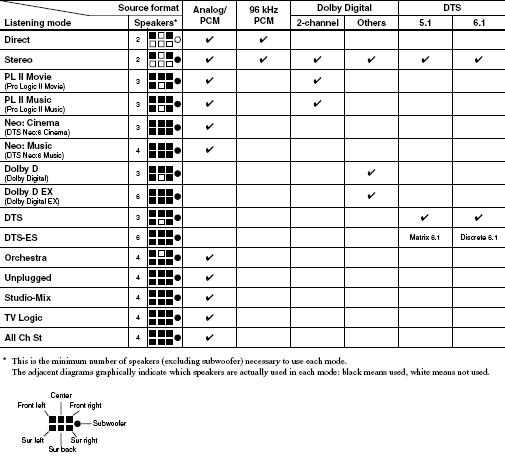
My receiver has many "listening modes": direct (2ch stereo), STereo (2.1), Pro Logic II movie/music, Neo cinema/music, Dolby D, Dolby D EX, DTS, DTS-ES, and more. Dolbe D/EX, dts/ES aren't available for PCM inputs, which I think is what I get with the S/PDIF coax. See p.34 of the Onkyo manual for a table (which I've included below) of what modes work with what inputs.
I think you have to use the appropriate listening mode for a particular input signal in order to get the sound decoded right. I think. (Do you really have to switch modes for different DVDs, or can you select one and stick with it?)
My receiver also has several subwoofer modes, specifying whether it should extract the bass from the general audio tracks, or play only the LFE track. I have mine set to LFE only.
So I cued up DVE title 9 (Audio Test Signals, Dolby and DTS 6.1) to make sure my speakers were getting the right sounds. DVE has both Dolby and dts signals so it seems like you should be able to make either one work.
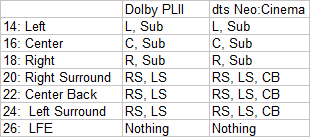
But the results I get are a mishmash. Instead of being localized to specific speakers, as it shows on the screen, it generally comes from many sources. See attached table for examples. (Left column is the DVE chapter & speaker, cells show which speakers turn on during that chapter. I tested PLII and neo6 because Dolbe D/EX and dts/ES aren't available for PCM input.) Strange things:
* The sub is going with L, C, and R, even though it should play only LFE.
* The sub plays NOTHING from the LFE track -- no matter what mode the sub is in!!
* The side and rear surrounds play together.
As you can imagine, this mess doesn't help my sound localization.
What am I doing wrong?? I *should* be using PCM inputs, right? That's what you get with S/PDIF? How should I set this up?
| Description: |
|
| Filesize: |
18.54 KB |
| Viewed: |
7567 Time(s) |
|
| Description: |
|
| Filesize: |
5.73 KB |
| Viewed: |
7567 Time(s) |
|
|
|
| Back to top |
|
 |
rabies_70

Joined: 15 Feb 2007
Posts: 1189
Location: Carlsbad, CA
TV/Projector: Sony G70Q
|
| Posted: Tue May 27, 2008 12:43 am Post subject: |
|
|
I'm pretty sure pcm is the old analog input format and that you should, when using digital inputs (spdif) you should select the DTS ES decoding available on your receiver and it will then default down to whatever the source is encoded with. As far a listening modes I never select one personally I never liked what they added to the sound, so I cant help you there.
I think once you use the correct input ie not pcm for a digital source it "should" correct the sound issues. Good luck
_________________
Ray
I am an iconoclast
|
|
| Back to top |
|
|
ecrabb
Forum Moderator

Joined: 13 Mar 2006
Posts: 15909
Location: Utah
TV/Projector: JVC RS40, Epson 5010
|
| Posted: Tue May 27, 2008 1:54 am Post subject: |
|
|
Gary,
Typing with one hand and feeding little boy w/the other, so here's the short version - more later.
You're having trouble because the Momitsu's audio output is PCM. It should be set to "Encoded Digital", NOT PCM. On some players, the correct option is called "bitstream". That sends the encoded digital stream from the DVD (either AC3 or DTS) directly to the AVR for decoding - which is exactly what you want.
Also, make sure your speaker setup is correct in the AVR.
SC
|
|
| Back to top |
|
|
ecrabb
Forum Moderator
Joined: 13 Mar 2006
Posts: 15909
Location: Utah
TV/Projector: JVC RS40, Epson 5010
|
| Posted: Tue May 27, 2008 3:13 am Post subject: |
|
|
OK, kids are in bed - I can type, now. 
| garyfritz wrote: | | I have an Onkyo HTR-510 6.1 AVR. It doesn't handle HDMI in so I feed it with S/PDIF via coax from my Momitsu v880N SD DVD player. I'm testing it with DVE to make sure I've got everything set up right. And I don't. I *swear* that at one time I did, but something along the way must have messed it up. |
One little change, and it can completely screw stuff up.
| garyfritz wrote: | | I am completely befuddled by all the options for sound input.... |
Don't feel bad - it's really pretty complicated. It took me a long time of reading and researching to get a handle on it all.
| garyfritz wrote: | I know there are several source formats: Dolby Digital, Dolby Digital EX, dts, dts Surround, dts ES, maybe more. I believe any particular movie may use any of these formats. I also believe the Onkyo treats all PCM signals as dts, translating Dolby into dts, but I'm not sure about that.
My receiver has many "listening modes": direct (2ch stereo), STereo (2.1), Pro Logic II movie/music, Neo cinema/music, Dolby D, Dolby D EX, DTS, DTS-ES, and more. Dolbe D/EX, dts/ES aren't available for PCM inputs, which I think is what I get with the S/PDIF coax. See p.34 of the Onkyo manual for a table (which I've included below) of what modes work with what inputs. |
A typical DVD can be PCM, AC-3 (Dolby Digital), DTS - or a combination of several. There are variations on DD and DTS, but those are the basics. The Onkyo shouldn't "treat" the PCM as anything, but that is where the "listening modes" come into play. PCM is typically stereo (not multi-channel), so "listening modes" like ProLogic II or Neo can process the stereo input to create a signal to put in the surround channels - where there was none before.
Think of "listening modes" as a way to make stereo formats sound like surround, or to make surround formats sound different - or better - or worse, depending on the mode.
| garyfritz wrote: | | I think you have to use the appropriate listening mode for a particular input signal in order to get the sound decoded right. I think. (Do you really have to switch modes for different DVDs, or can you select one and stick with it?) |
No, generally, once you set it up and like how a certain mode sounds, you won't have to mess with it. Your receiver should remember how you last listened to a certain source - whether it's PCM, Dolby Digital or DTS - and go back in the correct mode the next time it sees that format.
| garyfritz wrote: | | My receiver also has several subwoofer modes, specifying whether it should extract the bass from the general audio tracks, or play only the LFE track. I have mine set to LFE only. |
This is usually referred to as "bass management" or "bass redirection". On some receivers, you have a setting for your main and surround speakers and can define them as "small" or "large". If set to small, a high-pass filter is applied and all bass below a specific frequency (usually 80hz) is "redirected" to the sub, along with the LFE. If set to "large", the full spectrum (regardless of content) is played on each speaker. Your Onkyo doesn't use the "small/large" setting, and instead you select a "subwoofer mode".
There are 3 modes in addition to "off". Mode 1 would be used if you had all small satellite speakers. All content below the crossover point you select goes to the sub in addition to the LFE. Mode 2 would be used if you had two tower speakers for your mains, and the rest were satellites. L and R are full-range, while C and the surrounds are high-passed. Mode 3 would be used if you had larger full-range speakers all around and didn't want to redirect any bass to the sub (except for LFE). If you have smaller bookshelf or satellite speakers, you should be using Mode 1.
I'll add notes in bold to your comments here:
| garyfritz wrote: | But the results I get are a mishmash. Instead of being localized to specific speakers, as it shows on the screen, it generally comes from many sources. See attached table for examples. (Left column is the DVE chapter & speaker, cells show which speakers turn on during that chapter. I tested PLII and neo6 because Dolbe D/EX and dts/ES aren't available for PCM input.) As I mentioned in my other post, you should be decoding DD or DTS in the receiver. This is the source of all your trouble.
Strange things:
* The sub is going with L, C, and R, even though it should play only LFE. Yep. Because you're sending PCM.
* The sub plays NOTHING from the LFE track -- no matter what mode the sub is in!! With PCM, there is no LFE track
* The side and rear surrounds play together.Again, no discrete channels - just a matrixed rear.
As you can imagine, this mess doesn't help my sound localization.Absolutely. This is a really bad way to be listening to your audio!!! |
| garyfritz wrote: | | What am I doing wrong?? I *should* be using PCM inputs, right? That's what you get with S/PDIF? How should I set this up? |
Nope. You want "encoded" or "bitstream".
Don't feel bad. For years, all new Sony DVD players came setup right out of the box to default to PCM output!!! There had to be hundreds of thousands of people all over the world listening to their DVD audio with stereo matrix audio instead of discrete DD or DTS - which was one of the great things about DVD!!! (To the rest of you reading, let's not have the LaserDisc audio discussion, mmm kay?)
Story... I go visit one of my good friends in NYC and he's showing me his new setup. Brand new Sony ES receiver, Sony ES DVD player, Mitsubishi Diamond RPTV... So, he's playing a scene from some new movie, and right away I notice it's not discrete surround (once you hear the difference, it's REALLY obvious.) Sounds flat and boring. So, I say, "Um. Check this out - I need to tweak a setting for you". I grab the DVD remote, go into the setup menu, switch SPDIF output from PCM to bitstream, and press play. Blue light turns on the AVR, DD light lights up indicating 5.1, and the sound is immediately SO much better. Excellent, in fact. He says, "Holy sh*t. I've been listening to it the other way for 6 months, and in 30 seconds you change one setting and make it sound ten times better."
SC
|
|
| Back to top |
|
|
garyfritz
Joined: 08 Apr 2006
Posts: 12088
Location: Fort Collins, CO
|
| Posted: Tue May 27, 2008 3:45 pm Post subject: |
|
|
Okaayyy, it's starting to make sense now.
| ecrabb wrote: | | You're having trouble because the Momitsu's audio output is PCM. It should be set to "Encoded Digital", NOT PCM. On some players, the correct option is called "bitstream". |
My Momitsu has only 2 audio output settings: Stereo and AC3 5.1. It was set to Stereo!! (Which may cause it to send PCM over the S/PDIF, I can't tell from the manual.) That is undoubtedly the cause of my problems. A quick test indicates that it's working the way it should now. 
There is no setting for dts but presumably the "AC3 5.1" setting produces dts as well. I don't think my Onkyo speaks AC3. With the "AC3 5.1" setting, the PCM light on the AVR no longer lights, and it goes automatically into Dolby D EX mode. It offers no other choice, which is probably the right answer.
| Quote: | | Also, make sure your speaker setup is correct in the AVR. |
I'm pretty sure that's all correct, but I'll be double-checking it. I want to re-set my levels anyway.
| Quote: | This is usually referred to as "bass management" or "bass redirection". On some receivers, you have a setting for your main and surround speakers and can define them as "small" or "large".
There are 3 modes in addition to "off". Mode 1 would be used if you had all small satellite speakers. All content below the crossover point you select goes to the sub in addition to the LFE. Mode 2 would be used if you had two tower speakers for your mains, and the rest were satellites. L and R are full-range, while C and the surrounds are high-passed. Mode 3 would be used if you had larger full-range speakers all around and didn't want to redirect any bass to the sub (except for LFE). If you have smaller bookshelf or satellite speakers, you should be using Mode 1. |
Aha! That wasn't at all clear from the manual. I thought mode 3 was the **ONLY** mode that sent LFE to the sub, since the manual says: "Subwoofer Mode 1: The subwoofer outputs the low frequencies of all channels. Subwoofer Mode 2: The subwoofer outputs the low frequencies of the center and surround channels only. Subwoofer Mode 3: The subwoofer outputs the LFE (Low Frequency Effects) channel of 6.1 source material."
If you're sure modes 1 & 2 combine low-end signals and LFE and send them to the sub, I should definitely be running with mode 1. My "mains" are small satellites with 4" cones, rated down to 55-60Hz. I don't have the "small" or "large" setting, but I can set the sub crossover frequency to 60Hz, 80Hz, 100Hz, 120Hz, or 150Hz. I should probably set it at 60 or maybe 80Hz.
Thanks SC!!!
Gary
|
|
| Back to top |
|
|
ecrabb
Forum Moderator
Joined: 13 Mar 2006
Posts: 15909
Location: Utah
TV/Projector: JVC RS40, Epson 5010
|
| Posted: Tue May 27, 2008 4:57 pm Post subject: |
|
|
Weird the Momitsu manual I found for the V880 (not the N) didn't say anything about AC-3. It only said "encoded digital" or "PCM/analog". I would guess the Momitsu is outputting as "bitstream" when you select AC-3, then.
FYI, AC-3 is the technical term for Dolby Digital, so for all practical terms AC-3 = Dolby Digital.
| garyfritz wrote: | | There is no setting for dts but presumably the "AC3 5.1" setting produces dts as well. I don't think my Onkyo speaks AC3. With the "AC3 5.1" setting, the PCM light on the AVR no longer lights, and it goes automatically into Dolby D EX mode. It offers no other choice, which is probably the right answer. |
Yep. You're good to go, now. Throw in a DVD with a DTS track on it (or select it in the "audio options" menu of the DVD), and you'll see the DTS logo light up on the AVR instead of the DD logo.
| garyfritz wrote: | | If you're sure modes 1 & 2 combine low-end signals and LFE and send them to the sub, I should definitely be running with mode 1. My "mains" are small satellites with 4" cones, rated down to 55-60Hz. I don't have the "small" or "large" setting, but I can set the sub crossover frequency to 60Hz, 80Hz, 100Hz, 120Hz, or 150Hz. I should probably set it at 60 or maybe 80Hz. |
Yes, if you've selected "Yes" to the subwoofer in speaker setup, then the AVR will be sending LFE to the sub whenever it's present. However, unless you select Mode 1 or 2, there would be times (especially with stereo or 2.0) material where you'd never hear anything out of the sub. In Mode 3, you'd never hear a peep out of the sub, unless there was an LFE track. So, never with a CD, for instance.
I'd go with 80hz, unless you have pretty good-sized bookshelf speakers that are nice and flat down to 60hz. Most smaller satellites aren't flat down that low. THX standard is 80hz.
SC
|
|
| Back to top |
|
|
garyfritz
Joined: 08 Apr 2006
Posts: 12088
Location: Fort Collins, CO
|
| Posted: Tue May 27, 2008 5:49 pm Post subject: |
|
|
| ecrabb wrote: | | FYI, AC-3 is the technical term for Dolby Digital, so for all practical terms AC-3 = Dolby Digital. |
Ah, OK.
Interesting tidbit: Wikipedia shows a close-up of a bit of optical 35mm film. Did you know the Dolby Digital signal is encoded between the sprocket holes!? With a cute little DD symbol in the center, even!! 
If a DVD offers both DD and dts, is there any reason to prefer one or the other? The wikipedia entry for dts indicates that DD is usually encoded at 448kb/s, which provides apparently excellent sound, while dts DVDs are usually encoded at 768kb/s which "no longer retains audio transparency." But on DVDs that have both soundtracks, dts is often "louder with less hiss."
|
|
| Back to top |
|
|
Person99
Joined: 09 Mar 2006
Posts: 4899
Location: Flower Mound, TX
|
| Posted: Tue May 27, 2008 7:12 pm Post subject: |
|
|
| garyfritz wrote: |
If a DVD offers both DD and dts, is there any reason to prefer one or the other? |
Yes.
| garyfritz wrote: | | The wikipedia entry for dts indicates that DD is usually encoded at 448kb/s, which provides apparently excellent sound |
Actually, it is not excellent sound. Otherwise, we would not need Dolby TrueHD or DTS-MA!!!
DD at that bit rate gives each channel 1/10 of the bit rate of each channel on a CD. Here is a thing to try: Get a CD soundtrack or just a CD with a song used in a movie. Put on the DVD of the movie and listen to that song. Then, put in the CD and listen to that song. The difference is amazing!
| garyfritz wrote: | | while dts DVDs are usually encoded at 768kb/s which "no longer retains audio transparency." |
DD does not maintain audio transparency either. DD can get away with a slightly less bit rate because of the encoding, but DTS at 768 is almost always better than DD at 448. The way DD does this is that it does not encode sound that you can't hear. Imagine a symphonic score recorded which has strings playing softly and the horns do a loud quarter note blast on the 1st beat of every measure. The string track is still there but you can't hear it because the horns drown it out. DTS encodes the whole track as recorded, just compressed. DD will actually not encode the strings during that 1 beat that you cannot hear them. They are actually not in the bitstream. If you could drop out the horns, you would hear silence where the horns where, and not strings. This can save some bits, but not 320 kb/s worth!
_________________
Dave
A train station is where the train stops. A bus station is where the bus stops. On my desk, I have a work station....
|
|
| Back to top |
|
|
ecrabb
Forum Moderator
Joined: 13 Mar 2006
Posts: 15909
Location: Utah
TV/Projector: JVC RS40, Epson 5010
|
| Posted: Tue May 27, 2008 7:16 pm Post subject: |
|
|
| garyfritz wrote: | | Did you know the Dolby Digital signal is encoded between the sprocket holes!? |
I did know that! Isn't that crazy? All that data crammed next to and between the sprockets! After you see that, it's no big mystery why the audio drops out completely once in awhile in the theater!
| garyfritz wrote: | | If a DVD offers both DD and dts, is there any reason to prefer one or the other? |
Pick the track that sounds the best. I usually go for the DTS track if there is one, but it really depends on the disc. There are both great and crappy DTS mixes, just like there are great and crappy DD mixes.
| garyfritz wrote: | | The wikipedia entry for dts indicates that DD is usually encoded at 448kb/s, which provides apparently excellent sound, while dts DVDs are usually encoded at 768kb/s which "no longer retains audio transparency." But on DVDs that have both soundtracks, dts is often "louder with less hiss." |
The DD/DTS debate was almost as bad as the Chevy/Ford or Mac/Windows debate. There are proponents and detractors of both. The comment you referenced really needs the context. There are so many variables, it's really hard to make unqualified sweeping statements about one format or the other.
Overall, I'd say this is a pretty fair representation of the pros and cons of each:
http://firstdtsstudio.hit.bg/dolby_vs_dts_eng.html
| Quote: | In the consumer (home theater) market, AC-3 and DTS are closer in terms of audio performance. When the DTS audio track is encoded at its highest legal bitrate (1.5 MB/s), most technical experts regard DTS as achieving perceptual transparency (i.e. indistinguishable to the uncoded source in a double blind test.) At AC-3's maximum bitrate of 640 kbit/s, Dolby claims similar transparency. However, the DVD format limits AC-3 audiotracks to 448 kbit/s, and some publishers limit the AC-3 bitrate further (to 384 kbit/s.) Even at 448 kbit/s, (DVD) AC-3 operates at a higher bitrate than theatrical (35 mm movie) AC-3, therefore a properly-equipped home theater already achieves surround sound superior to a cinema AC-3 installation. Likewise, DTS audio on movie DVDs is commonly encoded at a reduced bitrate, allowing a single title to fit multiple 5.1 soundtracks (AC-3 + DTS.) At this reduced rate (768 kbit/s), DTS no longer retains audio transparency.
It should be noted, that AC-3 and DTS use different coding tools and syntax to perceptually compress audio, and therefore, the raw bitrates of the two formats do not indicate an objective measure of sound quality. Regardless, DTS proponents claim that the extra bits give higher fidelity and more dynamic range, providing a richer and more lifelike sound. A DTS track is often louder with less hiss, even at the same relative playback volume. |
So, if you read into that, you'll realize that on every DVD with a DTS track on it, the DTS track will probably sound better than the DD track BECAUSE the space required for the DTS track has stolen available bandwidth from the DD track - which is somewhat true. From my experience, an excellent DTS mix sounds great, and an excellent DD mix sounds great.
Did you know the DTS track in the theater is actually played from red-book audio-cd style file? It's a 1.1 Mbps stereo file, but has DTS surround encoded in the stream. The optical track on the film print is just timecode - the audio is actually played and stored from CD-ROMs.
Of course, this whole discussion is moot now, with BD and DTS-MA and DD TrueHD - both of which smoke low-bitrate DD and DTS.
SC
|
|
| Back to top |
|
|
garyfritz
Joined: 08 Apr 2006
Posts: 12088
Location: Fort Collins, CO
|
| Posted: Tue May 27, 2008 7:20 pm Post subject: |
|
|
|
Well, until I upgrade my AVR to something that can handle HDMI audio (not likely anytime soon), I'll be limited to S/PDIF input. So for some of us it ain't moot just yet.
|
|
| Back to top |
|
|
|
|
|
|
|
You cannot post new topics in this forum
You cannot reply to topics in this forum
You cannot edit your posts in this forum
You cannot delete your posts in this forum
You cannot vote in polls in this forum
You cannot attach files in this forum
You can download files in this forum
|
Forum powered by phpBB © phpBB Group
|
|




