|
As this forum is rarely used anymore, we've locked it. Feel free to browse and read. Questions? Please reach out to us directly. Cheers! |

|
 |
|
|
| Author |
Message |
camaropilot
Joined: 19 Jun 2006
Posts: 20
Location: Indy
|
| Posted: Tue May 20, 2008 9:46 pm Post subject: HTPC custom timings for Barco 701s |
|
|
Hello there,
I have been reading the posts for NVidia 8600 problems. I see there are quite a few. I recently upgraded to this card and have had difficulty getting my system to speak to my Barco 701s. I had the brilliant idea to try Powerstrip again until I saw the posts. Can anyone tell me the proper settings to input into the custom settings section of the video driver? I am running the HTPC to an HDFury, Extron RGB 201 Rxi (to provide neg sync), then to the Barco.
I also use an HDMI switch before the Fury to run my standard DVD player (which works flawlessly), it's just when I switch to the HTPC that the Extron shows NO SIGNAL.
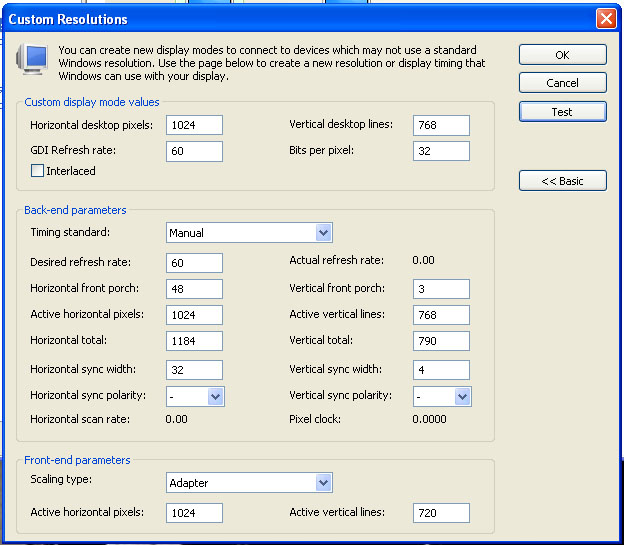
I have attached a screen shot of the custom resolution dialog which shows what the computer is currently trying to output.
Any help would be greatly appreciated!
| Description: |
|
| Filesize: |
98.54 KB |
| Viewed: |
4687 Time(s) |
|
_________________
I got a new projector...so I had to sell my tiny little 54" tv!
|
|
| Back to top |
|
 |
Gerbrand
Joined: 13 May 2008
Posts: 199
|
| Posted: Wed May 21, 2008 2:29 pm Post subject: Re: HTPC custom timings for Barco 701s |
|
|
| camaropilot wrote: | Hello there,
Can anyone tell me the proper settings to input into the custom settings section of the video driver? |
I have an Nvidia 8600 + HDFury combi too. I was using port 5 (BG808). Port 5 is supposed to take negative sync only. HOWEVER: for some reason, in the custom timing menu, I had to choose positive sync. On an older PC with an older NVidia card, only negative sync worked.
Maybe NVidia mixed up the signs?
Unfortunately I do not have the exact timings I use available. Normally CVT reduced blank is a good starting point.
Gerbrand
|
|
| Back to top |
|
|
AnalogRocks
Forum Moderator

Joined: 08 Mar 2006
Posts: 26706
Location: Toronto, Ontario, Canada
TV/Projector: Sony 1252Q, AMPRO 4000G
|
| Posted: Thu May 22, 2008 6:12 am Post subject: |
|
|
What happen's if you just select 1024 x 768 without touching anything in that menu? Will you get a picture?
Just as a test try bypassing the Extron box and run directly into the projector at 1024. It may give you a picture.
_________________
Tech support for nothing
CRT.
HD done right!
|
|
| Back to top |
|
|
camaropilot
Joined: 19 Jun 2006
Posts: 20
Location: Indy
|
| Posted: Fri May 23, 2008 2:15 pm Post subject: |
|
|
Thanks for the replies guys,
Gerbrand, I will try the CVT, the neg sync produced by the Extron box is an absolute, again, it works perfectly every time with a standard DVD player.
Analog, I have tried setting 1024 x 768 res. I used that with my old NVidia 6800GTS. In fact, I have been able to converge the Barco at that resolution. Now, with the new card, I have been able to power up the system 'once' and have a picture. The next time I tried to start everything up (and every time since) there is no picture. It makes me wonder if the computer (video driver) is resetting something incorrectly. When I first got my HDFury, I used it directly without the Extron (didn't have it yet), but the Barco did not want to sync consistently.
_________________
I got a new projector...so I had to sell my tiny little 54" tv!
|
|
| Back to top |
|
|
|
|
|
|
|
You cannot post new topics in this forum
You cannot reply to topics in this forum
You cannot edit your posts in this forum
You cannot delete your posts in this forum
You cannot vote in polls in this forum
You cannot attach files in this forum
You can download files in this forum
|
Forum powered by phpBB © phpBB Group
|
|




