| Author |
Message |
Stinger72

Joined: 01 May 2008
Posts: 53
Location: Fountain, CO
|
| Posted: Tue May 20, 2008 1:59 am Post subject: |
|
|
Lucky me, I caught the flu!!! Well it gave me a day or two off to mess with the 808. I went through the adjust menu and I must say, the picture has cleared up some. I feel as though I have to adjust the raster over an over as well and the convergence. I am a little skeptical about going into the g2 settings as it has that warning(no way am I a tech). Anyone who has experience with this mind giving this newbie a little info (Or Boost My Confidence)....Oh yeah, the picture is not syncing again...any ideas what could be wrong? I have the extron at 1080i @50hz. Should I switch it to 720p?
_________________
I hate working on saturdays!!!
Barco Data 808
Pioneer VSX-D810S
HTPC
RCA DCT-100
Samsung SIR T451
Extron DDS-402
Carver AV 705
Athena AS-F1.2x2
Athena AS-C1.2x2
Athena AS-B1.2x2
|
|
| Back to top |
|
 |
Tom.W

Joined: 09 Mar 2006
Posts: 6635
|
| Posted: Tue May 20, 2008 3:13 am Post subject: |
|
|
|
Read the service manual or read the information you can find here in the Barco section about setting G2. Quite easy to do if your careful. Why are you sending 1080i @ 50hz instead of the usual 60hz ?
|
|
| Back to top |
|
|
Stinger72
Joined: 01 May 2008
Posts: 53
Location: Fountain, CO
|
| Posted: Fri Sep 26, 2008 12:08 pm Post subject: Been a while |
|
|
Hello to all,
Well I am actually posting this from South Korea. It has been sometime since I have been on here, but the military is very demanding. Anyway, I know that it really doesn't matter since I can't actually touch my projector  (back in Colorado), but I read the troubleshooting procedures here a few days ago about my barco 808 and the G2 settings caught my eye. I can recall that when adjusting the settings for the blue and green tubes, the lights went off. But the red tube stayed on, or kept coming back on after a few seconds. Does this mean that the board for this is bad. I am only aking because once I get back home I will be in full swing in finishing my basement and don't want to bother with a bad projector if I don't have to. I really wanted this to work, but after all this time of fiddling with it, I'd gladly remove it if it is broken. May just have to go digital after all....a shame since I got it for so cheap too. Well, like I said I know it's hard to help without the unit being here, I am just going off of memory...so any assitance would be greatly appreciated. By the way, I won't be home until August 09. (back in Colorado), but I read the troubleshooting procedures here a few days ago about my barco 808 and the G2 settings caught my eye. I can recall that when adjusting the settings for the blue and green tubes, the lights went off. But the red tube stayed on, or kept coming back on after a few seconds. Does this mean that the board for this is bad. I am only aking because once I get back home I will be in full swing in finishing my basement and don't want to bother with a bad projector if I don't have to. I really wanted this to work, but after all this time of fiddling with it, I'd gladly remove it if it is broken. May just have to go digital after all....a shame since I got it for so cheap too. Well, like I said I know it's hard to help without the unit being here, I am just going off of memory...so any assitance would be greatly appreciated. By the way, I won't be home until August 09.
Thanks
Stinger72
_________________
I hate working on saturdays!!!
Barco Data 808
Pioneer VSX-D810S
HTPC
RCA DCT-100
Samsung SIR T451
Extron DDS-402
Carver AV 705
Athena AS-F1.2x2
Athena AS-C1.2x2
Athena AS-B1.2x2
|
|
| Back to top |
|
|
Ile

Joined: 09 Mar 2006
Posts: 1491
Location: Jyväskylä, Finland
|
| Posted: Fri Sep 26, 2008 12:56 pm Post subject: |
|
|
It's pretty common that G2 led doesn't go off in some of the rgb amps in 808. Adjustment pot for led have drifted, but it doesn't matter abl is still working ok.
Project black picture and set contrast to 0. Look in to the tubes and adjust red G2 to same level what G/B rasters are. Led is still on, but it doesn't matter. 
|
|
| Back to top |
|
|
Stinger72
Joined: 01 May 2008
Posts: 53
Location: Fountain, CO
|
| Posted: Sun Sep 28, 2008 3:28 am Post subject: |
|
|
Ile,
Thanks for the response. I will do this when I get back home, just have to wait another 10 months. I'm not taking any leave from this tour so I'll just keep reading the 808 manual while I am here to keep me satisfied until then. I had a picture at first, and then it dropped as soon as I started to adjust the dang thing. Do you have any suggestions about screen size? My room is quite small (20x14x8). Unfortunately I can't hang it because the ceiling will not support this beast at all. So I will have to build a stand for it somehow. Overall, I just want the thing to work. I have heard so many good reviews on CRT's and how they can really outshine the newer projectors by a long shot. Plus the cost was ridiculously low!
_________________
I hate working on saturdays!!!
Barco Data 808
Pioneer VSX-D810S
HTPC
RCA DCT-100
Samsung SIR T451
Extron DDS-402
Carver AV 705
Athena AS-F1.2x2
Athena AS-C1.2x2
Athena AS-B1.2x2
|
|
| Back to top |
|
|
Stinger72
Joined: 01 May 2008
Posts: 53
Location: Fountain, CO
|
| Posted: Sun Sep 28, 2008 10:59 am Post subject: |
|
|
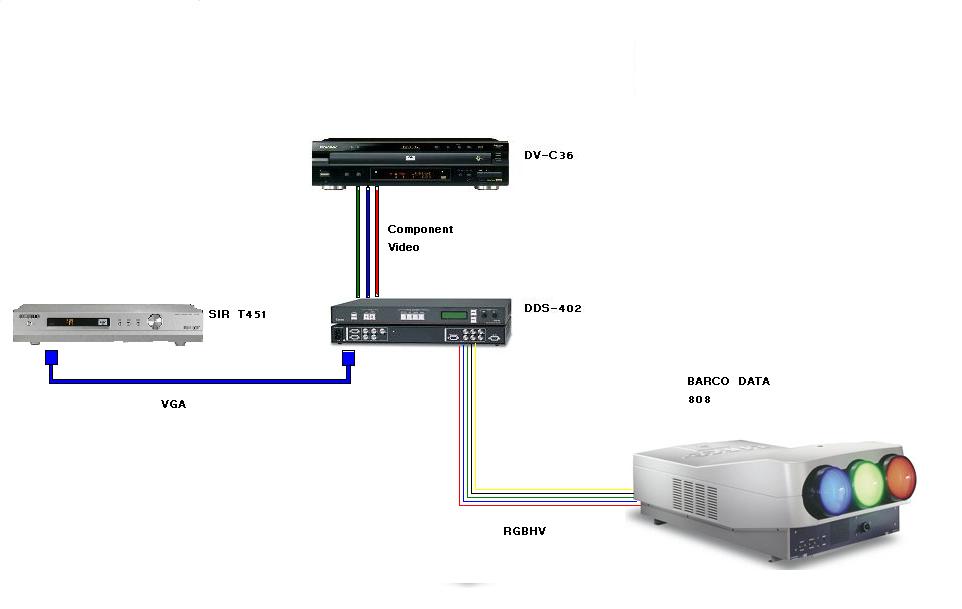
Just as a quick reminder, this is what I using in my setup. I left the audio out for simplicity.
| Description: |
| It's pretty basic for a starter system. |
|
| Filesize: |
31.05 KB |
| Viewed: |
9625 Time(s) |
|
_________________
I hate working on saturdays!!!
Barco Data 808
Pioneer VSX-D810S
HTPC
RCA DCT-100
Samsung SIR T451
Extron DDS-402
Carver AV 705
Athena AS-F1.2x2
Athena AS-C1.2x2
Athena AS-B1.2x2
|
|
| Back to top |
|
|
Z-Photo

Joined: 07 Mar 2006
Posts: 2749
Location: Huntsville - Alabama
|
| Posted: Sun Sep 28, 2008 2:28 pm Post subject: |
|
|
About the only thing I would suggest is
replace the extron with kims transcoder. I have had a large number of extron boxes and they all add noise.
Unless you need the scaler - I have replace all my scalers adn replace them with the PS3 for dvd and run HD cable though the transcoder straight.
_________________
Engineer by Day
Photographer by Night
My Portfolio
The Only GOOD AMPRO - is a Dead AMPRO.
wait - are they not all DEAD already?
|
|
| Back to top |
|
|
Stinger72
Joined: 01 May 2008
Posts: 53
Location: Fountain, CO
|
| Posted: Sun Sep 28, 2008 2:51 pm Post subject: |
|
|
If I take out the Extron, won't my dvd's that I play just be basic 480i/p depending on the setting of the player? I have no use for a blu ray at this point since I don't want to change my existing reciever just to get lossless audio (not important now) The players that I have seen that had 7.1 analog outputs did not have internal true hd/ dts master  (so far). So although you say I would get noise...wouldn't the picture still be better than 480i/p if it is scaled to a higher resolution? The transcoder says it will allow you to boost gamma levels, but does it upconvert the resolution as well? If so, then I will buy it and remove the extron once I return home....or can I add it to the extron for better picture quality? I'm still new to this game so if you smell the milk on my breath, I get it honestly. Thanks for the suggestions. (so far). So although you say I would get noise...wouldn't the picture still be better than 480i/p if it is scaled to a higher resolution? The transcoder says it will allow you to boost gamma levels, but does it upconvert the resolution as well? If so, then I will buy it and remove the extron once I return home....or can I add it to the extron for better picture quality? I'm still new to this game so if you smell the milk on my breath, I get it honestly. Thanks for the suggestions.
_________________
I hate working on saturdays!!!
Barco Data 808
Pioneer VSX-D810S
HTPC
RCA DCT-100
Samsung SIR T451
Extron DDS-402
Carver AV 705
Athena AS-F1.2x2
Athena AS-C1.2x2
Athena AS-B1.2x2
|
|
| Back to top |
|
|
Z-Photo
Joined: 07 Mar 2006
Posts: 2749
Location: Huntsville - Alabama
|
| Posted: Sun Sep 28, 2008 3:43 pm Post subject: |
|
|
The PS3 has an amazing scaler - it will scale DVD to 1080i/p or what ever you want to run.
If you already have the 402 - use it if not I would say look into the PS3.
Not sure about the sound - i am currently just running the R/L outputs as my reciever does not have HDMI
_________________
Engineer by Day
Photographer by Night
My Portfolio
The Only GOOD AMPRO - is a Dead AMPRO.
wait - are they not all DEAD already?
|
|
| Back to top |
|
|
Stinger72
Joined: 01 May 2008
Posts: 53
Location: Fountain, CO
|
| Posted: Mon Sep 29, 2008 3:10 am Post subject: |
|
|
Yes the Extron is already in my system, has been since May. I don't see a need for a PS3 even if it does do a great job at scaling, it would be a waist since I am not a gamer and it can't do what I want as far as audio processing goes (7.1 analog). So I'll just stick with the extron until another/better scaler comes along at a reasonable price. My main concern is getting my projector set up after my return. Thanks for the advice though.
_________________
I hate working on saturdays!!!
Barco Data 808
Pioneer VSX-D810S
HTPC
RCA DCT-100
Samsung SIR T451
Extron DDS-402
Carver AV 705
Athena AS-F1.2x2
Athena AS-C1.2x2
Athena AS-B1.2x2
|
|
| Back to top |
|
|
Belcherwm
Joined: 19 Aug 2006
Posts: 112
Location: Haymarket, Northern Va.
|
| Posted: Mon Sep 29, 2008 9:03 pm Post subject: |
|
|
If you're looking for 7.1 keep an eye on the new Panasonic DMP-BD55 Blu Ray Player. Should be out in a few months.
If you don't want to spend the coin, then look at the HDFury W/the Kim transcoder and a decent upconverting DVD player.
_________________
Bill
|
|
| Back to top |
|
|
tommo2

Joined: 03 Jun 2006
Posts: 226
Location: Ireland
|
| Posted: Tue Sep 30, 2008 11:29 am Post subject: |
|
|
The very first thing you need to do with that projector is delete all memory blocks.
The barco projectors store settings for different resolutions in memory, and once you have set a couple of different resolutions, it uses this info to "guess" convergence and geometry settings for a different resolution.
If you delete all the old stored data, it will make the setup of new resolutions so much easier.
All settings should be now at default (50)
Okay, go into service menu and select "delete all blocks". Next, decide what resolution you will be running (probably 1080i or 720. Lets say 1080i for now. Do not use the internal patterns for geometry settings, they are never accurate.
Send a 1080i signal 60hz to the projector.
Ensure the projector is perfectly square and centered on your screen.
Increase H width and V height (think this is called V size) to 90. Project a green screen. Do a quick mechanical focus on green. Move the projector away from or towards your screen until it fills the screen. (ignore and skew/keystone for now). Remove the green lense and increase raster size until it is 1/4 inch away from phosphor edge and perfectly centered. Now put the lens back on and move projector back/forth until screen is filled. Focus again.
Do a quick geometry setup on green, and increase h and V size to 95. Now move projector back/forth until the screen is filled again. Do green focus again. This is the projectors final distance from screen, and ensures you use as much phosphor as possible. Leaving V and H size controls at 95 allows a little adjustment, set to 99 would be ideal but leaves no room for tweaking. Also, setting the raster size 1/4 inch from the phosphor edge maximizes phosphor usage, without risking cracking the tube due to electron beam off phosphor.
Now you can follow the barco guided adjustment mode which is quite good for a newbie. You should not have to adjust green much at all.
Once setup is complete you can tweak geometry/focus again and againh to get it perfect. This will become so easy once you have done it a few times.
Then do electronic beam focus, G2 adjust, and the pic will be amazing. Do not get rid of that pj. A digital for $2000 will not be a patch on that projector.
Look at performing greyscale adjustment at some point aswell. Trust me, as soon as you have done the intiial setup, you will be amazed at the picture. Then you will tweak a bit more as you understand more and the picture will be evcen better.
Then you will play with astig/g2/grayscale and be blown away by the improvements. Then gamma adjust, schiempflug ... etc etc etc
Thats the beauty of CRT. Even a poorly setup pj can look cool, but the more you tweak the better the results. And as you learn more, it will all become easier. Something you were afraid to attempt at the start will not be a problem to adjust later on. And it is so much fun to do a few tweaks and see the results. It really makes that big a difference.
Don't be put off by the large number of adjustments. Just do the initial setup, and when you have a decent picture you can tackle the other adjustments one by one.
_________________
pull up the handbrake and walk away
Barco Data 701s
iScan HD scaler with sdi mod
Oppo 981HD with sdi mod
Xbox 360
Playstation 2
Denon AVR 1507 7.1 AV receiver
Wharfedale Diamond 9.4 floorstanders (front)
Wharfedale EVO2 (center)
Pioneer 100W (sides)
Wharfedale Diamond 9.1 (rear)
Wharfedale SW150 active subwoofer
Photos on the way!
|
|
| Back to top |
|
|
Stinger72
Joined: 01 May 2008
Posts: 53
Location: Fountain, CO
|
| Posted: Tue Sep 30, 2008 11:53 am Post subject: |
|
|
tommo2,
Thanks for all the advice on the Barco. I will definitely save this post to my laptop for later use. Unfortunately, I won't be able to get to the projector until next August  . After all the help here, I couldn't let any of you guys/gals down by buying a digital projector without trying my best to get this one up and running. Well I think I should stop posting until I am back home with the unit....don't want to start ticking people off by not having any thing to show for all the assistance. Again thanks to all of you who have been open, honest and concerned with your answers and critiques. . After all the help here, I couldn't let any of you guys/gals down by buying a digital projector without trying my best to get this one up and running. Well I think I should stop posting until I am back home with the unit....don't want to start ticking people off by not having any thing to show for all the assistance. Again thanks to all of you who have been open, honest and concerned with your answers and critiques.
_________________
I hate working on saturdays!!!
Barco Data 808
Pioneer VSX-D810S
HTPC
RCA DCT-100
Samsung SIR T451
Extron DDS-402
Carver AV 705
Athena AS-F1.2x2
Athena AS-C1.2x2
Athena AS-B1.2x2
|
|
| Back to top |
|
|
Stinger72
Joined: 01 May 2008
Posts: 53
Location: Fountain, CO
|
| Posted: Sat Oct 17, 2009 7:35 pm Post subject: |
|
|
Ok, after a year and two months away from the house, I am finally back in the states to finish what I started. I have the Barco lense calculator, but I have a question. Which model do I pick when asked what projector I have? I have a basic data 808, but that option is not available. Should I use the option for BG808s? Thanks to anyone helping me out. Oh by the way, Is there anyone in the Denver/Colorado Springs area that would be willing to give me some guidance or tips 
_________________
I hate working on saturdays!!!
Barco Data 808
Pioneer VSX-D810S
HTPC
RCA DCT-100
Samsung SIR T451
Extron DDS-402
Carver AV 705
Athena AS-F1.2x2
Athena AS-C1.2x2
Athena AS-B1.2x2
|
|
| Back to top |
|
|
tommo2
Joined: 03 Jun 2006
Posts: 226
Location: Ireland
|
| Posted: Sun Oct 18, 2009 1:12 pm Post subject: |
|
|
Are you asking what distance away from screen you need to be?
Follow my earlier post and you will be fine.
Your image size will increase the further away from the screen you are. Unlike digitals, the only way to increase or decrease image size is to move the projector away from or towards the screen. You can make the image smaller on the tube face, but this will give decreased brightness and resolution.
Also, increasing image size on the tube face will give you a larger image.
Your aim will be to have the image on the tube face as large as possible, thereby increasing phosphor usage, and hence brightness/resolution etc.
Be careful though that the image does not get too near the tube edge, coz it can crack the tube.
Use the method I described earlier to get the image as large as possible on the tube face, then move the projector back and forward until the image size is correct for your screen.
If you use the distance calculator you will end up using a lot less phosphor. Use the calculator for guidance only.
Read the CRT setup article below, so you understand what you are trying to achieve. Then my method will make perfect sense to you.
http://www.curtpalme.com/CRTSetupGuide.shtm
_________________
pull up the handbrake and walk away
Barco Data 701s
iScan HD scaler with sdi mod
Oppo 981HD with sdi mod
Xbox 360
Playstation 2
Denon AVR 1507 7.1 AV receiver
Wharfedale Diamond 9.4 floorstanders (front)
Wharfedale EVO2 (center)
Pioneer 100W (sides)
Wharfedale Diamond 9.1 (rear)
Wharfedale SW150 active subwoofer
Photos on the way!
|
|
| Back to top |
|
|
|
|




