|
As this forum is rarely used anymore, we've locked it. Feel free to browse and read. Questions? Please reach out to us directly. Cheers! |

|
 |
|
|
| Author |
Message |
dropzone7

Joined: 12 Jun 2007
Posts: 1069
Location: Charlotte, NC
|
| Posted: Sun Aug 10, 2008 2:37 pm Post subject: |
|
|
I did my "before" readings last night with my new Eye One LT meter. I can already tell that this meter is much more accurate and reliable than the Spyder II which I tried back when the guide was first written. I have a question about something I noted in the "measures" data. There is a line near the top that gives a value for average gamma and contrast ratio. My gamma was at 1.55 and contrast was 316:1. That contrast seems really low. Is that normal? These initial reading are with brightness and contrast set to defaults of 60 and 75, much higher than I normally set them at for viewing. The guide suggested setting levels to default so that is what I did. I'm getting about 13.126 foot lamberts with the sensor placed optimally at the screen.


_________________
"Coffee is for Closers."
|
|
| Back to top |
|
 |
daveginsd
Joined: 11 Aug 2008
Posts: 4
|
| Posted: Mon Aug 11, 2008 3:01 pm Post subject: |
|
|
|
I found this site last night and found the "grayscale for dummies" very helpful. I do have a question regarding my particular RPTV, its a Tosh 56HM195, and it has RGB cuts and drives, however these only effect SD material. It does have RGB center contrast controls that seem to have effect on HD grayscale. Would it be possible to get an explanation of how one would best adjust grayscale with these type of controls? I've searched high and low and have yet to find someone who can describe how these are used. I do very much appreciate all the info I've found on your site.
|
|
| Back to top |
|
|
kal
Forum Administrator

Joined: 06 Mar 2006
Posts: 18114
Location: Ottawa, Canada
TV/Projector: JVC DLA-NZ7
|
| Posted: Mon Aug 11, 2008 3:11 pm Post subject: |
|
|
| daveginsd wrote: | | I found this site last night and found the "grayscale for dummies" very helpful. I do have a question regarding my particular RPTV, its a Tosh 56HM195, and it has RGB cuts and drives, however these only effect SD material. It does have RGB center contrast controls that seem to have effect on HD grayscale. Would it be possible to get an explanation of how one would best adjust grayscale with these type of controls? I've searched high and low and have yet to find someone who can describe how these are used. I do very much appreciate all the info I've found on your site. |
Afraid I don't know what the term "RGB center contrast control" means or what it does. I find it surprising that it would have cuts/drives that *only* affect SD material. Are you absolutely sure?
Kal
_________________

Support our site by using our affiliate links. We thank you!
My basement/HT/bar/brewery build 2.0
|
|
| Back to top |
|
|
macgyver655
Joined: 22 Aug 2007
Posts: 8508
|
| Posted: Mon Aug 11, 2008 6:57 pm Post subject: |
|
|
| kal wrote: | | daveginsd wrote: | | I found this site last night and found the "grayscale for dummies" very helpful. I do have a question regarding my particular RPTV, its a Tosh 56HM195, and it has RGB cuts and drives, however these only effect SD material. It does have RGB center contrast controls that seem to have effect on HD grayscale. Would it be possible to get an explanation of how one would best adjust grayscale with these type of controls? I've searched high and low and have yet to find someone who can describe how these are used. I do very much appreciate all the info I've found on your site. |
Afraid I don't know what the term "RGB center contrast control" means or what it does. I find it surprising that it would have cuts/drives that *only* affect SD material. Are you absolutely sure?
Kal |
Kal. A lot of the RPTV's and flat panels provide separate controls for SD and HD. HD even sometimes separate for various resolutions. Most are in advanced sections of the service menu. I think alot of the people coming here, wanting to adjust these types of displays should realize that a service manual is really needed for proper understanding and adjustments for these types of various displays.
Not sure on the Toshiba he has as to what is in the menu. I'll look later and see if I have a manual.
|
|
| Back to top |
|
|
daveginsd
Joined: 11 Aug 2008
Posts: 4
|
| Posted: Mon Aug 11, 2008 8:14 pm Post subject: |
|
|
|
I bought the service manual theres only one menu as far as I can tell, unless there are some hidden ones which I hear tosh does. The cuts and drives most definately only effect SD, and the controlls listed in the service manual as "CNTCG, CNTCR, CNTCB" and the description given is "G CONTRAST CENTER, R CONTRAST CENTER, B CONTRAST CENTER" only effect HD material. The manual really had very little info in it at all most of it I had already found by searching online, kinda bent I spent the money. If any one can shed some light I'd appreciate it.
|
|
| Back to top |
|
|
macgyver655
Joined: 22 Aug 2007
Posts: 8508
|
| Posted: Mon Aug 11, 2008 8:28 pm Post subject: |
|
|
|
Toshiba manuals really do suck. They contain very little info on service menu. In your service manual, on the page of setting and adjustment data, does it have a note at the bottom saying " The image system data xxxxxxxxxxx is different by each image format." ?
|
|
| Back to top |
|
|
daveginsd
Joined: 11 Aug 2008
Posts: 4
|
| Posted: Mon Aug 11, 2008 11:58 pm Post subject: |
|
|
|
yes, it says Items marked with * which includes, BRTC, COLC, UVTT, CNTX, which leads to another question what is "base band tint" and how does this differ from regular tint or does it?
|
|
| Back to top |
|
|
macgyver655
Joined: 22 Aug 2007
Posts: 8508
|
| Posted: Tue Aug 12, 2008 1:24 am Post subject: |
|
|
Baseband tint is an adjustment of the chroma part of the signal. It would give more of a shiney vs dull appearence, rather then an actual tint. You will find a lot of different terms in a bulb style device vs a tube style. You can fiddle with color settings all day in a DLP or LCD RPTV and your still not going to get a real good color balance. Remember, they cant really do black.
But you can make them look better then the factory settings. A problem with Toshiba, besides their poor service manuals is they regularly leave names of adjustments in the service menu, but disable the feature so that the control doesn't work.
This may be why it doesn't seem to change when in HD.
Did you try making adjustments while an HD signal was being inputted? Make sure the tv recognizes the HD signal before entering the service menu.
|
|
| Back to top |
|
|
daveginsd
Joined: 11 Aug 2008
Posts: 4
|
| Posted: Tue Aug 12, 2008 2:34 pm Post subject: |
|
|
|
Tried it out last night, input an HD signal then entered the service mode, no change. How would it benifit a television manufacturer to bypass features in a service menu. On my Mits I had before, it had a laundry list of features, and pretty good descriptions of them as well. Do you think these and other features could be unlocked, or perhaps in another unmentioned menu? I've read on some other sights about a "Designer Menu" in some older Tosh units, that in later units they were hidden better. Possable to find out info on these, if I contact Tosh and complain loud enough?
|
|
| Back to top |
|
|
paiaboy7
Joined: 15 Aug 2008
Posts: 68
|
| Posted: Fri Aug 15, 2008 6:00 pm Post subject: Unable to use eye one device |
|
|
I get the following message when I go to calibrate internal sensor offsets in step 1.10
Eye One .DLL not found. Cannot use EyeOne device/ This DLL can be found in probe software installation directory/ please copy it inside HCFR coloromiter installation directory.
Please Help.
Thanks
|
|
| Back to top |
|
|
dropzone7
Joined: 12 Jun 2007
Posts: 1069
Location: Charlotte, NC
|
| Posted: Fri Aug 15, 2008 6:09 pm Post subject: Re: Unable to use eye one device |
|
|
| paiaboy7 wrote: | I get the following message when I go to calibrate internal sensor offsets in step 1.10
Eye One .DLL not found. Cannot use EyeOne device/ This DLL can be found in probe software installation directory/ please copy it inside HCFR coloromiter installation directory.
Please Help.
Thanks |
You have a PM. I tried to explain it, hopefully not confusing you more...
_________________
"Coffee is for Closers."
|
|
| Back to top |
|
|
jwong
Joined: 28 Aug 2008
Posts: 1
Location: Hong Kong
|
| Posted: Fri Aug 29, 2008 1:21 am Post subject: |
|
|
Hi Kal,
Thx for your nice "GREYSCALE & COLOUR CALIBRATION FOR DUMMIES", I have a very basic concept/skill after reading this article. For me, I live in Hong Kong & we can only find Spyder in the market. I'm using Sony KLV-40X300 (equal to BR5 in US). I started calibrate my TV in the past few days (at night actually). I found that my colorimeter cannot detect signal at 0IRE & 20IRE but can detect signal at 10IRE, 30-100IRE if I measure Gray scale (already set at 2000ms). If the colorimeter work find if i make continuous measures (set to 300ms).
1) Is anything wrong for my colorimeter or any setting i have to special take care ?
2) Btw, I found that after i install HCFR, my SpyderTV Software cannot detect the colorimeter. Is it a known bug ?
Please advise, thanks.
I'll try to re-install the HCFR SW tonight.
JWong
|
|
| Back to top |
|
|
damaster
Joined: 12 Sep 2008
Posts: 4
|
| Posted: Fri Sep 12, 2008 3:47 am Post subject: |
|
|
Hi folks,
I'm a long time AVS member who found this guide in the past 6 months and went out and ordered an EyeOne. I've since done the grayscale on 3 RP CRT sets, 1 plasma, and 1 LCD, and I must say this guide is awesome! It is very well written, very thorough and incomparably one of the best calibration guides I've ever come across!
Now I've moved on to color calibration, and unfortunately my Toshiba 50H82 RP CRT doesn't have any CMS controls; not in the user menus and not in the service menus. However, I am using an HTPC for all of my viewing, and was wondering if I could adjust the colors through the ATI video card control panel to achieve a near perfect color calibration. The only problem is I don't understand how to co-relate the video card controls to those described in the guide.
The ATI control panel allows me to control the Gamma, Brightness, and Contrast for each of the primary color channels (RGB). Is the following correlation of these controls to those described in the guide correct?:
Gamma = color 'hue'
Brightness = color 'luminance'
Contrast = color 'saturation'
Thanks in advance.
|
|
| Back to top |
|
|
damaster
Joined: 12 Sep 2008
Posts: 4
|
| Posted: Sat Sep 13, 2008 4:03 am Post subject: |
|
|
| JTT wrote: | I am just about to commence calibrating my Panasonic 50PZ70 plasma. I have a question about this TV.
The closest default settings to start from seem to be Cinema\warm.
To do the RGB drv and cut settings etc you need to go into the service menu, but when in the service menu and set to cinema\warm, its much brighter and more colourful than when not in the service menu?
Therefore where do I do the calibration with my eye-one? In normal viewing mode, or in the service menu (where its brighter and more colourful)? If in normal viewing mode I will keep having to switch to service menu making settings changes then coming out and checking with eye-one, not ideal.
Can someone with experience of this set please help.  |
Same problem here on my 42PZ77U. How did you end up doing your grayscale with the service menu parameters?
|
|
| Back to top |
|
|
kal
Forum Administrator
Joined: 06 Mar 2006
Posts: 18114
Location: Ottawa, Canada
TV/Projector: JVC DLA-NZ7
|
| Posted: Sat Sep 13, 2008 7:55 pm Post subject: |
|
|
| jwong wrote: | Hi Kal,
Thx for your nice "GREYSCALE & COLOUR CALIBRATION FOR DUMMIES", I have a very basic concept/skill after reading this article. For me, I live in Hong Kong & we can only find Spyder in the market. |
BH Photowill ship anywhere worldwide. See the link in the guide.
| Quote: | I'm using Sony KLV-40X300 (equal to BR5 in US). I started calibrate my TV in the past few days (at night actually). I found that my colorimeter cannot detect signal at 0IRE & 20IRE but can detect signal at 10IRE, 30-100IRE if I measure Gray scale (already set at 2000ms). If the colorimeter work find if i make continuous measures (set to 300ms).
1) Is anything wrong for my colorimeter or any setting i have to special take care ? |
I don't understand how it could read at 10IRE but not 20. That doesn't make any sense at all to me. The more like you have, the easier it is to read. Try setting a really high read time (like 60 seconds) temporarily just to see.
| Quote: | | 2) Btw, I found that after i install HCFR, my SpyderTV Software cannot detect the colorimeter. Is it a known bug ? |
Not that I know of, but then, I've never used the software that comes with the Spyder.
Kal
_________________
Support our site by using our affiliate links. We thank you!
My basement/HT/bar/brewery build 2.0
|
|
| Back to top |
|
|
kal
Forum Administrator
Joined: 06 Mar 2006
Posts: 18114
Location: Ottawa, Canada
TV/Projector: JVC DLA-NZ7
|
| Posted: Sat Sep 13, 2008 7:56 pm Post subject: |
|
|
| damaster wrote: | The ATI control panel allows me to control the Gamma, Brightness, and Contrast for each of the primary color channels (RGB). Is the following correlation of these controls to those described in the guide correct?:
Gamma = color 'hue'
Brightness = color 'luminance'
Contrast = color 'saturation' |
Maybe someone else knows but unfortunately I do not... I've never used the ATI control panel and actually have very limited experience with CMS's too (none of my displays have complete CMS's).
Kal
_________________
Support our site by using our affiliate links. We thank you!
My basement/HT/bar/brewery build 2.0
|
|
| Back to top |
|
|
damaster
Joined: 12 Sep 2008
Posts: 4
|
| Posted: Sun Sep 14, 2008 6:50 am Post subject: |
|
|
| kal wrote: | | damaster wrote: | The ATI control panel allows me to control the Gamma, Brightness, and Contrast for each of the primary color channels (RGB). Is the following correlation of these controls to those described in the guide correct?:
Gamma = color 'hue'
Brightness = color 'luminance'
Contrast = color 'saturation' |
Maybe someone else knows but unfortunately I do not... I've never used the ATI control panel and actually have very limited experience with CMS's too (none of my displays have complete CMS's).
Kal |
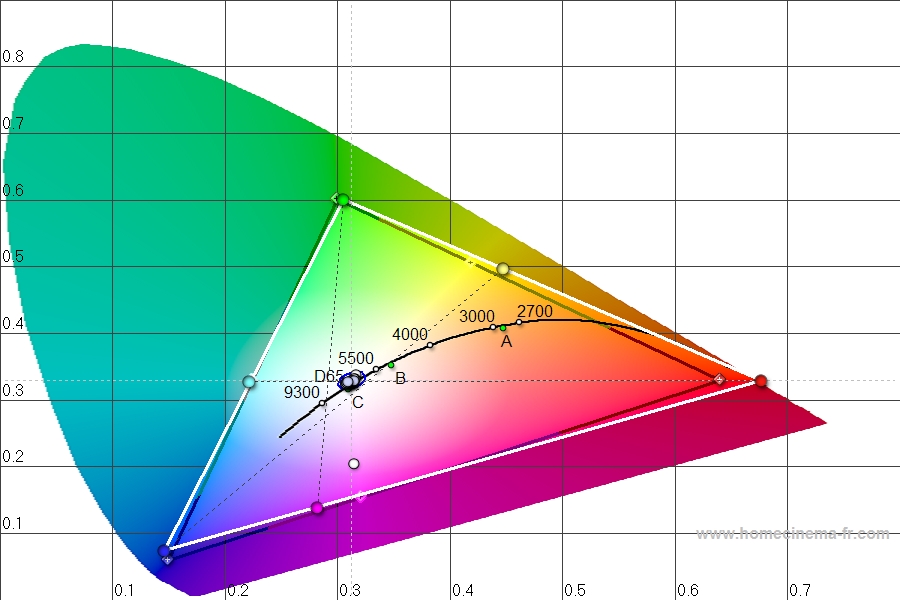
I tried to play around with my ATI video card color settings and there was nothing I could do to reign my colors in. My color decoder is quite off as in the attachment.
| Description: |
|
| Filesize: |
204.82 KB |
| Viewed: |
110 Time(s) |
|
|
|
| Back to top |
|
|
bubsnews
Joined: 08 Jun 2008
Posts: 15
|
| Posted: Wed Sep 17, 2008 1:04 am Post subject: |
|
|
I have two questions regarding the guide.
1) Curt says in the guide that you adjust the red primary using the 'color' adjustment and the cyan secondary using the 'tint' control before moving on to the advanced color adjustments in your CMS. He also says that these two controls are not available for high definition inputs. If that is the case, how do I adjust red and cyan before getting into the other steps to advanced color calibrations?
2) I've never been comfortable with setting the initial contrast point. This seems rather arbitrary to me. If your projector provides plenty of lumens, then how do you adjust contrast according to the guide instructions? I mean, is it really just as simple as finding your target ftL reading by adjusting contrast? I would think since this adjustment precedes all other adjustments, that it might be a more scientific adjustment not simply increase or decrease until you reach a range of ftL.
I have a DLP front projector 1080, BenQ W5000.
Thanks for any advice and/or assistance,
George
Curt, love the guide man, keep up the great work! My displays never looked anywhere near as impressive as they have lately after I found your site and bought an EyeOne colorimeter and using your ColorHCFR software. Thanks again!
|
|
| Back to top |
|
|
kal
Forum Administrator
Joined: 06 Mar 2006
Posts: 18114
Location: Ottawa, Canada
TV/Projector: JVC DLA-NZ7
|
| Posted: Wed Sep 17, 2008 1:21 am Post subject: |
|
|
| bubsnews wrote: | I have two questions regarding the guide.
1) Curt says in the guide that you adjust the red primary using the 'color' adjustment and the cyan secondary using the 'tint' control before moving on to the advanced color adjustments in your CMS. He also says that these two controls are not available for high definition inputs. If that is the case, how do I adjust red and cyan before getting into the other steps to advanced color calibrations? |
Err, I wrote the guide. Not Curt. 
As for your question, you don't adjust red and cyan - just adjust what the instructions say you should adjust.
| Quote: | | 2) I've never been comfortable with setting the initial contrast point. This seems rather arbitrary to me. If your projector provides plenty of lumens, then how do you adjust contrast according to the guide instructions? |
You try and target between 12-16 foot lamberts for front projectors like yours.
| Quote: | | I mean, is it really just as simple as finding your target ftL reading by adjusting contrast? |
Yes.
| Quote: | | I would think since this adjustment precedes all other adjustments, that it might be a more scientific adjustment not simply increase or decrease until you reach a range of ftL. |
Nope, that's how you do it. Light output is a bit of a personal preference. 12-16 foot lamberts for a projector is about what you want. If you can do anywhere between 12-16, try calibrating everything for both and see where you prefer it. If you're lazy, target around 14 and leave it at that.
| Quote: | | Curt, love the guide man, keep up the great work! My displays never looked anywhere near as impressive as they have lately after I found your site and bought an EyeOne colorimeter and using your ColorHCFR software. Thanks again! |
You're welcome, but I'm not Curt.
Kal
_________________
Support our site by using our affiliate links. We thank you!
My basement/HT/bar/brewery build 2.0
|
|
| Back to top |
|
|
bubsnews
Joined: 08 Jun 2008
Posts: 15
|
| Posted: Wed Sep 17, 2008 2:36 am Post subject: |
|
|
Sorry about that 'slip' Kal. I know that you wrote it, we've corresponded before.
As far as the question regarding adjustments of red and cyan in the guide...
Step 8.2, Adjusting the Color Control
Guide says check 'Y' value with "100% Gray window", then skip to "100% Red window" and adjust using the color control so that 'Y' is 21% of 100% Gray window 'Y'.
Step 8.3, Adjusting the tint control
Guide says check 'Y' value with "100% Gray window", then skip to "100% Cyan window" and adjust using the tint control so that Cyan 'x' and 'y' values equal 0.225 and 0.329 respectively.
If I'm using HDMI and my color and tint controls are greyed out, how would I adjust red and cyan? All the other primaries and secondaries have x and y coordinates so I know where they are supposed to be. I see now under step 8.3, that there are x and y coordinates for cyan. Still, I can't see how to adjust red if my color control is unavailable.
Again, my apologies for typing Curt instead of Kal TWICE no less, Kal. Thank you for your assistance. Your guide rocks and so do you for putting up with all my questions. I can't thank you enough for how much improvement I see in my displays due solely to your efforts with this guide.
George
|
|
| Back to top |
|
|
|
|
|
|
|
You cannot post new topics in this forum
You cannot reply to topics in this forum
You cannot edit your posts in this forum
You cannot delete your posts in this forum
You cannot vote in polls in this forum
You cannot attach files in this forum
You can download files in this forum
|
Forum powered by phpBB © phpBB Group
|
|




