|
As this forum is rarely used anymore, we've locked it. Feel free to browse and read. Questions? Please reach out to us directly. Cheers! |

|
 |
|
|
| Author |
Message |
richmond5
Joined: 17 Aug 2007
Posts: 48
Location: Toronto, Canada
|
| Posted: Fri Jun 20, 2008 11:01 pm Post subject: |
|
|
|
I have a Marquee 8500, I should be using eye-one display-CRT right, how do one go around calibrating it? Thanks in advance!
|
|
| Back to top |
|
 |
kal
Forum Administrator

Joined: 06 Mar 2006
Posts: 18114
Location: Ottawa, Canada
TV/Projector: JVC DLA-NZ7
|
| Posted: Sat Jun 21, 2008 12:34 am Post subject: |
|
|
| garyfritz wrote: | | kal wrote: | | Just because it matches your Minolta doesn't necessarily mean that it's accurate however. Do the Minolta TV2150 box and probe have the same S/N? Was it calibrated recently? Otherwise there's no guarantee that the Minolta is accurate. It just means that the two are giving similar numbers. |
Absolutely true. But I assume the odds of two arbitrary dissimilar sensors being wrong **in almost exactly the same way** are slim. It's more likely they're both roughly correct. |
Absolutely right Gary, I don't like when people presume stuff. You never know... it may be that both are off. Unlikely but it may still be possible.
Kal
_________________

Support our site by using our affiliate links. We thank you!
My basement/HT/bar/brewery build 2.0
Last edited by kal on Sat Jun 21, 2008 12:36 am; edited 1 time in total
|
|
| Back to top |
|
|
kal
Forum Administrator
Joined: 06 Mar 2006
Posts: 18114
Location: Ottawa, Canada
TV/Projector: JVC DLA-NZ7
|
| Posted: Sat Jun 21, 2008 12:36 am Post subject: |
|
|
| richmond5 wrote: | | I have a Marquee 8500, I should be using eye-one display-CRT right, how do one go around calibrating it? Thanks in advance! |
Whichever sensor you're using you should be setting it to "CRT" mode as per the guide. How do you go about calibrating the Marquee 8500 or the Eye-One? To calibrate the Eye-One, you follow the instructions in my guide. To calibrate your 8500 you follow the instructions in my guide. 
Sorry, I just don't understand your questions. Just follow the guide.
Kal
_________________
Support our site by using our affiliate links. We thank you!
My basement/HT/bar/brewery build 2.0
|
|
| Back to top |
|
|
richmond5
Joined: 17 Aug 2007
Posts: 48
Location: Toronto, Canada
|
| Posted: Sat Jun 21, 2008 1:54 am Post subject: |
|
|
| kal wrote: | | richmond5 wrote: | | I have a Marquee 8500, I should be using eye-one display-CRT right, how do one go around calibrating it? Thanks in advance! |
Whichever sensor you're using you should be setting it to "CRT" mode as per the guide. How do you go about calibrating the Marquee 8500 or the Eye-One? To calibrate the Eye-One, you follow the instructions in my guide. To calibrate your 8500 you follow the instructions in my guide.
Sorry, I just don't understand your questions. Just follow the guide.
Kal |
You guide only apply to LCD mode which require a black surface. When you select CRT, a white patch shows up on the screen instead, and ask you to put the sensor on it. Once I did that , it would said " cannot read the refresher rate of the screen and display " error". That's the part I was stuck and I don't think it was mention in your guide, thanks!
|
|
| Back to top |
|
|
GEBrown

Joined: 08 Mar 2006
Posts: 729
Location: Denver
|
| Posted: Sat Jun 21, 2008 6:20 pm Post subject: |
|
|
| kal wrote: |
Just because it matches your Minolta doesn't necessarily mean that it's accurate however. Do the Minolta TV2150 box and probe have the same S/N? Was it calibrated recently? Otherwise there's no guarantee that the Minolta is accurate. It just means that the two are giving similar numbers.
. . . . . . .
Kal |
Kal,
Now I'm not trying to start an argument here, but am trying to bring reason to some of your arguments.
Back in this thread: https://www.curtpalme.com/forum_archived/viewtopic.php@t=10650.html
You suddenly pooh-poohed the Spyder2 probe and lauded the praises of the DisplyLT probe because "it (the Spyder2 probe results) just didn't look right" and you basically offered no proof that the DisplayLT was a better probe than "it looks better" or "these are the results I wanted to see".
Yet, you are challenging Gary's Minolta probe with "Was it calibrated recently? Otherwise there's no guarantee that the Minolta is accurate.". Well, when was your DisplayLT calibrated? You have no idea which one is more accurate. Neither do I. And you have no guarantee that your DisplayLT is accurate.
I mean I understand that based on everyday visual experience in the real world that some things might not "look right", but in an isoloated environment like an HT, your eyes can become "calibrated" to what you (first) are seeing on the screen and changes after that can sometimes seem "wrong".
I agree and posted in the above referenced thread that professional calibrators with known calibrated colorimeters had found problems with the Spyder2 product. But at least they had a known reference point to compare against.
I hope that you can take this as constructive criticism and not as an attack. Your "Calibration Guide for Dummies" is very helpful to all and took a lot of time on your part, which was voluntary time with no payback except the satisfaction of helping others.
I am simply questioning some of your logic.
Gary
_________________
Member of the Marquee Maniacs Club
|
|
| Back to top |
|
|
joikd
Joined: 22 Jun 2008
Posts: 4
|
| Posted: Sun Jun 22, 2008 4:53 pm Post subject: |
|
|
kal,
Forgive my ignorance, but I'm totally confused on the primary adjustment section.
The part that says:
SDTV - REC 601 (NTSC):
Red primary: x=0.630 / y=0.340 / Y=0.2124
Green primary: x=0.310 / y=0.595 / Y=0.7010
Blue primary: x=0.155 / y=0.070 / Y=0.0866
Yellow secondary: x=0.421 / y=0.507 / Y=0.9134
Cyan secondary: x=0.231 / y=0.326 / Y=0.7876
Magenta secondary: x=0.314 / y=0.161 / Y=0.2990
Well, all of my Y (uppercase) measurements are like 5.5, 2.5, etc. even when the x & y are good. The Y's are way too high. What am I doing wrong? If I am adjusting red, do I need to turn off blue and green?
Thanks for your guide!!!
|
|
| Back to top |
|
|
garyfritz

Joined: 08 Apr 2006
Posts: 12088
Location: Fort Collins, CO
|
| Posted: Sun Jun 22, 2008 5:11 pm Post subject: |
|
|
|
The writeup shouldn't show Y values. Y is basically brightness, which will vary from setup to setup. You just want to worry about x/y, which are the color coords that define the colors.
|
|
| Back to top |
|
|
LastButNotLeast
Joined: 15 May 2008
Posts: 13
Location: 08077
|
| Posted: Sun Jun 22, 2008 8:10 pm Post subject: |
|
|
| GEBrown wrote: | | I hope that you can take this as constructive criticism and not as an attack. Your "Calibration Guide for Dummies" is very helpful to all and took a lot of time on your part, which was voluntary time with no payback except the satisfaction of helping others. |
Actually, there is a link for contributions. I used it, and hope many others who've benefitted from the Guide do, too.
|
|
| Back to top |
|
|
LastButNotLeast
Joined: 15 May 2008
Posts: 13
Location: 08077
|
| Posted: Sun Jun 22, 2008 8:42 pm Post subject: Hitachi makes it difficult |
|
|
From the Guide:
"STEP 6.3: Adjust the red and blue RGBHighEnd controls on your display until all three RGB Level bars are at 100% or very close. You'll have to play around the first time to figure out which way to adjust the controls to add or remove red and blue as all displays work differently. Once all three are close to 100% you should be close to the D65 point (x=0.313 and y=0.329).
Note that we only adjust red and blue. Green is typically the reference and should be left alone as adjusting the green RGBHighEnd control (and balancing the red and blue levels to match) has the same effect as simply adjusting the overall contrast."
Unfortunately, my Hitachi RPCRT has drive controls only for green and red, not for blue. Cuts for all three, though.
So I make the changes, then recheck my contrast setting, right?
|
|
| Back to top |
|
|
usul

Joined: 23 Jun 2008
Posts: 6
|
| Posted: Mon Jun 23, 2008 6:05 am Post subject: Change Log |
|
|
Hi kal,
Great guide! After reading thoroughly a few times about a month ago, I felt confidant in ordering the test disc and Eye-one (from your suggested supplier list - BTW: great service from B&H Photo Video, only took a couple of weeks to arrive in Australia. Actually beat the test disc from Amazon!).
I've been in "calibration" mode over the weekend with my Sony KS-70R200A SXRD RPTV (KDS-R70XBR2 in US) and have the situation where I can't get near enough red and also have too much blue to get get the values anywhere near 100% to each other (even when red and blue are set to the opposite extremes of each other).
I searched this thread and came across your reference to the new Section 6.12 (Colour "Running Out"). This could well be the answer to my problem, so I'll give that a go and see if things improve. If not, no doubt I'll be back with some questions
When I looked at the updated guide, I noticed at the top you enter the date of the last update but (without reading the whole document) it's not readily apparent what's been changed/added/updated. My request would be to add a Change Log section at the top to make it easy to find new additions. Just adding a simple one-liner (date and brief description) for each update, in a section at the top of the guide, would be really useful.
Thanks again for the enormous amount time and effort you must have put in to creating the guide!
Cheers
|
|
| Back to top |
|
|
usul
Joined: 23 Jun 2008
Posts: 6
|
| Posted: Mon Jun 23, 2008 12:55 pm Post subject: Re: Change Log |
|
|
| usul wrote: | I've been in "calibration" mode over the weekend with my Sony KS-70R200A SXRD RPTV (KDS-R70XBR2 in US) and have the situation where I can't get near enough red and also have too much blue to get get the values anywhere near 100% to each other (even when red and blue are set to the opposite extremes of each other).
I searched this thread and came across your reference to the new Section 6.12 (Colour "Running Out"). This could well be the answer to my problem, so I'll give that a go and see if things improve. If not, no doubt I'll be back with some questions |
Well, I gave this a go and while it assisted a little, my RGB level bars are still a long way off 100% to each other (with the Red cranked right up and blue cut right back). Specifically:
- HighEnd using 80 IRE: Red = 64%, Green = 107%, Blue = 134%
- LowEnd using 30 IRE: Red = 71%, Green = 104%, Blue =144% (at these settings, I notice that the "2% above black" bar takes on a red tinge).
These are so far out I'm wondering if I have some equipment issue (eg. bad Eye-one sensor). Anyone have any hints on where to look next, or what further information I can provide to shed some further light on my issue?
Any input would be greatly appreciated.
Cheers.
|
|
| Back to top |
|
|
kal
Forum Administrator
Joined: 06 Mar 2006
Posts: 18114
Location: Ottawa, Canada
TV/Projector: JVC DLA-NZ7
|
| Posted: Mon Jun 23, 2008 2:14 pm Post subject: |
|
|
| richmond5 wrote: | | You guide only apply to LCD mode which require a black surface. When you select CRT, a white patch shows up on the screen instead, and ask you to put the sensor on it. Once I did that , it would said " cannot read the refresher rate of the screen and display " error". That's the part I was stuck and I don't think it was mention in your guide, thanks! |
You're doing something wrong I think. Anything that comes up on the screen is from the calibration disc and not from the ColorHCFR software. You seem to be running ColorHCFR is some sort of interactive mode if you're seeing a white patch come up on the screen automatically.
Kal
_________________
Support our site by using our affiliate links. We thank you!
My basement/HT/bar/brewery build 2.0
|
|
| Back to top |
|
|
kal
Forum Administrator
Joined: 06 Mar 2006
Posts: 18114
Location: Ottawa, Canada
TV/Projector: JVC DLA-NZ7
|
| Posted: Mon Jun 23, 2008 2:41 pm Post subject: |
|
|
| GEBrown wrote: | | kal wrote: |
Just because it matches your Minolta doesn't necessarily mean that it's accurate however. Do the Minolta TV2150 box and probe have the same S/N? Was it calibrated recently? Otherwise there's no guarantee that the Minolta is accurate. It just means that the two are giving similar numbers.
. . . . . . .
Kal |
Kal,
Now I'm not trying to start an argument here, but am trying to bring reason to some of your arguments.
Back in this thread: https://www.curtpalme.com/forum_archived/viewtopic.php@t=10650.html
You suddenly pooh-poohed the Spyder2 probe and lauded the praises of the DisplyLT probe because "it (the Spyder2 probe results) just didn't look right" and you basically offered no proof that the DisplayLT was a better probe than "it looks better" or "these are the results I wanted to see".
Yet, you are challenging Gary's Minolta probe with "Was it calibrated recently? Otherwise there's no guarantee that the Minolta is accurate.". Well, when was your DisplayLT calibrated? |
The DisplayLT is calibrated at the factory so fairly recently since I just bought it.
The Minolta probe that Gary's using hasn't been manufacturered in years so it's likely 20 years old which means it's going to be off if it hasn't been calibrated. As well, it's 2-piece unit (box and probe). If the S/N on both does not match and the two have not been calibrated together then it's definitely going to be off.
In 20 years my Eye-One will also be off I'm sure.
| Quote: | | And you have no guarantee that your DisplayLT is accurate. |
No, but a brand new Eye-One that was calibrated within the last year at the factory is going to be more accurate than a 20 year old device that was only calibrated when it left the factory 20 years agol
| Quote: | | I agree and posted in the above referenced thread that professional calibrators with known calibrated colorimeters had found problems with the Spyder2 product. But at least they had a known reference point to compare against. |
And this is what I based my guide on.
I made the mistake early on of assuming that the Spyder2 would produce accurate results. I wrote the guide based on the fact that I owned a Spyder2. As soon as I published it I got a flurry of emails from professional calibrators linking me to reviews and comparisons of the Spyder2 to other products like the Eye-One Display2/LT and the Eye-One Pro. *Nobody* liked the Spyder2. The results were all over the place. Mine seems reasonably good though, but it's quite off at the low end. Some are better, some are worse. So I ordered an Eye-One DisplayLT myself and changed the guide as the Eye-One DisplayLT is the lowest price probe recommended by the pro's.
| Quote: | | I am simply questioning some of your logic. |
No a problem. This has been a learning process and I'm definitely made mistakes along the way.
Kal
_________________
Support our site by using our affiliate links. We thank you!
My basement/HT/bar/brewery build 2.0
|
|
| Back to top |
|
|
kal
Forum Administrator
Joined: 06 Mar 2006
Posts: 18114
Location: Ottawa, Canada
TV/Projector: JVC DLA-NZ7
|
| Posted: Mon Jun 23, 2008 2:43 pm Post subject: |
|
|
| joikd wrote: | kal,
Forgive my ignorance, but I'm totally confused on the primary adjustment section.
The part that says:
SDTV - REC 601 (NTSC):
Red primary: x=0.630 / y=0.340 / Y=0.2124
Green primary: x=0.310 / y=0.595 / Y=0.7010
Blue primary: x=0.155 / y=0.070 / Y=0.0866
Yellow secondary: x=0.421 / y=0.507 / Y=0.9134
Cyan secondary: x=0.231 / y=0.326 / Y=0.7876
Magenta secondary: x=0.314 / y=0.161 / Y=0.2990
Well, all of my Y (uppercase) measurements are like 5.5, 2.5, etc. even when the x & y are good. The Y's are way too high. What am I doing wrong? If I am adjusting red, do I need to turn off blue and green?
Thanks for your guide!!! |
| garyfritz wrote: | | The writeup shouldn't show Y values. Y is basically brightness, which will vary from setup to setup. You just want to worry about x/y, which are the color coords that define the colors. |
Good point. The Y value can be different from what's in my guide but you still need to make sure it doesn't change as you adjust x/y (as it says in my guide). I'll remove the Y values to make it less confusing.
Kal
_________________
Support our site by using our affiliate links. We thank you!
My basement/HT/bar/brewery build 2.0
|
|
| Back to top |
|
|
kal
Forum Administrator
Joined: 06 Mar 2006
Posts: 18114
Location: Ottawa, Canada
TV/Projector: JVC DLA-NZ7
|
| Posted: Mon Jun 23, 2008 2:47 pm Post subject: Re: Hitachi makes it difficult |
|
|
| LastButNotLeast wrote: | From the Guide:
"STEP 6.3: Adjust the red and blue RGBHighEnd controls on your display until all three RGB Level bars are at 100% or very close. You'll have to play around the first time to figure out which way to adjust the controls to add or remove red and blue as all displays work differently. Once all three are close to 100% you should be close to the D65 point (x=0.313 and y=0.329).
Note that we only adjust red and blue. Green is typically the reference and should be left alone as adjusting the green RGBHighEnd control (and balancing the red and blue levels to match) has the same effect as simply adjusting the overall contrast."
Unfortunately, my Hitachi RPCRT has drive controls only for green and red, not for blue. Cuts for all three, though.
So I make the changes, then recheck my contrast setting, right? |
If you only have drive controls for 2, you'll have to make due with the other two. After going through all adjustments you should always go back and re-run measurements again to see that everything's reasonably (like brightness/contrast).
Kal
_________________
Support our site by using our affiliate links. We thank you!
My basement/HT/bar/brewery build 2.0
|
|
| Back to top |
|
|
kal
Forum Administrator
Joined: 06 Mar 2006
Posts: 18114
Location: Ottawa, Canada
TV/Projector: JVC DLA-NZ7
|
| Posted: Mon Jun 23, 2008 3:00 pm Post subject: Re: Change Log |
|
|
| usul wrote: | | When I looked at the updated guide, I noticed at the top you enter the date of the last update but (without reading the whole document) it's not readily apparent what's been changed/added/updated. My request would be to add a Change Log section at the top to make it easy to find new additions. Just adding a simple one-liner (date and brief description) for each update, in a section at the top of the guide, would be really useful. |
It's something I've been meaning to do once it quiets down a bit. Though so far for most major things I've been adding a separate post at the bottom. Often the changes are just wording/text changes to make things clearer, though I suppose then the log entry could simply be that: "Updated multiple spots for clarity".
Kal
_________________
Support our site by using our affiliate links. We thank you!
My basement/HT/bar/brewery build 2.0
|
|
| Back to top |
|
|
LastButNotLeast
Joined: 15 May 2008
Posts: 13
Location: 08077
|
| Posted: Mon Jun 23, 2008 7:14 pm Post subject: Option to "average many reads on dark measurements" |
|
|
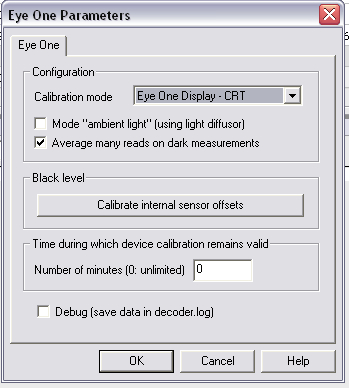
This setting takes longer (about 30 to 40 seconds at 10 IRE, but back to normal at 40 IRE), but results are more consistent at the lower end. Might not want to use it when setting up balance at 30 and 80, but might want to turn it on when running greyscale test.
| Description: |
|
| Filesize: |
97.45 KB |
| Viewed: |
150 Time(s) |
|
|
|
| Back to top |
|
|
richmond5
Joined: 17 Aug 2007
Posts: 48
Location: Toronto, Canada
|
| Posted: Mon Jun 23, 2008 9:06 pm Post subject: |
|
|
You're doing something wrong I think. Anything that comes up on the screen is from the calibration disc and not from the
ColorHCFR software. You seem to be running ColorHCFR is some sort of interactive mode if you're seeing a white patch come up on the screen automatically.
Kal[/quote]
Ok, can you do me a favor. Please go to measures>sensor>configure, choose 'Eye One Display- CRT', and then depress '
Calibrate internal sensor offsets', what happen next, thanks!
|
|
| Back to top |
|
|
kal
Forum Administrator
Joined: 06 Mar 2006
Posts: 18114
Location: Ottawa, Canada
TV/Projector: JVC DLA-NZ7
|
| Posted: Tue Jun 24, 2008 1:05 am Post subject: |
|
|
| richmond5 wrote: | You're doing something wrong I think. Anything that comes up on the screen is from the calibration disc and not from the
ColorHCFR software. You seem to be running ColorHCFR is some sort of interactive mode if you're seeing a white patch come up on the screen automatically.
Kal |
Ok, can you do me a favor. Please go to measures>sensor>configure, choose 'Eye One Display- CRT', and then depress '
Calibrate internal sensor offsets', what happen next, thanks![/quote]
Ok, odd. Yes, I see the white window. What are other users doing to get around this? What's the right procedure? I was using LCD myself for the longest time but everyone told me that CRT was the right mode to use for CRT displays so I changed the guide.
Kal
_________________
Support our site by using our affiliate links. We thank you!
My basement/HT/bar/brewery build 2.0
|
|
| Back to top |
|
|
LastButNotLeast
Joined: 15 May 2008
Posts: 13
Location: 08077
|
| Posted: Tue Jun 24, 2008 1:57 am Post subject: |
|
|
| Quote: |
Ok, odd. Yes, I see the white window. What are other users doing to get around this? What's the right procedure? I was using LCD myself for the longest time but everyone told me that CRT was the right mode to use for CRT displays so I changed the guide.
Kal |
When I was using LCD mode, I would put the sensor in a black felt bag for calibration. In CRT mode, it asks for a white screen, so I put up a 100% white window from the same test DVD I'm using. The white box on the computer is just in the way, so I ignore it.
Great results, by the way. Many thanks, again.
Michael
|
|
| Back to top |
|
|
|
|
|
|
|
You cannot post new topics in this forum
You cannot reply to topics in this forum
You cannot edit your posts in this forum
You cannot delete your posts in this forum
You cannot vote in polls in this forum
You cannot attach files in this forum
You can download files in this forum
|
Forum powered by phpBB © phpBB Group
|
|




