|
As this forum is rarely used anymore, we've locked it. Feel free to browse and read. Questions? Please reach out to us directly. Cheers! |

|
 |
|
|
| Author |
Message |
VideoGrabber
Joined: 09 Apr 2006
Posts: 933
Location: Michigan
|
| Posted: Mon May 26, 2008 4:26 pm Post subject: |
|
|
Kal wrote:
> I do have a link Tim. In the closing comments section I say: <
Geez, how could I have missed that? 
I would suggest that at any point (e.g., the very end) where you say that comments would be appreciated, you include a link to where you'd like them to be made.
_________________
- Tim
|
|
| Back to top |
|
 |
kal
Forum Administrator

Joined: 06 Mar 2006
Posts: 18114
Location: Ottawa, Canada
TV/Projector: JVC DLA-NZ7
|
| Posted: Mon May 26, 2008 7:21 pm Post subject: |
|
|
| Plasmid wrote: | Black Adjust: Off/Low/Medium/High
You can directly select the black level on the screen to adjust the screen depth.
Dynamic Contrast: Off/Low/Medium/High
You can adjust the screen contrast so that the optimal contrast is provided.
From that description, I think leaving them off would be the better choice. It seems somewhat artificial from the description. |
Agreed. They sound artificial. The first one sounds like it'll make your black level float around based on content. The second sounds like some sort of dynamic iris type thing you see on digital projectors but obviously different since it's a plasma.
Having brightness and contrast float around out of your control isn't going to help you set the thing up correctly.
Kal
_________________

Support our site by using our affiliate links. We thank you!
My basement/HT/bar/brewery build 2.0
|
|
| Back to top |
|
|
dochlywd
Joined: 25 Apr 2006
Posts: 346
Location: Saint Louis, Missouri
|
| Posted: Mon May 26, 2008 9:02 pm Post subject: |
|
|
Kal,
Maybe I have missed this, but ................
I have a G90 calibrated by Ken W. I later purchased a XA2 and haven't really used it since it needs to be calibrated and Ken hasn't had any trips through town lately. I would love to try to do this. Is there ANY risk at my attempt in doing so, would mess up the other sources already calibrated by Ken? How do I make sure that it ONLY affects the source I am calibrating? Sorry if this is a repeat or stupid question, but I've never done this before and don't want to jack up any of the "great-one"s work.
Thanks!
Doc
|
|
| Back to top |
|
|
kal
Forum Administrator
Joined: 06 Mar 2006
Posts: 18114
Location: Ottawa, Canada
TV/Projector: JVC DLA-NZ7
|
| Posted: Tue May 27, 2008 3:25 am Post subject: |
|
|
| dochlywd wrote: | Kal,
Maybe I have missed this, but ................
I have a G90 calibrated by Ken W. I later purchased a XA2 and haven't really used it since it needs to be calibrated and Ken hasn't had any trips through town lately. I would love to try to do this. Is there ANY risk at my attempt in doing so, would mess up the other sources already calibrated by Ken? How do I make sure that it ONLY affects the source I am calibrating? Sorry if this is a repeat or stupid question, but I've never done this before and don't want to jack up any of the "great-one"s work. |
Simple: Write down any settings before you make any changes. You'll be able to revert back quickly if you need to. There's only a half a dozen things we change so it shouldn't be hard. Just follow through the guide and anywhere where it tells you to change a setting, write down the old value first.
That being said, if Ken calibrated for other sources the XA2 will likely be 99% of the way there. You won't need to relibrate (or much at all). In fact, most people don't have different settings for different sources. Not only is that very hard to set up, it's a lot more work for an extremely minor difference in source devices.
Kal
_________________
Support our site by using our affiliate links. We thank you!
My basement/HT/bar/brewery build 2.0
|
|
| Back to top |
|
|
Plasmid
Joined: 25 May 2008
Posts: 4
|
| Posted: Tue May 27, 2008 4:18 pm Post subject: |
|
|
Alright, so I was too tired last night to post anything (let alone get the necessary screen caps for showing my results). But here's how things went:
First, I unfortunately don't have an before/aftercomparison pics to show yet. I used Spider-Man 3 on blu-ray to take some before pics, but returned the PS3 to my brother before I took any after pics. If I hopefully get around to taking the after pics, I'll definitely post them.
Anyway. I set everything up and took a reading Here are my BEFORE results:
50" Samsung PS-50Q97HDX (also known as Q91, HP-T5064, and other model names depending on your region). According to an online review, setting the plasma to Movie Mode with Warm2 at default settings is very close to 6500k. I was very happy when the first result proved that wrong.
Grayscale:

This actually excited me. It meant I had some work to do.
Luminance:

Gamma:

RGB Levels:

CIE Diagram:

As you can see, all settings were far from optimal. Before calibrating the grayscale, I decided to test something. These cNet settings are supposed to be pretty good. It varies from room to room, of course, but I decided to use it as a springboard.
When I saw the results, I was quite discouraged. They were pretty guide, and a great deal better than the default settings. I felt as if I had wasted my time and money. All I needed were these settings. I wasn't even sure how much better I could get the set to look.
Despite this, though, I went on to calibrate my TV. And the results were (surprisingly) significantly better. Here they are with the cNet settings for comparison:
GRAYSCALE:
cNet:

After:

LUMINANCE:
cNet:

After:

GAMMA:
cNet:

After:

RGB LEVELS:
cNet:

After:

CIE DIAGRAM:
cNet:

After:

Obviously, quite an improvement. I was taken aback by how close the gamma value was to 2.2. But I'm still unhappy with the deltaE values at 10 and 20 IRE, and I'll most likely play around with them in the future. Overall, though, I'm VERY satisfied.
After that, I decided to see if I can't improve the primaries and secondaries. I didn't save the "before" file, but I'm pretty sure the end results were markedly improved. Here's what I ended up with:

I definitely plan on messing around with them some more, since by the time I got to them it was pretty late and I calibrated them halfheartedly.
In closing, I'd like to thank kal again for this truly informative and extremely helpful guide. I never bothered looking at this kind of stuff before (and almost didn't), but I've learned so much.
|
|
| Back to top |
|
|
kal
Forum Administrator
Joined: 06 Mar 2006
Posts: 18114
Location: Ottawa, Canada
TV/Projector: JVC DLA-NZ7
|
| Posted: Tue May 27, 2008 7:06 pm Post subject: |
|
|
| Plasmid wrote: | | Anyway. I set everything up and took a reading Here are my BEFORE results: |
FYI: All of your before results are my "before" results. They seemed way too familiar so I checked! You probably had my sample file loaded when you took the screenshots by mistake.
Here are your before results:
Here are mine:
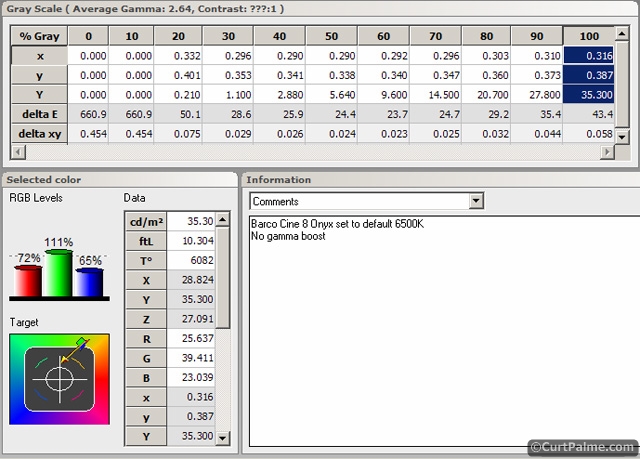
What are the odds of that?
| Quote: | As you can see, all settings were far from optimal. Before calibrating the grayscale, I decided to test something. These cNet settings are supposed to be pretty good. It varies from room to room, of course, but I decided to use it as a springboard.
When I saw the results, I was quite discouraged. They were pretty guide, and a great deal better than the default settings. I felt as if I had wasted my time and money. All I needed were these settings. I wasn't even sure how much better I could get the set to look. |
The cnet numbers are actually pretty good, but the idea of being able to use someone else's numbers is rarely ever going to work, especially once you get a few hundred hours on any bulb-based display.
| Quote: | | Obviously, quite an improvement. I was taken aback by how close the gamma value was to 2.2. But I'm still unhappy with the deltaE values at 10 and 20 IRE, and I'll most likely play around with them in the future. Overall, though, I'm VERY satisfied. |
Yes - I must say, your final numbers are very nice indeed. Don't worry about the 10 and 20 IRE points. Your deltaE is just under 10 which is very good. I personally wouldn't bother playing with it. You can chase your tail a lot when doing greyscale. You could spent an hour getting to this point and then futz around for another 3 hours to just get it very *slightly* better and not notice the difference. I'd leave it alone. Your results are excellent and you should be happy with them. Remember that they're also going to drift over time (especially with digital displays with bulbs) so frankly there's no point in spending x4 the effort to get more perfect. Better to do a couple of quick tweaks a year than one long perfect calibration once every 2 years.
| Quote: | After that, I decided to see if I can't improve the primaries and secondaries. I didn't save the "before" file, but I'm pretty sure the end results were markedly improved. Here's what I ended up with:
I definitely plan on messing around with them some more, since by the time I got to them it was pretty late and I calibrated them halfheartedly. |
Your primaries are pretty good too. Nice.
| Quote: | | In closing, I'd like to thank kal again for this truly informative and extremely helpful guide. I never bothered looking at this kind of stuff before (and almost didn't), but I've learned so much. |
Glad you liked it! If nothing else, maybe with more and more people taking notice if greyscale & colour calibration, manufacturers will start to spend more time getting it closer to right (especially the primaries) and give us advanced CMS features in all displays so that we can adjust ourselves (at the very least!).
Kal
_________________
Support our site by using our affiliate links. We thank you!
My basement/HT/bar/brewery build 2.0
|
|
| Back to top |
|
|
garyfritz

Joined: 08 Apr 2006
Posts: 12088
Location: Fort Collins, CO
|
| Posted: Tue May 27, 2008 7:26 pm Post subject: |
|
|
|
Yeah right, and DVD manufacturers will notice how much we pay attention to PQ and audio quality, and devote lots more bits to the picture and audio tracks instead of using 40% of the disk for whogivesashit "extras" .... NOT!!
|
|
| Back to top |
|
|
Plasmid
Joined: 25 May 2008
Posts: 4
|
| Posted: Tue May 27, 2008 8:00 pm Post subject: |
|
|
| kal wrote: | | FYI: All of your before results are my "before" results. They seemed way too familiar so I checked! You probably had my sample file loaded when you took the screenshots by mistake. |
You're absolutely right. I can't believe I did that. Here is my actual "before" grayscale:

Mine were much worse.
And I'll take your advice and leave the settings as they are.
|
|
| Back to top |
|
|
Scott_R_K
Joined: 30 May 2008
Posts: 17
Location: Rockwood , Ontario
|
| Posted: Fri May 30, 2008 7:17 pm Post subject: |
|
|
So glad I found this forum and Topic . Very well done .
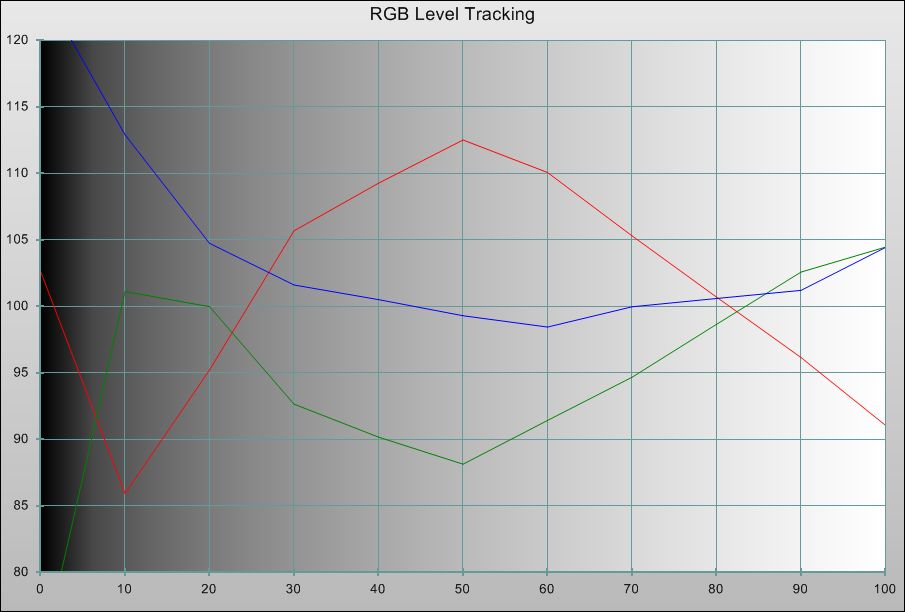
Question , of course , in your examples you show , on your RGB Curves diagram , a Blue "hump" . You go on to explain how to remove if you have a CRT system . I have an LCD Projector that has a Red "hump" almost identical to your Blue example.Do you have any suggestion on how I might correct this ?
Thanks ,
Scott......................
|
|
| Back to top |
|
|
kal
Forum Administrator
Joined: 06 Mar 2006
Posts: 18114
Location: Ottawa, Canada
TV/Projector: JVC DLA-NZ7
|
|
| Back to top |
|
|
garyfritz
Joined: 08 Apr 2006
Posts: 12088
Location: Fort Collins, CO
|
| Posted: Fri May 30, 2008 8:55 pm Post subject: |
|
|
|
Kal, why would the red "run out of steam" in an **LCD** projector? All 3 colors are using the same bulb. 100% output should be reliable when the LCD panel is "wide open." The red shouldn't top out unless there's something nonlinear in the "how much light to transmit" algorithm that controls the LCD panel -- and I wouldn't expect that to be different between the different colors.
|
|
| Back to top |
|
|
kal
Forum Administrator
Joined: 06 Mar 2006
Posts: 18114
Location: Ottawa, Canada
TV/Projector: JVC DLA-NZ7
|
| Posted: Sat May 31, 2008 12:56 am Post subject: |
|
|
| garyfritz wrote: | | Kal, why would the red "run out of steam" in an **LCD** projector? All 3 colors are using the same bulb. 100% output should be reliable when the LCD panel is "wide open." The red shouldn't top out unless there's something nonlinear in the "how much light to transmit" algorithm that controls the LCD panel -- and I wouldn't expect that to be different between the different colors. |
The individual with the problem has a DLP projector (similar enough, one bulb) and he has the graphs to show for it. See here: http://www.avsforum.com/avs-vb/showthread.php?p=13965217#post13965217
Could be how the mirrors or LCD panels are blocking (or more accurately letting through) light - if they're not doing it in a linear fashion I could see this probelm cropping up.
Kal
_________________
Support our site by using our affiliate links. We thank you!
My basement/HT/bar/brewery build 2.0
|
|
| Back to top |
|
|
garyfritz
Joined: 08 Apr 2006
Posts: 12088
Location: Fort Collins, CO
|
| Posted: Sat May 31, 2008 12:58 am Post subject: |
|
|
|
I was referring to Scott_R_K's post above -- he has an LCD with a red hump. I still don't see why either a DLP or LCD would behave in a nonlinear fashion like this, unless something was fundamentally wrong with the projector's control circuitry.
|
|
| Back to top |
|
|
Scott_R_K
Joined: 30 May 2008
Posts: 17
Location: Rockwood , Ontario
|
| Posted: Sat May 31, 2008 7:51 pm Post subject: |
|
|
| garyfritz wrote: | | I was referring to Scott_R_K's post above -- he has an LCD with a red hump. I still don't see why either a DLP or LCD would behave in a nonlinear fashion like this, unless something was fundamentally wrong with the projector's control circuitry. |
Hi to Kal and Gary ,
I can answer this one . In the early days of HT when Business Projector Manufacturers were getting into Home Theatre , the models they chose were usually much better Graphics Projectors than accurate Video Projectors . They were intentionally "altered" to produce higher Blue and Green outputs to produce a more vivid picture and higher Lumens numbers. Also , the bulbs chosen were also usually Red deficient . My Infocus SP5000 was very Red deficient and I have since added a CC30R colour correction filter in front of the lens . This tames the Blue and Green enough to allow me to get a fairly decent Calibration .
However , that being said and me still looking for perfection , I cannot smooth out the Red response . It's not so much a "hump" that rolls off at the high end but rather a hump in the middle of the RGB response curve . I've seen this discussed elsewhere and be described as more of an "S" curve than a hump .
The SP5000 Menu allows Cuts and Gains for RGB as well as adjustments for RGB Gammas . I've tried all three basic Gamma settings and they all give the same Red "S" or hump but to varying degrees . I've also played with the individual Gammas and had a little bit of success in flattening the "S" or hump .This may be something I'll never get rid of with this current PJ but I thought I'd ask  If I can , I'll try posting a screen shot of what I'm seeing . Maybe that will be more informative . If I can , I'll try posting a screen shot of what I'm seeing . Maybe that will be more informative .
Scott .
Edit: I can't seem to figure out how the recent Posters managed to get jpg's and gif's into the body of their text .
|
|
| Back to top |
|
|
kal
Forum Administrator
Joined: 06 Mar 2006
Posts: 18114
Location: Ottawa, Canada
TV/Projector: JVC DLA-NZ7
|
|
| Back to top |
|
|
Scott_R_K
Joined: 30 May 2008
Posts: 17
Location: Rockwood , Ontario
|
| Posted: Sun Jun 01, 2008 2:20 am Post subject: |
|
|
OK , let's see if an attachment will work . The graph looks worse than I remember but that's probably because I autoscaled it this time . You'll at least see what I'm talking about . It's odd . The Green and Blue track each other but the Red is almost an inverted profile of the other two .
Thanks for the interest .
Scott..........
| Description: |
|
| Filesize: |
47.5 KB |
| Viewed: |
193 Time(s) |
|
|
|
| Back to top |
|
|
delphiplasma
Joined: 06 May 2008
Posts: 14
|
| Posted: Mon Jun 02, 2008 12:46 pm Post subject: |
|
|
Hi All,
Just set up my plasma, using the latest chapter in 'colour calibration'.
The before measurement showed an over wide colour gamut. I managed to reduce this to normal by reducing the colour control. But now I'm a little worried, as with the 'blue mode setting' the colour control was set at '0', but I've had to reduce it to -40! Is the 'Blue mode' calibration that inaccurate? The PQ looks more natural with the measurement calibration, but every now and again, with certain program material, the skin tones can look a bit grey.
Also, my Green primary is a little oversaturated, but the yellow secondary is spot on? How can that be? I would assume if I corrected the Green primary then the yellow would tend towards red?
Thanks for any help in advance
|
|
| Back to top |
|
|
kal
Forum Administrator
Joined: 06 Mar 2006
Posts: 18114
Location: Ottawa, Canada
TV/Projector: JVC DLA-NZ7
|
| Posted: Mon Jun 02, 2008 5:42 pm Post subject: |
|
|
| delphiplasma wrote: | | The before measurement showed an over wide colour gamut. I managed to reduce this to normal by reducing the colour control. But now I'm a little worried, as with the 'blue mode setting' the colour control was set at '0', but I've had to reduce it to -40! Is the 'Blue mode' calibration that inaccurate? |
Could be, who knows! Can you post some before and after numbers and pictures?
| Quote: | | The PQ looks more natural with the measurement calibration, but every now and again, with certain program material, the skin tones can look a bit grey. |
If it looks more natural normally and measures more accurate with test sources then I'd say it certainly is more accurate.
| Quote: | | Also, my Green primary is a little oversaturated, but the yellow secondary is spot on? How can that be? I would assume if I corrected the Green primary then the yellow would tend towards red? |
You must have compensated with the colour decoder settings? No idea.
Kal
_________________
Support our site by using our affiliate links. We thank you!
My basement/HT/bar/brewery build 2.0
|
|
| Back to top |
|
|
EManT2200
Joined: 16 May 2008
Posts: 2
Location: Maryland
|
| Posted: Tue Jun 03, 2008 2:29 am Post subject: Greyscale calibration on a Panasonic ! |
|
|
Hi Kal, I own a 52" Panasonic PT-52LCX35, LCD projection television. I bought it 6 weeks ago from Wal-Mart, where I work. It sat in the warehouse, new in the box, for 2 years. I found out it had been marked down to $899.00, it sold for $2099.00 when new ! ! ! I would like to purchase an Eye-One DisplayLT and use your guide for dummies(actually I do have alittle knowledge about about such things) to perform the greyscale adjustments. Problem is, the only RGB level controls that I can find in the menu are for the computer input, which, I believe will have no affect on the other inputs. I know how to get into the SERVICE MENU, but, they use what have been referred to as HEX numbers, don't know why. I don't know which ones to use for RGB high end and low end. I thought about calling Panasonic and asking, but, I am afraid they might tell me that, me, going into the service menu will void my warranty. Any suggestions ? I would appreiciate any help at all, you certainly don't want to be guessing while in the service menu ! ! ! 
|
|
| Back to top |
|
|
delphiplasma
Joined: 06 May 2008
Posts: 14
|
| Posted: Tue Jun 03, 2008 11:21 am Post subject: |
|
|
Yes, I must send the calibration files to view.
Although, last night I took a look at the Delta E values and they were worse, with the exception of 'yellow, than the before readings?
I had basically adjusted the saturation control until the CIE chart matched the PAL reference chart.
I have Delta E values of something like 3 for Yellow, 19 for Red and 12 for green, which makes no sense, as green is off by quite a bit and red seems spot on?
Now if I increase the saturation control, the Delta values improve, but the CIE triangle grows wider.
Question is, does the delta E value look more at the accuracy , rather than the saturation, of the colours?
Or, does it seem there is some form of error in the readings taken, caused by software/hardware faults??
I'm measuring a Plasma with Eye one, HCFR and the HCFR test patterns.
Excellent guide, Kal!!
Thanks
|
|
| Back to top |
|
|
|
|
|
|
|
You cannot post new topics in this forum
You cannot reply to topics in this forum
You cannot edit your posts in this forum
You cannot delete your posts in this forum
You cannot vote in polls in this forum
You cannot attach files in this forum
You can download files in this forum
|
Forum powered by phpBB © phpBB Group
|
|




