|
As this forum is rarely used anymore, we've locked it. Feel free to browse and read. Questions? Please reach out to us directly. Cheers! |
|
|
 |
|
|
| Author |
Message |
cvearl
Joined: 21 Dec 2008
Posts: 4
|
| Posted: Sun Dec 21, 2008 8:38 pm Post subject: Re: Help with Calibration |
|
|
| dagarshali wrote: | first off, Kal,
Thanks a tonne for putting up a fantastic guide for calibrating. I had posted the question in the general section of calibration and thought it would be more appropriate to post it here.
Mine is a Samsung LN40A650. I am using I1D2 with CHCFR and AVIA DVD and my dvd player is OPPO 980H and I use HDMI input.
If i adjust the brigtness based on the fact that "The Y value at 10 IRE should be equal to 0.65% of Y value at 100IRE", I need to adjust the brightness slider to around 60 or so on my sammy. On the other hand, if used the pluge pattern, I will hae to adjust the brightness slider to only around 45 or so. The question is how reliable is I1 display 2 at 10 IRE?
Also, the TV comes with a gamma setting which can be varied from -3 to +3 in increments of 1. The gamma graph is not close to 2.2. I had set the gamma to be +2 on my TV ? How do I adjust gamma?
I hope I can recieve from input from you guys so that I can calibrate it right this time around
Thanks,
Dagarshali |
It sounds almost like you multiplied your Y from 100% white window by 0.65 instead of .0065 to arrive at your target Y for 10 IRE.
.65% is actually to multiply by .0065 and not .65
I initially used .65 in error in mine and ended up with a Constrast setting waaaayyyy too high.
Also I noticed that my line is low on the left(lower IRE's) and high on the right (upper IRE's). Which meant that I would end up with a picture setting too dark from an average standpoint using the "multiply by .65%" rule. 10 IRE would be set at around 2.2 Gamma but the rest would be going into 2.5 and beyond as I approach 100 IRE and all of the patterns I use to look for dark detail (black clipping pattern on AVS 709 DVD and moving black bars on Getgray or DVE's pluge pattern) show that I was crushing my blacks big time. In the end I set brightness and contrast to try and AVERAGE 2.2 gamma as best as I can. A compromise at each extreme end of the IRE for my Gamma line while making sure I do not show below black or clip above black out with the test patterns.
C.
|
|
| Back to top |
|
 |
Arno P

Joined: 01 Jan 2007
Posts: 282
Location: The Netherlands
|
| Posted: Wed Dec 31, 2008 9:17 am Post subject: |
|
|
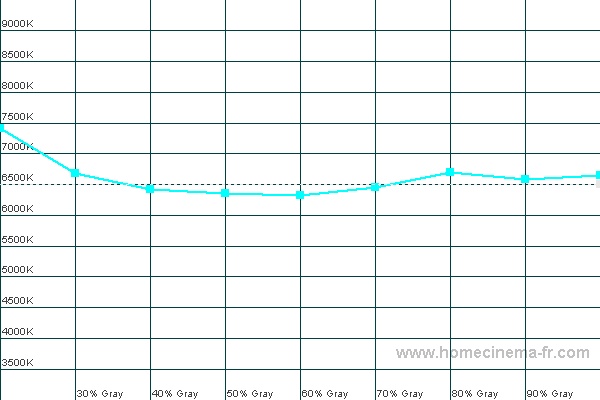
After years of doing all calibrations in the difficult way....I started to use HCFR yesterday with the spyder2 (and the eye-one is ordered as well  ) )
Very nice software....everything that should have been in the standard spyder software...
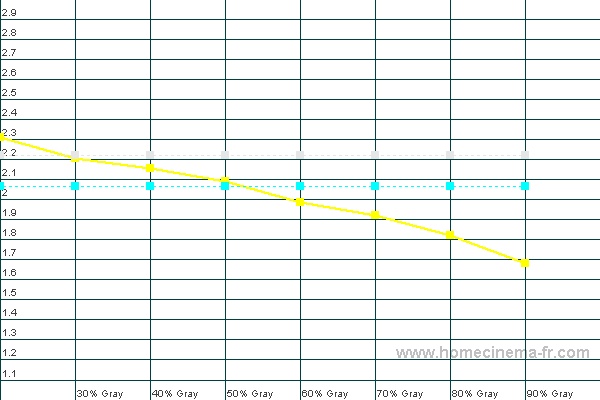
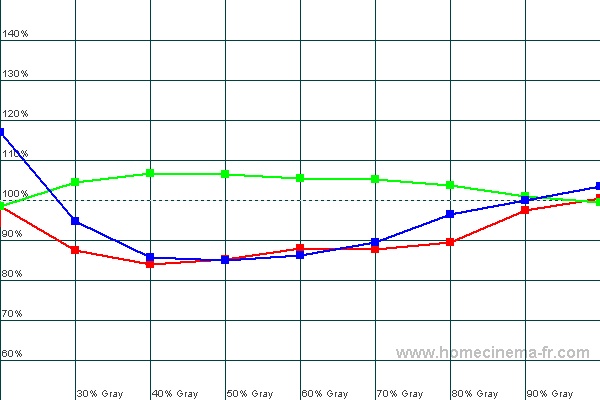
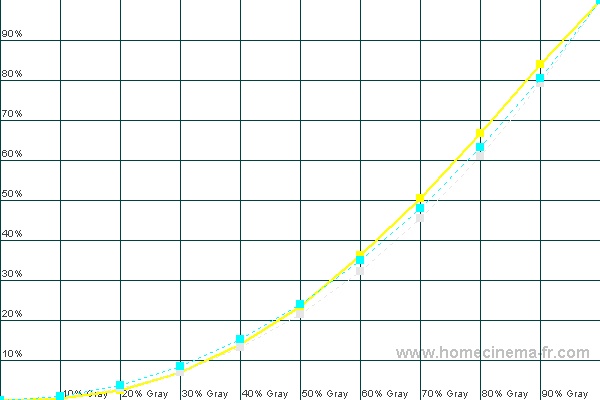
Results...not there yet...but a nice start...
Main problem (inspite of the moome gamma boost): gamma..It seems gamma is not going to be perfect without a decent scaler with gamma adjust per color on board...right? Gamma in the graph below is without moome boost.
(And is there any way to get a dark background in those graphs?)
| Description: |
|
| Filesize: |
58.38 KB |
| Viewed: |
278 Time(s) |
|
| Description: |
|
| Filesize: |
72.3 KB |
| Viewed: |
278 Time(s) |
|
| Description: |
|
| Filesize: |
62.83 KB |
| Viewed: |
278 Time(s) |
|
| Description: |
|
| Filesize: |
56.71 KB |
| Viewed: |
278 Time(s) |
|
_________________
"Obviously you're not a golfer"
|
|
| Back to top |
|
|
hariskar
Joined: 01 Dec 2008
Posts: 18
Location: Greece/Kavala
|
| Posted: Sat Jan 03, 2009 1:06 pm Post subject: |
|
|
Here are my calibration results of Pioneer PDP-428XD.
I made 2 different calibrations: 020109col0chc with all colors at 0 and pc1colorscor291208 with some colors corrected with CMS. The second one has worse gamma, Temperature etc, but better CIE.
Can someone help me to choose which calibration is better? Should I sacrifice gamma a little or colors?
Both calibrations are for Night. I used i1 pro. My source is Pioneer DV-600 DVD player and I chose PAL/SECAM.
Thank you!
| Description: |
|

Download |
| Filename: |
020109col0chc.chc |
| Filesize: |
76.97 KB |
| Downloaded: |
3 Time(s) |
| Description: |
| Corrected Colors with CMS |
|
Download |
| Filename: |
pc1colorscor291208.chc |
| Filesize: |
76.83 KB |
| Downloaded: |
2 Time(s) |
|
|
| Back to top |
|
|
hariskar
Joined: 01 Dec 2008
Posts: 18
Location: Greece/Kavala
|
| Posted: Wed Jan 07, 2009 8:46 pm Post subject: |
|
|
When calibrating should we use total gamma or total and individual RGB gamma?
Thank you!
_________________
Display: Pioneer PDP-428XD
|
|
| Back to top |
|
|
kal
Forum Administrator

Joined: 06 Mar 2006
Posts: 18114
Location: Ottawa, Canada
TV/Projector: JVC DLA-NZ7
|
| Posted: Wed Jan 07, 2009 9:45 pm Post subject: |
|
|
Hi guys!
Sorry, I've been delinquent with responses to these questions. That being said, I won't be able to look at and answer specific questions about how to make someone's calibration better. Your best bet for answers is to start a new thread with your calibration results for others to look at and comment on. You'll get more responses this way too.
This thread should be about questions/comments about the actual guide please. I use it to maintain the guide and make sure it's easy to follow and as correct as possible.
-------------------------------------
| hariskar wrote: | | When calibrating should we use total gamma or total and individual RGB gamma? |
Look at the average gamma. The one average line. You want it to hit around 2.2.
Kal
_________________

Support our site by using our affiliate links. We thank you!
My basement/HT/bar/brewery build 2.0
Last edited by kal on Sat Jun 19, 2010 6:17 pm; edited 1 time in total
|
|
| Back to top |
|
|
hariskar
Joined: 01 Dec 2008
Posts: 18
Location: Greece/Kavala
|
| Posted: Thu Jan 08, 2009 10:20 am Post subject: |
|
|
My gamma is around 2.2, what should I change to raise it to 2.5? I want to try it. Thank you!
_________________
Display: Pioneer PDP-428XD
|
|
| Back to top |
|
|
kal
Forum Administrator
Joined: 06 Mar 2006
Posts: 18114
Location: Ottawa, Canada
TV/Projector: JVC DLA-NZ7
|
|
| Back to top |
|
|
hariskar
Joined: 01 Dec 2008
Posts: 18
Location: Greece/Kavala
|
| Posted: Fri Jan 09, 2009 6:40 am Post subject: |
|
|
| kal wrote: | Going from 2.2 to 2.5 means you'll have a less bright image in darker regions. Few TVs that I know of have gamma adjustments. You'd have to adjust it on the external device that you're using to provide a gamma boost. If you have no such device you can't adjust it.
2.2 is perfect. Why adjust it down?
Kal |
I wanted to try only to see how the picture is.
Any opinion about my calibration files i posted 7-8 posts above? Are they good? Which one is better?
_________________
Display: Pioneer PDP-428XD
|
|
| Back to top |
|
|
kal
Forum Administrator
Joined: 06 Mar 2006
Posts: 18114
Location: Ottawa, Canada
TV/Projector: JVC DLA-NZ7
|
|
| Back to top |
|
|
hariskar
Joined: 01 Dec 2008
Posts: 18
Location: Greece/Kavala
|
| Posted: Fri Jan 09, 2009 3:32 pm Post subject: |
|
|
| kal wrote: | | hariskar wrote: | | Any opinion about my calibration files i posted 7-8 posts above? Are they good? Which one is better? |
Whichever you prefer. 
If you had to sacrifice something in each only you can decide which sacrifice 'bothers' you more.
Kal |
I don't have experience and knowledge to decide if my picture is good, or which is better, that is why I ask in this forum, hoping for someones more experienced answer 
Edit: ...but I don't get any...
_________________
Display: Pioneer PDP-428XD
Last edited by hariskar on Sat Jan 17, 2009 8:22 am; edited 1 time in total
|
|
| Back to top |
|
|
paiaboy7
Joined: 15 Aug 2008
Posts: 68
|
| Posted: Sat Jan 17, 2009 12:41 am Post subject: B drive & Cut problem |
|
|
Hi,
I currently have a Dwin HD700 projected on an a cream colored wall. First off i noticed you must select lcd in color hcfr for a crt projector. I calibrated and noticed the blue drive needed to be turned way up, this then threw off the the low end blue cut. Any way around this or is it because the wall is off white? I cam get perfect greyscale on the high but not low. When i choose greyscale adjust on my crt projector i get a grey screen with a dark to light gradient. Can i use this for greyscale adjust? Thanks.
Levy
|
|
| Back to top |
|
|
kal
Forum Administrator
Joined: 06 Mar 2006
Posts: 18114
Location: Ottawa, Canada
TV/Projector: JVC DLA-NZ7
|
| Posted: Sat Jan 17, 2009 1:21 am Post subject: Re: B drive & Cut problem |
|
|
| paiaboy7 wrote: | Hi,
I currently have a Dwin HD700 projected on an a cream colored wall... |
You wall isn't white so your colours are going to be off requiring you to crank certain drives/cutoffs way up or down for your projector to try and compensate. Don't bother trying to do a greyscale on a screen that isn't white. No display's going to have enough range of control to account for that. Get a white wall or screen first. $5 at home depot.
Kal
_________________
Support our site by using our affiliate links. We thank you!
My basement/HT/bar/brewery build 2.0
|
|
| Back to top |
|
|
luigi.lauro
Joined: 10 Feb 2009
Posts: 2
Location: Milan, Italy
|
| Posted: Tue Feb 10, 2009 9:57 am Post subject: |
|
|
My equipment:
Samsung LE-46A956D1M
Samsung BD-P2500
X-Rite EyeOne Display 2 LT
DVE: HD Basics on Blu-Ray
AVS HD 709 on AVCHD
HFCR
I'm trying to use these to calibrate my sammy9, but while I was doing it I came up with several questions and doubts that I feel unanswered here in the guide or FAQs.
1) How to handle the calibration with a latest generation LED display:
I have ofc controls for: brightness, contrast, gamma, Offset/Gain for every color, color/tint, along with custom colorspace for setting primaries and secondaries separately. These are all covered in the guide.
But I also have BACKLIGHT and ENERGY SAVING settings which greatly affect the luminance of the TV. Where should I aim here? I'm especially curious if I would be better to keep the backlight as low as possible while reaching the 40 FTL target for 100 IRE or keep it higher for a stronger 'drive' for contrast and better rendering over the whole grayscale range.
The default is 5, the range for backlight on my LCD is 0-10. I have no idea where to go with this one.
2) How to handle calibration with LOCAL DIMMING for LED TVs:
With local dimming turned on, a 30 IRE is not simply a 30 IRE. If it's a window with black around the luminance would be lower than if the window is with a white background, because of the local dimming.
Also, If i try to show the 0 IRE with the 2/4% black lines, I just get a BLANK SCREEN, no light as if the tv is OFF. I guess the local dimming algorithm is 'crushing' the bars into the complete darkness, because all the rest of the image is just pitch black, so I can't see anything.
How Am i supposed to calibrate the screen? With local dimming on? With local dimming off?
With local dimming on, i see great variations if for example i turn on the menu display, because the bright menu area even if it's not under the sensor, influences the overall brightness because of the wide dimming zones (I've got the 46''). I think these variations offset the calibration.
With local dimming off, linearity is restored, but black is not the black I will get when I will turn local dimming on, and also white are stronger than with local dimming on. Calibrating with local dimming off would be a wrong calibration if I plan to keep local dimming ON.
OFC, I plan to keep LOCAL DIMMING ON, since that's THE reason I've bought my series9 for. But i want it calilbrated right!
3) How to handle my strange situation with gamma.
This is not answered in the guide AFAIK.
I've started with a Cinema/Warm2 basic settings for my TV, which gave me a very wrong gamma.
Higher then 2.2 in the 0-30 IRE, then slowly falling to 1.2 gamma at 100 IRE. The only 'right' point is about at 40-50 IRE, the rest of the gamma is way off: too high for blacks (2.5-2.4), too low for whites (1.2-1.5).
Also the color were a bit off: green was right, blue was a tad low, red was way low.
I followed very carefully the guide and adjusted brightness and contrast as suggested. Also I fixed the colors by tuning the Offset/Gain for blue and red for having 30/80 IRE gray with the same color amount (100% for each primary). This way done mostly by boosting the blue offset/gain a bit, and boosting A LOT the offset/gain for red (for example the gain for RED went from 25 to 41).
The result is a calibration which is just PERFECT for colors (a very flat line for all 3 colors on the whole range, very close to one another) and about right for FTL at 100 IRE (39-40 FTL).
BUT THE GAMMA IS STILL WAY OFF.
My blacks (0, 10, 20, 30 IRE) have a too high gamma, around 2.5. If I increase brightness as suggested (bumping it from 45 to around 65-70) i can get the right gamma (2.2-2.3) but at the expense of a GRAY black.
What I get is a black not so black as my TV is capable of, and I can easily spot the '4% below black' in the DVE test, because the 16 black has become 'dark gray' and the 0 black is the real 'black' (local dimming off).
How do I have to deal with this? I sacrifice real blacks for getting a good 2.2/2.3 gamma, or I should aim for 2.5 gamma in the blacks to keep the 16lvl black as the real 'LED OFF' black?
Also, my whites are very wrong. The boost I did to the blue/red gains to get correct white balance make the low gamma in the whites even WORSE, now its WAY OFF TRACK and quite far from the target 2.2/2.3.
The gamma is way too low for everything above 50 IRE, and at 100 IRE i get as low as 1.2/1.3 gamma.
The suggested 'fix' would be to lower the contrast, but I feel I have to lower it TOO MUCH (from 85 contrast to about 50) to get a correct gamma in the whites. This doesn't 'dull' the picture too much?
Moreover, I can still see the difference in the higher IREs, despite the very low gamma, I can easily distinguish the various white bars in the grayscale pluge tests. So, despite the very low gamma, my eyes tell me the whites are not 'crushed' at all, i can see the difference betweent 90/95/100 IRE easily, and I can also spot 235 from 255 whites.
So, setting the brightness as low as possible but still retain the detail in the blacks, leads to a too high gamma in blacks.
So, setting the contrast as high as possible but still retain the detail in the whites, leads to a too low gamma in whites.
Moreover I fear the problem in the whites is an off-product of the raised gain to 'fix' the white balance, so maybe lowering contrast to fix that is a bad decision, and I would be better to keep the contrast as it is while lowering the 'gain' for the three colours (green included) to fix it.
I'M LOST: I don't know what to do.
I would like to be able to calibrate my TV to get REAL blacks and punchy 'right' contrast, and at the same time have a proper gamma, grayscale and white balance on the whole range... but I haven't been able to achieve that.
Can anyone help here? 
|
|
| Back to top |
|
|
luigi.lauro
Joined: 10 Feb 2009
Posts: 2
Location: Milan, Italy
|
| Posted: Tue Feb 10, 2009 10:52 am Post subject: Calibration File |
|
|
Adding my 'before' file, for checking the calibration BEFORE the calibration.
After calibration the color tracking is just fine, but the gamma only got worse, as I said.
| Description: |
| LE-46A956D1M, before calibration |
|
Download |
| Filename: |
Before.chc |
| Filesize: |
15.06 KB |
| Downloaded: |
5 Time(s) |
|
|
| Back to top |
|
|
LastButNotLeast
Joined: 15 May 2008
Posts: 13
Location: 08077
|
| Posted: Mon Feb 16, 2009 10:05 pm Post subject: |
|
|
| luigi.lauro wrote: | | The suggested 'fix' would be to lower the contrast, but I feel I have to lower it TOO MUCH (from 85 contrast to about 50) to get a correct gamma in the whites. This doesn't 'dull' the picture too much? |
Don't know about your particular type of set (I have an RPCRT), but your contrast is, indeed, very high. Mine is at 50 only for bright daytime viewing; in a dark room, it's 15 to 20.
Your "corrected" picture will take some getting used to, but will be much closer to realistic, which is the whole point.
|
|
| Back to top |
|
|
dave999z
Joined: 01 Mar 2009
Posts: 5
|
| Posted: Sun Mar 01, 2009 7:12 pm Post subject: |
|
|
Hello,
Awesome guide!
I have a Samsung LN46A630 LCD tv. calibrating grayscale was no problem (there is a "white balance" section with six controls for r,g,b gain and r,g,b, offset).
I have a couple questions though:
first question... should i dial down my tv's "color" control to zero (which makes the picture black and white) before doing a grayscale calibration? if not, what should the color control be set at? 50? does it matter?
second question... In Section 8.5 of your guide you refer to tint, hue, and lightness settings for each of the primary and secondary colors. My tv has advanced color management for each of the six colors, but i'm not exactly sure how the settings correspond to yours. I do not have "tint", "hue", and "lightness" (or "saturation") for the individual colors. Instead, in my tv's "color space" settings, for each of the six colors (red, green, blue, yellow, cyan, magenta) i can adjust values (from 1-100) for "red", "green", and "blue" (so, 18 controls in all). Do you know how these "red", "green", and "blue" controls would correspond to the "lightness", "hue", and "saturation" settings you mention?
thanks!
|
|
| Back to top |
|
|
kal
Forum Administrator
Joined: 06 Mar 2006
Posts: 18114
Location: Ottawa, Canada
TV/Projector: JVC DLA-NZ7
|
| Posted: Mon Mar 02, 2009 3:00 pm Post subject: |
|
|
| dave999z wrote: | | first question... should i dial down my tv's "color" control to zero (which makes the picture black and white) before doing a grayscale calibration? if not, what should the color control be set at? 50? does it matter? |
Don't set it to zero. You don't set it to zero when you watch the TV so you shouldn't set it zero when calibrating. Leave it at the default setting and run through the guide. You may need to adjust it in the later sections when asked and then you'll be told that you need to go through and re-verify greyscale after anyway. It's very itterative.
| Quote: | | second question... In Section 8.5 of your guide you refer to tint, hue, and lightness settings for each of the primary and secondary colors. My tv has advanced color management for each of the six colors, but i'm not exactly sure how the settings correspond to yours. I do not have "tint", "hue", and "lightness" (or "saturation") for the individual colors. Instead, in my tv's "color space" settings, for each of the six colors (red, green, blue, yellow, cyan, magenta) i can adjust values (from 1-100) for "red", "green", and "blue" (so, 18 controls in all). Do you know how these "red", "green", and "blue" controls would correspond to the "lightness", "hue", and "saturation" settings you mention? |
No idea. Sorry. I don't think they correspond directly. If you only have one control per colour then it's likely a contrast or saturation type control per colour. Not sure how that would be used.
Kal
_________________
Support our site by using our affiliate links. We thank you!
My basement/HT/bar/brewery build 2.0
|
|
| Back to top |
|
|
dave999z
Joined: 01 Mar 2009
Posts: 5
|
| Posted: Mon Mar 02, 2009 8:56 pm Post subject: |
|
|
| kal wrote: |
No idea. Sorry. I don't think they correspond directly. If you only have one control per colour then it's likely a contrast or saturation type control per colour. Not sure how that would be used.
Kal |
I didn't explain that well... I have three controls ("Red," "Green," "Blue") for each color.
|
|
| Back to top |
|
|
kal
Forum Administrator
Joined: 06 Mar 2006
Posts: 18114
Location: Ottawa, Canada
TV/Projector: JVC DLA-NZ7
|
|
| Back to top |
|
|
dave999z
Joined: 01 Mar 2009
Posts: 5
|
| Posted: Tue Mar 03, 2009 2:36 pm Post subject: |
|
|
| kal wrote: | That's even more confusing! What's a red and green control do to blue? That doesn't make any sense!
Kal |
Here is one other explanation I've found...
"Remember adding a single primary in another primary's adjustment changes that color's hue towards that other primary. Adding both opposing primaries desaturates the primary you're adjusting which is the same as lessening a primary within its own adjustment (ie. changing red in red's ajustment). Adding or taking away all 3 raises or lowers the contrast or Y or luminance of that color."
|
|
| Back to top |
|
|
|
|
|
|
|
You cannot post new topics in this forum
You cannot reply to topics in this forum
You cannot edit your posts in this forum
You cannot delete your posts in this forum
You cannot vote in polls in this forum
You cannot attach files in this forum
You can download files in this forum
|
Forum powered by phpBB © phpBB Group
|
|




