| Author |
Message |
mcb01
Joined: 13 Dec 2008
Posts: 2
|
| Posted: Sat Dec 13, 2008 3:43 pm Post subject: |
|
|
Hi Kal,
Thanks for the excellent guide. I have a Samsung rear projection DLP. You mention that it is best to set contrast so that my ftl reading will be 30-40. My question is where specifically in this range should I aim for? Should I do an average of approximately 35 ftl?
Also, since contrast is the first thing adjusted, does it matter what brightness is set to at that time, or should I use my TV's default setting of 50?
|
|
| Back to top |
|
 |
mifronte
Joined: 13 Dec 2008
Posts: 2
|
| Posted: Sat Dec 13, 2008 5:24 pm Post subject: Suggestions for Low IRE's |
|
|
Hello.
I just stumbled upon the Greyscale & Colour Calibration for Dummies a week ago. Since then, I have purchased the i1 LT and followed the guide to calibrate my Sony XBR4.
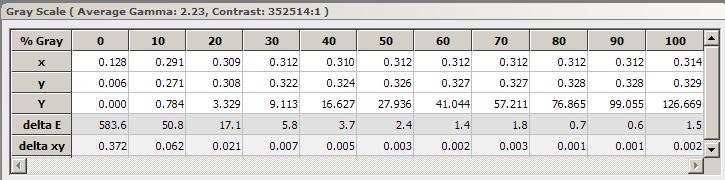
Attached is my calibrated grayscale. I have only been at it a week, but can someone suggest what settings to tweak to improve my grayscale in the lower (0-30) IRE's?
Should I adjust the over brightness so that the lowe IRE's can be read by the i1 LT?
Thanks.
| Description: |
| Calibrated Sony XBR 4 Grayscale |
|
| Filesize: |
35.56 KB |
| Viewed: |
168 Time(s) |
|
| Description: |
|

Download |
| Filename: |
Denon_HDMI3_20081212.chc |
| Filesize: |
71.25 KB |
| Downloaded: |
3 Time(s) |
|
|
| Back to top |
|
|
skyerjoe
Joined: 11 Dec 2008
Posts: 19
|
| Posted: Mon Dec 15, 2008 3:21 pm Post subject: |
|
|
Hallo everybody
Very good TUT....
I've a question how good are the software which is sold with the eye-one display 2 ?
I would like to use the dummy guide .... but after i while, i wonder if the eye one software as good as the hcfr software to calibrate my home equipment?
Or is the hcfr software more accurate then the allinone eye2-one software solution ?
Whats the difference does anybody know. ?
Sorry for my bad english:)
|
|
| Back to top |
|
|
kal
Forum Administrator

Joined: 06 Mar 2006
Posts: 18114
Location: Ottawa, Canada
TV/Projector: JVC DLA-NZ7
|
| Posted: Mon Dec 15, 2008 6:10 pm Post subject: |
|
|
| hariskar wrote: | | I can't find eye-one.dll. only i1.sys, *inf etc, but no dll. So HCFR does not recognise my eye-one pro meter. What can I do? Thank you! |
Not sure. I'm not sure why you can't find the file....
| mcb01 wrote: | Hi Kal,
Thanks for the excellent guide. I have a Samsung rear projection DLP. You mention that it is best to set contrast so that my ftl reading will be 30-40. My question is where specifically in this range should I aim for? Should I do an average of approximately 35 ftl? |
A range is given as it will depend on your environment (how dark it is), viewing habits, etc., and it's also just a target range. You should be happy as long as you fall in that range. It may not be possible to hit the range and still get a flat greyscale so you may have to compromise.
| Quote: | | Also, since contrast is the first thing adjusted, does it matter what brightness is set to at that time, or should I use my TV's default setting of 50? |
Nope. Doesn't really matter. Set everything else to defaults (I think I mentioned this in the guide).
Brightness only affects the low light areas (dark areas). It does not have any effect on light output (contrast).
Kal
_________________

Support our site by using our affiliate links. We thank you!
My basement/HT/bar/brewery build 2.0
|
|
| Back to top |
|
|
kal
Forum Administrator
Joined: 06 Mar 2006
Posts: 18114
Location: Ottawa, Canada
TV/Projector: JVC DLA-NZ7
|
| Posted: Mon Dec 15, 2008 6:11 pm Post subject: Re: Suggestions for Low IRE's |
|
|
| mifronte wrote: | I just stumbled upon the Greyscale & Colour Calibration for Dummies a week ago. Since then, I have purchased the i1 LT and followed the guide to calibrate my Sony XBR4.
Attached is my calibrated grayscale. I have only been at it a week, but can someone suggest what settings to tweak to improve my grayscale in the lower (0-30) IRE's? |
It looks really good. What happens if you adjust the blue cut-off to try and bring down that blue curve on the low end?
| Quote: | | Should I adjust the over brightness so that the lowe IRE's can be read by the i1 LT? |
I'm not sure what "over brightness" is.
Kal
_________________
Support our site by using our affiliate links. We thank you!
My basement/HT/bar/brewery build 2.0
|
|
| Back to top |
|
|
kal
Forum Administrator
Joined: 06 Mar 2006
Posts: 18114
Location: Ottawa, Canada
TV/Projector: JVC DLA-NZ7
|
| Posted: Mon Dec 15, 2008 6:16 pm Post subject: |
|
|
| skyerjoe wrote: | I've a question how good are the software which is sold with the eye-one display 2 ?
I would like to use the dummy guide .... but after i while, i wonder if the eye one software as good as the hcfr software to calibrate my home equipment?
Or is the hcfr software more accurate then the allinone eye2-one software solution ? |
I assume you mean the X-rite software that comes with the EyeOne Display 2 and not CalMAN sold in this package: http://www.curtpalme.com/EyeOneDisplay2.shtm
The X-rite software is only for creating profiles for PCs. It does so automatically too. No graphing or anything home theeater / TV related.
Kal
_________________
Support our site by using our affiliate links. We thank you!
My basement/HT/bar/brewery build 2.0
|
|
| Back to top |
|
|
hariskar
Joined: 01 Dec 2008
Posts: 18
Location: Greece/Kavala
|
| Posted: Mon Dec 15, 2008 6:49 pm Post subject: |
|
|
| hariskar wrote: | | I can't find eye-one.dll. only i1.sys, *inf etc, but no dll. So HCFR does not recognise my eye-one pro meter. What can I do? Thank you! |
I found the answer: The default drivers I downloaded from spectracal.com as the instructions said didn't include a *.dll. I downloaded other drivers from x-rite and everythinkg ok!
|
|
| Back to top |
|
|
mifronte
Joined: 13 Dec 2008
Posts: 2
|
| Posted: Mon Dec 15, 2008 7:08 pm Post subject: Re: Suggestions for Low IRE's |
|
|
| kal wrote: |
It looks really good. What happens if you adjust the blue cut-off to try and bring down that blue curve on the low end?
|
I will try to tweak the blue cut-off. I am starting to understand the adjustments a little better. Should I use a 20 IRE window pattern to adjust the RGB cut-off's instead of the 30 IRE window pattern?
| kal wrote: |
I'm not sure what "over brightness" is.
|
I mean increasing the ftL at 100 IRE by either increasing the backlight or contrast.
|
|
| Back to top |
|
|
skyerjoe
Joined: 11 Dec 2008
Posts: 19
|
| Posted: Tue Dec 16, 2008 3:08 pm Post subject: |
|
|
| Quote: | | The X-rite software is only for creating profiles for PCs. It does so automatically too. No graphing or anything home theeater / TV related. |
Ohh yes youre right
.... I'm not able to see the wood for the trees

thanx
skyerjoe
|
|
| Back to top |
|
|
kal
Forum Administrator
Joined: 06 Mar 2006
Posts: 18114
Location: Ottawa, Canada
TV/Projector: JVC DLA-NZ7
|
| Posted: Tue Dec 16, 2008 4:16 pm Post subject: Re: Suggestions for Low IRE's |
|
|
| mifronte wrote: | | kal wrote: |
It looks really good. What happens if you adjust the blue cut-off to try and bring down that blue curve on the low end?
|
I will try to tweak the blue cut-off. I am starting to understand the adjustments a little better. Should I use a 20 IRE window pattern to adjust the RGB cut-off's instead of the 30 IRE window pattern? |
Doesn't really matter. I'd stick to 30 if you were using it before but you'll still want to measure at 10 and 20 to graph the results.
| Quote: | | kal wrote: |
I'm not sure what "over brightness" is.
|
I mean increasing the ftL at 100 IRE by either increasing the backlight or contrast. |
You shouldn't artificially increase anything to making readings easier to take.
Kal
_________________
Support our site by using our affiliate links. We thank you!
My basement/HT/bar/brewery build 2.0
|
|
| Back to top |
|
|
dropzone7

Joined: 12 Jun 2007
Posts: 1069
Location: Charlotte, NC
|
| Posted: Wed Dec 17, 2008 5:19 pm Post subject: |
|
|
Just a few quick questions regarding calibration with the Eye One. I did a good bit of calibration a few months ago when I first got the colorimeter but have not touched it since. Now that I have added the XG-FULLHD card as well as a VP50 scaler I figured it was time to redo the grayscale on my XG. So, after a few runs at this last night I find that the following two items need attention:
1. My Delta E numbers are pretty good except for at 0IRE and 10IRE. I have WAY too much red, so much so that's it's visible in the test pattern. What can I do to tone that down without affecting the rest of the grayscale?
2. I'm having a terrible time getting gamma to 2.22. My luminance curve is a good bit above where it should be even after lowering my brightness to almost "crushing" levels with the 0IRE pluge pattern. The best gamma reading so far is 1.92. So does this mean I have the gamma adjusted too high in the Moome card since lower numbers mean higher gamma? Is this where I should be making an adjustment?
_________________
"Coffee is for Closers."
|
|
| Back to top |
|
|
kal
Forum Administrator
Joined: 06 Mar 2006
Posts: 18114
Location: Ottawa, Canada
TV/Projector: JVC DLA-NZ7
|
| Posted: Wed Dec 17, 2008 6:57 pm Post subject: |
|
|
| dropzone7 wrote: | Just a few quick questions regarding calibration with the Eye One. I did a good bit of calibration a few months ago when I first got the colorimeter but have not touched it since. Now that I have added the XG-FULLHD card as well as a VP50 scaler I figured it was time to redo the grayscale on my XG. So, after a few runs at this last night I find that the following two items need attention:
1. My Delta E numbers are pretty good except for at 0IRE and 10IRE. I have WAY too much red, so much so that's it's visible in the test pattern. What can I do to tone that down without affecting the rest of the grayscale? |
If you can't get any better with a 2-point control setup (ie: you're adjusting gains and cutoffs) one solution is to add more points with an advanced video processor like the RadianceXD: http://www.curtpalme.com/CalMAN_RadianceXD_kit.shtm
I didn't say it was an inexpensive solution. 
| Quote: | | 2. I'm having a terrible time getting gamma to 2.22. My luminance curve is a good bit above where it should be even after lowering my brightness to almost "crushing" levels with the 0IRE pluge pattern. The best gamma reading so far is 1.92. So does this mean I have the gamma adjusted too high in the Moome card since lower numbers mean higher gamma? Is this where I should be making an adjustment? |
You should be making the adjustment in the card. If your gamma is 1.9 then it's too "high". Meaning you have too much gamma boost.
Kal
_________________
Support our site by using our affiliate links. We thank you!
My basement/HT/bar/brewery build 2.0
|
|
| Back to top |
|
|
dropzone7
Joined: 12 Jun 2007
Posts: 1069
Location: Charlotte, NC
|
| Posted: Wed Dec 17, 2008 7:07 pm Post subject: |
|
|
| kal wrote: | | dropzone7 wrote: | Just a few quick questions regarding calibration with the Eye One. I did a good bit of calibration a few months ago when I first got the colorimeter but have not touched it since. Now that I have added the XG-FULLHD card as well as a VP50 scaler I figured it was time to redo the grayscale on my XG. So, after a few runs at this last night I find that the following two items need attention:
1. My Delta E numbers are pretty good except for at 0IRE and 10IRE. I have WAY too much red, so much so that's it's visible in the test pattern. What can I do to tone that down without affecting the rest of the grayscale? |
If you can't get any better with a 2-point control setup (ie: you're adjusting gains and cutoffs) one solution is to add more points with an advanced video processor like the RadianceXD: http://www.curtpalme.com/CalMAN_RadianceXD_kit.shtm
I didn't say it was an inexpensive solution.
| Quote: | | 2. I'm having a terrible time getting gamma to 2.22. My luminance curve is a good bit above where it should be even after lowering my brightness to almost "crushing" levels with the 0IRE pluge pattern. The best gamma reading so far is 1.92. So does this mean I have the gamma adjusted too high in the Moome card since lower numbers mean higher gamma? Is this where I should be making an adjustment? |
You should be making the adjustment in the card. If your gamma is 1.9 then it's too "high". Meaning you have too much gamma boost.
Kal |
Thanks Kal. That's a nice package but it ain't gonna happen I'm afraid. I have thrown a lot of money at this setup now and I just want to do the best I can with it for the next few years. Then...I believe digital will be difficult to pass up. I will see if I can get the gamma dialed in on the Moome card. I think part of the problem is that I'm addicted to the look of the gamma boost when in reality I'm overusing it.
_________________
"Coffee is for Closers."
|
|
| Back to top |
|
|
skyerjoe
Joined: 11 Dec 2008
Posts: 19
|
| Posted: Wed Dec 17, 2008 9:24 pm Post subject: |
|
|
Are there any Possibilities to save with HCFR the Black Level Sensor Offset Calibaration`?
Or should i have to do this if want to restart the software again and again?
Greetz skyerjoe
|
|
| Back to top |
|
|
kal
Forum Administrator
Joined: 06 Mar 2006
Posts: 18114
Location: Ottawa, Canada
TV/Projector: JVC DLA-NZ7
|
| Posted: Wed Dec 17, 2008 9:55 pm Post subject: |
|
|
| dropzone7 wrote: | | Thanks Kal. That's a nice package but it ain't gonna happen I'm afraid. I have thrown a lot of money at this setup now and I just want to do the best I can with it for the next few years. Then...I believe digital will be difficult to pass up. I will see if I can get the gamma dialed in on the Moome card. I think part of the problem is that I'm addicted to the look of the gamma boost when in reality I'm overusing it. |
For what it's worth, more digital owners use the RadianceXD than CRT owners... it's really useful for fixing the broken (oversaturated) primary colours that most digital projectors have. 
Kal
_________________
Support our site by using our affiliate links. We thank you!
My basement/HT/bar/brewery build 2.0
|
|
| Back to top |
|
|
kal
Forum Administrator
Joined: 06 Mar 2006
Posts: 18114
Location: Ottawa, Canada
TV/Projector: JVC DLA-NZ7
|
|
| Back to top |
|
|
skyerjoe
Joined: 11 Dec 2008
Posts: 19
|
| Posted: Wed Dec 17, 2008 10:54 pm Post subject: |
|
|
| Quote: | | I don't understand what this means. |
If you start the hcfr software and take a mesure, you have to calibriate your colorimeter on a black surface
But i must do this everytime new if i start the software again
Is it possible to save these calibration settings?
is it now more understandable ?
Ps: how can i clean my sensor from my eyeone ?
or is this not required to become a fully efficent colorimeter?
i hope so
greetz sykerjoe
|
|
| Back to top |
|
|
kal
Forum Administrator
Joined: 06 Mar 2006
Posts: 18114
Location: Ottawa, Canada
TV/Projector: JVC DLA-NZ7
|
| Posted: Thu Dec 18, 2008 1:14 am Post subject: |
|
|
| skyerjoe wrote: | If you start the hcfr software and take a mesure, you have to calibriate your colorimeter on a black surface
But i must do this everytime new if i start the software again
Is it possible to save these calibration settings? |
No, you can't save that. And you don't want that. The reason you're doing that calibration is because the sensor will drift with time and temperature. So you *WANT* to do that every single time. Some people do it every 30 minutes even. Some software will even warn you to do it every 15-30 minutes.
| Quote: | | Ps: how can i clean my sensor from my eyeone ? |
It shouldn't require any cleaning.
Kal
_________________
Support our site by using our affiliate links. We thank you!
My basement/HT/bar/brewery build 2.0
|
|
| Back to top |
|
|
skyerjoe
Joined: 11 Dec 2008
Posts: 19
|
| Posted: Fri Dec 19, 2008 9:51 pm Post subject: |
|
|
cal thnx for the answer
keep going
Ps: Are there any better objects than a DVD-Jewel Case cause
i think my European DVD-Case isn't so deep black
greetz skyerjoe
|
|
| Back to top |
|
|
cvearl
Joined: 21 Dec 2008
Posts: 4
|
| Posted: Sun Dec 21, 2008 7:01 pm Post subject: |
|
|
Love the guide. That goes almost without saying. I am a long time forum lurker in alot of forums and participate heavily in Video Card forums elsewhere and this has to be the coolest internet based tech guide I have seen someone throw together without a pricetag attached to it. Bravo!! 
Can I get some opinions on the following please? I am about ready to get into adjusting the greyscale. First I am choosing my starting point Contrast and Brightness settings as outlined in the guide. With that in mind, which of these two Contrast/Brightness settings is the better "jumping off point" before I get started with adjusting my Greyscale?
They both have my PZ85U brightness set at 52 but one is 60 Contrast and the other is 90. I have been trying DVE and Getgray and AVS 709 from a BD35 over HDMI is my source. In all cases, the 1 or 2% just above black bars/detail are just barely visible on the screen using the patterns on getgray/DVE and the Black 17 bar and above is flashing for me with AVS709's black clipping pattern. As for Contrast, there is no clipping near white detail at either 60 or 90. At 60 Contrast, you can see a few more white bars above white 235 flash using AVS 709's white clipping pattern than you see with 90 but not many more. At 90 Contrast, two bars above 235 are still flashing. At 60 Contrast there are 4 bars above 235 flashing.
As you can see below, at 60 the light output peaks at just under 34 ftL and at 90 just over 34 ftL. That is when using Getgray DVD. Using the DVE (not pictured below) the curves are all the same. Just that DVE uses smaller grey box patterns and as a result the ftL is perceived as brighter by the i1 Display LT I am using by a value of 1ftL. So just under 35 ftL with the DVE pattern 100% white window at 60 Contrast and at 90 it's just over 35 ftL.
Enough of my blabbing. Here are my screenshots from the software...
Are either of these going to be an easier to start from?
DVE versions of the 2 settings are attached as well.
OPTION 1... CONTRAST @ 60

OPTION 2... CONTRAST @ 90

| Description: |
|
Download |
| Filename: |
DVE 9052.chc |
| Filesize: |
14.45 KB |
| Downloaded: |
1 Time(s) |
| Description: |
|
Download |
| Filename: |
DVE 6052.chc |
| Filesize: |
14.46 KB |
| Downloaded: |
2 Time(s) |
Last edited by cvearl on Mon Dec 22, 2008 2:34 am; edited 1 time in total
|
|
| Back to top |
|
|
|
|




